
1. Introduction
The Dyson V8 Origin Extra is a versatile cordless stick vacuum cleaner designed for efficient cleaning across various surfaces. Featuring a powerful digital motor, HEPA filtration, and a bagless design, it offers convenience and strong suction for your home.
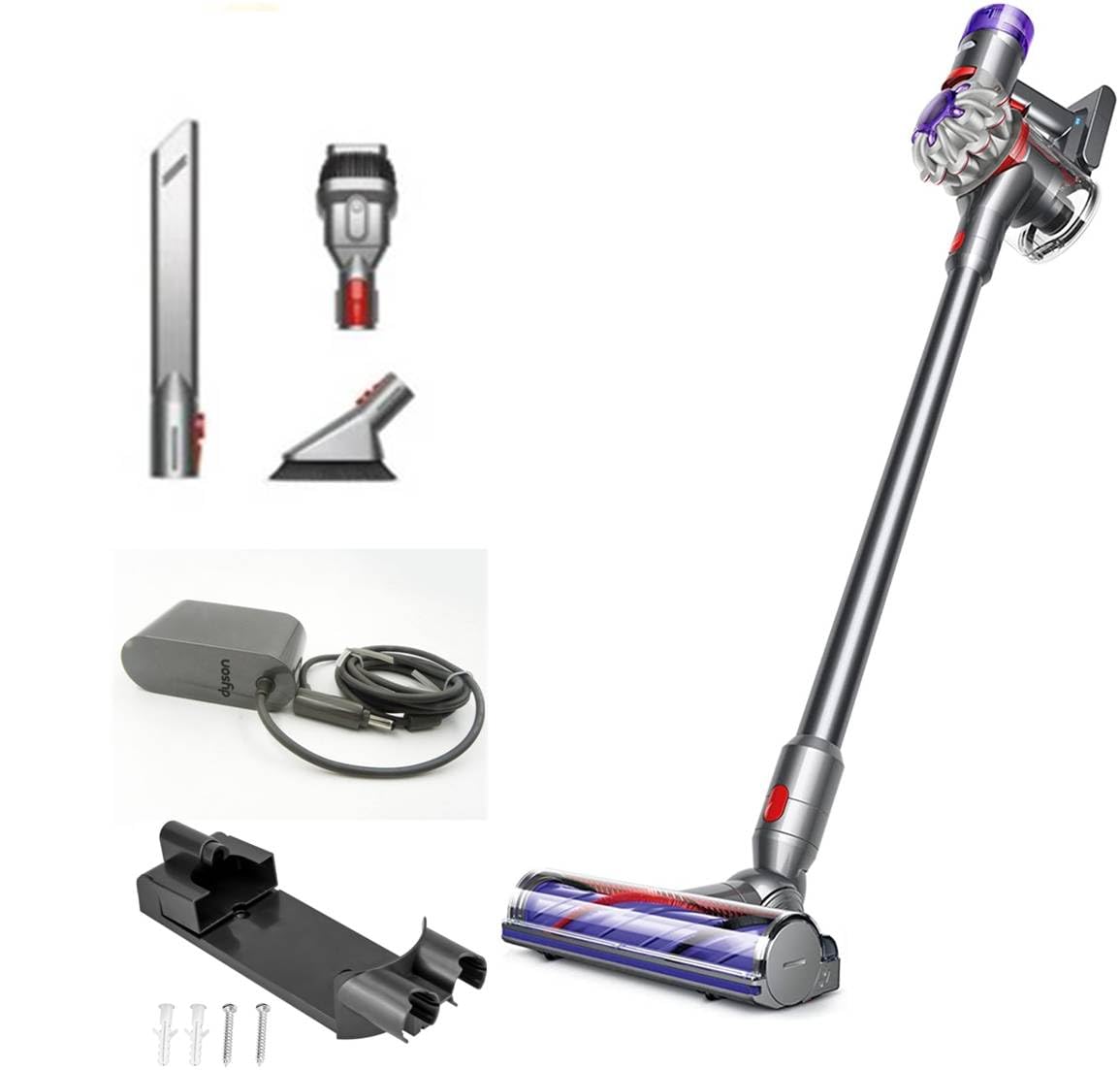
Image: The Dyson V8 Origin Extra cordless stick vacuum cleaner, showcasing its sleek design and purple accents.
2. Setup
2.1 Unpacking and Assembly
- Carefully remove all components from the recyclable packaging.
- Attach the main cleaning head to the end of the wand. Ensure it clicks securely into place.
- Connect the wand to the main motor unit (the handheld part). Again, listen for a click to confirm it's secure.
- Attach any desired accessories (e.g., crevice tool, combination tool) to the main unit or the wand as needed.
2.2 Charging the Battery
The Dyson V8 Origin Extra is battery-powered and requires charging before first use. The battery has a quick-charging feature and a runtime of up to 40 minutes on standard mode.
- Locate the charging port on the main motor unit.
- Plug the charger into a wall outlet and connect the charging cable to the vacuum's charging port.
- The battery indicator lights will illuminate to show the charging status. A full charge typically takes approximately 5 hours.
- For convenient storage and charging, utilize the included wall-mounted docking station.
Video: A demonstration of setting up the Dyson V8, including attaching components and placing it on a charging stand.
3. Operating Instructions
3.1 Powering On/Off and Suction Modes
- To turn the vacuum on, press and hold the power trigger located on the handle. Release the trigger to turn it off.
- The Dyson V8 offers 2 power levels. Use the slider switch on the top of the motor unit to toggle between standard mode and MAX mode for increased suction on tougher messes.
3.2 Cleaning Different Surfaces
The Dyson V8 is suitable for various surfaces including carpet, hard floor, tile floor, hardwood, and rugs.
- For hard floors and light debris, the standard suction mode is typically sufficient.
- For carpets, rugs, or stubborn dirt, switch to MAX mode for enhanced cleaning power.
- The cleaner head is designed to maneuver easily, allowing you to reach under furniture and into tight spaces.
Video: A user demonstrating the Dyson V8's performance on carpet, highlighting its maneuverability and suction.
Video: A detailed look at the Dyson V8's features, including its quiet operation and powerful suction on various surfaces.
4. Maintenance
4.1 Emptying the Clear Bin
The Dyson V8 features a bagless design with a clear bin for easy monitoring of dirt levels. Empty the bin when debris reaches the MAX line.
- Hold the vacuum over a trash bin.
- Push the red lever down firmly. The bin base will open, and the shroud will slide down, ejecting dirt.
- Close the bin base until it clicks securely.
4.2 Washing the Filter
The Dyson V8 is equipped with a HEPA filter that requires regular washing to maintain optimal performance. It is recommended to wash the filter at least once a month.
- Twist the purple filter unit counter-clockwise from the top of the motor unit and lift it out.
- Wash the filter under cold running water until the water runs clear. Do not use detergent.
- Squeeze and twist the filter to remove excess water.
- Leave the filter to dry completely for at least 24 hours in a warm, dry place. Ensure it is completely dry before reinserting.
- Reinsert the dry filter into the motor unit and twist clockwise until it clicks into place.
Video: A demonstration of how to empty the dust bin and clean the filter of the Dyson V8.
5. Specifications
| Feature | Detail |
|---|---|
| Brand | Dyson |
| Model Name | V8 Origin Extra |
| Model Number | V8 |
| Special Feature | Bagless |
| Filter Type | HEPA Filter |
| Surface Recommendation | Carpet, Hard Floor, Tile Floor, Hardwood, Rug |
| Power Source | Battery Powered |
| Color | Blue |
| Motor Horsepower | 0.16 horsepower |
| Number of Speeds | 2 |
| Portable | Yes |
| Indoor Outdoor Usage | Indoor |
| Item Dimensions L x W x H | 8.7"L x 49.45"H |
| Controller Type | Push Button |
| Control Method | Touch |
| Form Factor | Stick |
| Voltage | 120 Volts |
| Wattage | 120 watts |
| Amperage | 5.55 Amps |
| Runtime | 40 minutes |
| Battery Charge Time | 5 Hours |
| Battery Life | 40 minutes |
| UPC | 885609027685 |
| GTIN | 885609027685 |
6. Troubleshooting
6.1 No Power / Not Charging
- Ensure the charger is securely plugged into both the wall outlet and the vacuum's charging port.
- Check if the wall outlet is functional by plugging in another appliance.
- Verify that the battery indicator lights are active during charging. If not, contact Dyson support.
6.2 Reduced Suction
- Check if the clear bin is full and needs emptying.
- Inspect the filter. If it's dirty, wash it according to the maintenance instructions and ensure it's completely dry before reinserting.
- Look for blockages in the cleaner head, wand, or main unit. Clear any obstructions carefully.
6.3 Unusual Noises
- Turn off the vacuum and check the cleaner head for any foreign objects or tangled hair that might be causing the noise.
- Ensure all attachments are securely fitted.
7. Warranty & Support
For warranty information, product registration, and customer support, please visit the official Dyson website or contact their customer service directly. Keep your proof of purchase for warranty claims.
Official Dyson Website: www.dyson.com


