
1. Introduction
The FREDI HD PLUS FHP-05 1080P HD Body Camera is a portable recording device designed for personal safety, outdoor activities, and documentation. It features 1080P video resolution, a 180-degree rotatable lens, night vision capabilities, and a long-lasting battery. This manual provides detailed instructions for the proper use and maintenance of your body camera.
2. Safety Information
Please read all safety instructions carefully before using the device. Failure to follow these instructions may result in damage to the device or personal injury.
- Do not expose the camera to extreme temperatures, direct sunlight, or high humidity.
- Keep the device away from water and liquids, as it is not water-resistant.
- Do not attempt to disassemble or modify the camera. This will void the warranty.
- Use only the provided charging cable and accessories.
- Ensure the device is fully charged before initial use.
Important Legal Notice for Hidden Products
Hidden Camera Products are strictly prohibited for use in any kind of illegal activity. The manufacturer shall not be held responsible for any crimes committed by using products purchased from us. Users are requested to kindly respect the country's laws and regulations. Do not break any rules and laws. Some countries have banned the use of hidden cameras unless consent is taken by law enforcement. The company reserves the right for no refund policy. For discrepancies, customers can move legal jurisdiction to Ghaziabad jurisdiction only.
If you have any concerns, please call: 9810589579.

Image: Legal notice detailing restrictions and responsibilities for hidden camera products.
3. Package Contents
Verify that all items are present in your package:
- 1 x FREDI HD PLUS FHP-05 Body Camera
- 1 x Charging Cable
- 1 x Card Reader
- 1 x User Manual (this document)
- (Optional: 64GB Micro SD card, if included with purchase)
4. Product Overview
Familiarize yourself with the camera's components and controls.
4.1. Product Dimensions

Image: Diagram showing the dimensions of the FREDI HD PLUS FHP-05 Body Camera. Dimensions are approximately 9.8cm (3.86in) height, 3.2cm (1.26in) width, and 1.9cm (0.75in) depth.
4.2. Controls and Ports
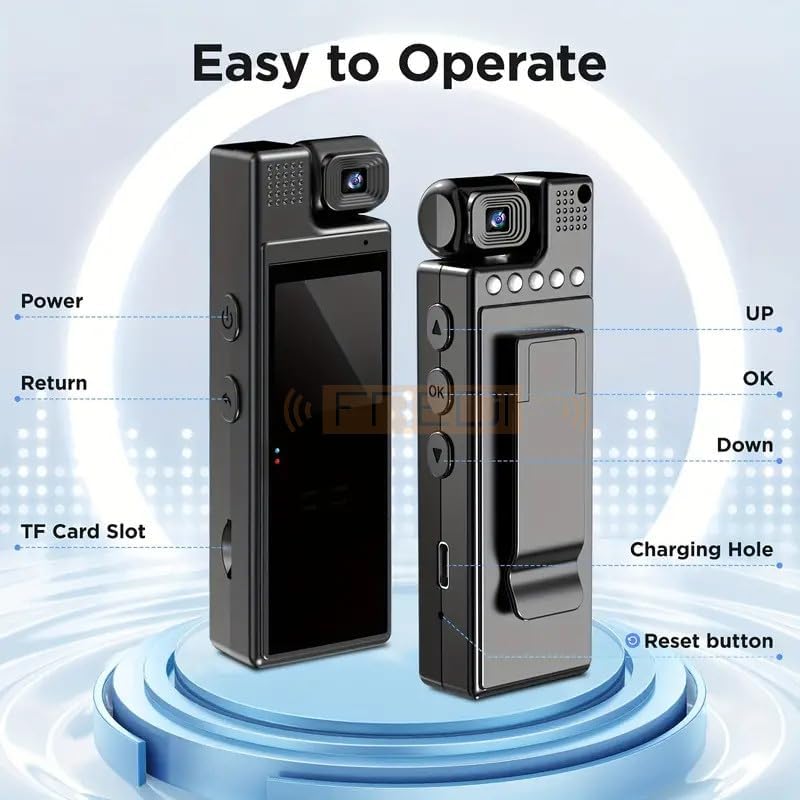
Image: Front and back view of the camera highlighting key controls and ports. These include: Power button, Return button, TF Card Slot, UP button, OK button, Down button, Charging Hole, and Reset button.
- Power Button: Turns the device on/off.
- Return Button: Navigates back in menus or exits current mode.
- TF Card Slot: For inserting a Micro SD card.
- UP/DOWN Buttons: Navigate through menu options or adjust settings.
- OK Button: Confirms selections or starts/stops recording.
- Charging Hole: USB port for charging and data transfer.
- Reset Button: Resets the device (use a pin to press).
- Rotatable Lens: 180-degree adjustable lens for various shooting angles.
- 1.3-inch Color Display: For real-time preview and menu navigation.
4.3. Back Clip Design
The camera features a back clip design, allowing it to be easily attached to clothing pockets, bag belts, or other suitable locations for hands-free recording. The clip is adjustable and detachable.

Image: The camera demonstrating its back clip design, showing it attached to a shirt pocket, highlighting its portability and ease of carrying.
5. Setup
5.1. Charging the Battery
Before first use, fully charge the camera's built-in 1200mAh battery. Connect the camera to a power source using the provided charging cable. The charging indicator will show the charging status. A full charge provides approximately 6-8 hours of continuous recording.
The camera supports recording while charging, allowing for extended operation when connected to a power bank or wall adapter.
Low Battery Reminder
When the battery level is low, the camera will display a reminder to recharge, preventing unexpected power loss during recording.

Image: The camera screen displaying a low battery reminder, indicating the need for recharging.
5.2. Inserting a Micro SD Card
The camera supports Micro SD cards up to 128GB (64GB card may be included). Insert the Micro SD card into the TF Card Slot with the gold contacts facing down until it clicks into place. To remove, gently push the card in until it springs out.
Ensure the Micro SD card is formatted to FAT32 for optimal performance. If the card is new or causing issues, format it using the camera's menu settings or a computer.
5.3. Powering On/Off
Press and hold the Power Button for a few seconds to turn the camera on or off. The screen will illuminate upon power-on.
6. Operating Instructions
The camera offers various modes for recording video, capturing photos, and recording audio. Navigate through the menu using the UP/DOWN buttons and confirm selections with the OK button.
6.1. Video Recording
From the main menu, select "Video" mode. Press the OK Button to start recording. Press it again to stop. The camera records in 1080P HD resolution.
Adjusting the Lens
The lens can be manually rotated 180 degrees to capture footage from different angles, making it versatile for various activities.

Image: The camera demonstrating its 180-degree rotatable lens, allowing for flexible video recording angles.
6.2. Photo Capture
Select "Photo" mode from the main menu. Press the OK Button to take a picture. Photos are saved in JPEG format.
6.3. Audio Recording
Select "Audio" mode to record sound only. Press the OK Button to start/stop audio recording.
6.4. Motion Detection
Activate motion detection in the camera's settings menu. When enabled, the camera will automatically begin recording when motion is detected and stop after 20 seconds of inactivity. This feature helps conserve battery life and memory space.
6.5. Night Vision
The camera is equipped with enhanced infrared capabilities and 5 built-in spotlights for clear recording in low-light or nighttime conditions. Night vision activates automatically or can be toggled in settings.
6.6. Playback
Select "Playback" mode from the main menu to view recorded videos, photos, or listen to audio files directly on the 1.3-inch color display. Use the UP/DOWN buttons to navigate through files and the OK button to play/view.
Instant Playback & Computer Connection

Image: The camera displaying recorded content on its screen and an illustration of connecting the camera to a laptop via USB for file transfer and playback.
6.7. Connecting to a Computer (USB Mode)
Connect the camera to your computer using the provided USB cable. The camera will enter USB mode, allowing you to access recorded files as a removable disk. You can also use the camera as a PC webcam in this mode.

Image: The camera connected to a laptop via USB, showing options for Memory access, PC Camera, and Video. This mode allows for charging, recording while charging, and using the camera as a webcam.
7. Maintenance
7.1. Cleaning
Wipe the camera body with a soft, dry cloth. Do not use liquid cleaners or solvents. For the lens, use a specialized lens cleaning cloth.
7.2. Storage
Store the camera in a cool, dry place away from direct sunlight and extreme temperatures. If storing for an extended period, ensure the battery is partially charged (around 50%) to prolong its lifespan.
8. Troubleshooting
| Problem | Possible Solution |
|---|---|
| Camera does not turn on. | Ensure the battery is charged. Connect to a power source and try again. If unresponsive, press the Reset button with a thin object. |
| Cannot record video/photos. | Check if a Micro SD card is inserted correctly and has sufficient free space. Format the Micro SD card if necessary. |
| Poor video/image quality. | Ensure the lens is clean. Check lighting conditions; use night vision in low light. |
| Camera freezes or becomes unresponsive. | Press the Reset button with a thin object to restart the device. |
| Computer does not recognize the camera. | Ensure the USB cable is securely connected. Try a different USB port or cable. Ensure the camera is in USB mode. |
9. Specifications
| Feature | Detail |
|---|---|
| Brand | FREDI HD PLUS |
| Model Number | FHP-05 |
| Video Capture Resolution | 1080p |
| Image Sensor Technology | CMOS |
| Lens Type | Standard, 180-degree Rotatable |
| Viewing Angle | 180 degrees |
| Screen Size | 1.3 inches |
| Flash Memory Type | Micro SD (supports up to 128GB) |
| Flash Memory Speed Class | C2, C4, C6, or C10 (Video Speed Class V10 recommended) |
| Battery Capacity | 1200mAh |
| Battery Life | 6-8 hours (continuous recording) |
| Video Capture Format | AVI |
| Supported Audio Format | AVI |
| Supported Image Format | JPEG |
| Connectivity Technology | Wireless (Infrared for night vision), USB |
| Special Features | Motion Detection, Night Vision, PC Webcam Functionality |
| Water Resistance Level | Not Water Resistant |
| Product Dimensions (D x W x H) | 19mm x 32mm x 98mm |
| Color | Black |
10. Warranty and Support
For product support or inquiries, please refer to the contact information provided at the point of purchase. Please note that the company reserves the right for no refund policy. Any legal discrepancies are subject to Ghaziabad jurisdiction only.
For urgent concerns, you may contact: 9810589579.