
1. Introduction
Thank you for choosing the Brinyte HC01 Rechargeable Headlamp. This manual provides detailed instructions for the safe and efficient operation, maintenance, and troubleshooting of your new headlamp. Please read this manual thoroughly before use and retain it for future reference.
Key Features:
- Triple Light System: 1000-lumen main white light, close-range white/red auxiliary lights.
- Adjustable Brightness: Low, Medium, High, Turbo modes.
- Special Modes: Strobe, SOS, Signal modes for various scenarios.
- Dual Power Options: Rechargeable via USB-C and compatible with AAA batteries for backup.
- Patented Anti-Tangle Headband: Breathable, easily adjustable with a side knob, and detachable for handheld use.
- Red Light Mode: Ideal for night hunting, fishing, maintaining night vision, and emergency signaling.
- Durable Construction: IP66 waterproof rate and 1-meter drop-resistant.
- Lightweight Design: Weighs only 2.29 oz for comfortable use.
2. Package Contents
Upon opening the package, please verify that all the following items are included:
- 1 x Brinyte HC01 Headlamp
- 1 x Head Strap
- 1 x Bracket
- 1 x Type-C Charging Cable
- 1 x BR1200 Rechargeable Battery
- 1 x User Manual (this document)
- 1 x Value-added Card

Image: Contents of the Brinyte HC01 Headlamp package, showing the headlamp, head strap, USB-C charging cable, and rechargeable battery.
3. Setup and First Use
3.1 Attaching the Headband
- Insert the headlamp unit into the bracket on the head strap. Ensure it clicks securely into place.
- Adjust the head strap to fit comfortably around your head. The patented anti-tangle headband can be adjusted using the side knob:
- To extend the strap: Press the knob and pull the buckle.
- To retract the strap: Rotate the knob to draw back the head strap.

Image: Step-by-step guide on adjusting the patented anti-tangle headband of the HC01 headlamp.
3.2 Charging the Battery
The Brinyte HC01 headlamp is equipped with a rechargeable BR1200 battery. For optimal performance, fully charge the battery before first use.
- Locate the USB-C charging port on the headlamp.
- Connect the provided Type-C charging cable to the headlamp and a compatible USB power source (e.g., laptop, power bank, AC adapter, car charger).
- The battery status indicator lights will illuminate during charging. A full charge typically takes approximately 1.5 hours.
- Once fully charged, disconnect the charging cable.

Image: The Brinyte HC01 headlamp being charged via USB-C, with an illustration of the 1200mAh battery capacity, 1.5 hours full charge time, and 45 hours usage.
3.3 Installing AAA Batteries (Optional Backup)
In situations where recharging is not possible, the HC01 can be powered by AAA batteries.
- Open the battery compartment of the headlamp.
- Insert 3 AAA batteries, ensuring correct polarity (+/-).
- Close the battery compartment securely.

Image: Illustration of the dual power options for the Brinyte HC01 headlamp, highlighting both USB-C charging and the use of AAA batteries as a backup.
4. Operation
The HC01 headlamp features two main buttons for control: one for white light and one for red light.
4.1 White Light Operation
- Turn On/Off: Press the white light button once to turn on the main white light. Press again to turn off.
- Adjust Brightness: While the white light is on, press and hold the white light button to cycle through brightness modes: Low, Medium, High, Turbo. Release the button at your desired brightness.
- Special Modes (Strobe/SOS/Signal): Double-click the white light button to activate Strobe mode. Double-click again to cycle through SOS and Signal modes. Single-click to return to the previous brightness mode or turn off.
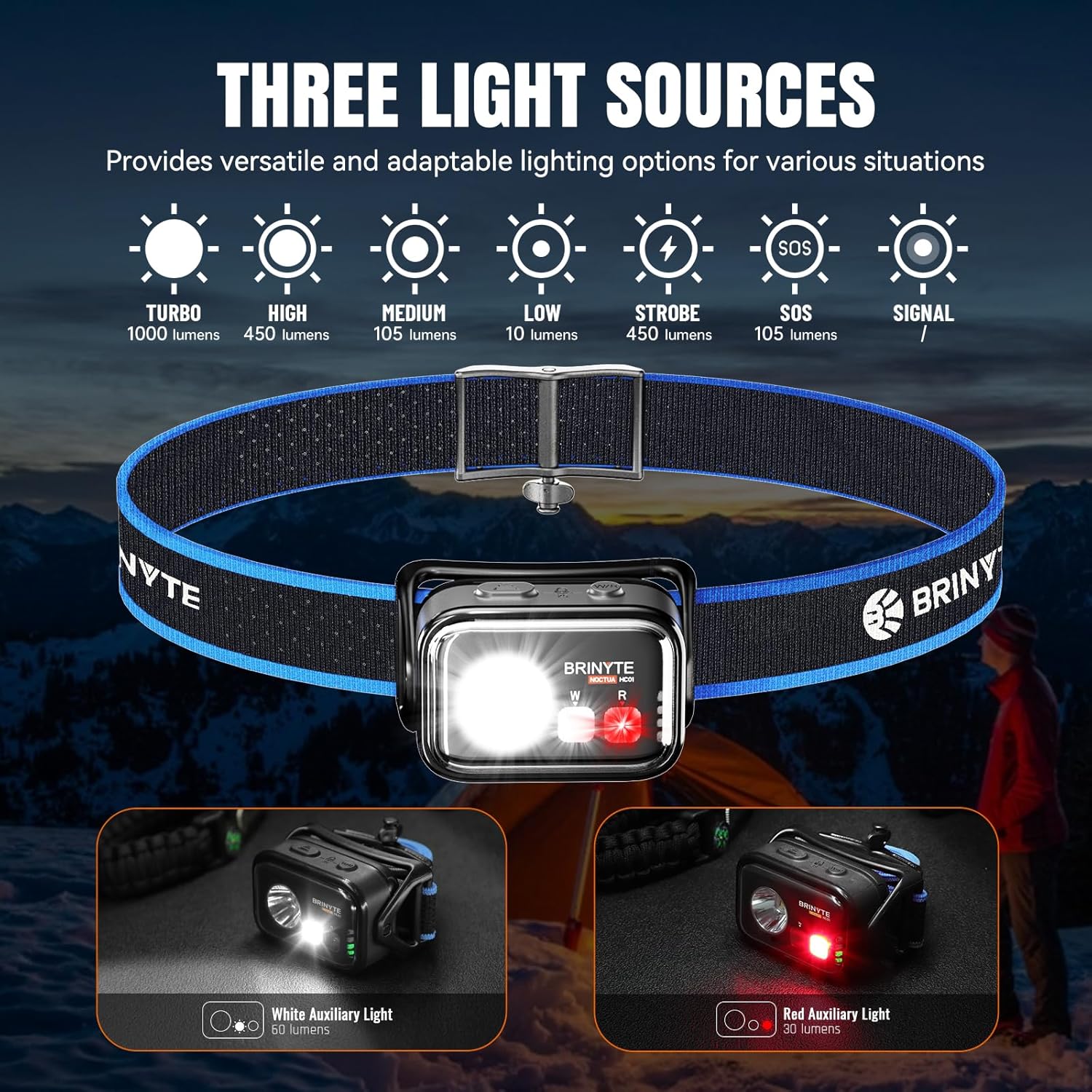
Image: The Brinyte HC01 headlamp showcasing its three light sources and various modes including Turbo, High, Medium, Low, Strobe, SOS, and Signal.
4.2 Red Light Operation
- Turn On/Off: Press the red light button once to turn on the red auxiliary light. Press again to turn off.
- Adjust Brightness: While the red light is on, press and hold the red light button to cycle through brightness modes.
- Red Signal Mode: Double-click the red light button to activate the red signal mode.
The red light mode is particularly useful for preserving night vision during activities like hunting, fishing, or astronomical observation, and can also serve as an emergency warning signal.

Image: Practical applications of the red light mode, including hunting, camping, flashing safety light, astronomical observation, fishing, photography, and reading.
4.3 Simultaneous Light Use
The white and red lights can be operated simultaneously for combined illumination.
4.4 Lock/Unlock Function
To prevent accidental activation, the headlamp features a lock function.
- To Lock: Simultaneously press both the main white light and red light switches for 3 seconds. The main light will flash twice to indicate successful locking.
- To Unlock: Simultaneously press both switches for 3 seconds again. The main light will flash twice to indicate successful unlocking.

Image: Instructions for locking and unlocking the headlamp by pressing both the main and auxiliary light switches simultaneously for 3 seconds.
4.5 Adjustable Lighting Angle
The headlamp unit can pivot 360 degrees, allowing you to direct the light precisely where needed.

Image: The Brinyte HC01 headlamp demonstrating its 360-degree pivotable head for adjustable lighting angle.
5. Maintenance
5.1 Cleaning
- Wipe the headlamp body with a soft, damp cloth.
- Do not use abrasive cleaners or solvents, as they may damage the finish.
- Clean the lens gently with a lens cloth to maintain optimal light output.
5.2 Battery Care
- Recharge the battery regularly, even if not in frequent use, to prolong its lifespan.
- If using AAA batteries, remove them if the headlamp will not be used for an extended period to prevent leakage.
5.3 Storage
- Store the headlamp in a cool, dry place away from direct sunlight and extreme temperatures.
- Ensure the headlamp is locked before storing to prevent accidental activation and battery drain.
6. Troubleshooting
| Problem | Possible Cause | Solution |
|---|---|---|
| Headlamp does not turn on. | Battery is depleted or not installed correctly. Headlamp is in lock mode. | Recharge the battery or replace AAA batteries. Ensure correct polarity. Unlock the headlamp by pressing both buttons simultaneously for 3 seconds. |
| Light output is dim. | Low battery. Lens is dirty. | Recharge the battery. Clean the lens with a soft cloth. |
| Headlamp flickers. | Loose battery connection. Battery nearly depleted. | Check battery installation. Recharge the battery. |
| Headband feels uncomfortable or tangles. | Incorrect adjustment. | Adjust the headband using the side knob for a comfortable, secure fit. |
If the problem persists after attempting these solutions, please contact Brinyte customer service for assistance.
7. Specifications
| Feature | Detail |
|---|---|
| Model Name | HC01 |
| Main White Light Brightness | Up to 1000 Lumens (Turbo Mode) |
| Auxiliary White Light Brightness | 60 Lumens |
| Auxiliary Red Light Brightness | 30 Lumens |
| Max Runtime (Low Mode) | 45 Hours (2700 minutes) |
| Max Beam Distance | 126 meters |
| Power Source | Rechargeable BR1200 Battery (included) or 3x AAA Batteries (not included) |
| Charging Port | USB Type-C |
| Charging Time | Approx. 1.5 hours |
| Water Resistance | IP66 (Dustproof, Water Resistant) |
| Impact Resistance | 1 meter |
| Weight | 2.29 Ounces (65g, battery included) |
| Dimensions (LxWxH) | 2.37" x 1.66" x 1.12" (60.3mm x 42.3mm x 28.7mm) |
| Material | ABS, Polycarbonate |

Image: Detailed technical specifications table for the Brinyte HC01 headlamp, including ANSI/NEMA FL1 standards for various light modes.
8. Warranty and Customer Support
8.1 Warranty Information
Brinyte offers the following warranty for the HC01 Headlamp:
- 30-Day Free Replacement: For any manufacturing defects within 30 days of purchase.
- 2-Year Free Repair: For functional issues under normal use within 2 years of purchase.
- Limited Lifetime Warranty: For certain components beyond the 2-year repair period.
Please retain your proof of purchase for warranty claims.
8.2 Customer Support
If you have any questions, concerns, or require assistance with your Brinyte HC01 Headlamp, please do not hesitate to contact Brinyte customer service. We are committed to providing professional and friendly support, with responses typically within 24 hours.
For more information, visit the official Brinyte Store: Brinyte Store on Amazon

Image: Brinyte's commitment to customer service, highlighting 24-hour support, dedicated customer care, and a limited lifetime warranty.
9. Safety Information
- Do not look directly into the light beam to avoid temporary vision impairment.
- Keep out of reach of children.
- Do not disassemble the headlamp; this will void the warranty.
- Dispose of batteries responsibly according to local regulations.