Introduction
This manual provides detailed instructions for the safe installation, operation, and maintenance of your SHIHOT 72 Inch Black Ceiling Fan. Please read all instructions carefully before beginning installation and retain this manual for future reference. This ceiling fan features a quiet DC motor, six adjustable wind speeds, three light color temperatures (3000K/4500K/6000K), a timer function, and reversible blades for year-round use.
Safety Information
WARNING: To reduce the risk of fire, electric shock, or personal injury, always follow these basic precautions:
- Read all instructions and safety information before installing your fan and save these instructions.
- Ensure the installation site is suitable for the fan's weight and size. The support structure must be able to hold a minimum of 35 lbs (15.9 kg).
- All wiring must be in accordance with national and local electrical codes. If you are unfamiliar with wiring, consult a qualified electrician.
- Before installation or servicing, disconnect power by turning off the circuit breakers at the main fuse box.
- Do not operate the fan with a damaged power cord or plug.
- Avoid placing objects in the path of the fan blades.
- Ensure the fan is installed at a height where blades are at least 7 feet (2.1 meters) from the floor.
Package Contents
Carefully unpack all components and ensure all items are present before discarding packaging materials. If any parts are missing or damaged, contact customer support.
- Motor Housing Assembly
- Fan Blades (8 pieces)
- Downrod
- Mounting Bracket
- Canopy
- Remote Control
- Receiver
- Light Kit (LED module and diffuser)
- Hardware Pack (screws, wire nuts, washers, etc.)
- Instruction Manual
Setup and Installation
This section outlines the general steps for installing your ceiling fan. Refer to the detailed diagrams and instructions provided in the included printed manual for specific wiring and mounting procedures. Professional installation is recommended if you are not experienced with electrical wiring.
- Prepare for Installation: Turn off power at the circuit breaker. Ensure the mounting location is secure and can support the fan's weight.
- Install Mounting Bracket: Secure the mounting bracket to the ceiling junction box.
- Assemble Downrod and Motor: Attach the downrod to the motor housing.
- Hang Fan Assembly: Carefully lift the fan assembly and hang it on the mounting bracket.
- Perform Electrical Connections: Connect the fan's wiring to the household wiring according to the wiring diagram in your printed manual. Ensure all connections are secure. Install the receiver for remote control functionality.
- Attach Fan Blades: Securely attach each fan blade to the motor housing.
- Install Light Kit: Connect the light kit wiring and attach the LED module and diffuser. Note: Ensure any protective Styrofoam or covers are removed from the LED light connections before final assembly.
- Secure Canopy: Raise the canopy to cover the mounting bracket and wiring, then secure it.

Figure 1: Fan Dimensions and Room Size Recommendation. This 72-inch fan is suitable for medium to large rooms, approximately 18ft x 18ft to 25ft x 25ft.
Operating Instructions
Your SHIHOT ceiling fan can be operated using the included remote control or a compatible mobile application.
Remote Control Functions:
- Fan ON/OFF: Press the fan button to turn the fan on or off.
- Speed Control (1-6): Use the numbered buttons (1-6) to adjust the fan speed. Speed 1-2 for sleeping wind, 3-4 for natural wind, and 5-6 for strong wind.
- Light ON/OFF: Press the light button to turn the light on or off.
- Color Temperature Adjustment: Cycle through 3000K (Warm Light), 4500K (Natural Light), and 6000K (Cool White Light) by pressing the light color temperature button.
- Timer Setting: Set the fan to turn off automatically after 1, 2, or 4 hours using the timer buttons.
- Reverse Function (F/R): Press the 'R' button to reverse the blade direction. This function allows for downdraft (cooling) in summer and updraft (circulating warm air) in winter.

Figure 2: Six Adjustable Fan Speeds. Speeds 1-2 provide a gentle breeze for sleeping, 3-4 offer a natural airflow, and 5-6 deliver a strong wind for rapid cooling.

Figure 3: Adjustable Light Color Temperatures. The integrated LED light can be set to Warm (3000K), Natural (4500K), or Cool White (6000K) to suit your preference.

Figure 4: Reversible Blades. The fan blades feature a wood grain finish on one side and a black finish on the other, allowing you to choose the style that best matches your decor.
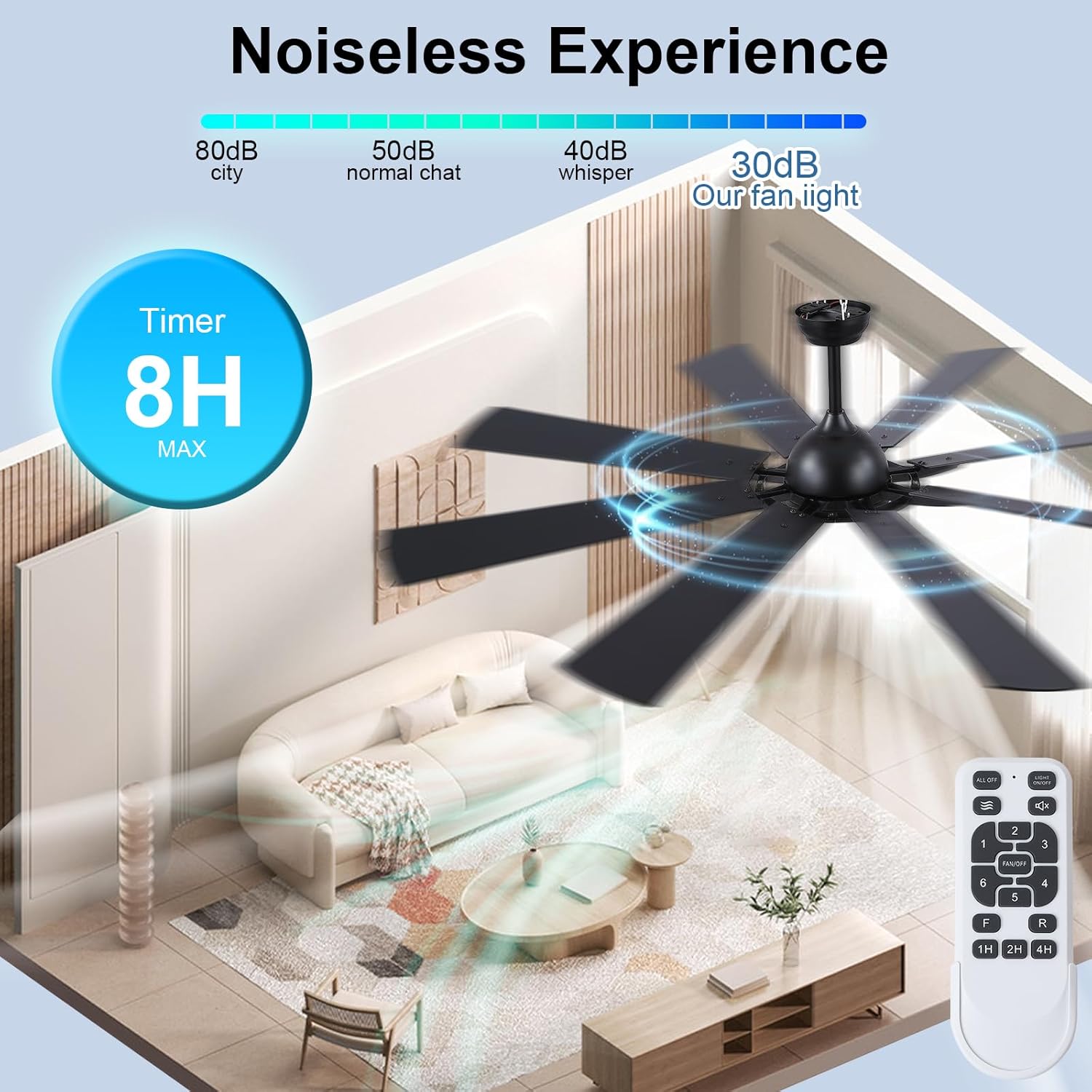
Figure 5: Quiet Operation and Timer Function. The fan operates at a low noise level of approximately 30dB, ensuring a peaceful environment. An 8-hour maximum timer setting is available via the remote control.
Maintenance
Regular maintenance helps ensure the longevity and optimal performance of your ceiling fan.
- Cleaning: To clean the fan, wipe with a soft, damp cloth. Do not use abrasive cleaners or solvents, as these may damage the finish. Ensure power is off before cleaning.
- Blade Cleaning: Dust the fan blades regularly to prevent dust buildup, which can affect fan balance and performance.
- Tighten Fasteners: Periodically check all screws and fasteners on the fan and mounting hardware to ensure they are secure.
- No Lubrication Required: The fan's DC motor is permanently lubricated and does not require additional oiling.
Troubleshooting
If you experience issues with your ceiling fan, refer to the following common problems and solutions:
| Problem | Possible Cause | Solution |
|---|---|---|
| Fan does not start | No power to the fan; Loose wire connections; Remote control battery low or not paired. | Check circuit breaker; Ensure all wire connections are secure; Replace remote battery or re-pair remote. |
| Light does not work, but fan operates | Loose light kit wiring; Protective material blocking LED connection; Faulty LED module. | Check light kit connections; Ensure any protective Styrofoam is removed from LED connections; Contact support if LED module is faulty. |
| Fan wobbles | Loose blade screws; Unbalanced blades; Loose mounting bracket. | Tighten all blade screws; Use a balancing kit (not included) to balance blades; Ensure mounting bracket is securely fastened. |
| Noisy operation | Loose screws; Motor housing rubbing against canopy; Incorrect installation. | Check and tighten all screws; Ensure canopy is not touching the motor housing; Re-check installation steps. |
Specifications
| Feature | Detail |
|---|---|
| Brand | SHIHOT |
| Model | B0DNJQ1ZXR |
| Colour | Black |
| Product Dimensions | 182.88 x 182.88 x 50.8 cm (72 x 72 x 20 inches) |
| Item Weight | 10.98 kg (11 kg) |
| Power/Wattage | 75 watts |
| Voltage | 120 Volts |
| Material | Iron, Plastic |
| Number of Speeds | 6 |
| Special Features | Adjustable Color Temperature, Adjustable Height, Timer, Reversible Blades |
| Electric Fan Design | Ceiling Fan |
| Power Source | DC |
| Mounting Type | Ceiling Mount |
Warranty and Support
For warranty information or technical support, please refer to the contact details provided with your purchase documentation or visit the official SHIHOT website. Keep your purchase receipt as proof of purchase for any warranty claims.


