
KEERCIGA DS01
KEERCIGA Dehumidifier Model DS01 User Manual
Your guide to efficient humidity control
1. Introduction
Thank you for choosing the KEERCIGA Dehumidifier Model DS01. This device is designed to effectively reduce excess moisture in your indoor environment, creating a more comfortable and healthier living space. Please read this manual thoroughly before operating the unit to ensure proper use, maintenance, and safety.
2. Safety Instructions
To prevent injury to the user or others and property damage, the following instructions must be followed. Failure to observe these instructions may result in improper operation, electric shock, injury, or fire.
- Always use the dehumidifier on a level, stable surface to prevent tipping.
- Ensure the power cord is not damaged, pinched, or placed under heavy objects.
- Do not operate the unit with wet hands or near water.
- Keep the air inlet and outlet clear of obstructions to ensure proper airflow.
- Unplug the dehumidifier before cleaning, maintenance, or when not in use.
- Do not insert foreign objects into the unit.
- This appliance is not intended for use by persons (including children) with reduced physical, sensory, or mental capabilities, or lack of experience and knowledge, unless they have been given supervision or instruction concerning use of the appliance by a person responsible for their safety.
- Do not use the dehumidifier in areas where flammable gases or liquids are stored.
3. Product Overview
3.1 Key Features
- High-Efficiency Dehumidification: Utilizes advanced semiconductor technology to absorb up to 16oz (450ml) of water per day in humid conditions (86°F, 80% RH) with 360° airflow.
- Large Capacity Water Tank: Equipped with a 63oz (1800ml) water tank, reducing the frequency of emptying.
- Automatic Shut-Off: The unit automatically powers off when the water tank is full, indicated by a red light, to prevent overflow.
- Automatic Defrost Function: Activates when temperatures drop below 0°C (32°F) to prevent frost buildup and ensure continuous operation.
- Ultra-Quiet Operation: Features a dedicated Sleep Mode with noise levels below 30dB for undisturbed rest.
- Multiple Operating Modes: Includes Efficiency Mode for powerful dehumidification and Sleep Mode for quiet operation.
- 7-Color Night Light: Offers a customizable colorful night light feature, which can be turned off in Sleep Mode.
- Compact and Portable: Designed with a compact size (6.38"W x 5.12"D x 9.84"H) and a built-in handle for easy relocation.
- Timer Function: Allows for scheduled operation.
3.2 Product Diagram
Familiarize yourself with the components of your KEERCIGA Dehumidifier.

Front view of the KEERCIGA Dehumidifier, highlighting its compact design and the multi-color light feature.

Visual representation of the automatic shut-off function, where the indicator light turns red when the water tank is full, preventing overflow.
4. Setup
4.1 Unpacking
- Carefully remove the dehumidifier from its packaging.
- Remove all packing materials and ensure no components are missing or damaged.
4.2 Placement
For optimal performance, place the dehumidifier in an area with good air circulation. Ensure there is at least 8 inches (20 cm) of space around the unit for proper airflow.
- Place the unit on a firm, level surface.
- Avoid placing it directly against walls or furniture.
- Ideal for high humidity spaces such as basements, bathrooms, bedrooms, closets, and RVs.

Examples of suitable placement for the dehumidifier in different areas of a home, including bedrooms, living rooms, wardrobes, and bathrooms.
4.3 Power Connection
- Plug the power cord into a grounded electrical outlet.
- Ensure the voltage matches the specifications of the unit.
5. Operating Instructions
5.1 Power On/Off
- Press the Power button once to turn the unit on.
- Press the Power button again to turn the unit off.
5.2 Mode Selection
The dehumidifier offers two operating modes:
- Efficiency Mode: Provides powerful dehumidification for faster moisture removal.
- Sleep Mode: Reduces fan speed and noise level to below 30dB for quiet operation, ideal for bedrooms. The night light automatically turns off in this mode.
- Press the Mode button to switch between Efficiency Mode and Sleep Mode.

The dehumidifier operating in a bedroom, illustrating its ultra-quiet sleep mode (below 30dB) and the customizable colorful night light feature, with timer options.
5.3 Timer Function
Set the dehumidifier to operate for a specific duration:
- Press the Timer button to cycle through available timer settings (e.g., 6H, 8H, 10H).
- The unit will automatically turn off after the selected time period.
5.4 Night Light Control
The dehumidifier features a 7-color changing night light.
- Press the Light button to turn the night light on or off.
- In Sleep Mode, the night light automatically turns off.
5.5 Automatic Shut-Off and Defrost
- Automatic Shut-Off: When the water tank is full, the unit will automatically stop operating, and the indicator light will turn red. Empty the water tank to resume operation.
- Automatic Defrost: If the ambient temperature drops below 0°C (32°F), the dehumidifier will automatically activate its defrost function to remove any ice buildup, ensuring continuous and efficient operation.

The dehumidifier's automatic defrost function, which activates in low temperatures (below 0°C) to ensure continuous operation by removing frost buildup.
6. Maintenance
Regular maintenance ensures the longevity and optimal performance of your dehumidifier.
6.1 Emptying the Water Tank
When the water tank is full, the unit will stop operating, and the indicator light will turn red. Empty the tank as follows:
- Gently pull out the water tank from the back of the unit.
- Remove the lid from the water tank.
- Pour out the collected water.
- Replace the lid and slide the water tank back into the dehumidifier until it clicks into place.

A step-by-step visual guide demonstrating the process of safely removing and emptying the water tank from the dehumidifier.
6.2 Cleaning the Unit
- Always unplug the unit before cleaning.
- Wipe the exterior of the dehumidifier with a soft, damp cloth. Do not use abrasive cleaners or solvents.
- Clean the air inlet and outlet grilles regularly with a soft brush or vacuum cleaner to remove dust and debris.
- Clean the water tank with mild detergent and rinse thoroughly. Ensure it is completely dry before reinserting.
6.3 Storage
- If storing the unit for an extended period, ensure the water tank is empty and clean.
- Clean the exterior and air grilles.
- Store the dehumidifier in a cool, dry place, away from direct sunlight and extreme temperatures.
7. Troubleshooting
If you encounter issues with your dehumidifier, refer to the following table for common problems and solutions.
| Problem | Possible Cause | Solution |
|---|---|---|
| Dehumidifier does not turn on. | No power supply. Water tank is full or not properly installed. | Check power connection and outlet. Empty and properly re-install the water tank. |
| No water collected or low dehumidification. | Ambient humidity is too low. Air inlet/outlet blocked. Temperature is too low (defrosting). | Dehumidifier may not be needed. Clear any obstructions. Allow unit to complete defrost cycle. |
| Unit is noisy. | Unit not on a level surface. Fan obstruction. | Place on a flat, stable surface. Check for and remove any obstructions. |
| Red indicator light is on. | Water tank is full. | Empty the water tank. |
8. Specifications
| Specification | Detail |
|---|---|
| Brand | KEERCIGA |
| Model Name | DS01 |
| Water Tank Capacity | 63 OZ (1.8 Liters) |
| Dehumidification Capacity | Up to 16 OZ (450ml) per day (at 86°F, 80% RH) |
| Coverage Area | Up to 270 Square Feet |
| Product Dimensions (D x W x H) | 5.12" x 6.38" x 9.84" |
| Item Weight | 3.94 pounds (63 Ounces) |
| Wattage | 22.5 watts |
| Material | Plastic |
| Color | White |
| Operation Mode | Standard, Sleep Mode |
| Special Feature | Portable, Auto Shut-Off, Defrost, Timer, 7-Color Light |
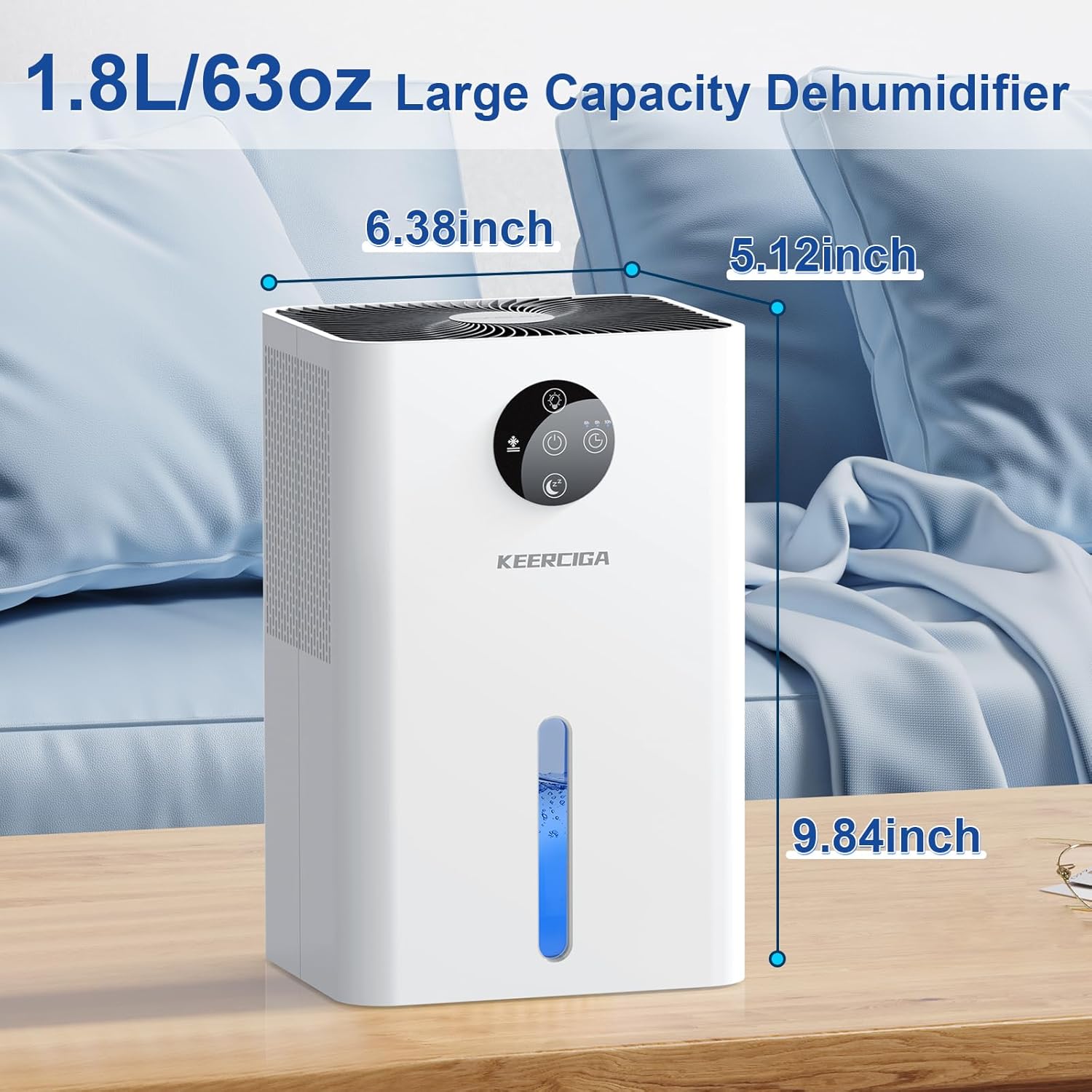
Diagram showing the compact dimensions of the KEERCIGA Dehumidifier, suitable for various small spaces.
9. Warranty and Support
KEERCIGA is committed to providing high-quality products. For any questions, concerns, or warranty inquiries, please contact our customer support team. Please retain your proof of purchase for warranty claims.
For further assistance, please refer to the contact information provided with your product packaging or visit the official KEERCIGA website.
Ask a question about this manual
Ask about setup, troubleshooting, compatibility, parts, safety, or missing instructions. Manuals+ will review the question and use this page’s manual context to help answer it.