
PREVCHA V8 Finder Pro
PREVCHA V8 Finder Pro Digital Signal Meter User Manual
Model: V8 Finder Pro
1. Introduction
The PREVCHA V8 Finder Pro is a professional digital signal meter designed for efficient and accurate installation and alignment of satellite, terrestrial, and cable TV systems. It supports multiple digital video broadcasting standards including DVB-S2X/S2/S, DVB-T2/T, and DVB-C, with advanced H.265 (10-bit) decoding capabilities. This device features a high-resolution TFT LCD screen, spectrum analyzer, automatic angle calculation, and a robust battery for extended outdoor use. This manual provides detailed instructions for operating and maintaining your V8 Finder Pro.
2. Safety Information
Please read and understand all safety precautions before operating the device. Failure to follow these instructions may result in electric shock, fire, or damage to the device.
- Power Supply: Use only the original charger provided with the device. Ensure the power outlet voltage matches the charger's specifications.
- Battery Safety: Do not disassemble, puncture, or expose the battery to extreme temperatures or fire. If the battery appears damaged or leaks, discontinue use immediately.
- Environmental Conditions: Avoid exposing the device to rain, moisture, direct sunlight, or extreme temperatures. Operate within the specified temperature range.
- Handling: Handle the device with care. Avoid dropping or subjecting it to strong impacts.
- Maintenance: Do not attempt to repair the device yourself. Refer all servicing to qualified personnel.
- LNB Short Protection: The device features LNB short protection. If a short circuit is detected, the device will automatically cut off power to the LNB to prevent damage.
3. Product Overview
3.1 Components and Controls
Familiarize yourself with the various parts and controls of your V8 Finder Pro.
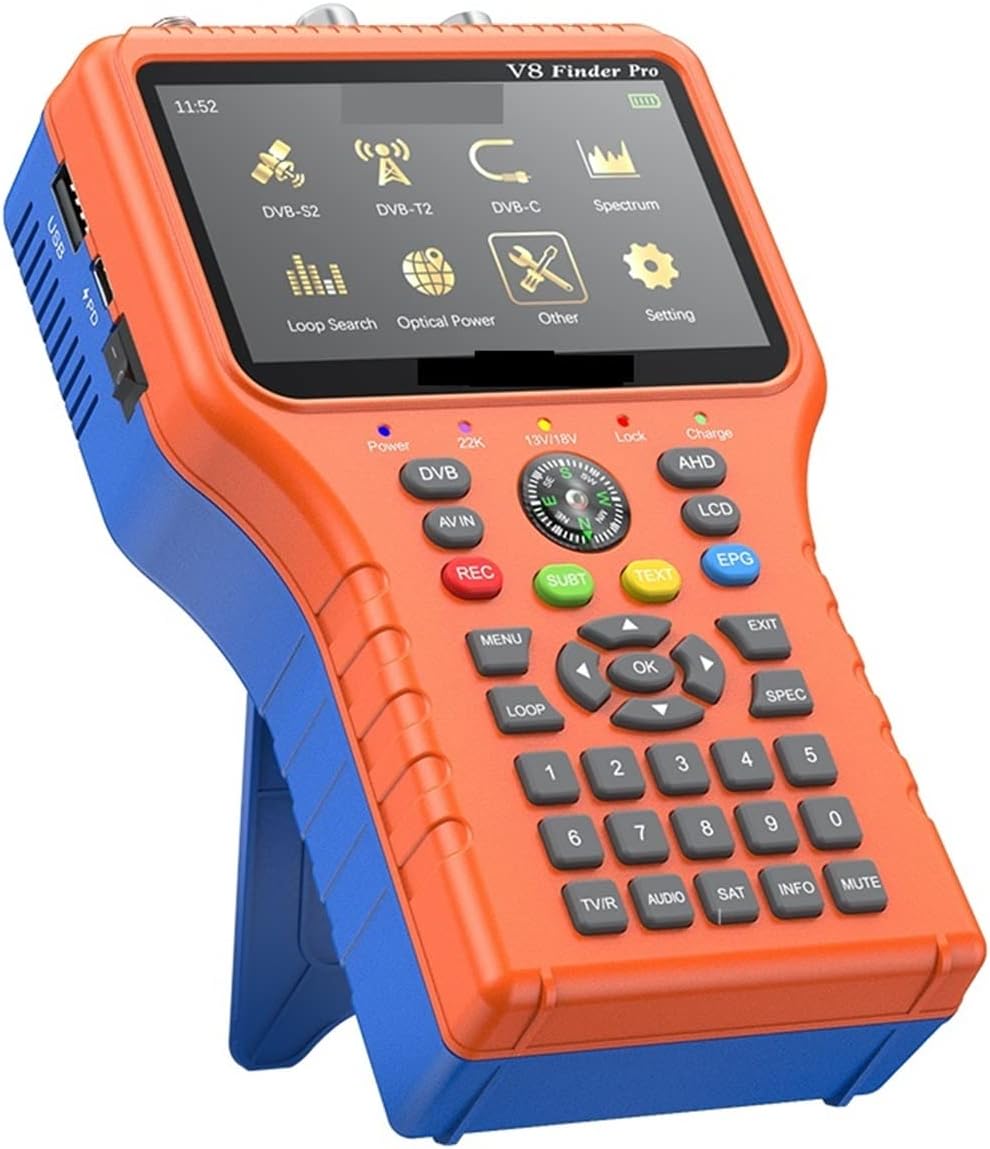
Figure 3.1: Front View of V8 Finder Pro
This image displays the main interface of the V8 Finder Pro, including its 4.3-inch TFT LCD screen, navigation buttons, numeric keypad, and function keys for various signal measurement modes (DVB-S2, DVB-T2, DVB-C, Spectrum, Loop Search, Optical Power, Other, Setting).

Figure 3.2: Back View and App Download Information
The back of the device features product specifications and a QR code. Scanning this QR code allows users to download the "V8 Finder" application from Google Play or the App Store, enabling smartphone integration for enhanced control and display.

Figure 3.3: Screen Interface Overview
This image highlights the main menu icons on the V8 Finder Pro's screen, representing different functionalities such as DVB-S2, DVB-T2, DVB-C, Spectrum Analyzer, Loop Search, Optical Power measurement, and system settings.

Figure 3.4: Built-in Lithium Battery and Charging Indicators
This diagram illustrates the internal 4000mAh lithium-ion battery and the charging status indicators (red light for charging, blue light for full power), emphasizing the device's portability and long battery life for outdoor use.
3.2 Key Features
- High-Resolution Display: 4.3-inch TFT LCD screen for clear signal readings and menu navigation.
- Multi-Standard Compatibility: Fully compatible with DVB-S2X/S2/S, DVB-T2/T, and DVB-C standards.
- Advanced Decoding: Supports H.264/H.265 (10-bit) hardware decoding.
- Digital Signal Measurement: Provides digital measurement for signal strength and quality. Supports preset information for all parameters.
- Spectrum Analyzer: Integrated spectrum analyzer for detailed signal analysis.
- Automatic Angle Calculation: Automatically calculates AZ (Azimuth) and EL (Elevation) angles for precise dish alignment.
- DISEQC Support: Supports DISEQC 1.0/1.1/1.2, Unicable, and 0/22kHz tone control.
- Built-in Speaker: Provides audio feedback for signal lock.
- Versatile Connectivity: Supports AV In/Out and HDMI Out/In interfaces.
- Compass Function: Integrated compass for directional guidance.
- Real-time Power Display: Shows real-time battery power with low power reminder.
- LNB Short Protection: Protects the device and LNB from short circuits.
- Long-lasting Battery: Built-in 7.4V/4000mAh Li-ion battery for extended operation.
- USB Upgrade: Software upgrades can be performed via the USB port.
- Portable Design: Compact and easy to carry for field use.
- Loop Search Support: Facilitates efficient channel scanning.
- SoftCAM Support: Supports BISS auto roll, PowerVu auto roll, and TNT (19.2E).
- Multi-stream Support: Supports VCM, ACM, Multi-stream, T2MI, and Multi-PLP.
4. Setup
4.1 Initial Charging
Before first use, fully charge the V8 Finder Pro. Connect the provided AC/DC adapter to the device's charging port and plug it into a power outlet. The red charging indicator light (Figure 3.4) will illuminate. Once fully charged, the blue light will turn on.
4.2 Connecting to a Display (Optional)
The V8 Finder Pro can be connected to an external display for a larger view of the signal parameters and video feed.

Figure 4.1: Connecting to a Large Screen Display
This image demonstrates how to connect the V8 Finder Pro to an external display, such as a TV or monitor, using an HDMI cable for a larger view of the signal analysis and video output.
- HDMI Output: Connect an HDMI cable from the device's HDMI OUT port to the HDMI IN port of your TV or monitor.
- AV Output: Connect an AV cable from the device's AV OUT port to the AV IN ports of your TV or monitor.
5. Operating Instructions
5.1 Powering On/Off
Press and hold the Power button located on the front panel to turn the device on or off.
5.2 Main Menu Navigation
Use the arrow keys (UP, DOWN, LEFT, RIGHT) to navigate through the menu options on the screen. Press OK to confirm a selection or enter a submenu. Press EXIT to return to the previous menu.
5.3 Signal Measurement (DVB-S2X/S2/S, DVB-T2/T, DVB-C)
To measure signal strength and quality for different broadcasting standards:
- From the main menu, select the desired mode (e.g., DVB-S2 for satellite, DVB-T2 for terrestrial, DVB-C for cable).
- Configure the parameters relevant to your setup (e.g., Satellite, LNB Type, Transponder for DVB-S; Frequency, Bandwidth for DVB-T/C).
- Adjust your antenna/dish while observing the signal strength and quality indicators on the screen. The device will provide an audible tone when a signal is locked.
- Utilize the Spectrum function for a visual representation of the signal frequency distribution.
5.4 Automatic AZ, EL Angle Calculation
For satellite dish alignment, the device can automatically calculate the Azimuth (AZ) and Elevation (EL) angles:
- Ensure the device's compass function is enabled and calibrated.
- Select the satellite you wish to align with.
- The device will display the calculated AZ and EL angles. Use these as a guide to position your satellite dish.

Figure 5.1: Smartphone App Interface for Alignment
This image shows the "V8 Finder" mobile application interface, which provides a user-friendly way to view channel lists and utilize a digital compass for precise satellite dish alignment, displaying real-time Azimuth and Elevation angles.
5.5 Software Upgrade
To ensure optimal performance and access new features, it is recommended to keep the device's software updated.
- Download the latest firmware file from the official PREVCHA website or technical support portal.
- Copy the firmware file to the root directory of a USB flash drive.
- Insert the USB flash drive into the device's USB port.
- Navigate to the Settings menu on the device and select Software Upgrade or Firmware Update.
- Follow the on-screen prompts to complete the upgrade process. Do not power off the device during the upgrade.
6. Maintenance
- Cleaning: Use a soft, dry cloth to clean the device. Do not use liquid cleaners or abrasive materials.
- Battery Care: To prolong battery life, avoid fully discharging the battery frequently. If storing the device for an extended period, charge it to about 50% every few months.
- Storage: Store the device in a cool, dry place away from direct sunlight and extreme temperatures.
- Port Protection: Keep all ports free from dust and debris. Use port covers if available.
7. Troubleshooting
| Problem | Possible Cause | Solution |
|---|---|---|
| Device does not power on. | Low battery; Faulty charger; Power button issue. | Charge the device fully. Ensure charger is working. Contact support if issue persists. |
| No signal detected. | Incorrect parameters; Antenna/LNB not connected; Dish/antenna misalignment; LNB faulty. | Verify input parameters (frequency, symbol rate, etc.). Check cable connections. Re-align antenna/dish. Test with another LNB if possible. |
| Poor signal quality. | Partial misalignment; Cable issues; Interference. | Fine-tune antenna/dish alignment. Check cables for damage or loose connections. Identify and eliminate sources of interference. |
| Screen is blank or frozen. | Software glitch; Hardware malfunction. | Perform a hard reset (press and hold power button for 10 seconds). If issue persists, attempt a software upgrade or contact support. |
| Battery drains quickly. | Aging battery; Excessive backlight brightness; Continuous LNB power. | Reduce screen brightness. Ensure LNB power is off when not in use. Battery may need replacement if old. |
8. Specifications
8.1 Transmission Standards
- DVB-S2X/S2/S, DVB-T2/T, DVB-C
- Video Decoding: MPEG-2, MPEG-4, H.264/H.265 (10-bit)
- SoftCAM Support: BISS Auto Roll, PowerVu Auto Roll, TNT (19.2E)
- Multi-stream Support: VCM, ACM, Multi-stream, T2MI, Multi-PLP
8.2 Satellite Input/Demodulation (DVB-S2X/S2/S)
- Connector Type: F Type
- Input Frequency: 950 to 2150 MHz
- Signal Input Level: -65 to -25 dBm
- Band Switch Control: 22 kHz
- LNB Supply: 13V/18V, Max 350mA
- Demodulation Type: QPSK, 8PSK, 16APSK, 32APSK (DVB-S2); QPSK, 8PSK, 16APSK, 32APSK, 64APSK (DVB-S2X)
8.3 Terrestrial/Cable Input/Demodulation (DVB-T2/T/C)
- Connector Type: Female
- Input Frequency: 48 to 862 MHz
- Signal Input Level: Max 80 dBm
- ANT Supply: 5V DC @ 120mA Max
- Demodulation Type: QPSK, 16QAM, 32QAM, 64QAM, 128QAM, 256QAM
8.4 LCD Features
- LCD Type: TFT Transmissive
- Resolution: 800 RGB (H) x 480 (V)
- Active Area (W x H): 95.04 x 53.86 mm
8.5 AV Output Interface
- Connector Type: 3.5mm Jack
- Video Output: CVBS
- Audio Output: Stereo L/R Output
8.6 HDMI Output Interface
- HDMI Format: HDMI 1.3a
8.7 HD Input Interface
- Connector Type: BNC Female
- Impedance: 75 Ω
- Frequency Range: DC to 2 GHz
- Video Input Support: NTSC/PAL, 720P/1080P
8.8 Audio/Video Processing
- Video Decompression: MPEG-2 MP@HL, MPEG-1 Decoding, MPEG-4 ASP@L5 HD Resolution, H.264/H.265 MP&HPL4
- HW JPEG Decoder
- Resolution Rate: PAL25@7200*576
8.9 General Specifications
- Brand: PREVCHA
- Model: V8 Finder Pro
- Battery: 7.4V/4000mAh Li-ion Battery (Built-in)
- Dimensions (Shipping): 3 x 2 x 1 cm
- Item Weight: 1 gram
9. Warranty and Support
Specific warranty information for the PREVCHA V8 Finder Pro is not provided in the product details. Please refer to the retailer or manufacturer's official website for warranty terms and conditions.
For technical support, troubleshooting assistance, or service inquiries, please contact PREVCHA customer support through their official channels. Keep your purchase receipt and product model number (V8 Finder Pro) ready when contacting support.
Ask a question about this manual
Ask about setup, troubleshooting, compatibility, parts, safety, or missing instructions. Manuals+ will review the question and use this page’s manual context to help answer it.