
1. Introduction
The Orbit Infrared Induction Cooker (Model OIR-01) is a modern kitchen appliance designed for efficient and versatile cooking. This manual provides essential information for the safe and proper operation, maintenance, and troubleshooting of your new infrared cooker. Please read all instructions carefully before use and retain this manual for future reference.
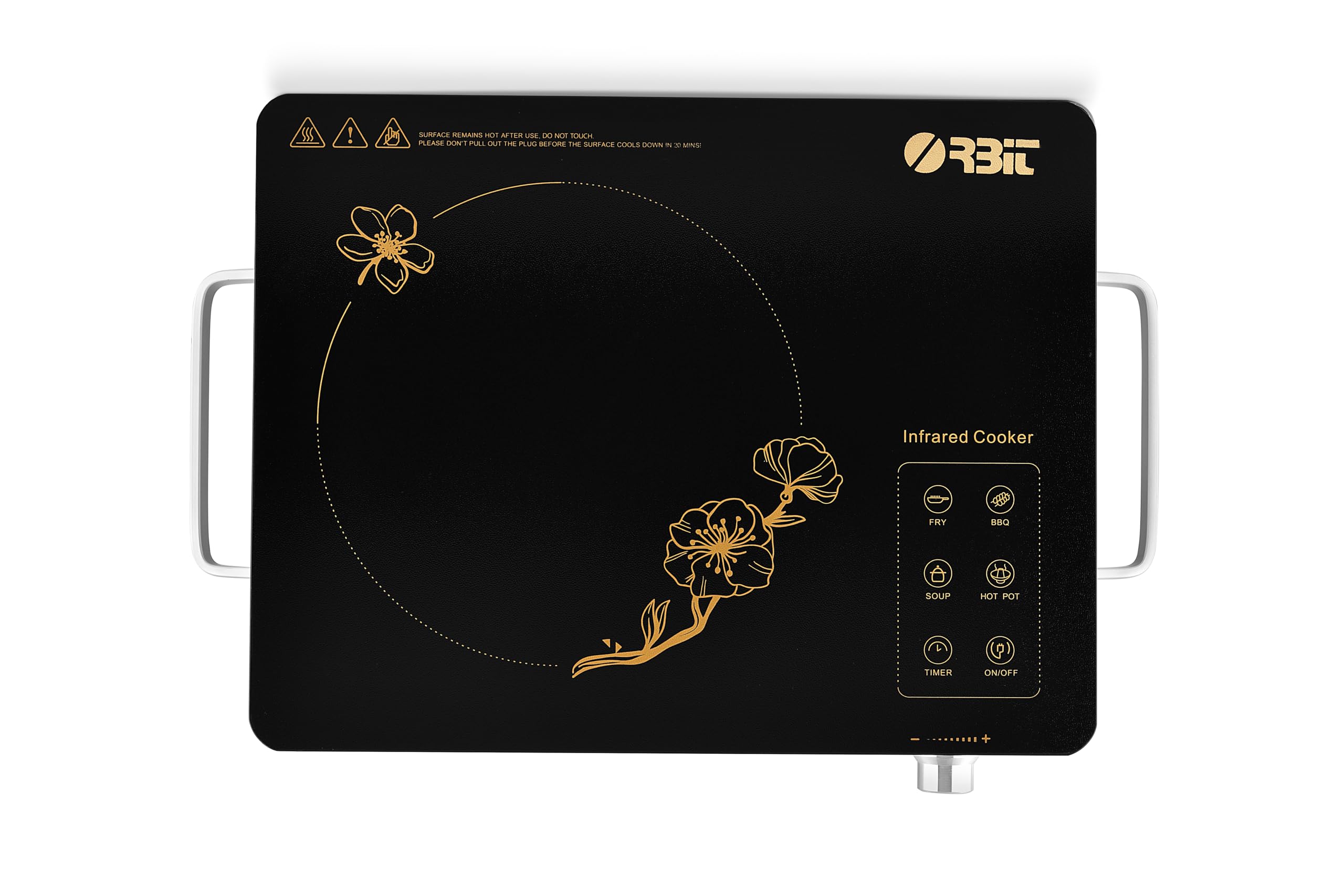
Image 1.1: Orbit Infrared Induction Cooker (OIR-01) in a kitchen setting with food being prepared.
Key Features:
- Stylish and Durable Design: Built with premium materials for longevity and aesthetic appeal.
- Overheating Protection: Advanced safeguards to prevent overheating during operation.
- 4-Digit Bright LED Display: Provides clear and precise control over cooking settings.
- Extra Soft Sensor Touch Keys: Responsive and user-friendly controls for effortless operation.
- Multifunctionality: Offers various cooking functions for diverse culinary needs.
- Universal Utensil Compatibility: Works with all types of flat-bottomed utensils, including glass, stainless steel, aluminum, and ceramic.
- A-Grade Crystalite Plate: Ensures efficient and even heat distribution.
- No Electromagnetic Radiation: Provides a safer cooking environment.
- Self-Lubricating Fan: Disperses heat quickly to maintain optimal cooking temperature.
- Powerful 2200 W: High wattage for efficient cooking.
2. Important Safety Instructions
To reduce the risk of fire, electric shock, injury to persons, or damage to the appliance, basic safety precautions should always be followed, including the following:
- Read all instructions before using the appliance.
- Do not touch hot surfaces. Use handles or knobs.
- To protect against electrical shock, do not immerse cord, plugs, or the appliance in water or other liquid.
- Close supervision is necessary when any appliance is used by or near children.
- Unplug from outlet when not in use and before cleaning. Allow to cool before putting on or taking off parts.
- Do not operate any appliance with a damaged cord or plug, or after the appliance malfunctions or has been damaged in any manner.
- The use of accessory attachments not recommended by the appliance manufacturer may cause injuries.
- Do not use outdoors.
- Do not let cord hang over edge of table or counter, or touch hot surfaces.
- Do not place on or near a hot gas or electric burner, or in a heated oven.
- Extreme caution must be used when moving an appliance containing hot oil or other hot liquids.
- Always attach plug to appliance first, then plug cord into the wall outlet. To disconnect, turn any control to "off", then remove plug from wall outlet.
- Do not use appliance for other than intended use.
- Ensure adequate ventilation around the cooker during operation.
- The cooking surface becomes very hot during and after use. Avoid direct contact.
- Only use flat-bottomed cookware suitable for infrared heating.
- The appliance is equipped with overheating protection. If the unit overheats, it will automatically shut off. Allow it to cool down before resuming use.
3. Setup and Unpacking
Carefully unpack your Orbit Infrared Induction Cooker and check for any damage. Ensure all components are present before discarding packaging materials.
Video 3.1: Unboxing and initial overview of the Orbit Infrared Induction Cooker (OIR-01), demonstrating package contents and basic features.
Placement:
- Place the cooker on a stable, flat, and heat-resistant surface.
- Ensure there is sufficient space (at least 10-15 cm) around the cooker for proper ventilation. Do not block the air vents located on the underside and sides of the unit.
- Keep the cooker away from water sources and flammable materials.
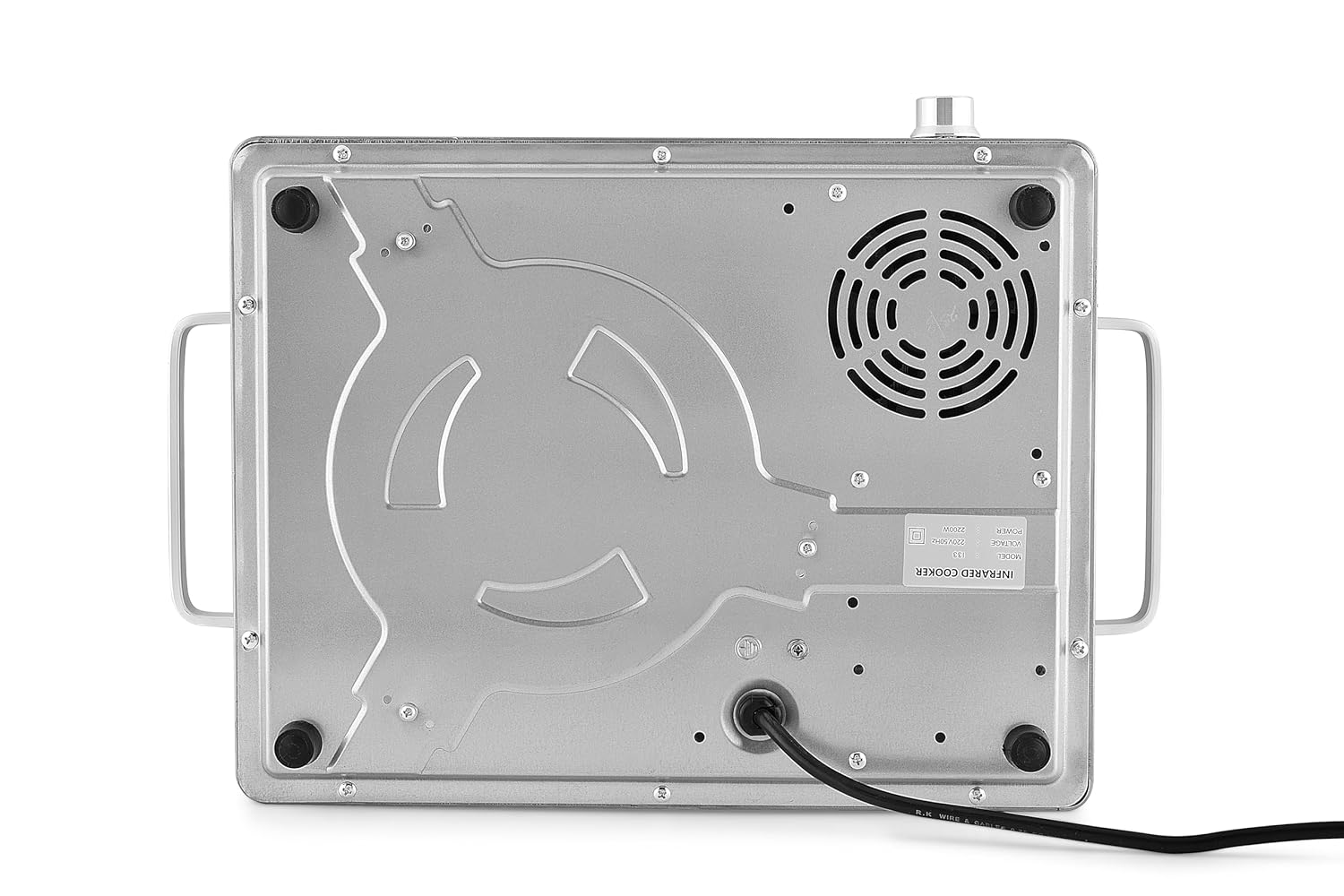
Image 3.2: Underside of the cooker, highlighting the self-lubricating fan for heat dispersion and stable feet.
Power Connection:
- Plug the power cord into a grounded electrical outlet with the correct voltage (220-240V).
- Ensure the outlet can support the cooker's 2200W power consumption.
4. Operating Instructions
The Orbit Infrared Induction Cooker features a user-friendly touch panel and a temperature adjustment knob for precise control.

Image 4.1: Detailed view of the touch control panel and temperature adjustment knob.
Powering On/Off:
- To turn on, press the ON/OFF touch key. The LED display will illuminate.
- To turn off, press the ON/OFF touch key again.
Selecting Cooking Modes:
The cooker offers various preset cooking modes for convenience. Simply touch the desired mode icon on the control panel:
- FRY: For frying and searing.
- BBQ: For grilling and barbecue-style cooking.
- SOUP: For simmering soups and stews.
- HOT POT: For hot pot dishes.
- TIMER: To set a cooking duration.

Image 4.2: Overview of the cooker's features, including different cooking modes.
Temperature/Power Adjustment:
- After selecting a cooking mode, use the rotary knob to adjust the temperature or power level.
- Turn clockwise to increase, and counter-clockwise to decrease. The 4-digit LED display will show the current setting.
Compatible Utensils:
The Orbit Infrared Cooker is compatible with all types of flat-bottomed cookware, including:
- Glass
- Stainless Steel
- Aluminum
- Ceramic
- Cast Iron
Ensure the base of the utensil is flat and covers the heating zone adequately for optimal performance.
5. Maintenance and Cleaning
Regular cleaning and proper maintenance will ensure the longevity and efficient operation of your cooker.
Cleaning the Cooker:
- Always unplug the cooker from the power outlet and allow it to cool completely before cleaning.
- Wipe the A-grade crystalite plate with a soft, damp cloth and mild detergent. For stubborn stains, use a non-abrasive cleaner specifically designed for glass cooktops.
- Do not use abrasive pads, harsh chemicals, or steel wool, as these can scratch the surface.
- Clean the exterior housing with a soft, damp cloth. Do not immerse the cooker in water or any other liquid.
- Ensure no liquid enters the ventilation openings.
Storage:
- Store the cooker in a dry place when not in use.
- Avoid placing heavy objects on the cooking surface.
6. Troubleshooting
If you encounter any issues with your Orbit Infrared Induction Cooker, refer to the following common problems and solutions:
| Problem | Possible Cause | Solution |
|---|---|---|
| Cooker does not turn on. | No power supply; power cord not properly connected. | Check if the power cord is securely plugged into a working outlet. Verify the power switch is on. |
| Cooker turns off automatically during operation. | Overheating protection activated; ventilation blocked. | Unplug the cooker and allow it to cool down. Ensure air vents are clear and there is adequate space around the unit. |
| Food is not heating or heating slowly. | Incorrect power/temperature setting; unsuitable cookware. | Adjust the power/temperature setting using the knob. Ensure you are using flat-bottomed cookware that covers the heating zone. |
| Unusual odors or smoke. | Food spills on heating element; new unit burning off manufacturing residues. | Turn off and unplug the unit. Clean any food spills. A slight odor or smoke is normal during first few uses. If persistent or excessive, contact support. |
If the problem persists after attempting these solutions, please contact customer support.
7. Specifications
| Feature | Detail |
|---|---|
| Model Number | OIR-01 |
| Brand | Orbit |
| Wattage | 2200 Watts |
| Controls Type | Touch Panel with Rotary Knob |
| Power Source Type | Infrared Heating |
| Material | Aluminium, Glass, Stainless Steel (A-Grade Crystalite Plate) |
| Product Dimensions (D x W x H) | 10D x 10W x 34H Centimeters |
8. Warranty and Support
Warranty Information:
The Orbit Infrared Induction Cooker (OIR-01) comes with a 1-year repair warranty from the date of purchase. This warranty covers manufacturing defects and malfunctions under normal household use. Please retain your purchase receipt as proof of purchase for warranty claims.
The warranty does not cover damage resulting from misuse, accident, unauthorized modification, or failure to follow the instructions in this manual.
Customer Support:
For technical assistance, warranty claims, or any questions regarding your Orbit Infrared Induction Cooker, please contact our customer support team:
- Email: support@orbitappliances.com
- Phone: 1800-XXX-XXXX (Toll-Free)
- Website: www.orbitappliances.com
Please have your model number (OIR-01) and purchase date available when contacting support.
