
1. Introduction
Thank you for choosing the UPXSXT Bicycle Turn Signals with Alarm. This product is designed to enhance your cycling safety by providing clear turn indications and an audible alarm, making your presence known to others on the road. This manual will guide you through the setup, operation, and maintenance of your new bicycle lights.

The UPXSXT Bicycle Turn Signals are versatile and can be mounted on various vehicles for enhanced visibility.
2. Safety Information
Please read all safety instructions carefully before using the product. Failure to follow these instructions may result in injury or damage to the product.
- Always ensure the lights are securely mounted before riding.
- Do not look directly into the light source to avoid eye damage.
- Keep the product away from children.
- Ensure the USB port is properly sealed when not charging to maintain IPX6 waterproof rating.
- Regularly check the battery level and charge as needed to ensure optimal performance.
3. Package Contents
Verify that all items listed below are included in your package:
- 4 x Bike Tail Lights
- 1 x Remote Control
- 1 x USB One-to-Four Charging Cable
- Mounting Brackets (2 pieces)
- Fixed Seats (4 pieces)
- Silicone Straps (4 pieces)
- Round Silicone Tape (4 pieces)
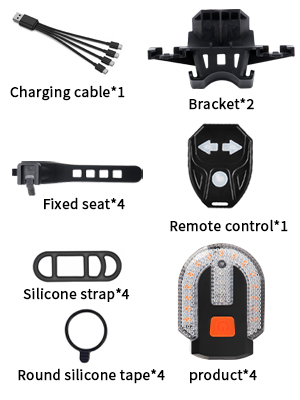
The package includes four turn signal lights, a remote control, and a multi-charging cable.
4. Specifications
| Feature | Detail |
|---|---|
| Brand | UPXSXT |
| Model Number | Bike Tail Light-4pcs |
| Material | ABS Plastic |
| Power Source | Battery Powered (Built-in 600mAh Polymer Battery) |
| Charging Method | USB Smart Charging |
| Charging Time | Approximately 60 minutes |
| Usage Time (Low Battery Mode) | Up to 300 minutes |
| Water Resistance Rating | IPX6 |
| Light Modes | 5 (Left Turn, Right Turn, Yellow Static, Red Static, All Flashing Strobe) |
| Product Dimensions | 2.52"L x 1.89"W x 1.02"H |
| Weight | Approximately 110g (tail light + remote control) |
| Life Expectancy | Up to 50,000 hours |

Detailed specifications and dimensions of the UPXSXT Bicycle Turn Signals.
5. Setup
5.1 Mounting the Lights
The UPXSXT Bicycle Turn Signals offer two installation methods: integrated and separate. Choose the method that best suits your bicycle and needs.
- Separate Installation: Use the provided silicone straps to attach individual lights to various parts of your bicycle, such as the front forks, seat posts, or handlebars. This allows for flexible positioning.
- One-Piece Installation: Combine two lights using the included bracket to create a single unit, typically for the rear of the bicycle. Secure this unit using the silicone straps or fixed seats.

Choose between one-piece or separate installation to best fit your bicycle's design and your visibility needs.
5.2 Mounting the Remote Control
Attach the remote control to your handlebar using the provided silicone strap. Ensure it is within easy reach for quick operation while riding.

The remote control easily attaches to your handlebar for convenient access.
5.3 Initial Charging
Before first use, fully charge all tail lights using the provided USB one-to-four charging cable. Connect the USB end to a power source (computer, power bank, USB charger) and the micro-USB ends to each light. The lights will indicate when charging is complete.
6. Operating Instructions
The remote control allows you to easily switch between 5 different light modes and activate the alarm function.
- Power On/Off: Press the power button on each individual light to turn it on or off.
- Left Turn Signal: Press the left arrow button on the remote control. The left lights will flash yellow, accompanied by an audible horn sound.
- Right Turn Signal: Press the right arrow button on the remote control. The right lights will flash yellow, accompanied by an audible horn sound.
- Mode Switching: Press the central button on the remote control to cycle through the following modes:
- Yellow Static Lights
- Red Static Lights
- All Flashing Strobe Lights (Yellow and Red)

The remote control provides easy access to all 5 lighting modes for various riding conditions.
6.1 Official Product Video
Watch this official product video for a demonstration of the UPXSXT Bicycle Turn Signals with Alarm, showcasing its features and operation.
7. Maintenance
7.1 Charging
Use the provided USB one-to-four charging cable to charge all four tail lights simultaneously. The built-in 600mAh polymer battery provides long-lasting power. You can charge the lights using your computer, car charger, power bank, or any device with a USB port.

The convenient USB one-to-four charging cable allows for simultaneous charging of all lights.
7.2 Cleaning and Waterproofing
The lights feature a one-piece sealed design with an IPX6 waterproof rating, allowing them to be used normally in various weather conditions. To clean, wipe with a damp cloth. Ensure the USB port cover is securely closed when not charging to maintain its waterproof integrity.

The IPX6 waterproof design ensures durability and functionality in various weather conditions.
8. Troubleshooting
If you encounter any issues with your UPXSXT Bicycle Turn Signals, please refer to the following common solutions:
- Lights not turning on: Ensure the lights are fully charged. Press the power button on each light to activate it.
- Remote control not responding: Check if the remote control battery needs replacement. Ensure the remote is within range of the lights.
- Lights not syncing: Turn off all lights and the remote. Then, turn them back on and try pairing again.
- Weak light output: Recharge the lights. Extreme cold weather can temporarily affect battery performance.
- Alarm not sounding: Ensure the lights are in a mode that supports the alarm function (e.g., turn signal modes).
If the problem persists after trying these steps, please contact customer support.
9. Warranty and Support
9.1 Warranty
This UPXSXT product comes with a 1-year warranty from the date of purchase. The warranty covers manufacturing defects and malfunctions under normal use. It does not cover damage caused by misuse, accidents, unauthorized modifications, or improper maintenance.
9.2 Customer Support
For any questions, technical assistance, or warranty claims, please contact UPXSXT customer support through the retailer where you purchased the product or visit the official UPXSXT store online. Please have your purchase receipt and product model number (Bike Tail Light-4pcs) ready when contacting support.