
Jocca 2182
Jocca 150W Cordless Stick Vacuum Cleaner User Manual
Model: 2182
Important Safety Instructions
Read all instructions carefully before using this appliance. Keep this manual for future reference.
- Always ensure the appliance is switched off and unplugged before cleaning or maintenance.
- Do not use the vacuum cleaner to pick up water or wet substances.
- Do not pick up flammable or combustible liquids, such as gasoline, or use in areas where they may be present.
- Keep hair, loose clothing, fingers, and all parts of the body away from openings and moving parts.
- Use only as described in this manual. Use only manufacturer's recommended attachments.
- Do not use with a damaged cord or plug. If appliance is not working as it should, has been dropped, damaged, left outdoors, or dropped into water, return it to a service center.
- Do not pull or carry by cord, use cord as a handle, close a door on cord, or pull cord around sharp edges or corners. Do not run appliance over cord. Keep cord away from heated surfaces.
- Do not unplug by pulling on cord. To unplug, grasp the plug, not the cord.
- Do not handle plug or appliance with wet hands.
- Do not put any object into openings. Do not use with any opening blocked; keep free of dust, lint, hair, and anything that may reduce air flow.
- Use extra care when cleaning on stairs.
- Do not use to pick up hard, sharp objects such as glass, nails, screws, coins, etc., as this may damage the machine.
- Do not use without dust cup and/or filters in place.
- Store the appliance indoors in a cool, dry place.
Product Components
Familiarize yourself with the parts of your Jocca Cordless Stick Vacuum Cleaner.

Figure 1: Main unit, extension tube, floor brush with LED, 2-in-1 brush, and crevice nozzle.

Figure 2: The main vacuum unit, including the motor, dustbin, and handle.
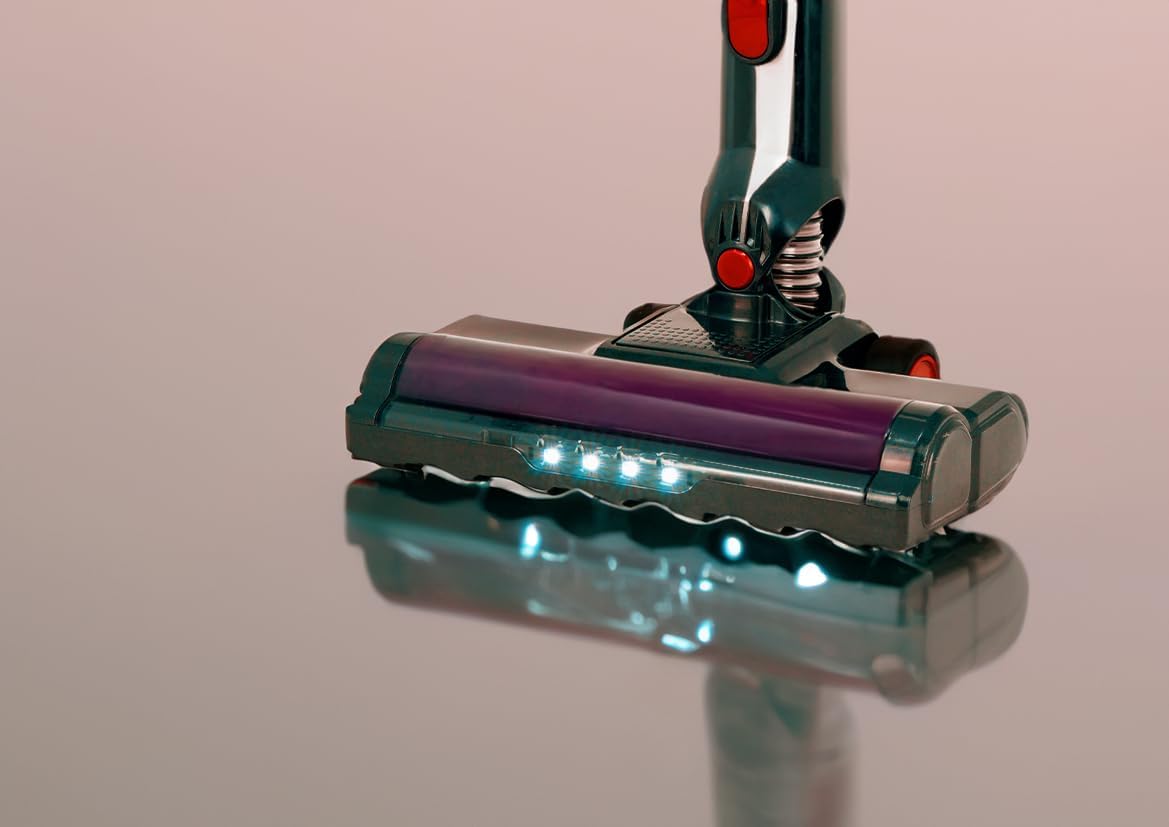
Figure 3: Floor brush head featuring integrated LED lights for improved visibility during cleaning.
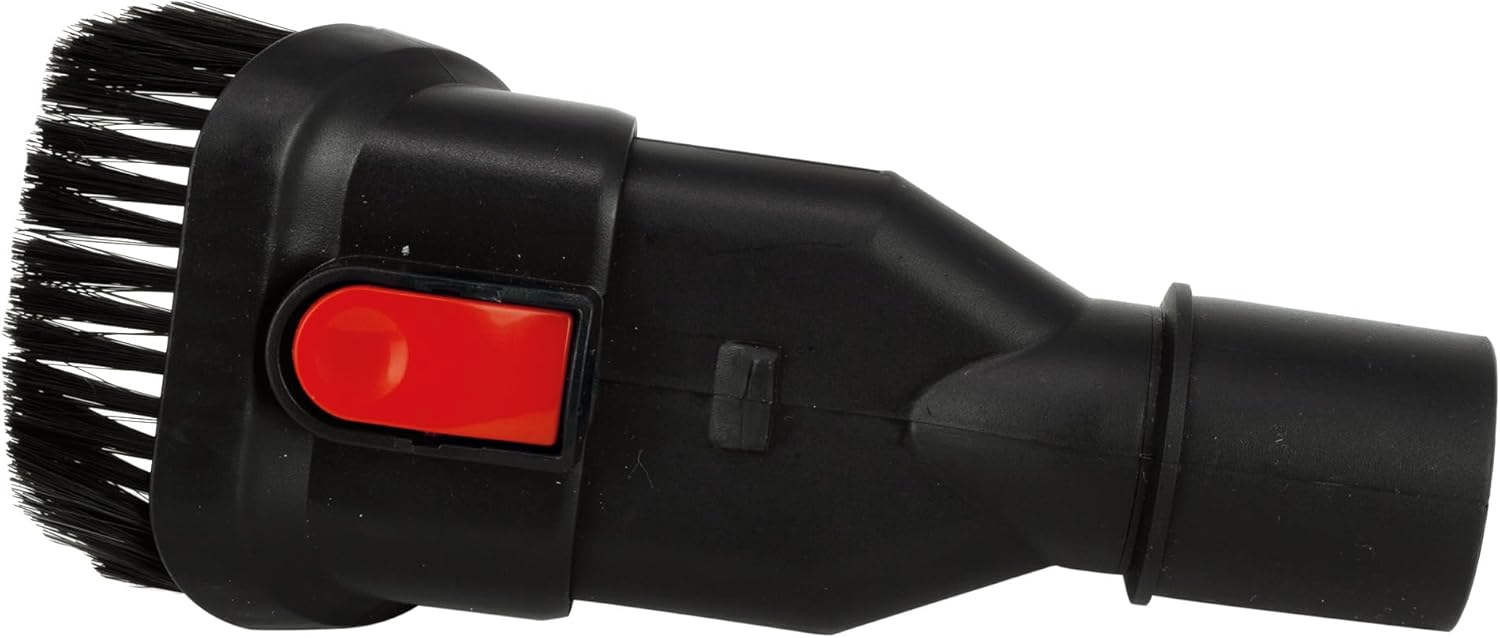
Figure 4: The 2-in-1 brush attachment, which can be used as a brush or an upholstery tool.

Figure 5: The crevice nozzle, ideal for reaching tight corners and narrow gaps.

Figure 6: The detachable dustbin and washable HEPA filter system.
Setup and Assembly
Charging the Battery: Before first use, fully charge the vacuum cleaner. Connect the charger to the charging port on the main unit and plug it into a power outlet. The indicator lights will show charging status. A full charge takes approximately several hours.
Assembling the Stick Vacuum:
- Insert the extension tube into the main vacuum unit until it clicks securely into place.
- Attach the floor brush head to the other end of the extension tube, ensuring it clicks firmly.

Figure 7: The vacuum cleaner fully assembled for upright use.
Assembling as Handheld Vacuum: For handheld use, detach the extension tube and floor brush. Directly attach the desired accessory (2-in-1 brush or crevice nozzle) to the main vacuum unit.

Figure 8: The main unit used as a handheld vacuum with an attachment.
Operating Instructions
Power On/Off: Press the power button on the handle to turn the vacuum cleaner on. Press it again to turn off.
Suction Modes: The vacuum cleaner features 2 speed settings. Press the mode button to switch between standard and max suction modes. Use standard mode for everyday cleaning and max mode for stubborn dirt.
Using the Floor Brush: The floor brush is equipped with LED lights that illuminate the cleaning path, making dust and debris more visible. It is suitable for both hard floors and carpets.

Figure 9: The vacuum cleaner effectively cleaning a floor surface.
Using Attachments:
- 2-in-1 Brush: Slide the brush part back and forth to switch between a soft brush for delicate surfaces and an upholstery tool for fabrics.
- Crevice Nozzle: Use this narrow tool to clean tight spaces, corners, and edges.
Battery Life: The vacuum provides up to 30 minutes of runtime on a full charge, depending on the selected suction mode.
Maintenance
Emptying the Dustbin
- Ensure the vacuum cleaner is switched off.
- Press the dustbin release button to detach the dustbin from the main unit.
- Hold the dustbin over a trash can and open the bottom flap to empty the contents.
- Close the flap securely and reattach the dustbin to the main unit.
Cleaning the HEPA Filter
The HEPA filter should be cleaned regularly to maintain optimal suction performance. It is recommended to clean it after every few uses, or when suction power decreases.
- Remove the dustbin as described above.
- Twist and pull out the HEPA filter assembly from the dustbin.
- Tap the filter gently over a trash can to remove loose dust.
- Rinse the HEPA filter under cold running water until the water runs clear. Do not use detergent.
- Allow the filter to air dry completely for at least 24 hours before reassembling. Do not use a hairdryer or other heating devices.
- Once completely dry, reinsert the filter into the dustbin and reattach the dustbin to the main unit.
Figure 10: The dustbin and HEPA filter separated for cleaning.
Cleaning the Roller Brush
Periodically check the roller brush for tangled hair or debris.
- Ensure the vacuum is off.
- Remove the floor brush head from the extension tube.
- Locate the roller brush cover on the bottom of the brush head and open it.
- Remove the roller brush and carefully cut away any tangled hair or fibers using scissors.
- Clean any debris from the brush housing.
- Reinsert the roller brush and close the cover securely.
Troubleshooting
| Problem | Possible Cause | Solution |
|---|---|---|
| Vacuum not turning on | Battery is low or dead. | Charge the battery fully. |
| Low suction power | Dustbin is full. HEPA filter is clogged. Roller brush is tangled. Nozzle or tube is blocked. | Empty the dustbin. Clean or replace the HEPA filter. Clean the roller brush. Check and clear any blockages. |
| Battery not charging | Charger not properly connected. Power outlet not working. Battery or charger fault. | Ensure charger is securely plugged into vacuum and outlet. Test outlet with another device. Contact customer support. |
| Unusual noise | Blockage in the brush or tube. Damaged component. | Check for and remove any blockages. If noise persists, discontinue use and contact support. |
Specifications
| Feature | Specification |
|---|---|
| Brand | Jocca |
| Model Number | 2182 |
| Power | 150 W |
| Voltage | 150 Volts |
| Battery Type | Lithium-ion (1 included) |
| Runtime | Up to 30 minutes |
| Dustbin Capacity | 0.6 L |
| Filter Type | HEPA Filter (Washable) |
| Dimensions (L x W x H) | 30.6 x 11.9 x 61.3 cm |
| Weight | 3 Kilograms |
| Special Features | Cordless, LED Roller Brush, 2-in-1 Brush, Crevice Nozzle |
| Surface Recommendation | Hard Floor, Carpet |
Warranty and Support
For warranty information or technical support, please refer to the warranty card included with your product or visit the official Jocca website. Keep your purchase receipt as proof of purchase.
Manufacturer: JOCCA
Country of Origin: Spain

Figure 11: Jocca Home & Life official logo.
Ask a question about this manual
Ask about setup, troubleshooting, compatibility, parts, safety, or missing instructions. Manuals+ will review the question and use this page’s manual context to help answer it.