
GP GPACSB441001
GP B441 Battery Charger + 4 AA Rechargeable 2100mAh Batteries User Manual
Model: GPACSB441001 | Brand: GP
1. Introduction
Thank you for choosing the GP B441 Battery Charger. This compact and efficient charger is designed to quickly and safely recharge your AA and AAA NiMH batteries. It comes bundled with four 2100mAh AA rechargeable batteries, providing a convenient and environmentally friendly power solution for your everyday devices. This manual provides essential information for the safe and effective use of your new charger.
2. Safety Information
Please read all safety instructions carefully before using the charger. Failure to follow these instructions may result in electric shock, fire, or personal injury.
- Use this charger only for NiMH rechargeable batteries. Do not attempt to charge alkaline, carbon-zinc, or any other type of non-rechargeable batteries, as this may cause leakage, rupture, or explosion.
- Do not expose the charger to rain or moisture. Use it indoors in a dry environment only.
- Do not disassemble, modify, or attempt to repair the charger. Refer all servicing to qualified personnel.
- Keep the charger and batteries out of reach of children and pets.
- Ensure proper battery polarity (+/-) when inserting batteries into the charger. Incorrect insertion can damage the charger and batteries.
- Unplug the charger from the power source when not in use or before cleaning.
- Do not operate the charger if it has been damaged in any way.
- Avoid charging batteries in direct sunlight or in extremely hot or cold environments.
3. Package Contents
Verify that all items are present in your package:
- 1 x GP B441 Battery Charger
- 4 x GP AA 2100mAh NiMH Rechargeable Batteries

Figure 3.1: GP B441 Battery Charger and 4 AA Batteries in retail packaging.
4. Setup
- Unpack the Charger: Carefully remove the charger and batteries from their packaging.
- Connect Power: Connect the charger to a USB power source (e.g., a USB wall adapter, computer USB port, or power bank) using a compatible USB cable (not included).
- Initial Power-On: Upon connecting to power, a green LED will light up for 5 seconds, indicating the charger is ready.

Figure 4.1: GP B441 Battery Charger with four AA batteries inserted, ready for charging.
5. Operating Instructions
- Insert Batteries: Insert up to four AA or AAA NiMH rechargeable batteries into the charging slots, ensuring correct polarity (+ and -). The charger can charge 1, 2, 3, or 4 batteries simultaneously.
- Begin Charging: Once batteries are correctly inserted and the charger is powered, the corresponding LED indicator for each slot will begin to flash green, indicating that charging is in progress.
- Charging Time: The charger is designed for fast charging. Four AA 2100mAh batteries can be fully charged in approximately 3 hours.
- Charging Completion: When a battery is fully charged, its corresponding LED indicator will turn to a static green light.
- Remove Batteries: Once charging is complete, remove the batteries from the charger. Unplug the charger from the power source when not in use.
6. LED Indicators
The intuitive LED display provides clear status updates:
- Green LED (5 seconds upon power-on): Charger is powered on and ready.
- Flashing Green LED: Battery is currently charging.
- Static Green LED: Battery is fully charged.
- Fast Flashing Green LED: Indicates that a single-use (non-rechargeable) battery or a bad/damaged rechargeable battery has been inserted. Remove the battery immediately.
7. Maintenance
- Cleaning: Disconnect the charger from the power source before cleaning. Use a soft, dry cloth to wipe the surface of the charger. Do not use liquid cleaners or solvents.
- Storage: Store the charger in a cool, dry place away from direct sunlight and extreme temperatures. The sturdy case also doubles as a battery organizer, keeping your batteries well protected at home or on the go.
- Battery Care: For optimal battery life, avoid completely discharging batteries before recharging.
8. Troubleshooting
| Problem | Possible Cause | Solution |
|---|---|---|
| Charger LED does not light up. | No power connection or faulty USB cable/power source. | Ensure the USB cable is securely connected to both the charger and a working USB power source. Try a different USB cable or power source. |
| LED is fast flashing green. | Non-rechargeable battery or damaged rechargeable battery inserted. | Remove the battery immediately. Only use NiMH rechargeable batteries. If it's a rechargeable battery, it may be faulty and needs replacement. |
| Batteries are not charging. | Incorrect battery polarity, poor contact, or battery is already fully charged. | Check that batteries are inserted with correct polarity (+/-). Ensure batteries make good contact with the charger terminals. If the LED is static green, the battery is already charged. |
9. Specifications
| Feature | Detail |
|---|---|
| Model Number | GPACSB441001 |
| Input | DC 5V=1A |
| Output (2 x AA size) | DC 2.8V=770mA x 1 |
| Output (4 x AA size) | DC 2.8V=380mA x 2 |
| Output (2 x AAA size) | DC 2.8V=300mA x 1 |
| Output (4 x AAA size) | DC 2.8V=150mA x 2 |
| Compatible Battery Types | NiMH AA / AAA |
| Safety Features | Automatic cut-off (delta V negative), Temperature cutoff, Safety timer protection (8 hours) |
| Product Dimensions | 2.68 x 2.91 x 0.87 inches |
| Item Weight | 6 ounces |
| Color | Green |
| Certifications | FCC |
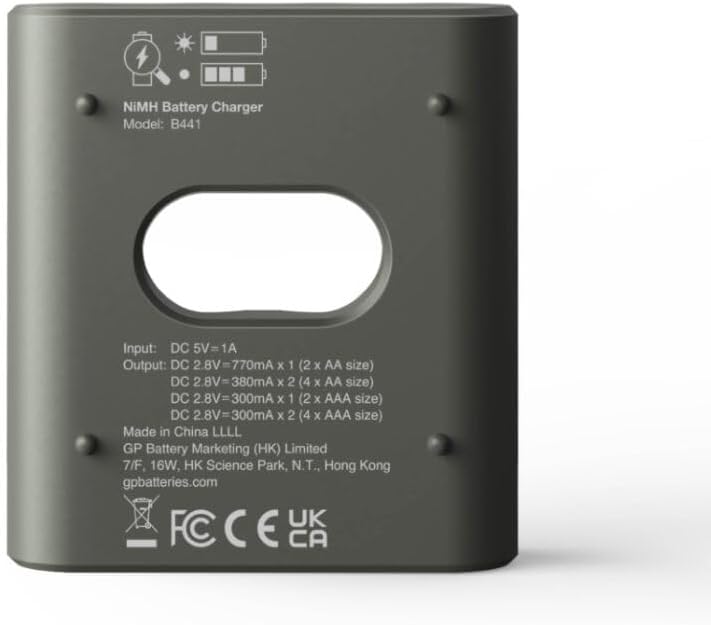
Figure 9.1: Bottom view of GP B441 Battery Charger displaying technical specifications and regulatory marks.
10. Warranty and Support
For warranty information and customer support, please refer to the documentation included with your purchase or visit the official GP website. Keep your purchase receipt as proof of purchase.
For further assistance, you may contact GP customer service through their official channels. Information regarding support can often be found on the product packaging or the manufacturer's website.
Website: gpbatteries.com
Ask a question about this manual
Ask about setup, troubleshooting, compatibility, parts, safety, or missing instructions. Manuals+ will review the question and use this page’s manual context to help answer it.