
Introduction
The LONGER LK5 Pro is a high-performance 3D printer designed for both beginners and experienced users. It features a large build volume of 300x300x400 mm, allowing for the creation of substantial models. Equipped with a 4.3-inch color touchscreen and an open-source 32-bit motherboard, it offers flexibility and precise control over your printing projects. This manual provides essential information for setup, operation, maintenance, and troubleshooting to ensure optimal performance and longevity of your printer.

Figure 1: The LONGER LK5 Pro 3D Printer, ready for operation.
Video 1: Overview of the LONGER LK5 Pro 3D Printer's features and capabilities.
1. Setup
The LONGER LK5 Pro 3D printer comes 90% pre-assembled, significantly simplifying the setup process. You can typically complete the assembly in approximately 10-15 minutes by following the detailed installation guide provided.
1.1 Unboxing and Component Check
Carefully remove all components from the packaging. Verify that all parts listed in the packing list are present and undamaged. The package includes the LONGER LK5 Pro 3D printer unit and necessary accessories.
1.2 Assembly Steps
- Mount the Threaded Rod: Securely attach the threaded rod by turning it into place.
- Pass Gantry Through X-axis Beam: Carefully slide the gantry through the X-axis beam.
- Install Support Bar: Attach the support bar to provide structural stability.
- Install Gantry on Base: Mount the assembled gantry onto the printer's base.
- Install Filament Holder: Secure the filament holder in its designated position.
- Mount Touch Screen: Attach the 4.3-inch touch screen to the left side of the base.
For a visual guide, refer to the assembly video available on the included USB drive or the manufacturer's website.

Figure 2: Quick and easy assembly guide for the LONGER LK5 Pro, highlighting the modular design and fast setup in approximately 15 minutes.
1.3 Initial Calibration (Z-axis)
The Z-axis calibration is performed manually by adjusting the four screw wheels located under the print bed. Ensure the print bed is level to achieve optimal print adhesion and quality.
2. Operating Instructions
2.1 Powering On and User Interface
Connect the printer to a power source and turn it on. The 4.3-inch color touchscreen provides an intuitive interface for controlling the printer. Navigate through menus using touch gestures.

Figure 3: The 4.3-inch color touchscreen offers high touch sensitivity, an intuitive interface, and knob-free control for easy operation.
2.2 Loading Filament
Place the filament spool onto the filament holder. Feed the filament through the extruder mechanism until it reaches the hotend. Use the touchscreen controls to preheat the hotend and extrude a small amount of filament to ensure it flows smoothly.
2.3 Starting a Print
Insert the USB drive or SD card containing your G-code file into the printer. Select the desired file from the touchscreen menu and initiate the print. The printer supports a print speed of up to 180 mm/s, significantly reducing print times.

Figure 4: High-speed printing at 180 mm/s with 0.1 mm precision, meeting diverse 3D printing requirements and ensuring detailed reproduction of even the smallest components.
2.4 Print Recovery Feature
The LK5 Pro includes an automatic print recovery feature. In the event of a power outage or filament depletion, the printer can resume printing from the last recorded position once power is restored or new filament is loaded. This protects your work results and prevents material waste.

Figure 5: The print resume function allows printing to continue from the last position after an unexpected power interruption.
2.5 Supported Materials
The printer is compatible with a variety of materials, including PLA, ABS, PETG, and wood filaments. Ensure proper temperature settings for each material type.

Figure 6: Wide compatibility with various materials like PLA, ABS, PETG, and Wood.
2.6 Open Source Firmware
The LK5 Pro features an open-source firmware, allowing advanced users to customize and modify the printer's software based on the source code. This enables community sharing of modifications and enhanced functionality.

Figure 7: Open-source firmware allows 3D printing enthusiasts to modify their printers based on source code and share modifications within the community.
2.7 Enhanced Stability and Precision
The printer incorporates reinforced diagonal rods, forming a stable triangular structure. This design significantly reduces vibrations during operation, contributing to improved print precision and overall quality of 3D models.

Figure 8: Absolutely stable printing with a double Z-axis support kit, reducing vibration errors and improving print quality.
2.8 Quiet Operation
Equipped with TMC2208 super silent drivers, the LK5 Pro operates quietly, providing a peaceful working environment.

Figure 9: TMC2208 Super Silent Driver ensures quiet operation.
2.9 Dual Fan Kit and Teflon Tube
The upgraded dual fan kit efficiently cools the print head and print bed, maintaining optimal temperature and preventing overheating. The high-temperature resistant Teflon tube reduces friction for optimal material flow and reliably prevents blockages.

Figure 10: The upgraded dual fan kit and Teflon tube ensure efficient cooling and smooth filament feeding.
3. Maintenance
Regular maintenance ensures the longevity and consistent performance of your LONGER LK5 Pro 3D printer.
3.1 Cleaning the Print Bed
After each print, allow the glass print bed to cool down. Gently remove printed models. Clean the print bed with isopropyl alcohol and a lint-free cloth to remove any residue, ensuring optimal adhesion for subsequent prints.
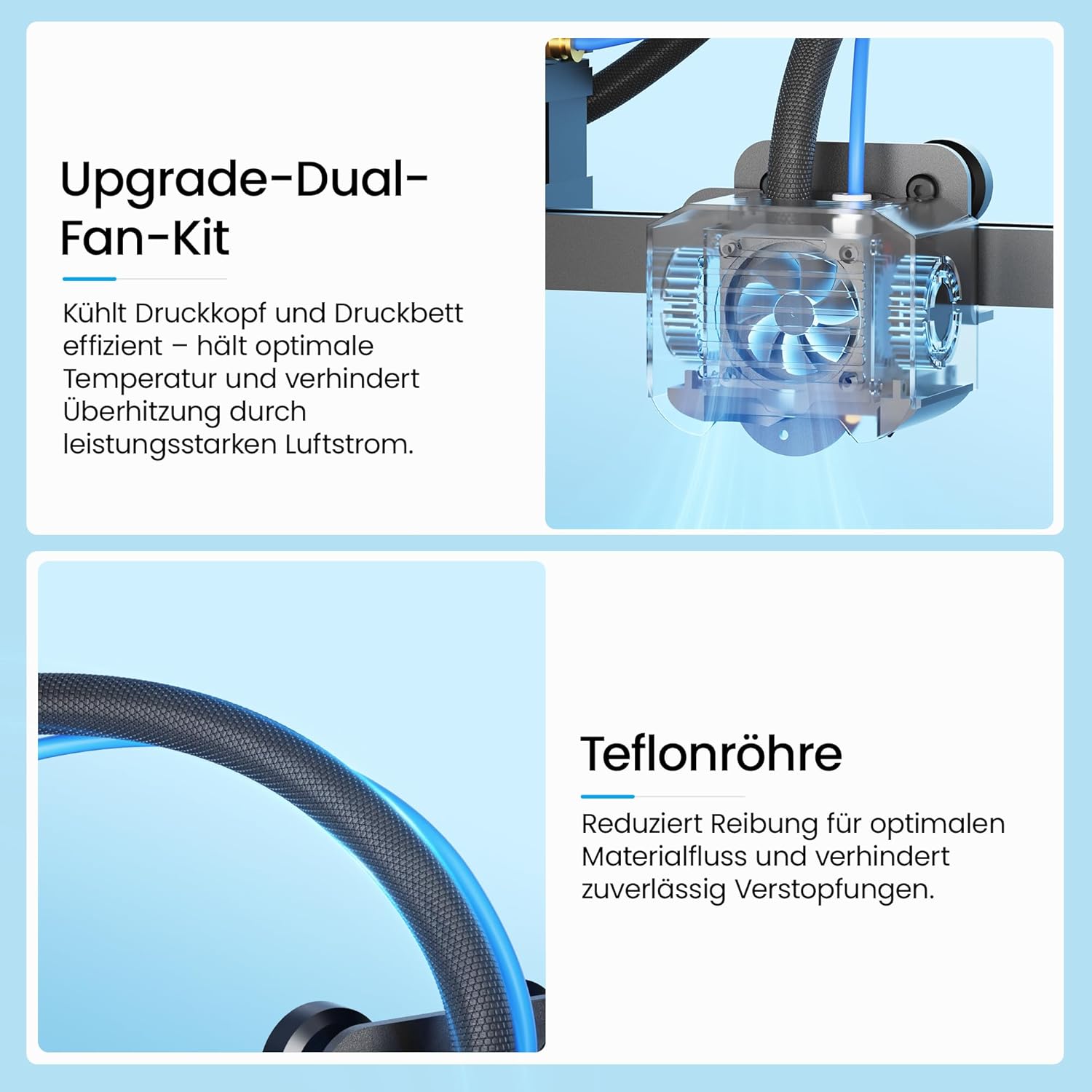
Figure 11: The glass print bed facilitates easy removal of printed models and ensures stability.
3.2 Nozzle Maintenance
Periodically check the nozzle for any clogs or wear. If a clog occurs, preheat the hotend and use a thin needle or cleaning filament to clear the obstruction. Replace the nozzle if it shows signs of significant wear or damage to maintain print precision.
3.3 Lubrication
Apply a small amount of lubricant to the Z-axis lead screws and smooth rods every few months or as needed to ensure smooth movement and reduce friction.
3.4 Firmware Updates
Check the official LONGER website for any available firmware updates. Keeping your firmware up-to-date can improve performance, add new features, and resolve potential issues.
4. Troubleshooting
This section addresses common issues you might encounter during the operation of your 3D printer.
4.1 Print Not Sticking to Bed
- Solution: Ensure the print bed is level. Clean the print bed thoroughly with isopropyl alcohol. Adjust the initial layer height and speed settings in your slicer software. Increase bed temperature if necessary.
4.2 Filament Jamming
- Solution: Check the hotend temperature; it might be too low for the filament. Clear any clogs in the nozzle. Ensure the filament path is free of obstructions. For flexible filaments like TPU, adjust the extruder tension if possible, as suggested by some users.
4.3 Poor Print Quality (Layer Shifts, Stringing)
- Solution:
- Layer Shifts: Check belt tension and ensure all axes move freely. Reduce print speed.
- Stringing: Adjust retraction settings (distance and speed) in your slicer. Ensure filament is dry.
- General Quality: Verify nozzle temperature, print speed, and cooling settings.
4.4 Printer Not Heating (Bed/Nozzle)
- Solution: Check all cable connections to the hotend and heated bed. If the issue persists, it may indicate a faulty thermistor or heating element. Contact customer support for further assistance.
5. Specifications
| Feature | Detail |
|---|---|
| Brand | Longer |
| Model | LK5 Pro |
| Product Dimensions | 62 x 59.5 x 19.5 cm |
| Item Weight | 11 Kilograms |
| Print Volume | 300 x 300 x 400 mm |
| Print Precision | 0.1 mm |
| Max Print Speed | 180 mm/s |
| Touch Screen | 4.3-inch Color Touchscreen |
| Motherboard | 32-bit, Open Source |
| Drivers | TMC2208 Super Silent Drivers |
| Compatible Peripherals | PC |
| Connectivity | USB |
| Printing Technology | Thermal |
| Material | Aluminum |
| Included Components | 1 LONGER LK5 Pro 3D Printer |
6. Warranty and Support
LONGER provides professional customer support and a 1-year warranty for the LK5 Pro 3D printer.
6.1 Warranty Information
The product comes with a 1-year warranty from the date of purchase, covering manufacturing defects. Please retain your proof of purchase for warranty claims.
6.2 Customer Support
If you have any questions, encounter issues, or require technical assistance, please do not hesitate to contact our professional engineering team. We are committed to providing a professional and satisfactory response.
For support, visit the official Longer Store on Amazon or refer to the contact information provided in your product packaging.


