
1. Product Overview
This manual provides instructions for the HCDZ Replacement Remote Control, designed for use with specific HEAO Electric Fireplace models including 2401-BE, GFI-24, and 01-99. This remote is a direct replacement and typically requires no programming for immediate operation.

Figure 1: Front view of the HCDZ Replacement Remote Control.
The remote offers comprehensive control over your electric fireplace's functions, including power, temperature adjustments, timer settings, and flame effects, replicating the functionality of your original remote.
2. Setup and Battery Installation
The remote requires two AAA batteries for operation. Proper installation is crucial for functionality.
- Locate the battery compartment on the back of the remote control.
- Slide the battery compartment cover downwards or outwards to open it.
- Insert two new AAA batteries, ensuring the correct positive (+) and negative (-) polarity as indicated inside the compartment. Incorrect polarity is a common cause of non-responsiveness.
- Slide the battery compartment cover back into place until it clicks securely.

Figure 2: Remote control with battery cover removed, showing battery slots.
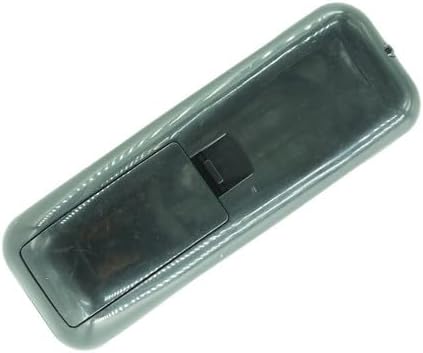
Figure 3: Remote control with battery cover installed.
For optimal performance, use high-quality alkaline batteries. This remote is designed for plug-and-play operation and typically requires no code setup or programming.
3. Operating Instructions
To effectively operate your HEAO Electric Fireplace with this replacement remote, follow these guidelines:
- Power Your Fireplace: Ensure your electric fireplace is properly plugged into a functional power outlet. The fireplace unit must have power for the remote to communicate with it.
- Aim Directly: Point the remote control directly at the infrared (IR) receiver on your fireplace unit. The IR receiver is usually located behind the front glass or mesh panel of the fireplace. Avoid aiming at walls or from extreme angles.
- Clear Line of Sight: Ensure there are no physical obstructions (e.g., furniture, decorative items) between the remote and the fireplace's IR receiver.
- Be Patient: Some fireplace models may have a slight delay in responding to remote commands. Press the desired button firmly and allow 2-3 seconds for the command to register with the fireplace.
- Functionality: Use the dedicated buttons on the remote to control various functions such as power on/off, increase/decrease temperature, set timers, and adjust flame effects.
4. Maintenance
To ensure the longevity and proper functioning of your remote control:
- Battery Replacement: Replace batteries when the remote's range decreases or it becomes unresponsive. Always replace both batteries simultaneously with new ones.
- Cleaning: Wipe the remote with a soft, dry cloth. Avoid using liquid cleaners or abrasive materials.
- Storage: Store the remote in a dry place, away from extreme temperatures and direct sunlight. If storing for extended periods, remove the batteries to prevent leakage.
5. Troubleshooting
If your remote control is not functioning as expected, please follow these troubleshooting steps:
- Step 1: Verify Fireplace Power Source
Confirm that your HEAO electric fireplace is securely plugged into a working power outlet. Check your home's circuit breaker if necessary. The fireplace must be powered on for the remote to operate it.
- Step 2: Recheck Batteries
Remove and then reinsert the AAA batteries, carefully verifying the positive (+) and negative (-) polarity. If the issue persists, try replacing them with a brand-new set of high-quality alkaline batteries.
- Step 3: Test the Remote Signal (Smartphone Camera Test)
This test helps determine if the remote is emitting an infrared signal. Open the camera application on your smartphone. Point the tip of the remote control directly at your phone's camera lens. Press and hold any button on the remote (e.g., the Power button). If the remote is working correctly, you should see a flickering white or purple light on your phone's screen. If no light is visible, the issue is likely with the batteries or the remote itself.
- Step 4: Check Fireplace Manual
Consult the original user manual for your specific HEAO electric fireplace model. Some fireplace models may require a specific reset procedure or have unique pairing instructions when a new remote is introduced.
If you have followed all these steps and continue to experience issues, please refer to the "Warranty and Support" section for further assistance.
6. Specifications
| Brand | HCDZ |
| Model Number | B0CLGMR9ML |
| Compatible Devices | HEAO Electric Fireplace (Models 2401-BE, GFI-24, 01-99) |
| Connectivity Technology | Infrared (IR) |
| Special Feature | No Programming Required |
| Color | Black |
| Controller Type | Button Control |
| Maximum Range | 8 Meters |
| Batteries Required | 2 x AAA (Alkaline recommended) |
7. Warranty and Support
Warranty: This product comes with a 90-day warranty from the date of purchase. This warranty covers manufacturing defects under normal use.
Customer Support: If you encounter any issues or have questions after following the troubleshooting steps, please contact HCDZ customer support directly through the Amazon messaging system. Our dedicated support team is available to provide personalized assistance and ensure your satisfaction.
We are committed to resolving any problems quickly and efficiently.