
Tamron AFA068S700
Tamron 17-50mm F/4 Di III VXD Lens Instruction Manual
Model: AFA068S700
1. Introduction
This manual provides detailed instructions for the proper use and care of your Tamron 17-50mm F/4 Di III VXD lens for Sony E-Mount Full Frame Mirrorless Cameras. Designed for versatility, this lens covers a wide-angle to standard focal length range with a constant F4 aperture, making it suitable for both still photography and video recording. Please read this manual thoroughly before using the lens to ensure optimal performance and longevity.
2. Product Overview
2.1 Key Features
- World's first lens covering ultra wide-angle through standard range (17-50mm) with constant F4 aperture.
- Excellent close-range shooting performance with a Minimum Object Distance (MOD) of 0.19m (7.5in) at the wide end and 0.3m (11.8in) at the tele end.
- Optical construction features 15 elements in 13 groups for superior image quality.
- Compact and lightweight design, weighing just 460g (16.2oz) and measuring 114.4mm (4.5in) long, ensuring good balance on Sony mirrorless camera bodies.
- Equipped with Moisture-Resistant Construction and Fluorine Coating on front and rear lens surfaces for enhanced durability in various environments.
- Incorporates TAMRON's VXD (Voice-coil eXtreme-torque Drive) linear motor for quiet, agile, high-speed, and high-precision autofocus.
- Internal zoom mechanism maintains physical length during zooming, ideal for gimbal use and video recording.
2.2 What's in the Box
- Tamron 17-50mm F/4 Di III VXD Lens
- Front Lens Cap
- Rear Lens Cap
- Lens Hood
2.3 Lens Components and Views

Figure 2.3.1: Front view of the Tamron 17-50mm F/4 Di III VXD lens, showing the zoom ring and focus ring.

Figure 2.3.2: Direct front view of the lens, highlighting the filter thread and front element.

Figure 2.3.3: Side view of the lens, showing the barrel and markings.

Figure 2.3.4: Rear view of the lens, displaying the lens mount and electronic contacts.
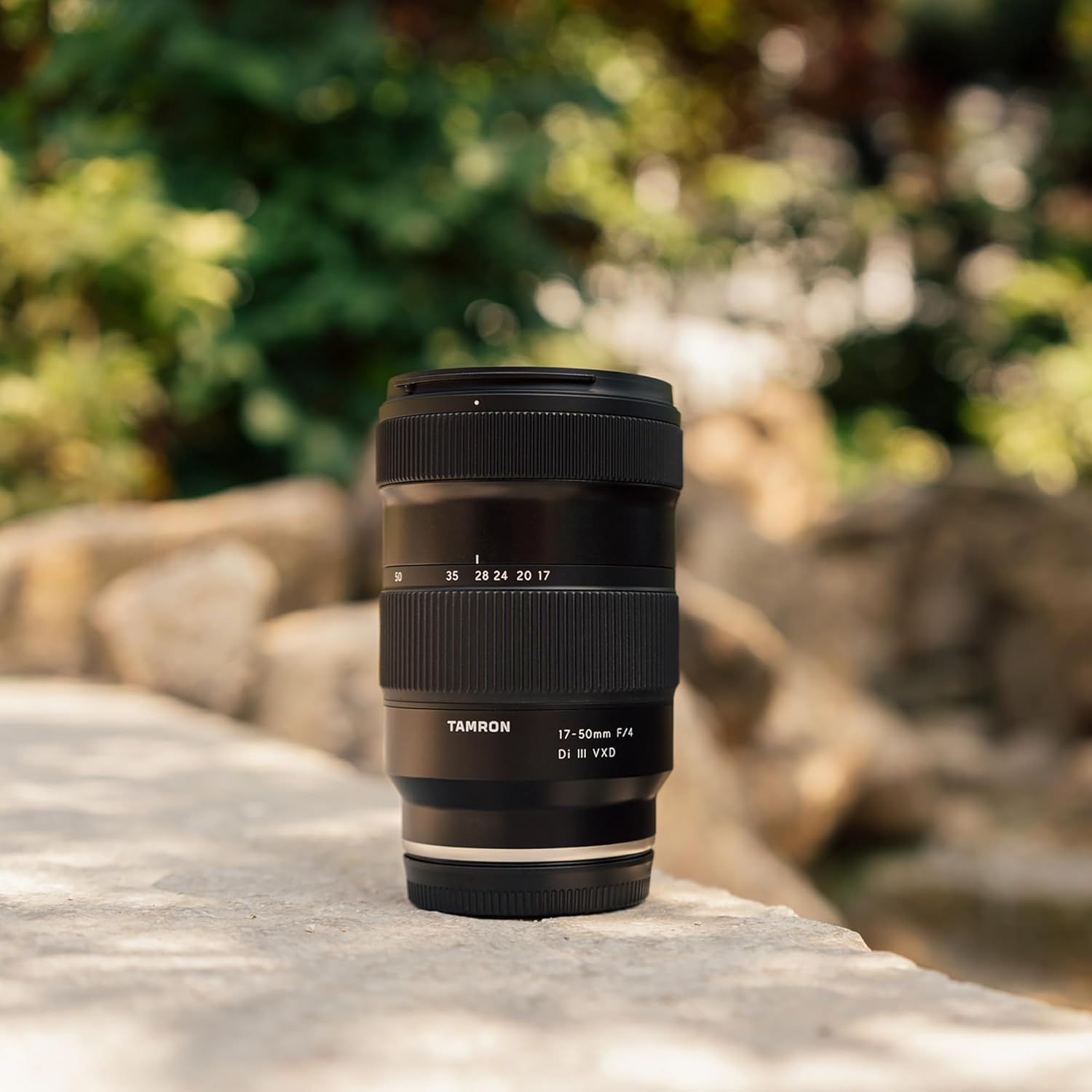
Figure 2.3.5: The Tamron 17-50mm lens positioned outdoors, demonstrating its compact size and portability.
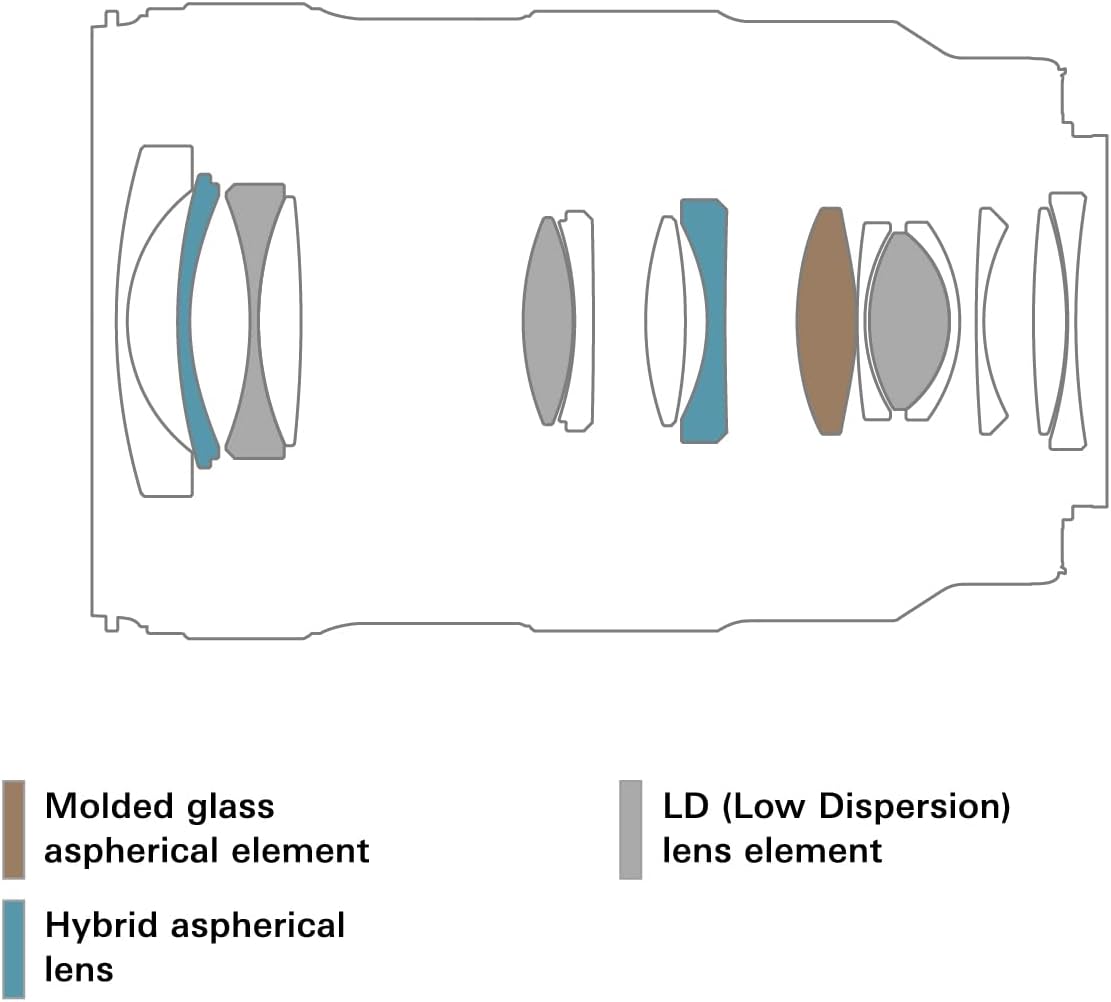
Figure 2.3.6: Diagram illustrating the internal optical construction of the lens, including molded glass aspherical, hybrid aspherical, and low dispersion (LD) lens elements.
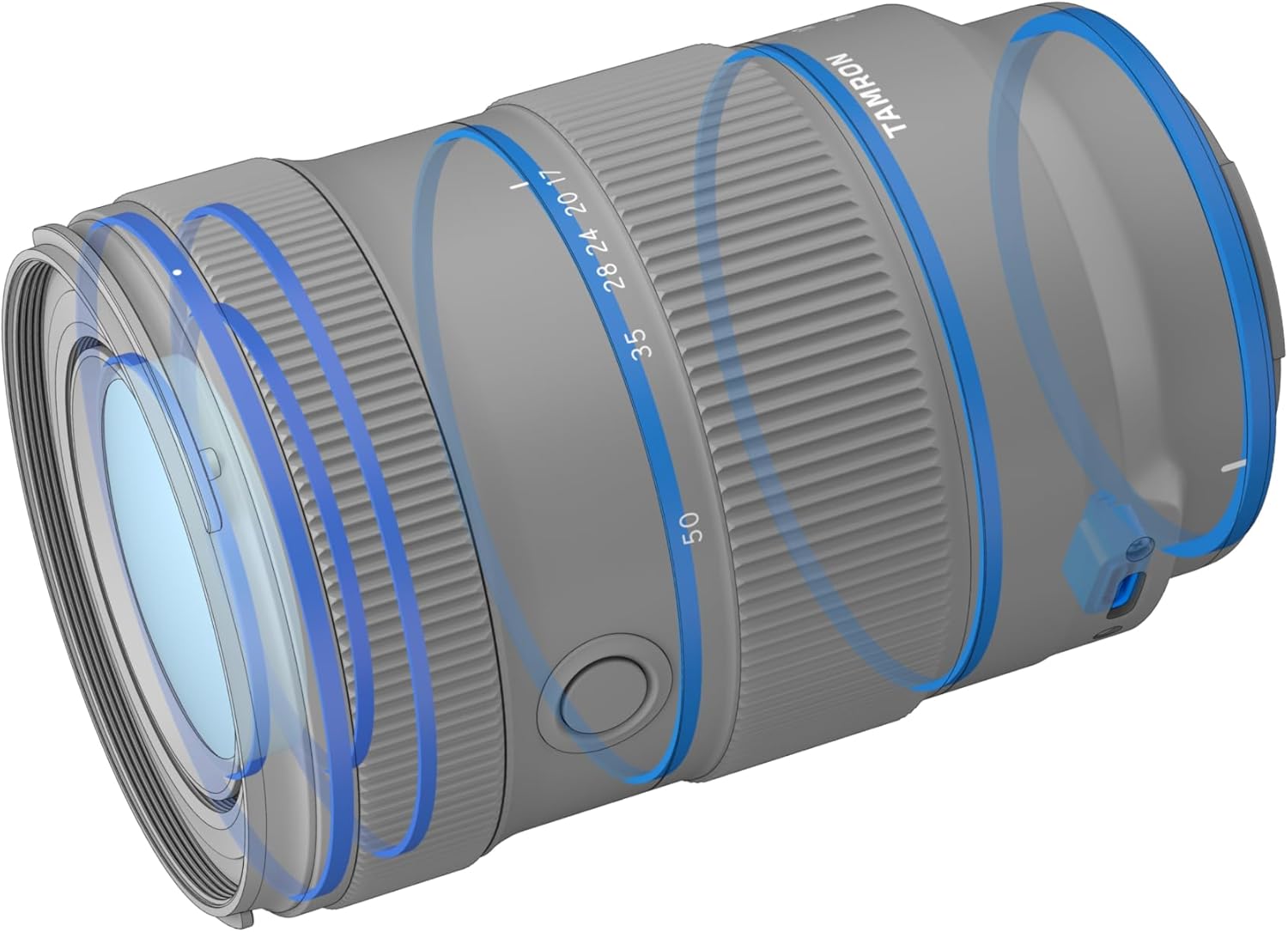
Figure 2.3.7: An illustrative diagram highlighting the moisture-resistant seals within the lens barrel, indicating enhanced durability against environmental elements.

Figure 2.3.8: The lens connected to a computer, demonstrating its compatibility with Tamron Lens Utility software for customization and firmware updates.
2.4 Sample Images

Figure 2.4.1: Sample image demonstrating the lens's capability for capturing detailed cityscape scenes.

Figure 2.4.2: Sample image showcasing the lens's performance in natural landscapes, capturing a waterfall with vibrant colors.
2.5 Performance Charts
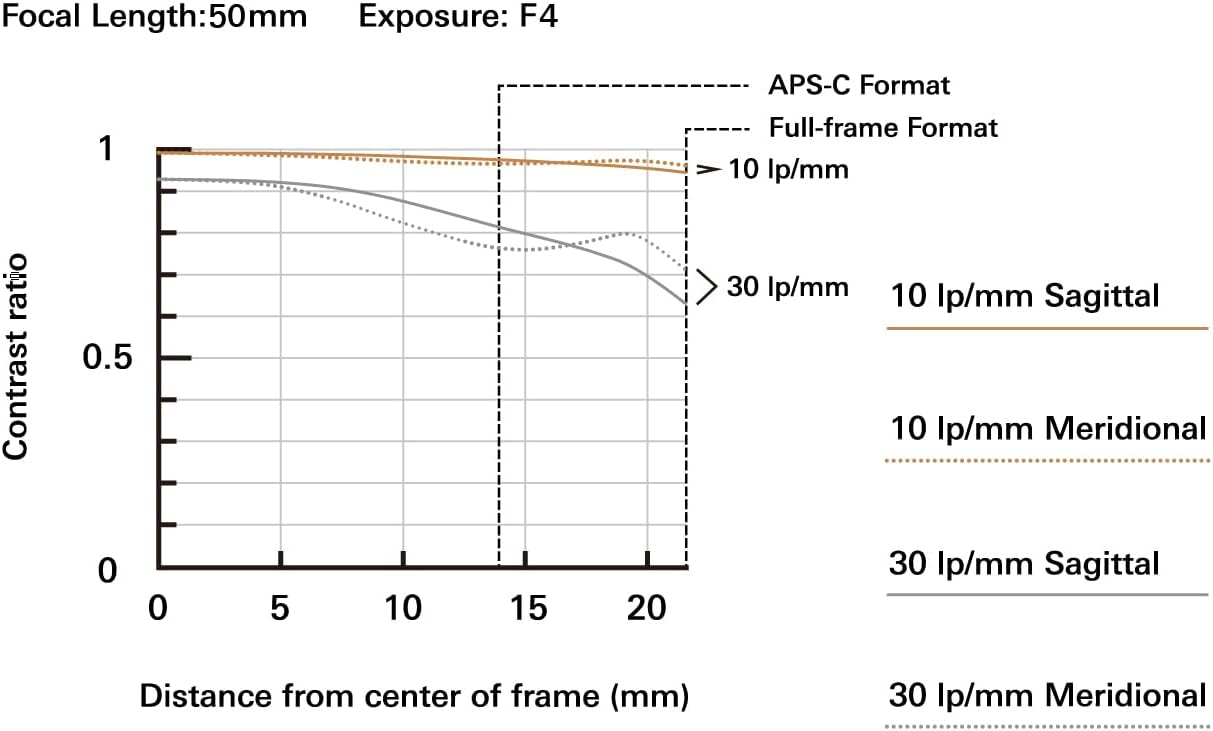
Figure 2.5.1: Modulation Transfer Function (MTF) chart for the lens at 50mm focal length and F4 aperture, indicating contrast and resolution performance across the frame for both APS-C and Full-frame formats.
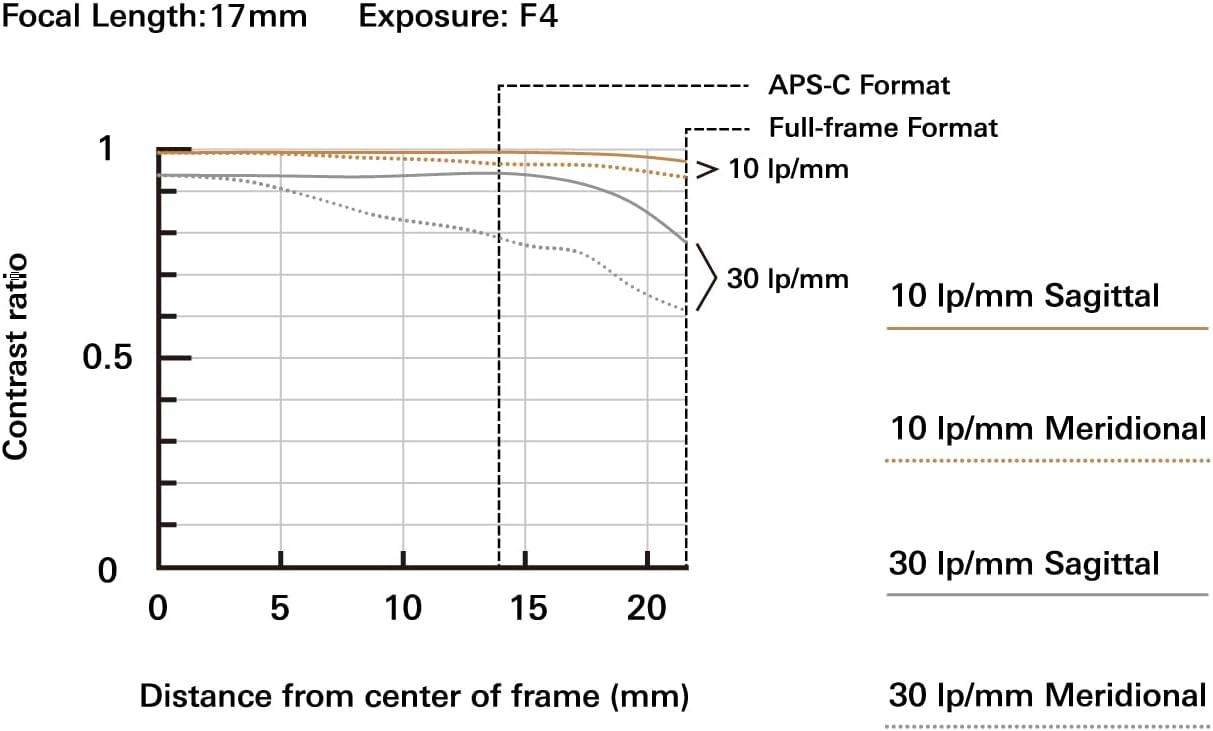
Figure 2.5.2: Modulation Transfer Function (MTF) chart for the lens at 17mm focal length and F4 aperture, showing contrast and resolution performance across the frame for both APS-C and Full-frame formats.
2.6 Official Product Videos
No official product videos from the seller were found for this product that meet the embedding criteria.
3. Setup
3.1 Attaching the Lens
- Ensure both the camera and lens are powered off.
- Remove the rear lens cap from the lens and the body cap from the camera.
- Align the mounting index (white dot) on the lens barrel with the corresponding mounting index on the camera body.
- Insert the lens into the camera mount and rotate it clockwise until it clicks into place. Do not force the lens.
3.2 Detaching the Lens
- Ensure the camera is powered off.
- While pressing the lens release button on the camera body, rotate the lens counter-clockwise until it stops.
- Carefully remove the lens from the camera body.
- Attach the front and rear lens caps to protect the lens elements.
4. Operating the Lens
4.1 Zooming
To adjust the focal length, rotate the zoom ring on the lens barrel. The lens features an internal zoom mechanism, meaning its physical length does not change when zooming, which is beneficial for balancing on gimbals and maintaining a consistent center of gravity.
4.2 Focusing
This lens utilizes Tamron's VXD (Voice-coil eXtreme-torque Drive) linear motor for fast, precise, and quiet autofocus. Ensure your camera's focus mode is set to autofocus (AF) for automatic operation. For manual focusing, switch your camera to manual focus (MF) mode and rotate the focus ring on the lens.
4.3 Aperture Control
The lens maintains a constant maximum aperture of F4 across its entire zoom range. Aperture control is managed through your camera body's settings. Refer to your camera's instruction manual for details on adjusting aperture.
4.4 Close-Range Shooting
The lens offers excellent close-range shooting capabilities. The Minimum Object Distance (MOD) is 0.19m (7.5 inches) at the 17mm wide end and 0.3m (11.8 inches) at the 50mm tele end, allowing for creative close-up photography.
5. Maintenance and Care
- Cleaning the Lens: Use a soft, clean microfiber cloth to gently wipe dust and smudges from the lens elements. For stubborn marks, use a lens cleaning solution specifically designed for optical surfaces. Avoid using abrasive materials or harsh chemicals.
- Moisture Resistance: The lens features moisture-resistant construction. While this provides enhanced protection against splashes and light rain, it is not waterproof. Avoid submerging the lens in water or exposing it to heavy rain.
- Fluorine Coating: The front and rear lens surfaces are treated with a fluorine coating, which repels water and oil, making them easier to clean and less prone to smudges.
- Storage: When not in use, store the lens with both front and rear caps attached in a dry, cool place away from direct sunlight and extreme temperatures. Consider using a desiccant to prevent mold growth in humid environments.
- Handling: Always handle the lens by its barrel, not by the front element or lens hood. Avoid dropping or subjecting the lens to strong impacts.
6. Troubleshooting
| Problem | Possible Cause / Solution |
|---|---|
| Lens not recognized by camera. | Ensure the lens is securely attached to the camera body. Clean the electronic contacts on both the lens and camera with a clean, dry cloth. Restart the camera. |
| Autofocus is slow or inaccurate. | Check lighting conditions; low light can affect AF performance. Ensure camera's AF mode is appropriate for the scene. Clean lens elements. Update lens firmware if available via Tamron Lens Utility. |
| Images are blurry. | Check focus settings (AF/MF). Ensure shutter speed is fast enough to prevent camera shake. Verify lens elements are clean. Check if lens is securely mounted. |
| Zoom ring is stiff. | This lens features an internal zoom, which should operate smoothly. If stiffness occurs, ensure no foreign objects are obstructing the mechanism. Avoid forcing the zoom ring. |
If you encounter issues not listed here or if solutions do not resolve the problem, please contact Tamron customer support.
7. Specifications
| Feature | Detail |
|---|---|
| Model Number | AFA068S700 |
| Focal Length | 17-50mm |
| Maximum Aperture | F/4 |
| Minimum Object Distance (MOD) | 0.19m (7.5 inches) at 17mm, 0.3m (11.8 inches) at 50mm |
| Optical Construction | 15 elements in 13 groups |
| Filter Size | 67mm |
| Dimensions (Diameter x Length) | Approx. 2.94 x 4.5 inches (74.7 x 114.4 mm) |
| Weight | Approx. 1.01 pounds (460g) |
| Compatible Mountings | Sony FE (E-Mount Full Frame) |
| Autofocus System | VXD (Voice-coil eXtreme-torque Drive) Linear Motor |
| Features | Moisture-Resistant Construction, Fluorine Coating |
8. Warranty and Support
For warranty information, product registration, and technical support, please refer to the official Tamron website or contact Tamron customer service directly. Keep your purchase receipt as proof of purchase for warranty claims.
You can visit the official Tamron Store on Amazon for more information and products: Tamron Store
Related documentsAFA068S700


Ask a question about this manual
Ask about setup, troubleshooting, compatibility, parts, safety, or missing instructions. Manuals+ will review the question and use this page’s manual context to help answer it.