
1. Introduction
This manual provides essential instructions for the installation, operation, and maintenance of your White Rodgers 1F96U-42WF Sensi Touch 2 Smart Thermostat. This smart thermostat offers advanced control over your home's heating and cooling system, featuring a touchscreen interface and Wi-Fi connectivity for remote management via the Sensi app, as well as compatibility with Amazon Alexa and Google Assistant.
2. Safety Information
Please read and understand all instructions before installing or operating this thermostat. Failure to follow these instructions could result in property damage, injury, or death. Always turn off power to the heating and cooling system at the circuit breaker or fuse box before beginning installation to prevent electrical shock. Installation should be performed by a qualified technician if you are unsure about any steps.
- Ensure all wiring complies with local electrical codes and ordinances.
- Do not use this thermostat with voltages exceeding 30V AC.
- Keep the thermostat away from water and excessive humidity.
3. Package Contents
Verify that all items are present in your package:
- White Rodgers 1F96U-42WF Sensi Touch 2 Smart Thermostat
- Mounting bracket
- Installation Guide (this document)
4. Setup and Installation
The Sensi Touch 2 Smart Thermostat is designed for wall mounting and requires a hardwired 24 Volts power source. A common wire (C-wire) is typically required for continuous power and Wi-Fi functionality. Refer to the detailed wiring diagrams in the Sensi app or the full installation guide for specific instructions tailored to your HVAC system.
4.1. Wiring Terminals
The thermostat supports universal system applications with the following terminal designations:
- RC: Power for cooling (24V AC)
- RH: Power for heating (24V AC)
- C: Common wire (required for smart features)
- W/E: Heat/Emergency Heat
- W2: Second Stage Heat
- Y: First Stage Cooling
- Y2/*: Second Stage Cooling/Auxiliary
- O/B: Reversing Valve (Heat Pump)
- G: Fan
- ACC+, ACC-: Accessory terminals
Ensure wires are securely connected to the correct terminals. Incorrect wiring can damage the thermostat or your HVAC system.
4.2. Physical Installation
- Power Off: Turn off power to your HVAC system at the circuit breaker.
- Remove Old Thermostat: Carefully remove your old thermostat from the wall. Take a picture of the wiring for reference.
- Mounting Bracket: Install the Sensi mounting bracket to the wall using the provided hardware.
- Wire Connection: Connect the wires from your wall to the corresponding terminals on the Sensi thermostat.
- Attach Thermostat: Secure the Sensi thermostat onto the mounting bracket.
- Power On: Restore power to your HVAC system.
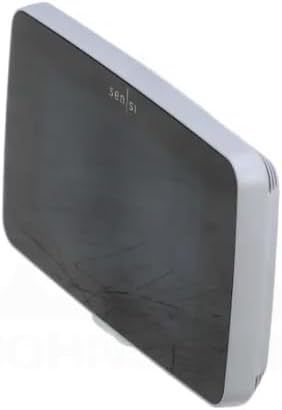
Figure 1: Front view of the White Rodgers Sensi Touch 2 Smart Thermostat, showcasing its modern design and LCD touchscreen.
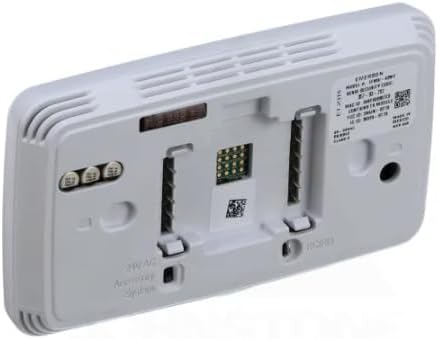
Figure 2: Rear view of the White Rodgers Sensi Touch 2 Smart Thermostat, illustrating the wiring terminals for HVAC system connection.
4.3. App Setup and Wi-Fi Connection
Download the Sensi app from your mobile device's app store. Follow the in-app instructions to create an account, connect your thermostat to your home Wi-Fi network, and configure your system settings. This step is crucial for enabling smart features, remote control, and integration with voice assistants like Amazon Alexa and Google Assistant.
5. Operating Instructions
The Sensi Touch 2 Smart Thermostat can be operated directly via its LCD touchscreen or remotely through the Sensi mobile application.
5.1. Touchscreen Operation
- Temperature Adjustment: Tap the up or down arrows on the screen to change the set temperature.
- System Mode: Select between Heat, Cool, Auto, or Off modes. The "Auto Changeover" feature allows the thermostat to automatically switch between heating and cooling to maintain your desired temperature range.
- Fan Mode: Choose between Auto (fan runs only when heating/cooling) or On (fan runs continuously).
- Backlight: The LCD touchscreen features a backlight for easy viewing in various lighting conditions.
5.2. Sensi App and Smart Features
The Sensi app provides comprehensive control and scheduling capabilities:
- Remote Control: Adjust settings from anywhere using your smartphone or tablet.
- Scheduling: Create custom heating and cooling schedules to optimize comfort and energy savings.
- Usage Reports: Monitor your HVAC system's run time and energy consumption.
- Geofencing: Automatically adjust temperature based on your proximity to home.
- Voice Control: Integrate with Amazon Alexa or Google Assistant for hands-free temperature adjustments.
6. Maintenance
The Sensi Touch 2 Smart Thermostat requires minimal maintenance to ensure optimal performance.
- Cleaning: Gently wipe the touchscreen and exterior with a soft, damp cloth. Do not use abrasive cleaners or solvents.
- Air Filter: Regularly check and replace your HVAC system's air filter as recommended by the filter manufacturer or your HVAC technician. A dirty filter can restrict airflow and reduce system efficiency.
- Software Updates: Ensure your Sensi app is up-to-date to receive the latest features and performance improvements for your thermostat.
7. Troubleshooting
If you encounter issues with your Sensi Touch 2 Smart Thermostat, refer to the following common troubleshooting steps:
- No Power/Blank Screen:
- Check the circuit breaker for your HVAC system and ensure it is ON.
- Verify that the C-wire is properly connected at both the thermostat and the HVAC system control board.
- Wi-Fi Disconnection:
- Ensure your home Wi-Fi network is operational.
- Restart your Wi-Fi router.
- Re-establish the Wi-Fi connection through the Sensi app's settings.
- Incorrect Temperature Readings:
- Ensure the thermostat is not exposed to direct sunlight, drafts, or heat sources (e.g., lamps, appliances) that could affect its sensor.
- HVAC System Not Responding:
- Check that the system mode (Heat, Cool, Auto) is correctly selected on the thermostat or in the app.
- Verify all wiring connections are secure.
- If the issue persists, contact a qualified HVAC technician.
For more detailed troubleshooting, visit the White-Rodgers support website or consult the Sensi app's help section.
8. Specifications
| Feature | Detail |
|---|---|
| Brand | White-Rodgers |
| Model Name | Sensi White Thermostat |
| Model Number | 1F96U-42WF |
| Product Dimensions (D x W x H) | 0.77"D x 3.25"W x 0.77"H |
| Controller Type | Touchscreen, Amazon Alexa, Google Assistant |
| Special Feature | Auto Changeover |
| Temperature Control Type | Smart/Remote |
| Connectivity Technology | Wi-Fi |
| Power Source | Hardwire (24 Volts) |
| Display Type | LCD touchscreen |
| Control Method | Touch |
| Mounting Type | Wall Mount |
| Backlight | Yes |
| Color | White |
| System Application | Universal |
| Stages Heat/Cool | 4/2 |
| Terminal Designations | RC, RH, C W/E, W2, Y, Y2/*, O/B, G, ACC+, ACC- |
| UPC | 786710566738 |
9. Warranty and Support
For warranty information, technical support, or to register your product, please visit the official White-Rodgers website or contact their customer service. Keep your purchase receipt as proof of purchase.
Online Support: sensi.emerson.com/en-us/support (Example link, actual link might vary)
Manufacturer: White Rodgers


