
DEALGADGETS GLS-C018
DEALGADGETS Under Cabinet Lights User Manual
Model: GLS-C018
Product Overview
The DEALGADGETS Under Cabinet Lights are motion-sensing, USB-C rechargeable LED lights designed to provide versatile illumination for various indoor spaces. These lights feature adjustable color temperatures and brightness levels, offering a customizable lighting experience.

Image: Three under cabinet lights, illustrating their design and light output.
Key Features:
- Side Illumination: Utilizes a side-emitting process for brighter, softer, and glare-free light.
- Adjustable Brightness: Supports 3-level brightness adjustment and 10%-100% stepless dimming.
- Multiple Color Temperatures: Offers 3 color temperatures (Warm White, Natural White, Cold White) for different ambiance needs.
- Motion Sensor Mode: Automatically detects human motion within 10ft/100° and turns off after 20 seconds of no movement in dark environments.
- USB-C Rechargeable: Built-in 1000mAh high-capacity battery, easily charged via USB-C.
- Easy Installation: Features built-in magnets for direct attachment to iron surfaces or use with included iron sheets and adhesive tape for non-iron surfaces.
- Durable Construction: Made from aluminum alloy for sturdiness.
What's in the Box
Please check the package contents to ensure all items are present and in good condition.

Image: A visual representation of the items included in the package.
- 3 x Under Cabinet Lights
- 3 x USB-C Charging Cables
- 6 x Iron Sheets with Adhesive Tape
- 1 x User Instructions Manual
Setup and Installation
The under cabinet lights are designed for easy installation with built-in magnets. Follow these steps for optimal placement.
Installation Steps:
- Direct Magnetic Attachment: If installing on an iron surface (e.g., a metal cabinet), simply place the light directly onto the surface. The built-in magnets will hold it in place.
- Adhesive Installation (for non-iron surfaces):
- Step 1: Clean the desired installation surface thoroughly to ensure it is dry and free of dust or grease.
- Step 2: Peel off the protective film from one side of the adhesive tape on an iron sheet.
- Step 3: Firmly press the iron sheet onto the cleaned surface.
- Step 4: Once the iron sheet is securely attached, the light can be magnetically affixed to the iron sheet.
- Removal for Charging: When charging is needed, simply detach the light from the magnetic surface (either the iron cabinet or the installed iron sheet).

Image: Step-by-step guide for installing the lights using adhesive iron sheets.

Image: Visual examples of magnetic and adhesive installation methods.
Operating Instructions
Understand how to use the various functions of your under cabinet lights.
Charging the Lights:
- Connect the provided USB-C charging cable to the light's charging port and the other end to a USB power source (computer, power bank, or USB outlet).
- A red light indicator signifies that the light is currently charging.
- A green light indicator signifies that the light is fully charged.
- Full charge typically takes 3-4 hours.
- Battery life: 5-80 hours on Always-on Mode (depending on brightness), or 7-25 days on Motion Sensor Mode (depending on frequency of use).
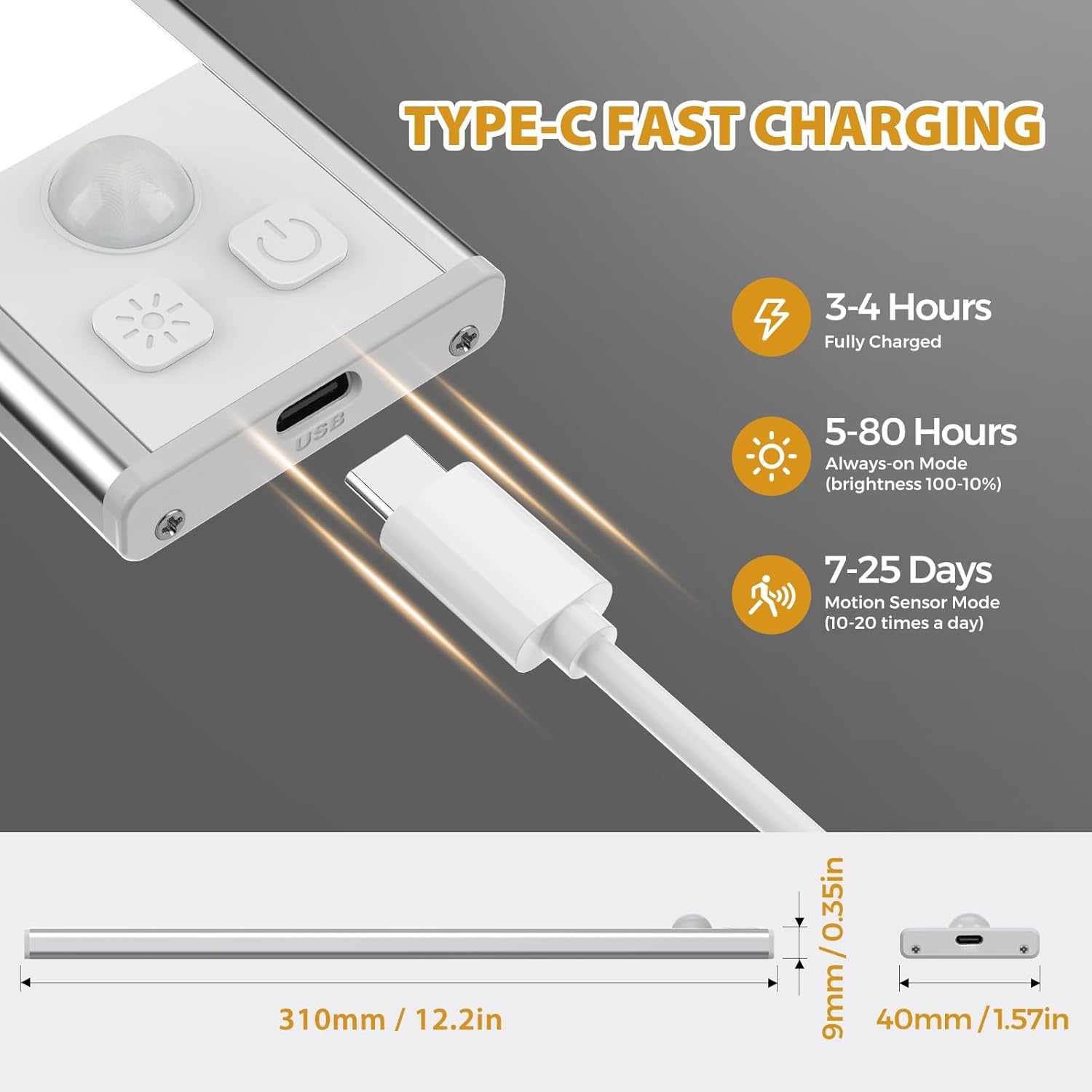
Image: The light connected to a USB-C cable, illustrating charging status indicators.

Image: Detailed information on charging duration and battery performance.
Operating Modes and Controls:
The lights feature a simple button design for mode selection and brightness/color adjustment.

Image: Diagram of the control buttons and their respective functions.
- Power Button (On/Off/Mode Selection):
- Click Once: Turns the light ON (Always-on Mode).
- Click Twice: Activates Motion Sensor Mode.
- Click Three Times: Turns the light OFF.
- Light Mode Button (Color Temperature/Brightness):
- Short Press: Changes the color temperature (cycles through Warm White, Natural White, Cold White).
- Long Press: Adjusts the brightness level (10% to 100% stepless dimming). Release when desired brightness is reached.

Image: Visual representation of adjustable color temperatures and brightness levels.
Motion Sensor Functionality:
- In Motion Sensor Mode, the light will automatically turn on when human motion is detected within a 10ft (3m) range and a 100° detection angle.
- The light will automatically turn off after approximately 20 seconds of no detected movement in dark environments.
- The motion sensor is most effective in dim light or darkness.

Image: Depiction of the motion sensor's detection capabilities.
Maintenance
To ensure the longevity and optimal performance of your under cabinet lights, follow these simple maintenance guidelines:
- Cleaning: Wipe the surface of the lights with a soft, dry cloth. Avoid using abrasive cleaners, solvents, or harsh chemicals, as these can damage the finish or electronic components.
- Charging: Recharge the lights regularly as needed. Avoid completely draining the battery frequently, as this can reduce overall battery lifespan.
- Storage: If storing the lights for an extended period, charge them to about 50% capacity and store them in a cool, dry place away from direct sunlight and extreme temperatures. Recharge every few months to prevent deep discharge.
- Water Exposure: These lights are designed for indoor use and are not water-resistant. Avoid exposing them to water or high humidity.
Troubleshooting
If you encounter any issues with your under cabinet lights, refer to the following common problems and solutions:
| Problem | Possible Cause | Solution |
|---|---|---|
| Light does not turn on. | Battery is depleted. Incorrect mode selected. | Charge the light fully. Press the power button to cycle through modes (Always-on, Motion Sensor, Off). |
| Motion sensor not working. | Light is not in Motion Sensor Mode. Environment is too bright. Obstruction blocking sensor. | Ensure the light is in Motion Sensor Mode (press power button twice). The sensor works best in dim or dark conditions. Clear any objects blocking the sensor. |
| Light turns off too quickly or stays on too long. | Continuous motion detected (stays on). No motion detected for 20 seconds (turns off). | This is normal behavior for the motion sensor mode. Ensure the light is placed where motion is expected. |
| Battery life is shorter than expected. | Frequent activation in motion sensor mode. High brightness setting in Always-on mode. Battery degradation over time. | Reduce frequency of activation if possible. Lower brightness setting. Ensure full charge cycles. If issues persist, contact support. |
| Light is not sticking to surface. | Surface is not iron or not clean. Adhesive tape not applied correctly. | Ensure surface is clean and dry. Use the included iron sheets with adhesive tape for non-iron surfaces. Apply firm pressure when attaching adhesive. |
If the problem persists after trying these solutions, please contact customer support.
Specifications
| Feature | Detail |
|---|---|
| Model Name | under cabinet light |
| Model Number | GLS-C018 |
| Brand | DEALGADGETS |
| Dimensions | 1.49 x 0.5 x 12 inches (310mm x 40mm x 9mm) |
| Item Weight | 1.17 pounds (0.53 Kilograms) |
| Material | Aluminum |
| Color | Silver |
| Light Source Type | LED (52 LEDs) |
| Color Temperatures | 3 (Warm White, Natural White, Cold White) |
| Brightness Adjustment | 3-level, 10%-100% stepless dimming |
| Battery Capacity | 1000mAh (built-in rechargeable) |
| Charging Time | 3-4 hours (USB-C) |
| Battery Life (Always-on) | 5-80 hours (brightness dependent) |
| Battery Life (Motion Sensor) | 7-25 days (frequency dependent) |
| Motion Sensor Range | 10ft (3m) |
| Motion Sensor Angle | 100° |
| Auto-off Time | 20 seconds (in motion sensor mode) |
| Mounting Type | Magnetic |
| Indoor/Outdoor Usage | Indoor |
| Water Resistance Level | Not Water Resistant |
Warranty and Support
DEALGADGETS is committed to providing high-quality products and excellent customer service.
Warranty Information:
The product comes with a lifetime free replacement policy. Please retain your purchase receipt as proof of purchase.
Customer Support:
If you have any questions, concerns, or require assistance with your DEALGADGETS Under Cabinet Lights, please do not hesitate to contact our customer service team. We offer 24-hour friendly service to assist you.
For support, please refer to the contact information provided on the product packaging or the retailer's website where you purchased the item.
Ask a question about this manual
Ask about setup, troubleshooting, compatibility, parts, safety, or missing instructions. Manuals+ will review the question and use this page’s manual context to help answer it.