
Introduction
The DEALGADGETS Under Cabinet Lights are designed to provide versatile and efficient lighting for various indoor spaces. Featuring motion sensing capabilities, adjustable color temperatures, and brightness levels, these USB-C rechargeable LED lights offer convenience and energy efficiency. Their ultra-thin design and easy installation make them suitable for kitchens, wardrobes, closets, and other areas requiring supplemental illumination.
Package Contents
Verify that all items are present in your package:
- 5 x DEALGADGETS Under Cabinet Lights (8.07 Inch)
- 1 x Remote Control
- 2 x USB-C Charging Cables
- 10 x Iron Sheets with Adhesive Tape
- 1 x User Manual

Specifications
| Model Name | GLS-C018 |
| Dimensions | 8.07 x 1.57 x 0.35 inches |
| Weight | 1.46 pounds (total for 5-pack) |
| Material | Aluminum |
| Light Source | LED (29 lamp beads per light) |
| Color Temperatures | Warm White (3000K), Neutral White (4000K), Cool White (6500K) |
| Brightness | 10% - 100% Stepless Dimming |
| Battery | Built-in 1000mAh Lithium Polymer (rechargeable) |
| Charging Port | USB-C |
| Motion Sensor Range | 10ft (3m) / 100° detection angle |
| Motion Sensor Auto-Off | 20 seconds of no movement |
| Control Method | Remote, Touch Switch |
| Installation Type | Magnetic / Stick-on |
Setup and Installation
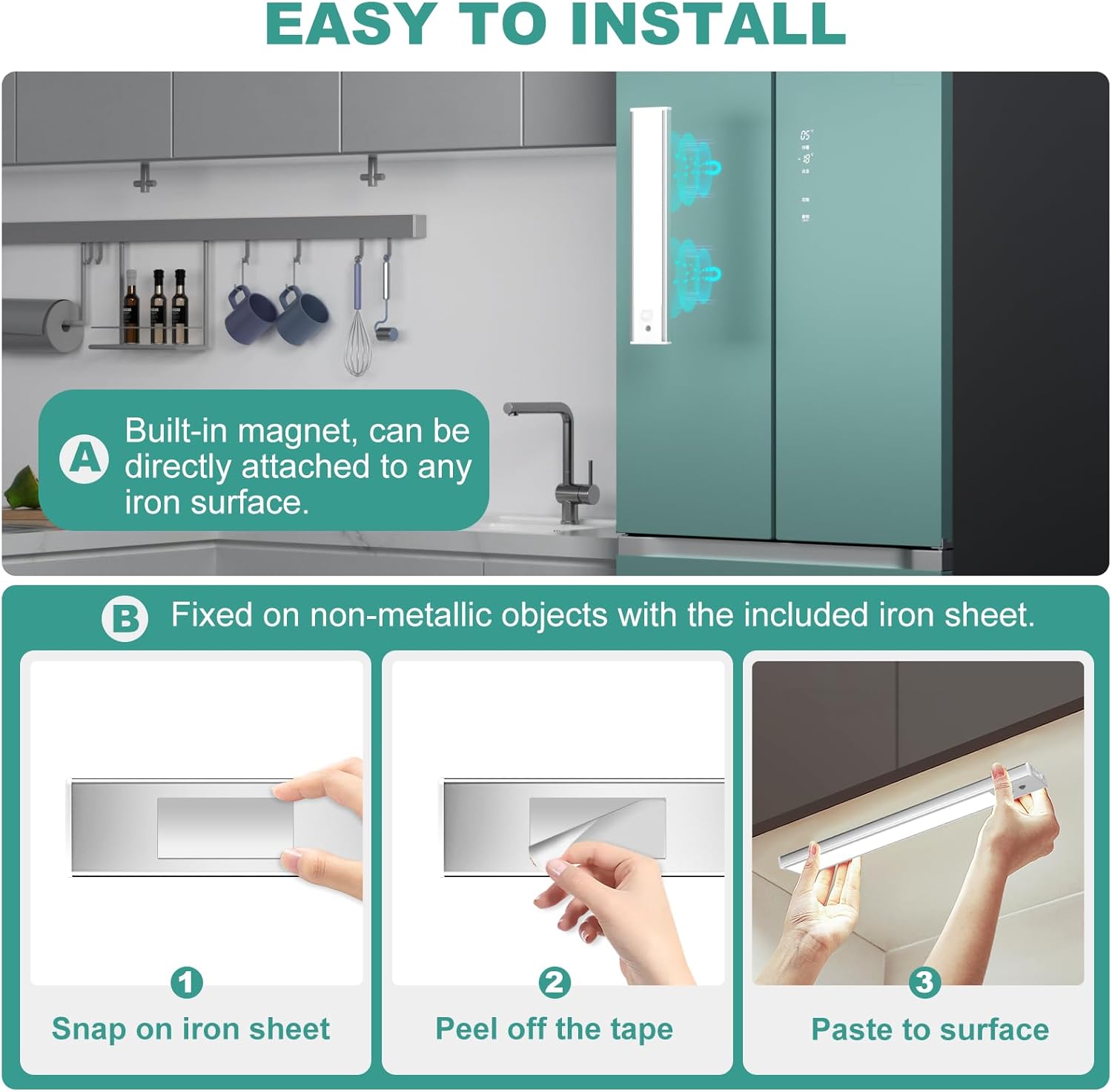
The under cabinet lights offer two primary installation methods:
- Direct Magnetic Attachment: The lights have built-in magnets and can be directly attached to any iron surface (e.g., refrigerator, metal shelving).
- Adhesive Iron Sheet Installation: For non-iron surfaces, use the included iron sheets with adhesive tape.
- Step 1: Clean the desired installation surface to ensure it is dry and free of dust.
- Step 2: Peel off the protective film from one side of the adhesive tape on an iron sheet and firmly stick it to the chosen surface.
- Step 3: Align the light with the installed iron sheet and allow the built-in magnets to secure it in place.
When charging or relocating the light, it can be easily removed from the magnetic attachment point.
Operating Instructions
The lights can be controlled via a physical switch on the unit or using the included remote control.
Unit Switch Control
Each light unit features a slide switch with three positions:
- ON: Always-On Mode. The light remains continuously illuminated.
- OFF: Lights Off. The unit is powered down.
- AUTO: Motion Sensor Mode. The light will automatically activate when motion is detected in dim light or darkness.
Remote Control Operation
The remote control provides comprehensive control over the lights. Ensure the battery protection plate is removed from the remote before first use.
- ON Button: Turns the lights on.
- OFF Button: Turns the lights off.
- Brightness Up/Down Buttons: Adjusts the light brightness from 10% to 100%.
- Color Temperature Select Buttons (Warm, Natural, Cool): Cycles through 3000K (Warm White), 4000K (Neutral White), and 6500K (Cool White).
- Delay Off Timing Select Buttons (5min, 15min, 30min, 60min): Sets a timer for the lights to automatically turn off after the selected duration.

Motion Sensor Functionality
In AUTO mode, the motion sensor detects human movement within a 10ft (3m) range and a 100° detection angle. The light will automatically turn on in dark environments and turn off after 20 seconds of no movement. The motion sensor only activates in dim light or darkness to conserve battery life.


Charging
The under cabinet lights are equipped with a built-in 1000mAh rechargeable battery and a USB-C charging port.
- Connect the provided USB-C cable to the light's charging port and to a USB power source (e.g., computer, power bank, USB wall adapter).
- A red indicator light signifies that the unit is currently charging.
- A green indicator light indicates that the battery is fully charged.
- Full charging typically takes 3-4 hours.
- Battery life varies by mode and brightness: 5-80 hours in Always-On Mode (depending on brightness) or 7-25 days in Motion Sensor Mode (depending on frequency of use).

Maintenance
To ensure optimal performance and longevity of your DEALGADGETS Under Cabinet Lights, follow these maintenance guidelines:
- Cleaning: Wipe the light's surface with a soft, dry cloth. Avoid using abrasive cleaners or solvents, as these can damage the finish or electronic components.
- Battery Care: Recharge the lights regularly, especially if they are used frequently in Always-On mode. Avoid completely draining the battery for extended periods to prolong its lifespan.
- Storage: If storing the lights for an extended period, ensure they are fully charged and store them in a cool, dry place. Recharge them every few months to prevent deep discharge.
- Environment: These lights are designed for indoor use only and are not waterproof. Avoid exposure to moisture, high humidity, or extreme temperatures.
Troubleshooting
If you encounter issues with your under cabinet lights, refer to the following common problems and solutions:
| Problem | Possible Cause | Solution |
|---|---|---|
| Light does not turn on. | Battery is depleted. Switch is in OFF position. | Charge the light using the USB-C cable. Slide the switch to ON or AUTO. |
| Motion sensor not working. | Light is in ON or OFF mode. Environment is too bright. Motion is outside detection range/angle. | Ensure the switch is in AUTO mode. The sensor only works in dim or dark conditions. Ensure motion occurs within 10ft/100° of the sensor. |
| Light turns off too quickly. | No continuous motion detected in AUTO mode. | In AUTO mode, the light turns off after 20 seconds of no movement. If continuous light is needed, switch to ON mode or use the remote to set a timer. |
| Remote control not responding. | Battery protection plate still in place. Remote battery is low/dead. Obstruction between remote and light. | Remove the clear plastic tab from the remote's battery compartment. Replace the remote battery. Ensure a clear line of sight to the light. |
| Short battery life. | Frequent use in Always-On mode. High brightness setting. Frequent motion triggers in AUTO mode. | Reduce brightness or switch to AUTO mode if appropriate. Charge the lights more frequently. |
Warranty and Support
DEALGADGETS provides a lifetime free replacement policy for this product. For any issues or inquiries, please contact customer service. Our support team is available 24 hours to provide friendly service and assistance.
For support, please refer to the contact information provided with your purchase or visit the official DEALGADGETS website.