
1. Product Overview
The Ajazz AJ099 Superlight Wireless Gaming Mouse is designed for competitive gaming, offering a lightweight, ergonomic design with dual-mode connectivity. It features a high-precision optical sensor and programmable buttons for a customized gaming experience.
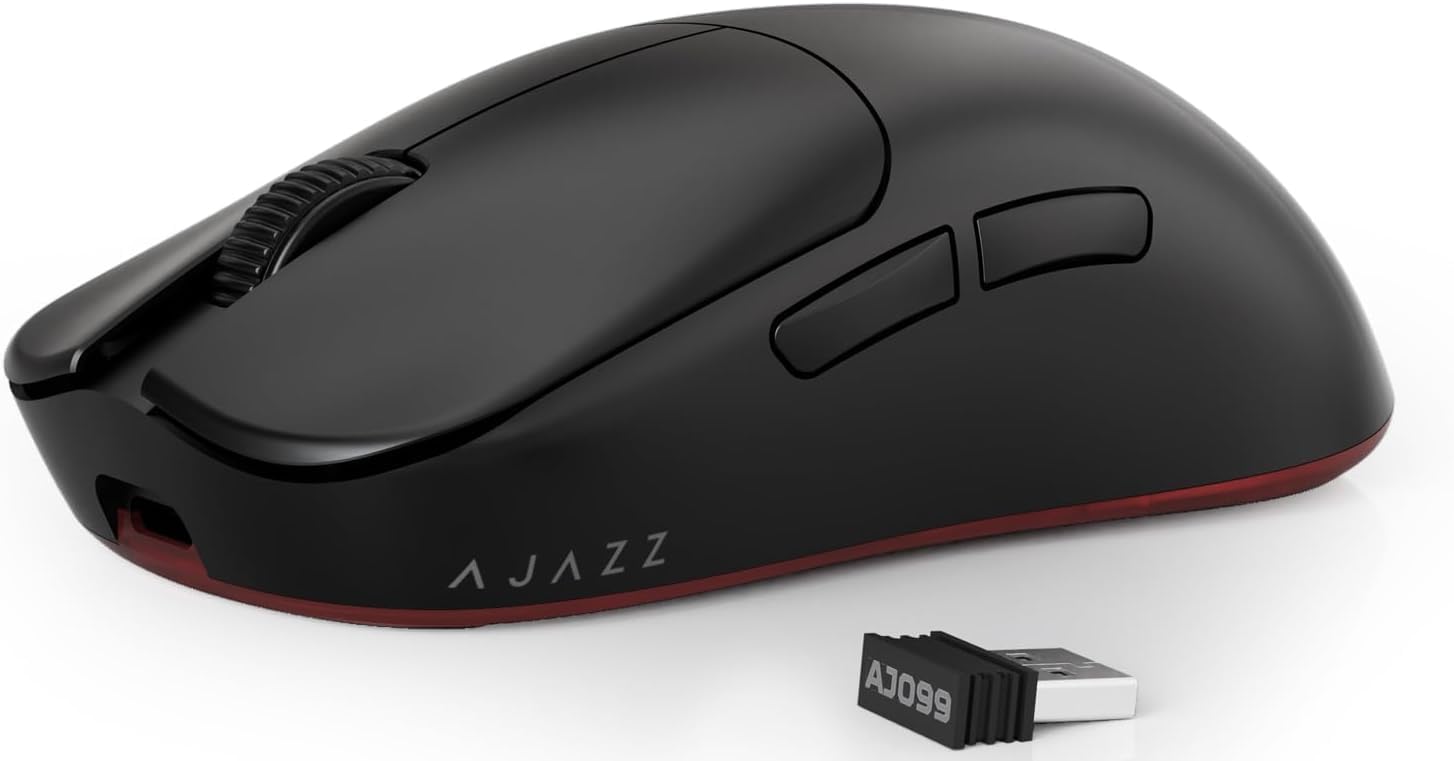
Figure 1: Ajazz AJ099 Superlight Wireless Gaming Mouse (Black)
Key Features:
- Ultra-Lightweight Design: Weighing approximately 54g, designed for fast-paced gaming.
- Dual-Mode Connectivity: Supports 2.4Ghz wireless and wired (USB-C) connections.
- PixArt PAW3311 Optical Sensor: Provides up to 12,000 DPI, 300 IPS, and 35G acceleration.
- HUANO Switches: Durable switches rated for over 20 million clicks.
- Long Battery Life: Up to 200 hours of usage on a single charge (500mAh battery).
- Programmable Buttons: Customize up to 6 buttons via driver software.
- Ergonomic and Symmetrical Design: Comfortable for various grip styles.

Figure 2: Overview of Ajazz AJ099 features including PixArt Sensor, Ultra-Light design, 2.4G Wireless/USB-C Wired, and 200 hours battery life.
Component Identification:
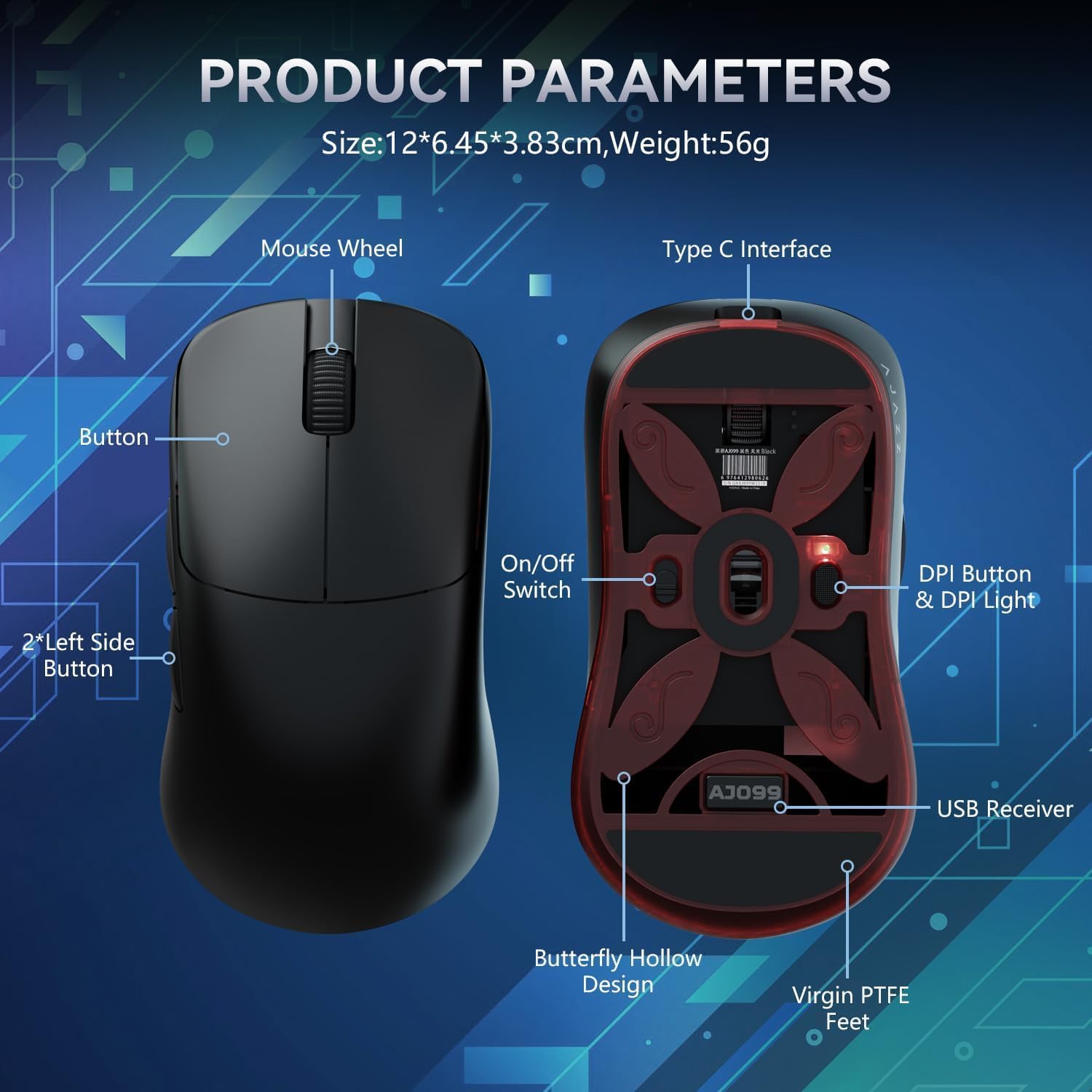
Figure 3: Top and bottom view of the Ajazz AJ099 mouse with labeled components.
- Mouse Wheel
- Left Button
- Right Button
- Middle Button
- Forward Button (Side)
- Back Button (Side)
- DPI Loop Button
- Type-C Interface (Front)
- On/Off Switch (Bottom)
- DPI Button & DPI Light (Bottom)
- USB Receiver Storage (Bottom)
- Butterfly Hollow Design (Bottom)
- Virgin PTFE Feet (Bottom)
2. Setup
2.1. Charging the Mouse
Before first use, it is recommended to fully charge the mouse. Connect the included USB Type-C cable to the mouse's Type-C interface and the other end to a USB power source (e.g., computer USB port, USB wall adapter). A full charge typically takes 2-3 hours.
The mouse features a 500mAh battery, providing up to 200 hours of usage on a full charge. It will enter sleep mode after 5 minutes of inactivity to conserve battery.

Figure 4: Power saving features of the Ajazz AJ099 mouse, highlighting battery life and sleep modes.
2.2. Connecting the Mouse
The Ajazz AJ099 supports two connection modes: 2.4Ghz Wireless and Wired.
2.2.1. 2.4Ghz Wireless Connection
- Locate the USB receiver stored in the compartment on the bottom of the mouse.
- Plug the USB receiver into an available USB port on your computer.
- Turn on the mouse using the On/Off switch located on the bottom of the mouse.
- The mouse should automatically connect to your computer. If not, ensure the receiver is properly inserted and the mouse is powered on.
2.2.2. Wired Connection
- Connect the included USB Type-C cable to the Type-C interface on the front of the mouse.
- Connect the other end of the USB Type-C cable to an available USB port on your computer.
- The mouse will function immediately in wired mode and will also charge simultaneously.
3. Operating Instructions
3.1. DPI Adjustment
The Ajazz AJ099 features a PixArt PAW3311 optical sensor with adjustable DPI settings. You can cycle through different DPI levels using the DPI button located on the bottom of the mouse. The DPI light will indicate the current DPI level.
The mouse supports up to 12,000 DPI and offers 6 programmable DPI levels. For precise control and customization, use the dedicated driver software.

Figure 5: Details of the PixArt PAW3311 sensor, including 12,000 DPI, 300 IPS, and 1000Hz polling rate.
3.2. Programmable Buttons and Software
The mouse is equipped with 6 programmable buttons (Left, Right, Middle, Forward, Back, DPI Loop). To customize button functions, DPI settings, polling rate, and create macros, download and install the Ajazz driver software from the official Ajazz website.
The software allows you to:
- Reassign button functions.
- Set up to 6 different DPI levels.
- Adjust polling rate (up to 1000Hz).
- Create and save custom macros to the onboard memory.

Figure 6: Screenshot of the Ajazz driver software interface for customizing mouse settings.
3.3. Ergonomics and Grip
The symmetrical design of the AJ099 is crafted for comfort and to reduce wrist fatigue during prolonged use. It is suitable for various grip styles, including claw grip, fingertip grip, and palm grip, especially for users with 17-19cm palm sizes.

Figure 7: Illustration of the Ajazz AJ099's ergonomic design optimized for various palm sizes and grip types.
4. Maintenance
4.1. Cleaning
To maintain optimal performance and hygiene, regularly clean your Ajazz AJ099 mouse.
- Use a soft, lint-free cloth slightly dampened with water or a mild cleaning solution to wipe the surface of the mouse.
- Avoid using harsh chemicals, abrasive cleaners, or solvents, as these can damage the mouse's finish.
- For crevices and around buttons, use a cotton swab or compressed air to remove dust and debris.
- Ensure the mouse is powered off and disconnected from any power source before cleaning.
4.2. Storage
When not in use for extended periods, store the mouse in a cool, dry place away from direct sunlight and extreme temperatures. Ensure the mouse is fully charged before long-term storage to preserve battery health.
5. Troubleshooting
5.1. Mouse Not Responding
- Check Power: Ensure the mouse is turned on using the On/Off switch on the bottom.
- Check Battery: If in wireless mode, ensure the mouse has sufficient battery charge. Connect it via USB-C cable to charge.
- Check Connection:
- For wireless: Ensure the USB receiver is securely plugged into a working USB port on your computer. Try a different USB port.
- For wired: Ensure the USB-C cable is securely connected to both the mouse and the computer. Try a different USB port or cable.
- Restart Computer: Sometimes a simple system restart can resolve connectivity issues.
5.2. Wireless Stuttering or Skipping
Some users may experience stuttering or skipping issues, particularly in wireless mode. This can be caused by interference or distance from the receiver.
- Reduce Distance: Ensure the mouse is within close proximity to the USB receiver.
- Minimize Interference: Move the receiver away from other wireless devices (e.g., Wi-Fi routers, other wireless peripherals) that might cause interference.
- Use a USB Extender: If your computer is under a desk, using a USB extender to bring the receiver closer to the mouse can improve signal strength.
- Switch to Wired Mode: If wireless performance remains unsatisfactory, use the mouse in wired mode for a stable connection.
- Update Drivers: Ensure you have the latest drivers and software installed for the mouse from the official Ajazz website.
5.3. Buttons Not Responding or Double-Clicking
- Clean Buttons: Dust or debris might be affecting button performance. Refer to the cleaning section.
- Software Reset: Use the driver software to reset button assignments to default settings.
- Firmware Update: Check the Ajazz website for any available firmware updates for your mouse, which may address performance issues.

Figure 8: Illustration highlighting the durable HUANO switches and TTC encoder for crisp clicks and precise scroll wheel steps.
6. Specifications
| Feature | Detail |
|---|---|
| Brand | Ajazz |
| Model | AJ099 |
| Connectivity Technology | 2.4Ghz Wireless, Wired (USB Type-C) |
| Sensor | PixArt PAW3311 Optical Sensor |
| DPI | Up to 12,000 DPI (6 programmable levels) |
| IPS | 300 IPS |
| Acceleration | 35G |
| Polling Rate | 1000Hz / 1ms |
| Switches | HUANO Blue Shell White Dot (20 million clicks) |
| Scroll Wheel Encoder | TTC Encoder |
| Battery | 500mAh Rechargeable |
| Battery Life | Up to 200 hours |
| Weight | Approx. 54g (1.98 ounces) |
| Dimensions | 4.72 x 2.54 x 1.51 inches (12 x 6.45 x 3.83 cm) |
| Special Features | Ultra-lightweight, Ergonomic Symmetrical Design, Programmable Buttons, Butterfly-Shaped Hollow Bottom Design, PTFE Feet |
7. Warranty and Support
7.1. Warranty Information
Ajazz products typically come with a limited warranty covering manufacturing defects. Please refer to the warranty card included with your product or visit the official Ajazz website for detailed warranty terms and conditions specific to the AJ099 mouse. Keep your proof of purchase for warranty claims.
7.2. Customer Support
For technical assistance, troubleshooting, or general inquiries, please contact Ajazz customer support. You can usually find contact information (email, support portal, or phone number) on the official Ajazz website or within the product packaging.
Official Ajazz Website: www.ajazz.com (Please note: This is a placeholder URL. Refer to your product packaging for the exact official support website.)


