
Introduction
This manual provides comprehensive instructions for the safe and efficient operation, installation, maintenance, and troubleshooting of your COTLIN Commercial Ice Maker Machine Model P818A. Please read this manual thoroughly before operating the appliance and retain it for future reference.
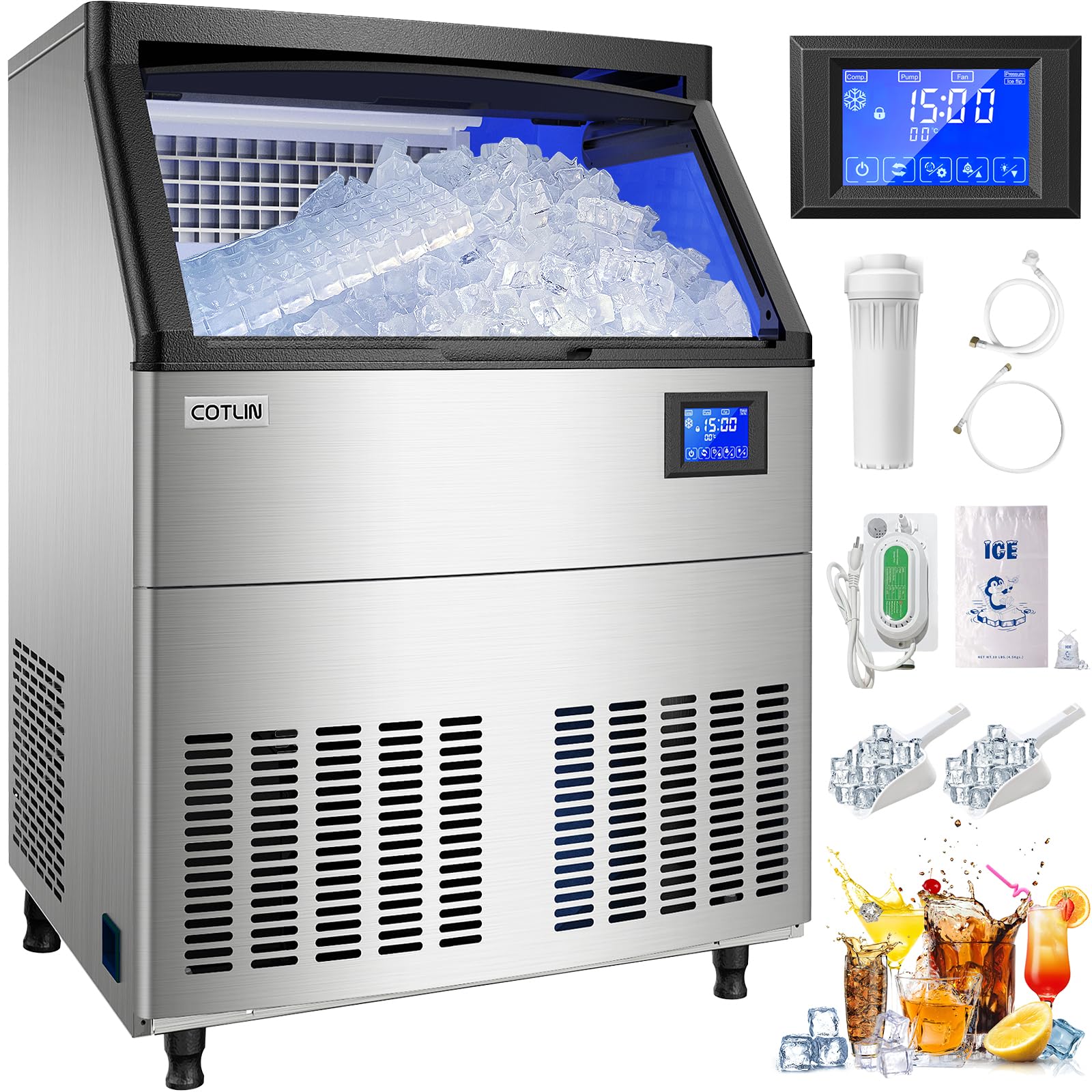
The COTLIN Commercial Ice Maker Machine, capable of producing up to 320 lbs of ice per 24 hours, with a 100 lbs storage capacity.
Safety Information
To prevent injury to users or property damage, ensure all safety precautions are followed. This appliance uses R290 refrigerant and requires a 115V electrical connection. Always disconnect power before performing any maintenance or cleaning. Do not operate the machine with a damaged power cord or plug. Ensure proper grounding. Keep ventilation openings clear of obstructions. Only qualified personnel should perform repairs involving the refrigerant system.
Package Contents
Verify that all components are present upon unpacking:
- COTLIN Commercial Ice Maker Machine (Model P818A)
- Blue LED Lights (integrated)
- Removable Air Filter (integrated)
- Digital Controller Panel (integrated)
- Drain Hose
- Water Inlet Hose
- Power Cord
- Ice Scoop
- User Manual
Specifications
| Feature | Specification |
|---|---|
| Brand | COTLIN |
| Model Name | P818A |
| Product Dimensions (D x W x H) | 27.5" x 26" x 35.4" |
| Ice Storage Capacity | 100 Pounds |
| Ice Production per Day | 320 Pounds |
| Wattage | 425 watts |
| Voltage | 115 Volts |
| Refrigerant | R290a |
| Material Type | Stainless Steel |
| Item Weight | 113 Pounds |
Setup and Installation
Proper installation is crucial for optimal performance and longevity of your ice maker. This unit is designed for under-counter or freestanding placement.
1. Placement
- Place the ice maker on a level, stable surface capable of supporting its weight when full of ice.
- Ensure adequate ventilation around the unit. Maintain at least 6 inches of clearance from walls and other appliances.
- Avoid direct sunlight or heat sources.

The ice maker is designed to fit under standard countertops, with dimensions of 26"W x 27.5"D x 35.4"H.
2. Water Connection
- Connect the provided water inlet hose to a potable water supply with appropriate pressure.
- Ensure all connections are secure to prevent leaks.
3. Drain Connection
- Attach the drain hose to the unit's drain outlet and route it to a suitable floor drain or standpipe.
- Ensure the drain hose has a continuous downward slope to allow for proper water drainage.
4. Electrical Connection
- Plug the power cord into a dedicated 115V, 60Hz, grounded electrical outlet.
- Do not use extension cords or adapters.

Rear view showing the simple connections for the drain hose, water inlet, and power cord.
5. Initial Cleaning
- Before first use, clean the interior of the ice bin and water reservoir with a mild detergent and warm water. Rinse thoroughly.
- Run a self-cleaning cycle as described in the Maintenance section.
Operating Instructions
Your COTLIN ice maker features a user-friendly digital control panel for easy operation.
1. Power On/Off
- Press the power button on the digital control panel to turn the machine on or off.
2. Ice Production
- Once powered on and connected to water, the machine will automatically begin the ice-making cycle.
- The unit produces clear cube ice, ideal for various beverages and cooling needs.

The ice maker produces 7/8-inch cube ice, which melts slowly, making it suitable for chilling drinks and preserving flavor.
3. Ice Thickness Adjustment
- The digital control panel allows for adjustment of ice cube thickness. Refer to the panel's specific icons or settings for this function.
- Adjusting the thickness can affect the ice-making cycle time.
4. Ice Storage
- The integrated storage bin has a capacity of 100 lbs.
- The bin's polypropylene interior provides insulation to help prevent ice from melting quickly.
Maintenance and Cleaning
Regular maintenance ensures the longevity and hygienic operation of your ice maker.
1. Self-Cleaning Function
- The machine features a built-in self-cleaning cycle. Activate this function via the digital control panel by pressing the designated button.
- Perform self-cleaning regularly, especially in areas with hard water.
2. Air Filter Cleaning
- The air filter is designed for tool-free removal. Regularly clean the air filter to maintain efficient cooling and ice production.
- Wash the filter with warm, soapy water, rinse thoroughly, and allow it to dry completely before reinserting.
3. Exterior and Interior Cleaning
- Wipe the stainless steel exterior with a soft cloth and mild detergent. Avoid abrasive cleaners.
- Clean the interior of the ice bin periodically with a food-safe sanitizer.

The ice maker features a heavy-duty stainless steel outer layer, cyclopentane foam insulation, and a food-grade polypropylene interior for durability and easy cleaning.
Troubleshooting Guide
The built-in diagnostic system helps identify common issues and displays them on the digital control panel. Refer to the table below for potential problems and solutions.
| Problem Indication | Possible Cause | Solution |
|---|---|---|
| "Ice Full" Alert | Ice bin is full. | Remove ice from the bin. The machine will resume operation automatically. |
| "High Temp" Alert | Ambient temperature is too high or ventilation is blocked. | Ensure proper ventilation around the unit. Clean the air filter. Move the unit to a cooler environment if necessary. |
| "Harvest Time" Alert | Indicates the ice harvest cycle is taking longer than expected. | Check water supply and temperature. Ensure the evaporator is clean. |
| "Error Alert" (General) | System malfunction. | Refer to the specific error code displayed on the panel for detailed troubleshooting in the full manual, or contact customer support. |
| No Ice Production | No water supply, power issue, or internal fault. | Check water connection and supply valve. Ensure power cord is securely plugged in. Verify circuit breaker. |
Warranty and Support
Your COTLIN Commercial Ice Maker Machine Model P818A comes with the following warranty:
- 1-year warranty on parts from the date of purchase.
- 3-year warranty on the compressor from the date of purchase.
For warranty claims, technical support, or service inquiries, please contact COTLIN customer service. Keep your purchase receipt as proof of purchase.


