
AODSK UAED-403T
AODSK Electric Drum Set Instruction Manual
Model: UAED-403T
Brand: AODSK
Introduction
This manual provides detailed instructions for the setup, operation, and maintenance of your AODSK Electric Drum Set, Model UAED-403T. Please read this manual thoroughly before using the product to ensure proper function and longevity.
What's Included
Your AODSK Electric Drum Set package includes the following components:
- 4 x 8-inch Drum Pads (Snare, Tom x3)
- 3 x 10-inch Cymbals (Hi-Hat, Ride, Crash)
- 1 x Sturdy Metal Frame (Drum Stand)
- 1 x Drum Module with LED display
- 1 x Drum Throne
- 1 pair of Drumsticks
- 1 pair of Headphones
- 2 x Switch Pedals (Hi-Hat Pedal, Kick Pedal)
- All necessary cables

Figure 1: Complete AODSK Electric Drum Set package contents.

Figure 2: Individual components including drumsticks, headphones, drum throne, and USB printer cable.
Setup
Assembling the AODSK Electric Drum Set is designed to be straightforward. Follow these steps for quick setup:
- Unpack Components: Carefully remove all parts from the packaging and verify against the "What's Included" list.
- Assemble the Frame: The sturdy metal frame is designed for easy assembly. Loosen the clamps, slide the frame pieces into place, and secure them.
- Attach Drum Pads and Cymbals: Mount the 8-inch drum pads and 10-inch cymbals onto the designated points on the frame. Ensure they are securely fastened.
- Install Drum Module: Attach the drum module to the frame in an easily accessible position.
- Connect Cables: Connect all necessary cables from the drum pads, cymbals, and pedals to the corresponding inputs on the drum module. Utilize the cable fixing buckles on the frame to prevent cables from falling off and ensure stability.
- Set up Drum Throne and Pedals: Assemble the drum throne and place the Hi-Hat and Kick pedals on the floor in comfortable playing positions.
- Connect Power and Audio: Connect the power adapter to the drum module and plug it into a power outlet. Connect headphones or external speakers to the appropriate audio output ports.

Figure 3: Diagram showing the main components of the drum set for assembly reference.
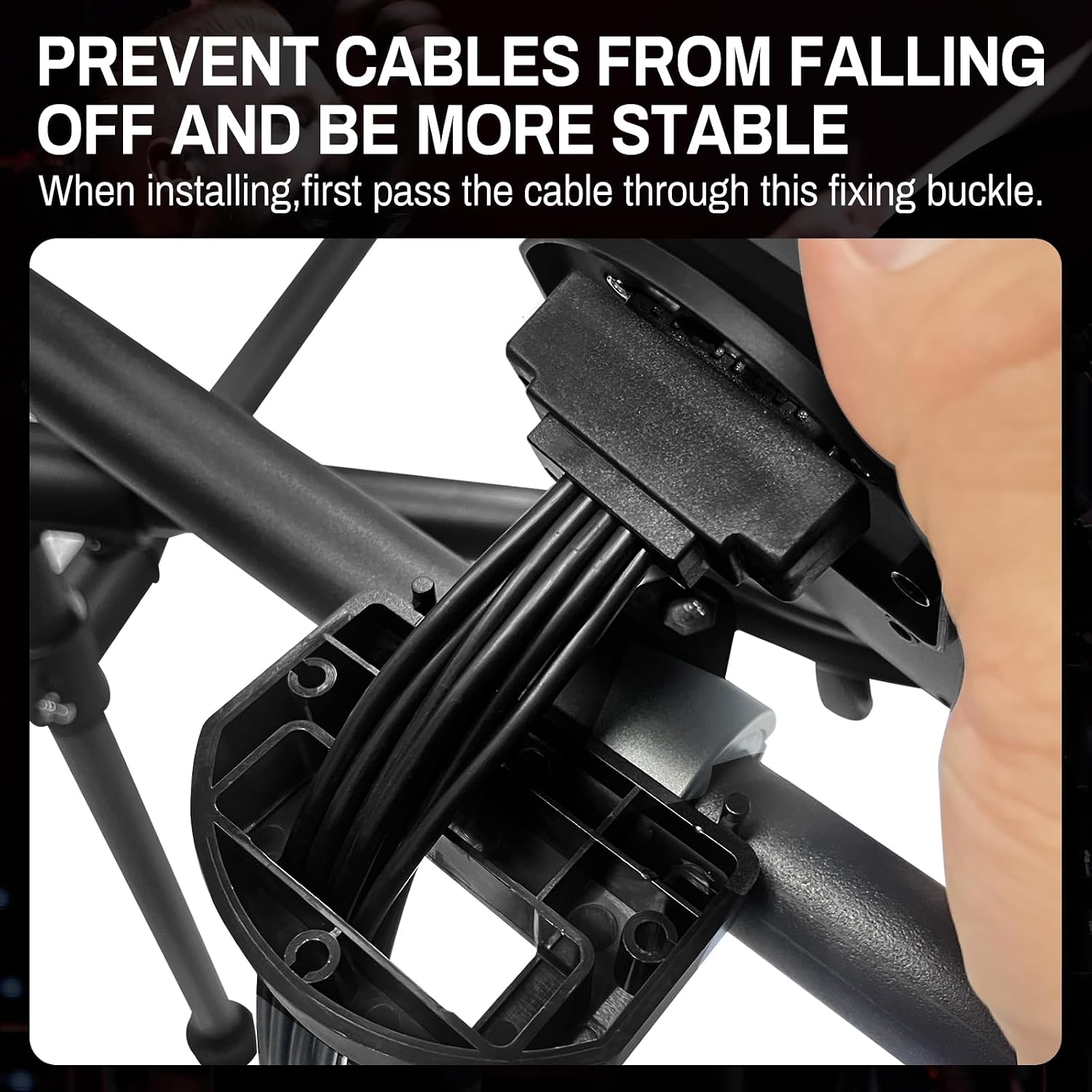
Figure 4: Detail of the cable management system on the drum frame to ensure stability.
Video 1: AODSK Electric Drum Set 403T assembly and basic demonstration. This video illustrates the ease of setup and initial use of the drum kit.
Operating Instructions
The AODSK Electric Drum Set offers a variety of sounds and modes for an enhanced drumming experience.
Drum Module Overview

Figure 5: The drum module with LED display and control buttons.
- LED Display: Shows current kit number, tempo, and other settings.
- KIT Button: Press to select from 20 pre-programmed drum kits. Use the '+' and '-' buttons to navigate.
- SOUND Button: Access 120 built-in sounds. Use '+' and '-' to select individual sounds for pads.
- TEMPO Button: Adjust the metronome tempo. Use '+' and '-' to increase or decrease the tempo.
- DEMO Button: Play one of the 20 demo songs. Use '+' and '-' to select different demo songs.
- REVERB Switch: Toggle reverb effect ON or OFF.
- VOLUME Knob: Adjust the overall output volume.
Connectivity
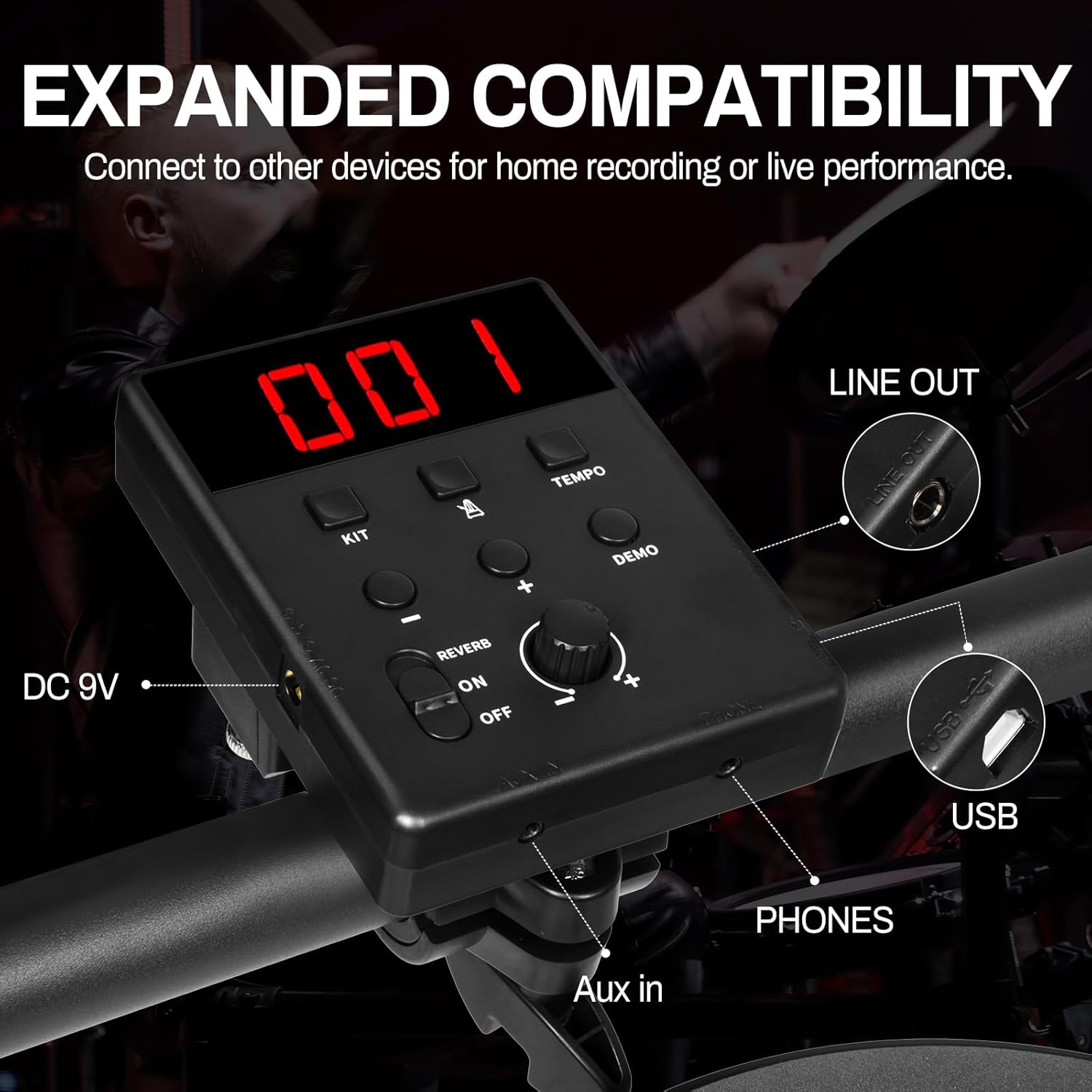
Figure 6: Input/Output ports including DC 9V, Aux In, Phones, USB, and Line Out.
- DC 9V: Power input.
- Aux In: Connect an external audio device (e.g., smartphone, MP3 player) to play along with your favorite music.
- Phones: Headphone output for private practice.
- USB: USB MIDI output for connecting to a computer or other MIDI-compatible devices for recording or using drum software.
- Line Out: Connect to external speakers or an amplifier for live performance or louder practice.
Playing the Drum Set
- The 8-inch high-density rebound sponge drumheads provide a percussion feel close to that of real drums, offering good elasticity and feel.
- The 10-inch cymbals feature a compact rubber impact pad with good elasticity and feel. Pinching the cymbal pad stops the sound.
- Experiment with different drum kits and sounds to find your preferred setup.
- Utilize the built-in metronome for rhythm practice.
- Play along with the 20 demo songs to explore various music styles.

Figure 7: High-density rebound sponge drum pad for realistic feel.
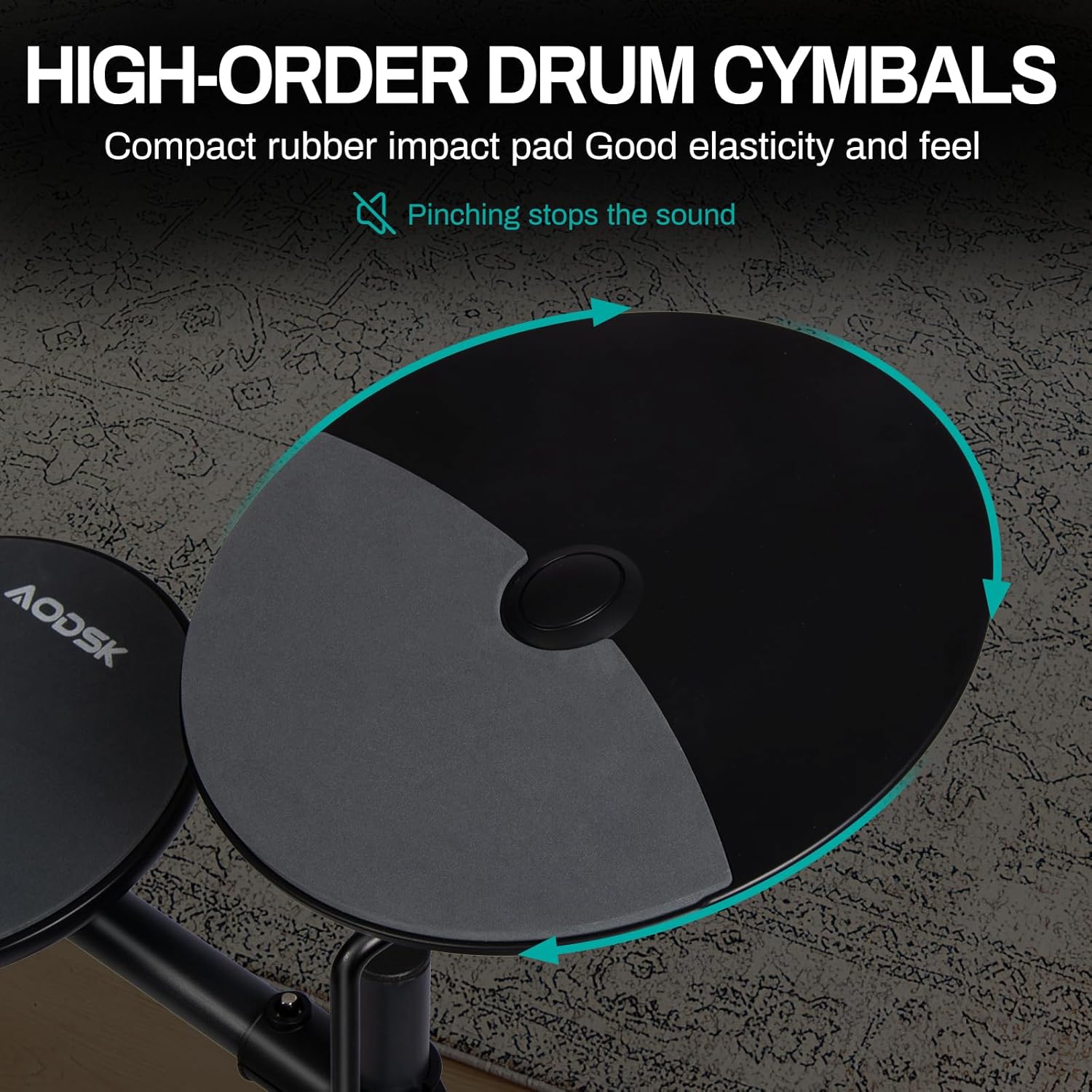
Figure 8: High-order drum cymbal with compact rubber impact pad.
Maintenance
To ensure the longevity and optimal performance of your AODSK Electric Drum Set, follow these maintenance guidelines:
- Cleaning: Wipe down the drum pads, cymbals, and module with a soft, dry cloth. Avoid using abrasive cleaners or solvents, as they may damage the surfaces.
- Storage: When not in use, store the drum set in a cool, dry place away from direct sunlight and extreme temperatures. The set is portable and foldable for convenient storage.
- Cable Care: Regularly check all cables for any signs of wear or damage. Ensure cables are not kinked or pinched. Use the integrated cable management features to keep them tidy and protected.
- Pad Care: While the drum pads are durable, avoid excessive force when striking them.
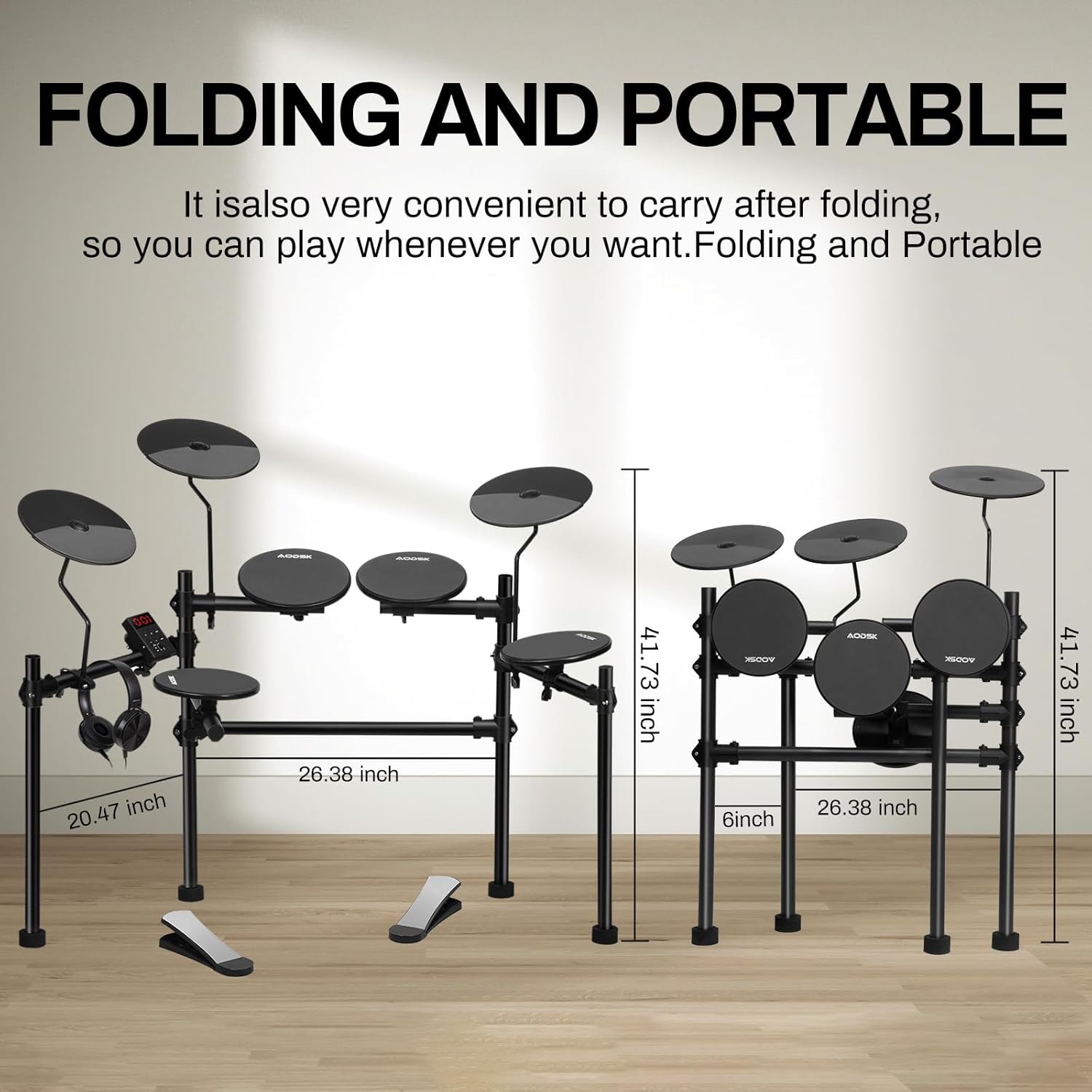
Figure 9: The drum set's folding mechanism for portability and storage.
Troubleshooting
If you encounter any issues with your AODSK Electric Drum Set, please refer to the following common troubleshooting tips:
| Problem | Possible Cause | Solution |
|---|---|---|
| No Sound | Power not connected; Volume too low; Headphones/speakers not connected or faulty; Cables loose. | Ensure power adapter is securely plugged in. Increase master volume. Check headphone/speaker connection and functionality. Verify all pad/cymbal cables are firmly connected to the module. |
| Pad/Cymbal Not Responding | Loose cable connection; Faulty pad/cymbal; Incorrect module settings. | Check the cable connection for the specific pad/cymbal. Try swapping cables with a working pad to isolate the issue. Ensure the correct drum kit is selected on the module. |
| Distorted Sound | Volume too high; Faulty cable; External interference. | Lower the volume on the module and connected audio devices. Try different cables. Ensure the drum set is not placed near strong electromagnetic sources. |
| Module Not Powering On | Power adapter not connected; Power outlet issue; Faulty adapter. | Verify the power adapter is fully inserted into the module and the wall outlet. Test the outlet with another device. If possible, try a different compatible power adapter. |
If the problem persists after trying these solutions, please contact AODSK customer support for further assistance.
Specifications
- Model: UAED-403T
- Drum Pads: 4 x 8-inch quiet drum pads
- Cymbals: 3 x 10-inch cymbals
- Sounds: 120 built-in sounds
- Drum Kits: 20 pre-programmed drum kits
- Demo Songs: 20 demo songs
- Pedals: 2 switch pedals (Hi-Hat, Kick)
- Connectivity: AUX input, USB MIDI output, Headphone output, Line Out
- Material Type: Polymer, plastic
- Item Weight: Approximately 24 pounds
- Product Dimensions: Approximately 26 x 20 x 41 inches (assembled)
- Portability: Foldable design for easy storage and transport
Warranty & Support
For warranty information, product registration, or technical support, please refer to the warranty card included in your product packaging or visit the official AODSK website. Keep your purchase receipt as proof of purchase for any warranty claims.
For additional assistance, you may contact the seller, GL0BAL INSTRUMENT, through the platform where the product was purchased.
Related documentsUAED-403T


Ask a question about this manual
Ask about setup, troubleshooting, compatibility, parts, safety, or missing instructions. Manuals+ will review the question and use this page’s manual context to help answer it.