
Fafrees F20 PRO
Fafrees F20 PRO Electric Bike User Manual
Model: F20 PRO
Introduction
Thank you for choosing the Fafrees F20 PRO Electric Bike. This manual provides essential information for the safe operation, assembly, maintenance, and troubleshooting of your new electric bicycle. Please read this manual thoroughly before your first ride to ensure proper usage and to maximize the lifespan of your bike.

Image: The Fafrees F20 PRO Electric Bike, black in color, shown from a three-quarter front view, highlighting its foldable frame, fat tires, and included storage bag.
Safety Information
Always prioritize safety when operating your electric bike. Failure to follow safety guidelines can result in serious injury or damage to the bike.
- Always wear a helmet that meets local safety standards.
- Ensure all components are securely fastened before each ride.
- Familiarize yourself with local traffic laws and regulations regarding electric bicycles.
- Do not ride under the influence of alcohol or drugs.
- Be aware of your surroundings and other road users.
- Avoid riding in adverse weather conditions, such as heavy rain or snow, if possible.
- Regularly check tire pressure, brake function, and battery charge level.
Package Contents
Upon opening the package, please verify that all the following items are included:
- 1 x Fafrees F20 PRO Electric Bike (partially assembled)
- 1 x Battery Charger
- 1 x Gift Box (contents may vary)
- 1 x User Manual (this document)
Setup and Assembly
The Fafrees F20 PRO Electric Bike comes partially assembled. Follow these steps to complete the assembly:
- Unfolding the Frame: Carefully unfold the main frame of the bike until it locks into place. Ensure the folding mechanism is securely latched.
- Installing the Handlebar: Insert the handlebar stem into the fork tube and tighten the quick-release lever or bolts as instructed. Ensure the handlebar is aligned with the front wheel.
- Attaching the Pedals: Identify the left (L) and right (R) pedals. Screw them into the corresponding crank arms. Note that the left pedal has a reverse thread. Tighten firmly with a wrench.
- Installing the Seat Post and Saddle: Insert the seat post with the saddle attached into the seat tube. Adjust the height to a comfortable riding position and secure it with the quick-release clamp. Important: Do not install the seat tube below the safe line marked on the post.
- Mounting the Headlight: Attach the LED headlight to the designated mounting point on the front of the bike, usually on the fork or handlebar stem. Connect any necessary wiring.
- Battery Installation: The battery may come pre-installed or require insertion. If not installed, slide the battery into its compartment (often within the frame or behind the seat tube) until it clicks into place. Ensure it is locked with the key if applicable.
- Initial Battery Charge: Before your first ride, fully charge the battery using the provided charger. Connect the charger to the bike's charging port and then to a power outlet. The indicator light on the charger will show charging status.
- Pre-Ride Checks: Before riding, check tire pressure, brake functionality (front and rear), and ensure all bolts and quick releases are tight.
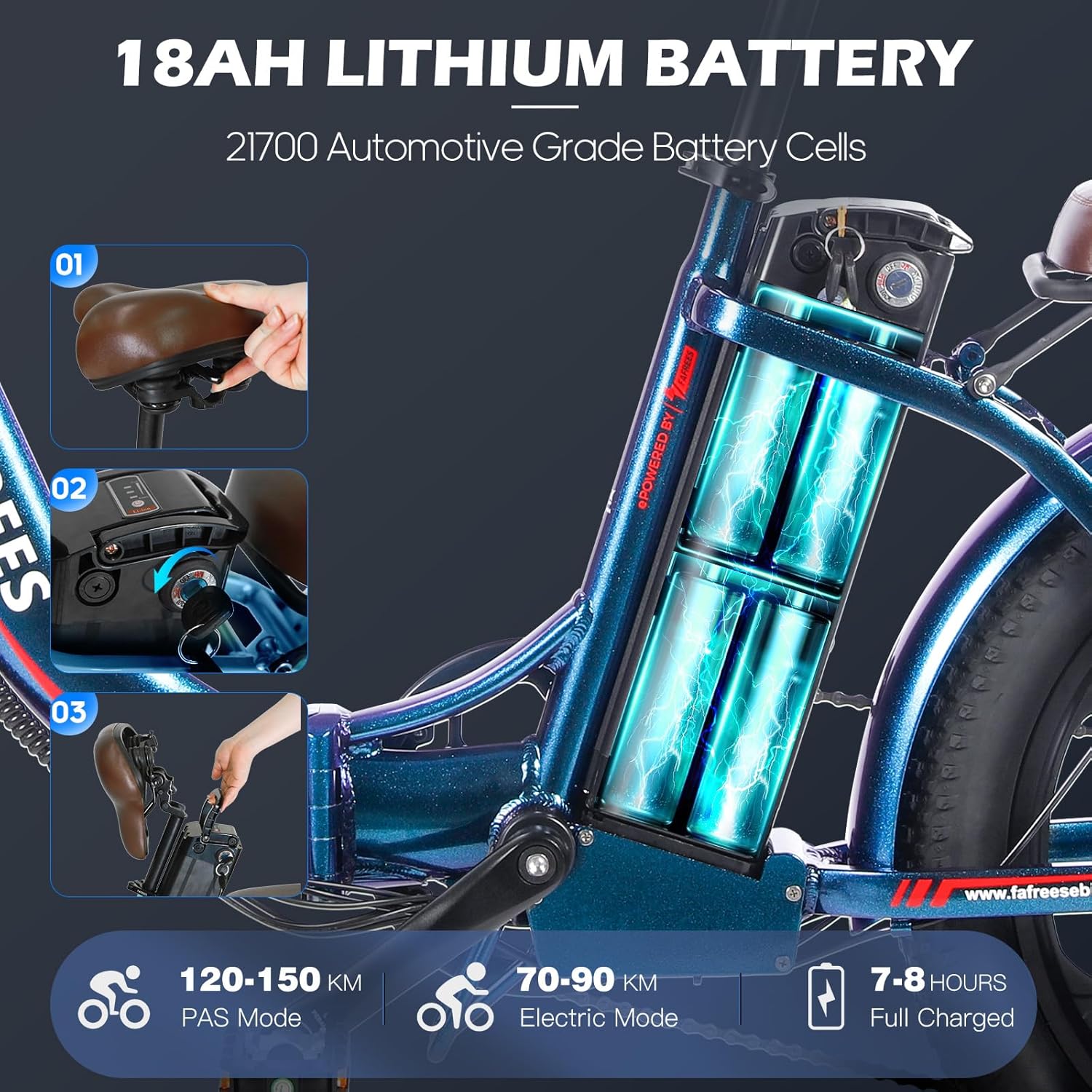
Image: A close-up view of the Fafrees F20 PRO's frame, illustrating the removable 18AH lithium battery compartment and the process of inserting and removing the battery.
Operating Instructions
Powering On/Off
To power on the bike, press and hold the power button on the LCD display. To power off, press and hold the same button until the display turns off.
LCD Display Functions
The smart LCD display provides real-time information about your ride:
- Speed: Current riding speed.
- Battery Level: Indicates remaining battery charge.
- Mileage: Displays trip distance or total odometer reading.
- Gear/PAS Level: Shows the current pedal assist level (PAS).
- Walk Assistance Mode: Activates a low-speed assist for walking the bike.
- Cruise Control: Maintains a set speed without continuous throttle input.

Image: A detailed view of the Fafrees F20 PRO's handlebar, showcasing the smart color LCD display, bell, gear shift lever, power-off brake levers, and thumb throttle.
Riding Modes
- Pedal Assist Mode (PAS): The motor provides assistance as you pedal. Adjust the assist level using the display controls (usually '+' and '-' buttons). Higher levels provide more assistance.
- Full Electric Mode: Use the thumb throttle to propel the bike without pedaling. This mode consumes battery faster.
- Manual Mode: Ride the bike like a traditional bicycle without any motor assistance.
Gears and Shifting
The F20 PRO is equipped with a 7-speed derailleur system. Use the gear shifter on the handlebar to change gears according to terrain and desired pedaling effort. Shift gears smoothly by easing off the pedals slightly during the shift.
Braking System
The bike features front and rear mechanical 160mm disc brakes with power-off brake levers. Squeeze both brake levers simultaneously for effective and safe stopping. The power-off feature cuts motor power when brakes are applied.

Image: A close-up of the Fafrees F20 PRO's front wheel, highlighting the mechanical disc brake system, including the rotor, caliper, and power-off brake lever, emphasizing its stopping capabilities.
Maintenance
Regular maintenance is crucial for the longevity and safe operation of your Fafrees F20 PRO Electric Bike.
- Cleaning: Clean the bike regularly with a damp cloth. Avoid using high-pressure washers directly on electrical components.
- Lubrication: Lubricate the chain and other moving parts (e.g., derailleur pivots) periodically with bicycle-specific lubricant.
- Tires: Check tire pressure before each ride. The recommended pressure is usually indicated on the tire sidewall. Inspect tires for wear and damage.
- Brakes: Regularly check brake pads for wear and ensure brake levers provide firm and responsive stopping power. Adjust brake cables as needed.
- Battery Care:
- Charge the battery fully after each ride, especially if it's been significantly discharged.
- Store the battery in a cool, dry place, away from direct sunlight and extreme temperatures.
- If storing the bike for an extended period, charge the battery to 50-70% every 1-2 months.
- Fasteners: Periodically check all bolts, nuts, and quick releases for tightness.
Troubleshooting
This section addresses common issues you might encounter with your Fafrees F20 PRO Electric Bike.
| Problem | Possible Cause | Solution |
|---|---|---|
| Bike does not power on. | Battery not charged, battery not properly seated, power cable loose, display issue. | Ensure battery is fully charged. Check if battery is securely inserted and locked. Inspect all cable connections. Contact support if issue persists. |
| Motor not assisting. | PAS level too low/off, battery low, brake levers engaged, motor connection issue. | Increase PAS level on display. Check battery charge. Ensure brake levers are fully released. Check motor cable connection. |
| Brakes feel weak or spongy. | Worn brake pads, loose brake cable, air in hydraulic system (if applicable). | Inspect and replace worn brake pads. Adjust brake cable tension. For hydraulic brakes, bleeding may be required by a professional. |
| Gears are not shifting smoothly. | Derailleur out of adjustment, bent hanger, dirty chain. | Clean and lubricate the chain. Adjust derailleur limits and cable tension. If hanger is bent, seek professional repair. |
Specifications
| Feature | Detail |
|---|---|
| Model | F20 PRO |
| Motor | 250W Brushless Motor, 40N·M Torque |
| Max Speed | 25 km/h |
| Battery | 36V 18Ah Lithium-ion (Removable) |
| Range (Full Electric) | 70-90 KM |
| Range (Pedal Assist) | 110-130 KM |
| Charging Time | 7-8 Hours (Full Charge) |
| Frame Material | Aluminum Alloy (Step-Through Foldable) |
| Tires | 20 * 3.0 Inch Fat Tires |
| Suspension | Front Oil Suspension Fork (75mm travel) |
| Brakes | Front & Rear Mechanical 160mm Disc Brakes |
| Gears | 7-Speed Derailleur |
| Display | Smart Color LCD Display |
| Recommended Rider Height | 160-185 cm |
| Max Load Capacity | 150 kg |
| Product Dimensions (Unfolded) | 174 x 60 x 118 cm |
| Product Weight | 25.5 kg |

Image: An illustration of the Fafrees F20 PRO's 250W brushless rear hub motor, detailing its internal components, along with icons indicating 40 Nm motor torque, 25 km/h max speed, and 7-speed Shimano gearing.
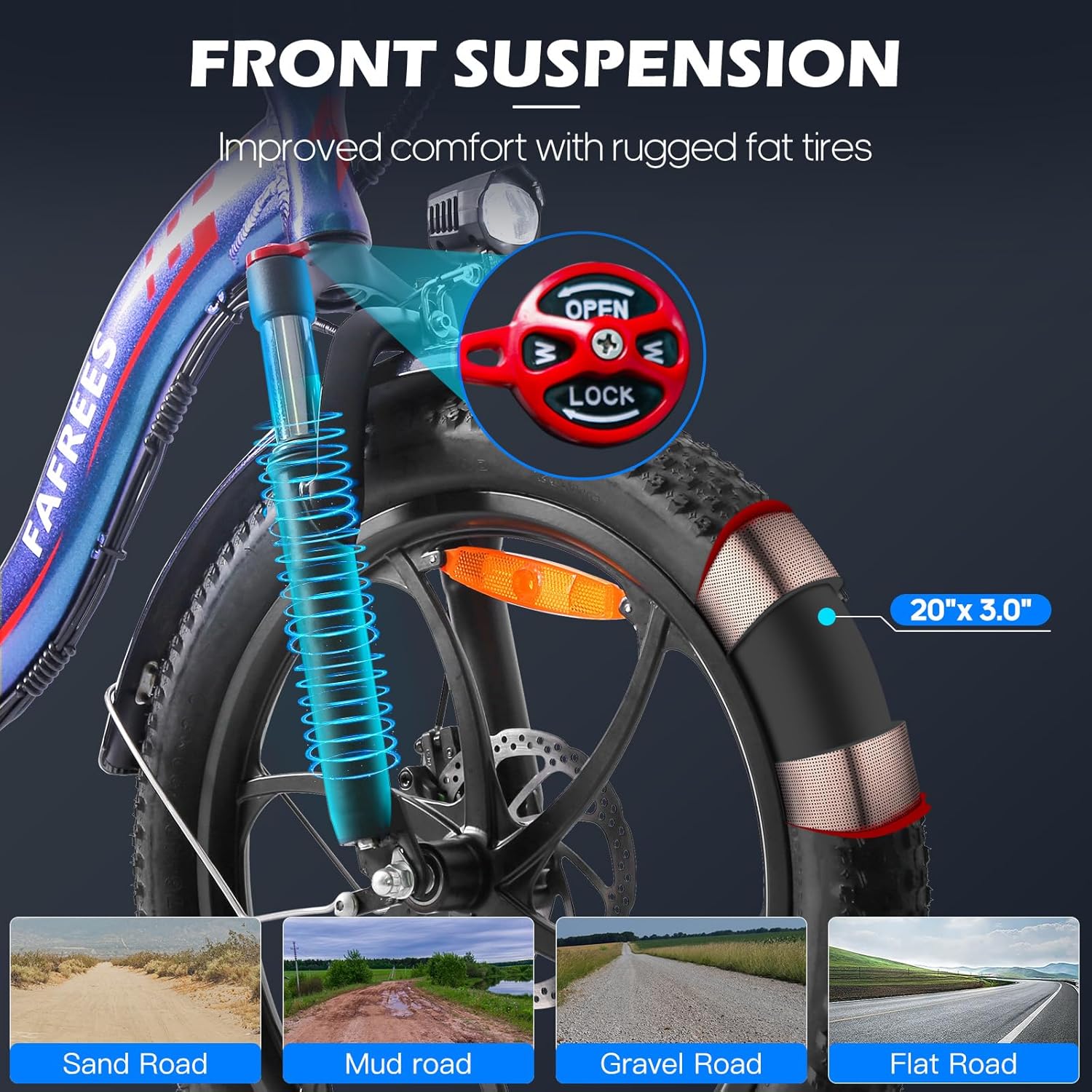
Image: A close-up of the Fafrees F20 PRO's front suspension fork and 20x3.0 inch fat tire, with an inset showing the suspension lock/open mechanism. Below are illustrations of various terrains (sand, mud, gravel, flat road) the fat tires can handle.
Warranty and Support
Fafrees provides a limited warranty for the F20 PRO Electric Bike. Please refer to the warranty card included in your package for specific terms and conditions. For technical support, spare parts, or warranty claims, please contact the official Fafrees customer service or the authorized seller from whom you purchased the product.
Seller: Fafrees_Official Ebike Store
Keep your purchase receipt and the bike's serial number (usually located on the frame) readily available when contacting support.
Related documentsF20 PRO


Ask a question about this manual
Ask about setup, troubleshooting, compatibility, parts, safety, or missing instructions. Manuals+ will review the question and use this page’s manual context to help answer it.