
Introduction
Welcome to your new Furmax Fireplace TV Stand. This manual provides detailed instructions for assembly, operation, maintenance, and troubleshooting to ensure safe and efficient use of your entertainment center. Please read this manual thoroughly before beginning assembly or operation.
Important Safety Information
To reduce the risk of fire, electric shock, or injury, please observe the following safety precautions:
- Always ensure the fireplace unit is properly grounded.
- Do not operate the fireplace with a damaged cord or plug.
- Keep combustible materials, such as furniture, pillows, bedding, papers, clothes, and curtains at least 3 feet (0.9 m) from the front of the heater and away from the sides and rear.
- Do not insert or allow foreign objects to enter any ventilation or exhaust opening as this may cause an electric shock or fire, or damage the heater.
- To prevent a possible fire, do not block air intakes or exhaust in any manner. Do not use on soft surfaces, like a bed, where openings may become blocked.
- The fireplace features overheat protection. If the heater overheats, it will automatically shut off.
- This product is ETL/FCC certified for safety.
- The TV stand has a maximum weight capacity of 220 lbs. Do not exceed this limit.
- Ensure proper ventilation around the fireplace unit. The label on the unit states "DO NOT COVER".
Package Contents
Your Furmax Fireplace TV Stand comes in two packages. Please verify that all components are present and undamaged before beginning assembly.
- TV Stand Components (labeled wooden panels, hardware, screws, and accessories)
- Electric Fireplace Unit (18-inch)
- Remote Control for Fireplace
- Detailed Instruction Manual
- Screw Kit and Assembly Tools

Figure 1: The TV stand and fireplace unit are shipped in two separate packages.
Setup and Assembly
Before You Begin
- Choose a clear, spacious area for assembly.
- It is highly recommended that two people perform the assembly.
- Unpack all components and lay them out, checking against the parts list in the included manual.
Assembly Steps
Follow the step-by-step diagrams and instructions provided in the separate assembly manual included with your product. Each accessory and screw is labeled for easy identification.
- Assemble the main frame of the TV stand according to the numbered steps.
- Attach the stable feet to the base of the stand.
- Install the grooved barn doors using the provided quality linkages and comfort handles.
- Insert the electric fireplace unit into the central opening.
- Adjust the internal shelves within the side cabinets to your desired height.
- Ensure all connections are secure and the stand is stable before placing a TV or other items on it.
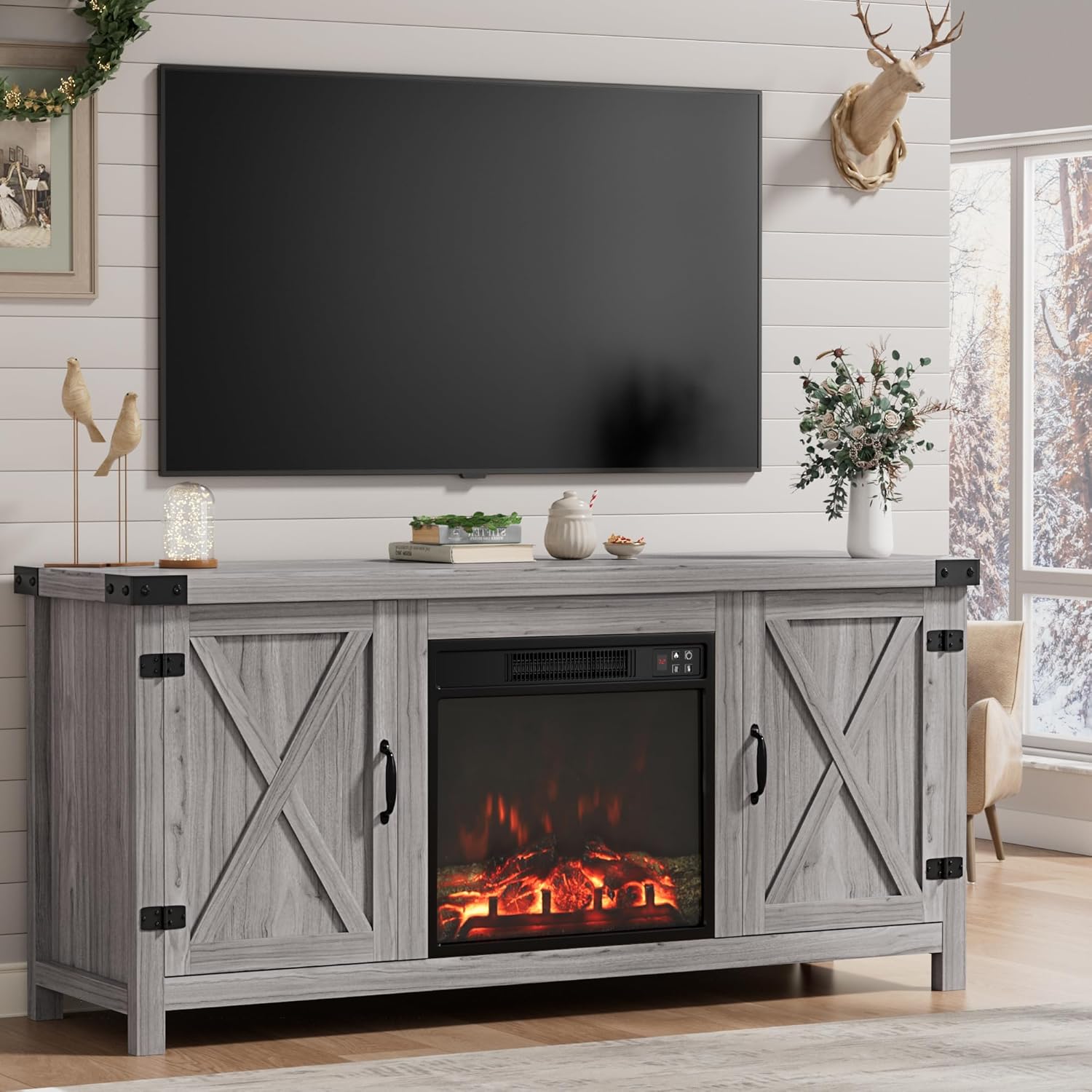
Figure 2: Fully assembled Furmax Fireplace TV Stand.

Figure 3: Details of the rustic barn doors, stable feet, and quality linkage.
Operating Instructions
Electric Fireplace Operation
The integrated 18-inch electric fireplace provides both visual ambiance and heating functionality. The flame effect and heating element can be controlled independently.

Figure 4: Fireplace control panel and remote.
Control Panel Buttons:
- Power Button (Power Icon): Turns the fireplace unit on or off.
- Flame Button (Flame Icon): Cycles through 3-speed flame settings.
- Heat Button (Heat Icon): Adjusts the heating temperature from 65°F to 95°F. The fireplace can warm up to 400 sq. ft.
- Timer Button (Clock Icon): Sets a timer for automatic shut-off.
Remote Control:
The fireplace can also be operated using the included wireless remote control for convenience. The remote mirrors the functions of the control panel buttons.
Storage Features
The Furmax TV Stand is designed with ample storage to keep your living space organized.

Figure 5: Open storage cabinets with adjustable shelves.
- Side Storage Cabinets: Two spacious cabinets with grooved barn doors are located on either side of the fireplace.
- Adjustable Shelves: Each cabinet features two adjustable shelves, allowing you to customize the storage space for various items like game consoles, media, or decor.
- Cable Management: Convenient cable management holes are located at the back of the cabinets to help keep wires and cords tidy and out of sight.

Figure 6: Details of storage features including comfort handle, adjustable shelf, and cable management.
TV Placement
This TV stand is designed to accommodate televisions up to 65 inches in size.

Figure 7: TV size compatibility.
Maintenance and Care
- Cleaning: Use a soft, damp cloth to clean the surfaces of the TV stand. Avoid using abrasive cleaners or harsh chemicals, as they may damage the finish.
- Fireplace Unit: Ensure the air intake and exhaust vents of the fireplace unit remain clear of dust and debris. Periodically wipe the glass with a soft, lint-free cloth.
- General Inspection: Periodically check all assembly screws and connections to ensure they remain tight and secure.
- Moving the Stand: When moving the TV stand, always lift it rather than dragging it to prevent damage to the legs or floor.
Troubleshooting
If you encounter any issues with your Furmax Fireplace TV Stand, please refer to the following table for common problems and solutions.
| Problem | Possible Cause | Solution |
|---|---|---|
| Fireplace not turning on | No power, loose connection, or unit is off. | Ensure the power cord is securely plugged into a functional outlet. Press the power button on the unit or remote. |
| No heat from fireplace | Heat function is not activated or temperature setting is too low. | Press the heat button on the unit or remote to activate heating and adjust the temperature. |
| Flame effect not working | Flame function is not activated. | Press the flame button on the unit or remote to activate the flame effect. |
| TV stand wobbles | Loose assembly screws or uneven floor. | Tighten all assembly screws. Ensure the stand is on a flat, level surface. |
| Doors not closing properly | Hinge misalignment or obstruction. | Adjust the door hinges as needed. Check for any items obstructing the door's path. |
Product Specifications
| Brand | Furmax |
| Model Name | Farmhouse Entertainment Center with Grooved Barn Doors |
| Model Number | 1030 |
| Product Dimensions | 15.75"D x 58"W x 24"H |
| Material | Wood, Particle Board |
| Finish Type | Particle Board |
| Installation Type | Freestanding |
| Special Features | Dimmer, Timer, TV Stand |
| Style | Farmhouse rustic |
| Color | Grey Wash |
| Room Type | Home Office, Living Room |
| Ventilation Type | Vent Free |
| Heating Coverage | 400 sq ft |
| Included Components | TV Stand & Fireplace |
| Item Weight | 78.3 Pounds |
| Maximum Compatible TV Size | Up to 65 Inches |
| Weight Capacity | 220 lbs |
| Certifications | ETL/FCC Certified |
Warranty and Support
Your Furmax Fireplace TV Stand comes with a Limited Warranty. For specific details regarding warranty coverage, please refer to the warranty information included with your product packaging.
For customer support, technical assistance, or warranty inquiries, please contact Furmax directly through their official channels. You can visit the Furmax Store on Amazon for more information.