
Furmax 0000
Furmax Gaming Chair User Manual
Model: 0000 | Brand: Furmax
Introduction
The Furmax Gaming Chair is designed to provide an ergonomic and comfortable seating experience for extended periods, ideal for gaming, working, or relaxation. It features adjustable components and a sturdy build to support various user needs.

Figure 1: Furmax Gaming Chair (Blue model).
Key Features
- Ergonomic Design: High back with body-hugging shape provides comfortable upper and lower back support, naturally fitting head and shoulder.
- Massage & Recline Function: Lumbar massage function helps relieve waist pressure. Backrest adjustable from 90 to 135 degrees with linkage arms.
- Stretchable Footrest: Allows for full body stretching and relaxation.
- 360-Degree Swivel: Seat and base allow for easy movement.
- Durable Materials: High-quality PU leather, elastic molded sponges, thick chair frames supporting up to 330lbs, Class-3 gas lift, and BIFMA tested metal base with rubber casters.
- Adjustable Headrest & Lumbar Pillow: Removable accessories for added comfort and support.
Setup and Assembly
The Furmax Gaming Chair is designed for quick and straightforward assembly. All necessary parts are clearly packed, and a detailed instruction manual is included. No additional tools are required beyond what is provided.
- Unpack all components and verify against the parts list in the included manual.
- Follow the step-by-step instructions provided in the assembly manual.
- Ensure all connections are secure before use.
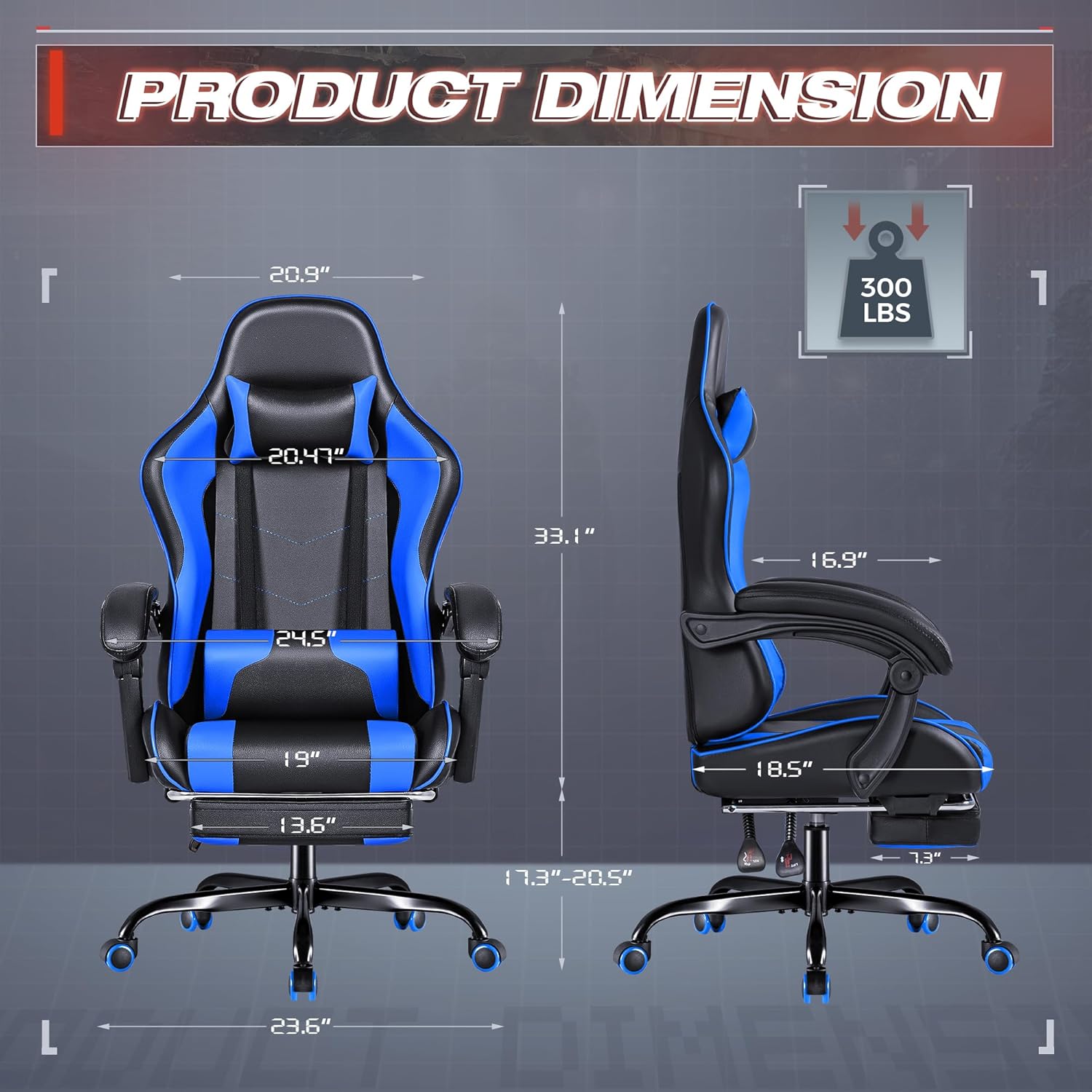
Figure 2: Product dimensions for assembly planning.
Operating Instructions
Adjusting Recline and Footrest
The chair's backrest can be adjusted from 90 to 135 degrees. Locate the recline lever on the side of the chair (typically on the right). Pull the lever up and lean back to your desired angle. Release the lever to lock the position. The stretchable footrest can be pulled out from under the seat for leg extension and pushed back in when not needed.

Figure 3: Recline and height adjustment mechanisms, and the extendable footrest.
Height Adjustment
To adjust the seat height, locate the height adjustment lever (typically on the right, below the seat). Pull the lever up while seated to lower the chair, or pull it up while standing to raise the chair. Release the lever at the desired height.
Lumbar Massage Function
The lumbar pillow features a massage function. Connect the USB cable from the lumbar pillow to a compatible USB power source (e.g., computer, power bank, USB wall adapter). The massage function will activate, providing relief to your lower back.

Figure 4: Lumbar support with integrated massage feature.
Adjustable Headrest and Lumbar Pillow
Both the headrest and lumbar pillow are removable and can be adjusted vertically along the chair's back straps to suit your comfort and ergonomic needs. Simply slide them up or down to find the optimal position for your head and lower back.

Figure 5: Ergonomic high back with adjustable headrest and lumbar support.
Maintenance
To maintain the quality and longevity of your Furmax Gaming Chair, regularly wipe clean the PU leather surfaces with a soft, damp cloth. Avoid using harsh chemicals or abrasive cleaners, as these may damage the material. Periodically check and tighten any loose screws or bolts to ensure stability and safety.
Troubleshooting
If you encounter any issues with your Furmax Gaming Chair, please refer to the following common troubleshooting tips:
- Chair not adjusting height: Ensure the height adjustment lever is fully engaged and the gas lift is not obstructed. If the issue persists, the gas lift may need replacement.
- Chair wobbles: Check all assembly bolts and screws to ensure they are securely tightened. Uneven flooring can also cause wobbling.
- Footrest not extending/retracting smoothly: Check for any obstructions or debris in the footrest mechanism. Lubrication may be required for smoother operation.
- Massage function not working: Verify that the USB cable is securely connected to a working power source. Try a different USB port or power adapter.
For more complex issues or if troubleshooting steps do not resolve the problem, please contact Furmax customer service.
Specifications
| Specification | Detail |
|---|---|
| Brand | Furmax |
| Model Name | Video Game Chair with Footrest and Massage |
| Color | Blue |
| Product Dimensions | 23.6"D x 23.6"W x 50.4"H |
| Maximum Weight Recommendation | 330 Pounds |
| Material | PU Leather, Sponge |
| Back Style | High Back |
| Reclining Position Count | 4 (90-135 degrees) |
| Furniture Base Movement | Swivel |
| Product Care Instructions | Wipe Clean |
| Item Weight | 41 pounds |
Warranty and Support
Furmax is committed to providing quality products and excellent customer service. While specific warranty details are not provided in this manual, we encourage you to contact our professional customer service team for any product-related inquiries, support, or assistance with issues. Your satisfaction is important to us.
For support, please visit the official Furmax store on Amazon: Furmax Amazon Store
Related documents0000


Ask a question about this manual
Ask about setup, troubleshooting, compatibility, parts, safety, or missing instructions. Manuals+ will review the question and use this page’s manual context to help answer it.