
Armocity armocity
Armocity 47" Height Adjustable Standing Desk with Power Outlets
Instruction Manual
Introduction
This manual provides comprehensive instructions for the assembly, operation, and maintenance of your Armocity 47" Height Adjustable Standing Desk. Please read this manual thoroughly before assembly and use to ensure proper function and safety. Keep this manual for future reference.
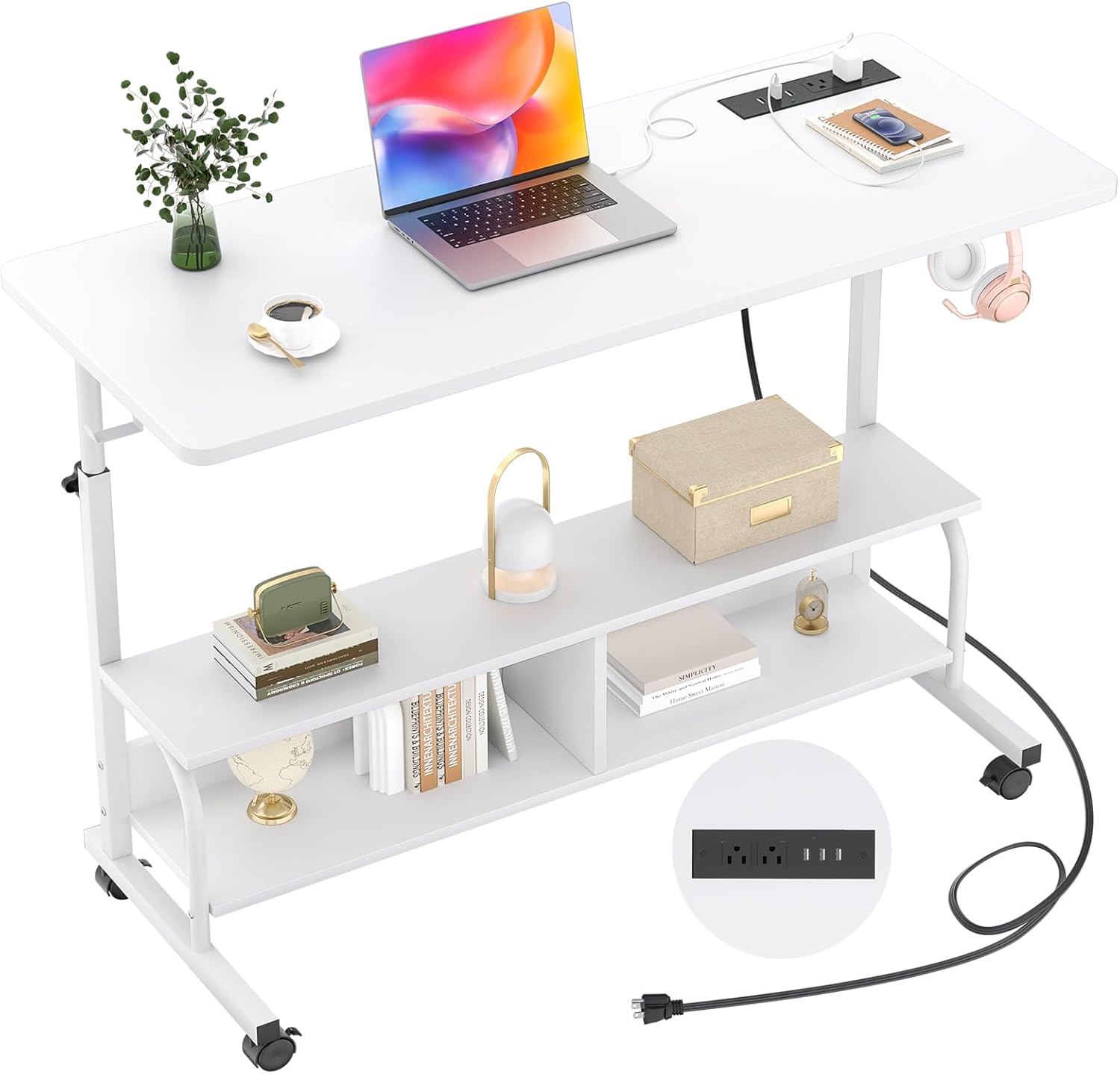
Image: The Armocity 47" Height Adjustable Standing Desk in white, showcasing its design with a laptop, plant, and power outlets on the main surface, and two storage shelves below.
Important Safety Information
This desk is designed for stability and has a high weight capacity. However, users should ensure that the desk is not overloaded beyond its weight limit and is used on a stable, level surface. Proper assembly is crucial for safety, and users should follow the provided instructions carefully. Always unplug electronic devices when not in use, and never leave them unattended while charging on the desk.
Package Contents
Please verify that all components are present before beginning assembly. If any parts are missing or damaged, please contact customer support.
- Desktop Surface
- Lower Storage Shelves
- Desk Frame Components (legs, supports)
- Power Outlet Strip (2 AC outlets, 3 USB ports)
- 6.5ft Power Supply Cord
- 4 x Rolling Wheels (2 lockable)
- 2 x Desk Iron Hooks
- Assembly Hardware (screws, bolts, etc.)
- Assembly Tools
- Instruction Manual
Setup and Assembly
Assembly of the Armocity standing desk is designed to be straightforward. All necessary accessories and tools are included, along with comprehensible detailed instructions and labeled parts to facilitate the process.
- Unpack all components and verify against the package contents list.
- Follow the step-by-step instructions provided in the separate assembly guide.
- Ensure all screws and fasteners are securely tightened before use.
- Attach the rolling wheels or non-slip footpads as desired.

Image: A detailed diagram illustrating the dimensions of the desk, including its adjustable height range from 27.5 to 41 inches, and the measurements of the 47"L x 15.7"W desktop and storage shelves.
Operating Instructions
Height Adjustment
The desk features a manual height adjustment mechanism, allowing you to easily transition between sitting and standing positions. To adjust the height, loosen the adjustment knobs on the side supports, raise or lower the desktop to your desired height (between 27.5 and 41 inches), and then securely tighten the knobs.

Image: Visual representation of the desk's height adjustability, demonstrating comfortable sitting and standing positions with corresponding height measurements.
Integrated Power Outlets
The desktop includes a built-in power strip with 2 AC outlets (120V/12A) and 3 USB ports (5V/2A). This allows for convenient charging of electronic devices such as phones, laptops, and AirPods directly from your workspace. The power strip is connected via a 6.5ft long power supply cord.

Image: A detailed view of the desk's power outlet module, highlighting the AC and USB ports in use for charging devices.
Mobility and Storage Features
The desk is equipped with 4 high-quality smooth rotary wheels for easy movement. Two of these wheels are lockable, allowing you to secure the desk in a fixed position when needed. Additionally, the desk features two tier opening storage shelves for organizing daily necessities and two extra iron hooks on the side for hanging headphones or bags, maximizing your workspace efficiency.

Image: An overview of the desk's functional features, including the protective edge, side hooks, two-tier storage, and the lockable wheels/footpads for stability and mobility.
Maintenance
To ensure the longevity and appearance of your Armocity standing desk, follow these maintenance guidelines:
- Cleaning: The surface is smooth and waterproof. Wipe clean with a soft, damp cloth. Avoid abrasive cleaners or harsh chemicals.
- Hardware: Periodically check all screws and bolts to ensure they remain tight. Retighten if necessary.
- Power Outlets: Keep the power outlets free from dust and debris. Do not expose to liquids.
- Weight Capacity: Do not exceed the recommended weight capacity of the desktop or shelves to prevent damage.
Troubleshooting
If you encounter any issues with your desk, please refer to the following common problems and solutions:
- Desk is Wobbly: Ensure all assembly screws are fully tightened. Check that the desk is on a level surface. If using wheels, ensure they are locked. If using footpads, adjust them to stabilize the desk.
- Height Adjustment is Difficult: Loosen the adjustment knobs sufficiently before attempting to change height. Ensure the vertical poles are clean and free of obstructions.
- Power Outlets Not Working: Check if the main power cord is securely plugged into a wall outlet. Verify that devices are correctly plugged into the desk's outlets. If issues persist, contact customer support.
- Missing Parts or Damaged Components: Refer to the package contents list. If any items are missing or damaged upon arrival, contact Armocity customer service immediately for assistance.
Product Specifications
| Feature | Specification |
|---|---|
| Brand | Armocity |
| Model Number | armocity |
| Product Dimensions (D x W x H) | 15.7"D x 47"W x 41"H |
| Color | White |
| Material | High-quality Wooden Board and Sturdy Metal Frame |
| Height Adjustment Range | 27.5 Inches (Minimum) to 41 Inches (Maximum) |
| Power Outlets | 2 AC Outlets (120V/12A) |
| USB Ports | 3 USB Ports (5V/2A) |
| Power Cord Length | 6.5 ft |
| Storage | 2 Open Shelves, 2 Iron Hooks |
| Mobility | 4 Rolling Wheels (2 Lockable) |
| Assembly Required | Yes (Tools Included) |
Warranty and Customer Support
Armocity provides 24-month customer support for this product. If you have any problems with your adjustable height desk, including assembly issues, missing parts, or operational concerns, please do not hesitate to contact our friendly customer service team. We are always here to assist you.
For support, please refer to the contact information provided with your purchase or visit the official Armocity website.
Ask a question about this manual
Ask about setup, troubleshooting, compatibility, parts, safety, or missing instructions. Manuals+ will review the question and use this page’s manual context to help answer it.