
1. Introduction and Safety Information
Thank you for choosing the COLAMY 270 Power Swivel Glider Recliner Chair. This manual provides essential instructions for assembly, operation, and maintenance to ensure safe and optimal use of your product. Please read this manual thoroughly before use and retain it for future reference.
Important Safety Warnings:
- Maximum Weight Capacity: Do not exceed the maximum weight recommendation of 300 pounds (136 kg). Exceeding this limit may result in injury or damage to the chair.
- Children and Pets: Keep children and pets away from the chair's moving parts, especially during recline or swivel operations.
- Power Cords: Ensure all power cords are properly routed to avoid tripping hazards or damage. Do not place the chair on the power cord.
- Stable Surface: Always place the chair on a flat, stable surface.
- Intended Use: Use this chair only for its intended purpose as a seating and reclining furniture item. Avoid standing on the chair or using it as a step stool.
- Maintenance: Regularly inspect the chair for any loose parts or damage. Do not use if any components are damaged.
2. Package Contents
Please verify that all components are present before beginning assembly:
- Sofa Back (B)
- Seat Cushion (A)
- Support Frame (C)
- Mobile Frame (D)
- iPad Frame (E)
- Frame Nut (F)
- Power Cable (G)
- Power Supply (H)
- User Manual (this document)
3. Setup and Assembly
Follow these steps to assemble your COLAMY Power Swivel Glider Recliner Chair. It is recommended to have two people for assembly.
Video: Assembly Guide for COLAMY Power Swivel Glider Recliner Chair. This video demonstrates the step-by-step process of assembling the chair, including connecting the backrest, power cables, and accessory holders.
- Step 1: Connect Sofa Back to Seat Cushion. Carefully align the Sofa Back (B) with the Seat Cushion (A) and push down until the connection is secure. Once connected, secure the Sofa Back cover to the bottom of the Seat Cushion using the Velcro fasteners.

Image: Connecting the sofa back to the seat cushion and securing with Velcro.
- Step 2: Connect Power Cables. Connect the Power Cable (G) to the Power Supply (H). Ensure the connection is firm. Then, connect the power supply to a wall outlet and switch it on.

Image: Connecting the power cable to the power supply.
- Step 3: Attach Support Frame. Use the Frame Nut (F) against the bottom of the frame base on the right side of the sofa. Rotate the Support Frame (C) until the connection is secure.
- Step 4: Attach Device Holders. Connect either the iPad Frame (E) or Mobile Frame (D) to the top of the Support Frame (C) until the connection is secure. These holders are removable and interchangeable.
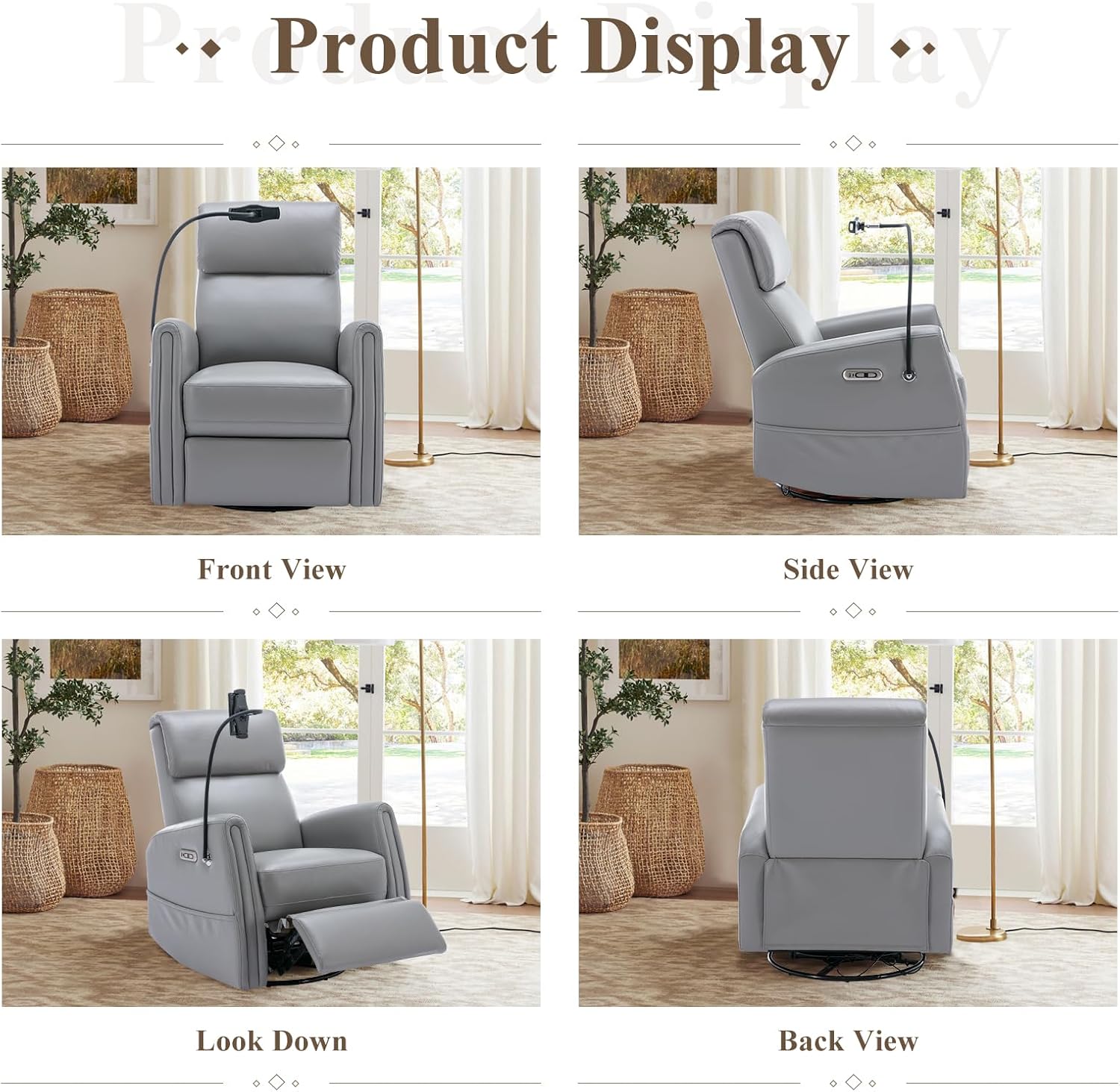
Image: Attaching the device holder to the support frame.
4. Operating Instructions
Your COLAMY recliner offers multiple features for enhanced comfort and convenience.
Video: Product Features Overview. This video highlights the key features of the COLAMY Power Swivel Glider Recliner Chair, including its recline function, device holders, and comfortable design.
4.1 Recline Function
The chair features a power recline mechanism. Locate the two buttons on the side of the chair's armrest. Press the forward button to recline the chair up to 145 degrees. Press the backward button to return the chair to its upright position. Release the button at any point to stop the recline motion.

Image: Power recline and charging port control panel.
4.2 Swivel and Gliding Function
The chair is designed with a 270-degree swivel mechanism, allowing you to rotate the chair to your desired orientation. It also offers a smooth gliding motion for gentle rocking.
Image: The COLAMY recliner chair demonstrating its 270-degree swivel and gliding motion.
4.3 Device Holders
The chair includes two removable device holders, one for mobile phones and one for iPads. These holders attach to the support frame on the side of the chair. Adjust the clamps to securely hold your device. The iPad clip holds up to 1.33 pounds, and the phone clip holds up to 0.88 pounds.
4.4 USB & Type-C Charging Ports
Conveniently located on the side of the chair, you will find both USB and Type-C charging ports. Use these ports to charge your electronic devices while relaxing in the chair.
4.5 Side Storage Pocket
A practical storage pocket is integrated into the side of the chair, perfect for holding magazines, remote controls, or other small items.
5. Maintenance
Proper care will extend the life and appearance of your recliner.
- Cleaning: For general cleaning, wipe the PU leather surface with a soft, damp cloth. Avoid using harsh chemicals or abrasive cleaners, as these can damage the material.
- Spills: Blot spills immediately with a clean, dry cloth.
- Inspection: Periodically check all bolts and connections to ensure they are tight. Retighten if necessary.
- Sunlight: Avoid prolonged exposure to direct sunlight to prevent fading and material degradation.
6. Troubleshooting
If you encounter any issues with your recliner, please refer to the following common solutions:
- Chair Not Reclining/Swiveling:
- Ensure the power cable is securely connected to the chair and the wall outlet.
- Check if the wall outlet is functioning by plugging in another device.
- Verify that no objects are obstructing the reclining mechanism or swivel base.
- Device Holder Loose:
- Tighten the Frame Nut (F) and ensure the device holder is securely attached to the Support Frame (C).
- Adjust the clamps on the device holder to firmly grip your phone or iPad.
- Unusual Noises:
- Check for any loose bolts or connections and tighten them.
- Ensure the chair is on a level surface.
If the problem persists after attempting these solutions, please contact COLAMY customer support for further assistance.
7. Specifications
Detailed product specifications for the COLAMY 270 Power Swivel Glider Recliner Chair:
| Feature | Detail |
|---|---|
| Brand | COLAMY |
| Model Name | 60399C-001 |
| Product Dimensions | 35.83"D x 30.51"W x 39.76"H |
| Item Weight | 38.9 pounds |
| Maximum Weight Recommendation | 300 Pounds |
| Material | Iron, Leather, Metal (PU Leather) |
| Color | Grey |
| Back Style | Cushion Back, Upholstered backrest |
| Special Features | Adjustable Lumbar, Arm Rest, Cushion Availability, Ergonomic, Upholstered Leather |
| Reclining Position Count | >1 (up to 145 degrees) |
| Furniture Base Movement | Glide, 270-degree Swivel |
| Charging Ports | USB, Type-C |
| Included Components | Upholstered leather chair, user manual |
| Product Care Instructions | Wipe Clean |

Image: Detailed product dimensions.
8. Warranty and Support
For warranty information, specific return policies, or to contact customer support, please refer to the documentation included with your purchase or visit the official COLAMY website. Please have your model number (60399C-001) and purchase details ready when contacting support.
