
Delta 5GA-PAD-240
Delta Faucet Steam System Auto Drain and Generator Pan User Manual
Model: 5GA-PAD-240
1. Product Overview
The Delta Faucet Steam System Auto Drain and Generator Pan are essential components designed to enhance the longevity and performance of your 240v steam generator. The Auto Drain automatically purges the system, preventing mineral buildup, while the Generator Pan provides protection against potential leaks or condensation.

Image 1.1: The Delta Faucet Steam System Auto Drain (left) and Generator Pan (right).
Key Features:
- Includes recommended auto drain and generator drip pan.
- Generator Pan ensures protection from potential generator leaks or condensation buildup.
- Auto Drain automatically purges the system by gravity once water in the generator cools.
- For use with 5GE-SMP 240v steam generators; the voltage should match the voltage of your steam generator.
- Generator pan includes solid brass drain pumping connection.
2. Setup and Installation
Proper installation of the Auto Drain and Generator Pan is crucial for optimal performance and safety. Ensure all local plumbing and electrical codes are followed.
2.1 Generator Pan Installation
The generator pan should be placed directly underneath the steam generator. It is designed to catch any potential leaks or condensation, protecting the surrounding area. The pan includes a solid brass drain pumping connection for proper drainage.

Image 2.1: General guidelines for steam shower installation, including generator placement.
2.2 Auto Drain Installation
The Auto Drain connects to your steam generator and requires a 240v power supply, matching the generator's voltage. It automatically purges the system by gravity. Refer to your steam generator's manual for specific connection points and electrical wiring diagrams.

Image 2.2: Diagram showing the typical components of a steam shower system, including the generator.
Important: Ensure the voltage of the Auto Drain (240v) matches the voltage of your steam generator (5GE-SMP 240v series).
3. Operating Instructions
The Delta Faucet Steam System Auto Drain operates automatically in conjunction with your steam generator. No manual intervention is typically required for its primary function.
3.1 Automatic Purge Function
The Auto Drain is designed to automatically purge the steam generator system. After the steam generator has been used and the water inside cools down, the Auto Drain will open to allow the water to drain out by gravity. This process helps prevent the buildup of mineral deposits within the generator, extending its lifespan and maintaining efficiency.

Image 3.1: Illustration of how a steam system operates, including the steam generator and control.
Ensure the drain line from the Auto Drain is properly connected to an approved drainage system.
4. Maintenance
The Auto Drain and Generator Pan are designed for low maintenance. Regular inspection is recommended to ensure proper function.
4.1 Generator Pan Inspection
- Periodically inspect the generator pan for any signs of water accumulation or damage.
- Ensure the drain connection on the pan is clear and free of debris.
- Clean the pan as needed with mild soap and water to remove any dust or residue.
4.2 Auto Drain Inspection
- Verify that the Auto Drain is cycling correctly after each use of the steam generator. You should hear it activate as the generator cools.
- Check the drain line for any blockages or kinks that could impede water flow.
- If you notice unusual noises or a lack of drainage, consult the troubleshooting section or contact customer support.
5. Troubleshooting
This section addresses common issues you might encounter with your Auto Drain and Generator Pan.
| Problem | Possible Cause | Solution |
|---|---|---|
| Water accumulating in generator pan | Steam generator leak; Condensation buildup; Pan drain blocked | Inspect steam generator for leaks; Ensure proper ventilation; Clear pan drain connection. |
| Auto Drain not purging | No power to Auto Drain; Drain line blocked/kinked; Malfunctioning unit | Check electrical connection; Clear drain line; Contact Delta Faucet support if issue persists. |
| Unusual noise from Auto Drain | Debris in valve; Normal operation sound | Ensure water quality; If noise is excessive or new, contact support. |
If you experience issues not listed here or if solutions do not resolve the problem, please contact Delta Faucet customer support.
6. Specifications
Detailed specifications for the Delta Faucet Steam System Auto Drain and Generator Pan.
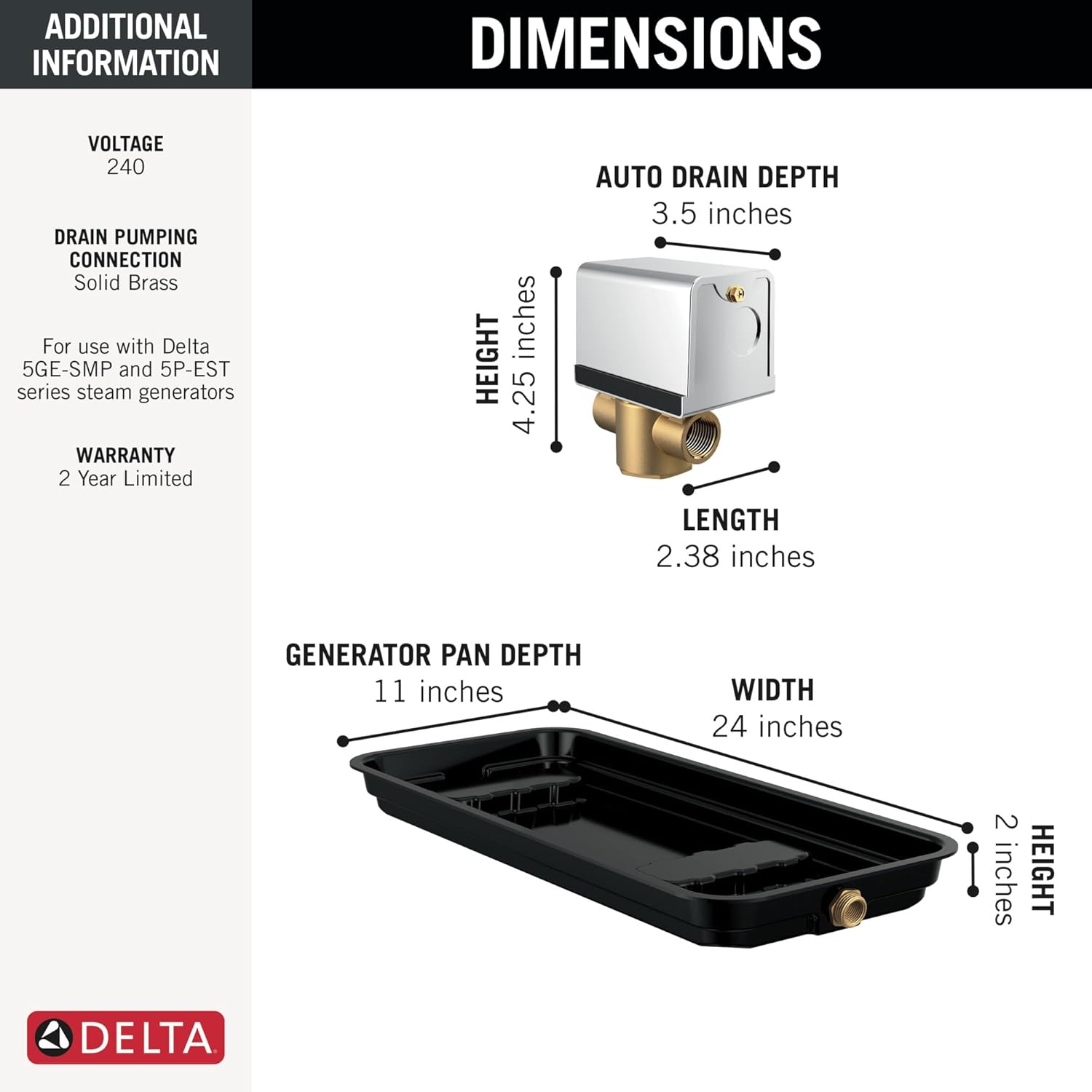
Image 6.1: Detailed dimensions for the Auto Drain and Generator Pan.
| Specification | Detail |
|---|---|
| Manufacturer | Delta Faucet Company |
| Part Number | 5GA-PAD-240 |
| Item Weight | 3.7 pounds |
| Product Dimensions | 11 x 24 x 4.25 inches |
| Item Model Number | 5GA-PAD-240 |
| Color | Chrome |
| Item Package Quantity | 1 |
| Included Components | Steam generator pan, auto drain |
| Batteries Required? | No |
| Date First Available | October 24, 2023 |
7. Warranty Information
The Delta Faucet Steam System Auto Drain and Generator Pan (Model 5GA-PAD-240) comes with a 2 Year Limited Warranty. This warranty covers defects in material and workmanship under normal use and service.
For full warranty terms and conditions, please refer to the official Delta Faucet warranty documentation or visit the Delta Faucet website.
8. Customer Support
For technical assistance, troubleshooting beyond this manual, or warranty claims, please contact Delta Faucet customer support:
- Website: www.deltafaucet.com
- Refer to the product packaging or the Delta Faucet website for current contact numbers and hours of operation.
When contacting support, please have your product model number (5GA-PAD-240) and date of purchase readily available.
Related documents5GA-PAD-240


Ask a question about this manual
Ask about setup, troubleshooting, compatibility, parts, safety, or missing instructions. Manuals+ will review the question and use this page’s manual context to help answer it.