
1. Introduction
Thank you for choosing the Cecotec ReadyWarm 2000 Max Box Ceramic Heater. This manual provides essential information for the safe and efficient use of your new ceramic heater. Please read these instructions carefully before operating the appliance and retain them for future reference.
This ceramic heater is designed to provide warmth in rooms up to approximately 20 m², making it suitable for bathrooms due to its IPX2 protection against splashing water. It features 2000W of power, an LED display, and a remote control for convenient operation.
2. Important Safety Instructions
WARNING: To avoid overheating, do not cover the heater.
- Read all instructions before using this heater.
- This heater is hot when in use. To avoid burns, do not let bare skin touch hot surfaces.
- Keep combustible materials, such as furniture, pillows, bedding, papers, clothes, and curtains at least 1 meter (3 feet) from the front of the heater and keep them away from the sides and rear.
- Extreme caution is necessary when any heater is used by or near children or invalids and whenever the heater is left operating and unattended.
- Always unplug the heater when not in use.
- Do not operate any heater with a damaged cord or plug or after the heater malfunctions, has been dropped, or damaged in any manner. Return heater to authorized service facility for examination, electrical or mechanical adjustment, or repair.
- Do not use outdoors. This heater is intended for indoor use only.
- This heater is suitable for use in bathrooms (IPX2 protection), but must not be placed directly above or below a water outlet.
- Do not run cord under carpeting. Do not cover cord with throw rugs, runners, or similar coverings. Arrange cord away from traffic area and where it will not be tripped over.
- To disconnect heater, turn controls to OFF, then remove plug from outlet.
- Do not insert or allow foreign objects to enter any ventilation or exhaust opening as this may cause an electric shock or fire, or damage the heater.
- To prevent a possible fire, do not block air intakes or exhaust in any manner. Do not use on soft surfaces, like a bed, where openings may become blocked.
- A heater has hot and arcing or sparking parts inside. Do not use it in areas where gasoline, paint, or flammable liquids are used or stored.
- Use this heater only as described in this manual. Any other use not recommended by the manufacturer may cause fire, electric shock, or injury to persons.
- This appliance is not intended for use by persons (including children) with reduced physical, sensory or mental capabilities, or lack of experience and knowledge, unless they have been given supervision or instruction concerning use of the appliance by a person responsible for their safety.
- Children should be supervised to ensure that they do not play with the appliance.
- The heater is equipped with an overheat protection system. If the heater overheats, it will automatically shut off. Unplug the heater and allow it to cool down for 30 minutes before restarting.
3. Product Components
Familiarize yourself with the main parts of your Cecotec ReadyWarm 2000 Max Box Ceramic Heater.

Figure 1: Front view of the Cecotec ReadyWarm 2000 Max Box Ceramic Heater with its remote control. The heater features a central LED display and a sleek white design.

Figure 2: Detailed front view of the heater, highlighting the air outlet and the integrated LED display.

Figure 3: Side profile of the ceramic heater, showing its compact design suitable for wall mounting.

Figure 4: Rear view of the heater, indicating mounting points and power cord entry.
4. Setup and Installation
The Cecotec ReadyWarm 2000 Max Box Ceramic Heater is designed for wall mounting. Ensure the installation location is safe and meets all electrical requirements.
4.1 Choosing an Installation Location
- Select a wall location that is at least 1 meter (3 feet) away from any combustible materials.
- Ensure the wall can support the weight of the heater (approximately 2.32 kg).
- For bathroom installation, ensure the heater is not directly above or below a water outlet and is installed in accordance with local electrical regulations for bathrooms. The IPX2 rating provides protection against dripping water.
- Ensure there is a suitable power outlet within reach of the power cord without requiring an extension cord.
4.2 Mounting the Heater
- Mark the desired mounting points on the wall using the heater's mounting holes as a template.
- Drill holes at the marked positions.
- Insert appropriate wall plugs (if necessary) into the drilled holes.
- Secure the heater to the wall using screws, ensuring it is firmly attached.
- Plug the heater into a grounded electrical outlet.

Figure 5: The heater installed on a bathroom wall, demonstrating its suitable placement in a humid environment due to IPX2 protection.
5. Operation
Your ceramic heater can be operated using the control panel on the unit or the included remote control.
5.1 Control Panel and LED Display
The integrated LED display shows the current settings and temperature. Buttons on the unit allow for basic control.

Figure 6: Close-up of the LED display, indicating temperature (e.g., 25°C) and various mode icons such as fan, low heat, high heat, and timer.
5.2 Remote Control
The remote control provides convenient access to all functions from a distance.
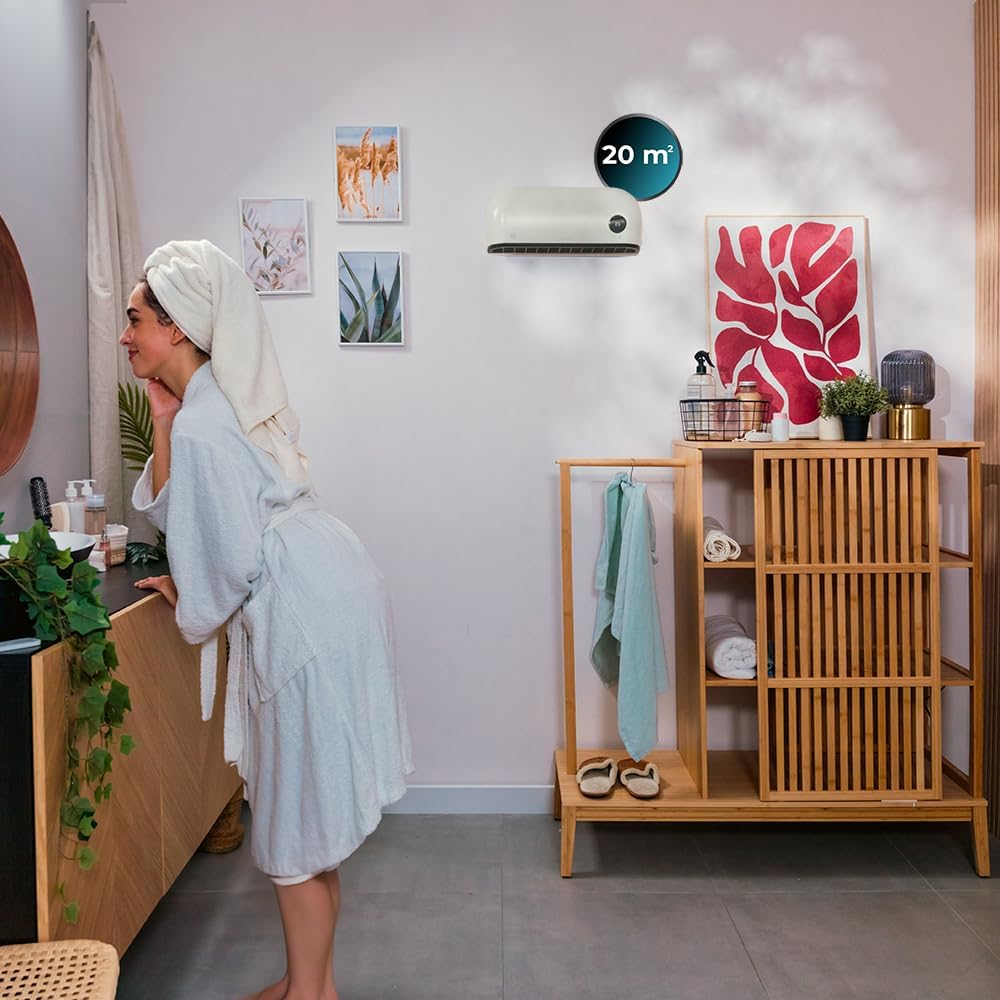
Figure 7: The remote control unit, featuring buttons for power, speed, mode, and timer functions.
5.3 Operating Modes
The heater offers 3 operating modes and an adjustable thermostat:
- Fan Mode: Circulates air without heating.
- Low Heat (1000W): Provides gentle warmth.
- High Heat (2000W): Delivers maximum heating power for rapid warming of spaces up to 20 m².

Figure 8: Visual representation of the three operating modes and the adjustable thermostat feature.
5.4 Timer Function
The programmable timer allows you to set the operating duration for up to 12 hours.
- Press the "TIME" button on the remote control or unit.
- Adjust the desired operating time using the appropriate buttons.
- The heater will automatically turn off after the set time.

Figure 9: The heater's display showing the timer function activated for 12 hours, indicating scheduled operation.
6. Maintenance and Care
Regular cleaning and proper care will ensure the longevity and efficient operation of your heater.
6.1 Cleaning
- Always unplug the heater and allow it to cool completely before cleaning.
- Use a soft, damp cloth to wipe the exterior surfaces of the heater.
- Do not use abrasive cleaners, solvents, or chemical agents as these can damage the heater's finish.
- Ensure no water enters the interior of the heater.
- Clean the air intake and exhaust vents regularly with a vacuum cleaner or a soft brush to remove dust and debris.
6.2 Storage
- If storing the heater for an extended period, clean it thoroughly.
- Store the heater in its original packaging in a cool, dry place.
- Do not place heavy objects on top of the heater during storage.
7. Troubleshooting
If you encounter issues with your heater, refer to the following common problems and solutions:
| Problem | Possible Cause | Solution |
|---|---|---|
| Heater does not turn on. |
|
|
| Heater produces no heat. |
|
|
| Remote control not working. |
|
|
| Heater makes unusual noise. |
|
|
8. Technical Specifications
| Feature | Detail |
|---|---|
| Brand | Cecotec |
| Model Number | 08281 |
| Product Dimensions | 50.5 x 13 x 20 cm |
| Weight | 2.32 kg |
| Power | 2000 Watts |
| Voltage | 220 Volts |
| Material | Plastic |
| Number of Speeds | 2 (Heat settings) |
| Noise Level | 10 Decibels (Note: User reviews indicate it can be louder during operation) |
| Special Features | Overheat Protection, IPX2 Water Protection, LED Display, Remote Control, Programmable Timer (up to 12 hours) |
| Recommended Use | Indoor, Bathroom |
| Heating Coverage | Up to 20 m² (215 sq ft) |
| Mounting Type | Wall Mount |
9. Warranty and Support
Cecotec products are manufactured to the highest quality standards. For detailed warranty information, please refer to the warranty card included with your product or visit the official Cecotec website.
9.1 Customer Support
If you have any questions, require technical assistance, or need to report a problem with your Cecotec ReadyWarm 2000 Max Box Ceramic Heater, please contact Cecotec customer service through their official website or the contact information provided in your product packaging.
For online support and FAQs, you may visit: Cecotec Official Website


