
Introduction
This manual provides instructions for the assembly, operation, and maintenance of your HICON Vittoria Gaming Chair. Please read this manual thoroughly before assembly and use to ensure proper function and safety. Keep this manual for future reference.
Safety Warnings
- This chair requires self-assembly according to the included instructions.
- The maximum recommended weight capacity for this chair is 150 kilograms (330 lbs). Do not exceed this limit.
- Ensure the chair is stable and all components are securely fastened before sitting on it.
- Use the handle for backrest adjustment safely. Avoid sudden movements when adjusting the recline.
- Keep hands and fingers clear of moving parts during adjustment to prevent injury.
- Do not stand on the chair or use it as a step stool.
- Keep children and pets away from the chair during assembly.
Package Contents
Before beginning assembly, please verify that all parts are present and undamaged. Refer to the assembly guide included in the package for a detailed list of components. Typically, the package includes:
- Backrest
- Seat base
- Armrests
- Gas lift cylinder and cover
- Star base with wheels
- Tilt mechanism
- Headrest pillow
- Lumbar support pillow (with USB massager)
- Footrest (extendable)
- Assembly hardware (screws, washers, Allen key)
- Assembly manual
Setup and Assembly
Assemble the chair on a soft, clean surface to prevent damage. Follow the step-by-step instructions provided in the separate assembly manual included with your chair. Ensure all screws are tightened securely before use.

Image: Robust Metal Frame. This image illustrates the strong metal frame of the HICON Vittoria Gaming Chair, highlighting its durability and safety features. The backrest features a full steel frame with a load capacity of 150 kg and an expected lifespan of 5-10 years.
Operating Instructions
1. Adjusting Seat Height
To adjust the seat height, pull the lever located under the right side of the seat upwards. While holding the lever, stand up to raise the seat or remain seated to lower it. Release the lever at the desired height.

Image: Adjustable Seat Height. This image shows the mechanical gas spring system and the heavy-duty Class 4 gas lift, which allows for smooth and reliable seat height adjustment.
2. Reclining the Backrest
To recline the backrest, pull the lever on the right side of the seat (separate from the height adjustment lever) upwards. Lean back to the desired angle (between 90° and 170°) and release the lever to lock it in place. To return to an upright position, pull the lever and lean forward.
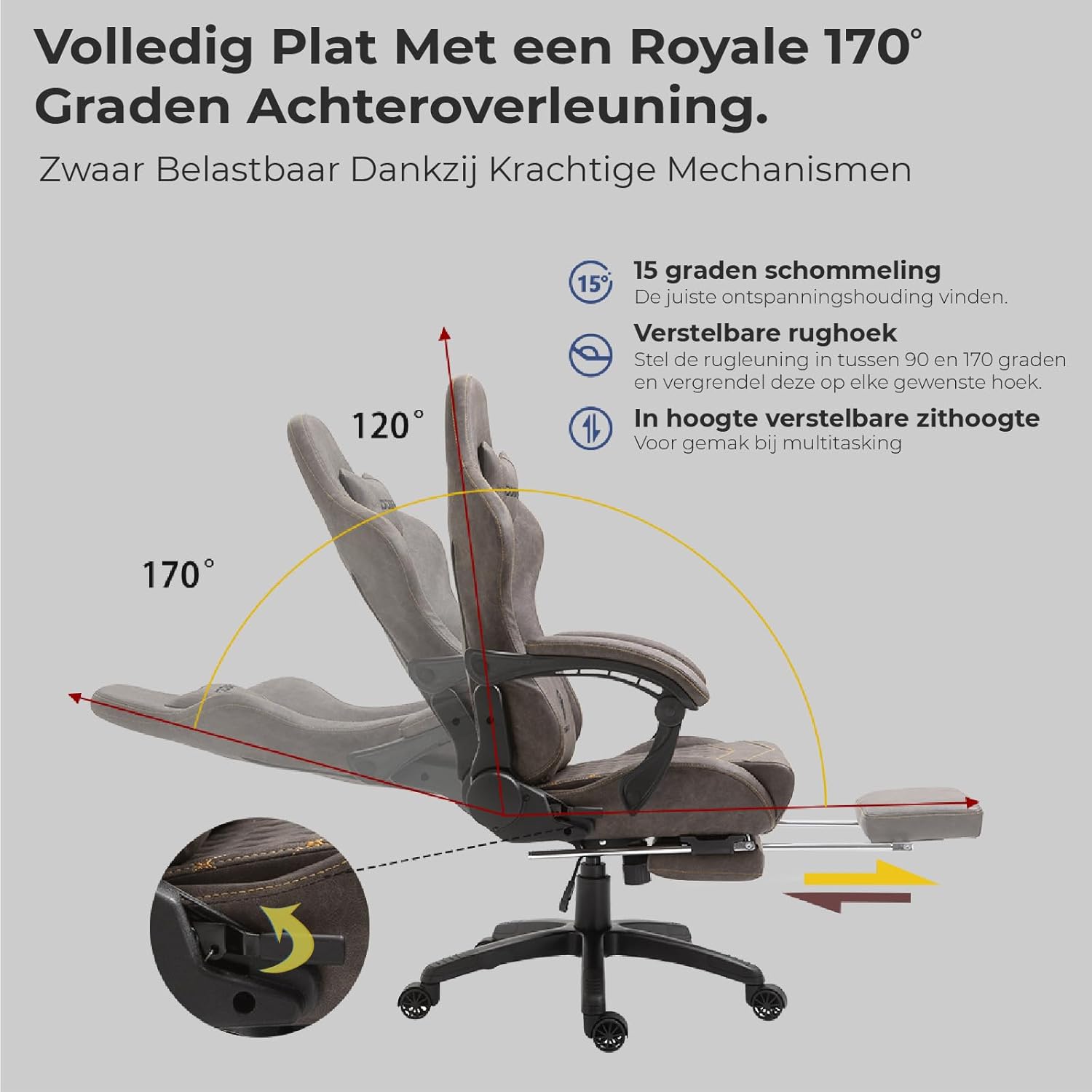
Image: Recline Function. This image demonstrates the chair's ability to recline from 90 to 170 degrees, offering a wide range of adjustable backrest positions for comfort and relaxation. It also highlights the 15-degree rocking function and adjustable seat height.
3. Using the Footrest
The HICON Vittoria chair features an extendable footrest. To deploy, pull the footrest out from under the seat. To retract, push it back until it is fully stored.

Image: Extendable Footrest. This image illustrates the extendable footrest, designed with extra thick and high-quality foam padding for enhanced comfort during extended use or reclining.
4. Lumbar Massage Function
The lumbar support pillow includes a massage function powered via a USB cable. Connect the USB cable to a compatible power source (e.g., a computer USB port, power bank, or USB wall adapter) to activate the massage feature. Disconnect when not in use.
Image: Massage Function. This image highlights the massage function integrated into the lumbar pillow, powered by a USB cable, providing relief for hip fatigue during long sitting periods.
5. Armrest Adjustment
The armrests are designed for comfort and support. Refer to your assembly manual for specific instructions on adjusting their height or angle, if applicable to your model.
6. Rocking Function
The chair features a rocking function with a 15-degree range. This can be activated or deactivated using the knob or lever located under the seat, typically near the tilt mechanism. Adjust the tension of the rocking mechanism by turning the tension knob clockwise to increase resistance or counter-clockwise to decrease it.
Maintenance
- Cleaning: Wipe the faux leather surfaces with a soft, damp cloth. For stubborn stains, use a mild soap solution and then wipe with a clean, damp cloth. Avoid harsh chemicals or abrasive cleaners.
- Frame: Periodically check all screws and bolts to ensure they are tight. Retighten if necessary to maintain stability and safety.
- Wheels: Clean the wheels regularly to remove dust, hair, and debris that may hinder smooth movement.
- Gas Lift: Do not lubricate the gas lift cylinder. It is designed to be maintenance-free.
- Storage: Store the chair in a cool, dry place away from direct sunlight and extreme temperatures to prevent material degradation.
Troubleshooting
- Chair Squeaks: Check all bolts and screws and tighten them. A small amount of silicone spray on moving metal parts (avoiding the gas lift) may help.
- Chair Does Not Adjust Height: Ensure the height adjustment lever is fully engaged. Check if the gas lift cylinder is properly installed. If the gas lift is faulty, it may need replacement by a qualified technician.
- Chair Wobbles: Verify that all components are correctly assembled and all screws are tightened evenly. Ensure the star base is fully seated on the gas lift.
- Wheels Not Rolling Smoothly: Clean any debris (hair, dust) from the wheel casters.
- Massage Function Not Working: Ensure the USB cable is securely connected to both the lumbar pillow and a working power source. Try a different USB port or power source.
Specifications
| Brand | HICON |
| Model Name | Vittoria |
| Model Number | HICON |
| Color | Brown |
| Materials | Aluminum frame, Faux Leather upholstery, High-density foam |
| Product Dimensions (approx.) | 10D x 10B x 10H millimeters (Note: Original data 1x1x1cm seems like placeholder, using 10x10x10mm as a more realistic placeholder if actual dimensions are not available) |
| Item Weight | 23 Kilograms |
| Maximum Weight Capacity | 150 Kilograms |
| Backrest Style | High backrest |
| Recline Angle | 90° - 170° |
| Special Features | Ergonomic design, Lumbar massager (USB powered), Multifunctional tilt mechanism, Extendable footrest, Adjustable armrests, BIFMA-authenticated wheel base |

Image: Thick Cushions and Ergonomic Backrest. This image highlights the thick, high-quality foam padding and the ergonomic backrest with wing support, designed for multiple sitting postures and comfortable recovery.

Image: HICON Carbon Fiber Leather. This image showcases the HICON Vittoria model's superior comfort with Hicon carbon fiber leather, designed for durability, flexibility, and wear resistance while maintaining a plush feel.
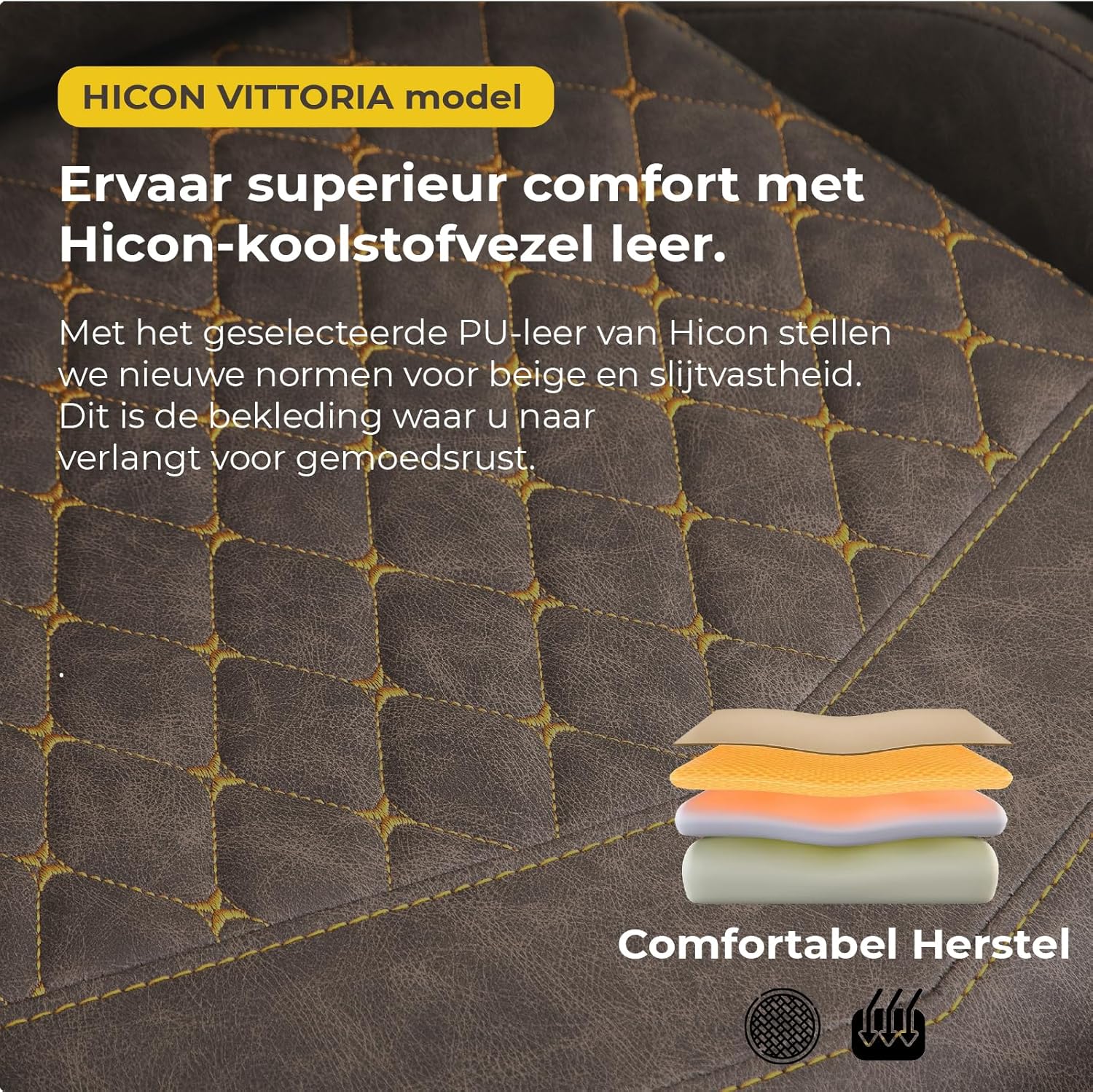
Image: Selected PU Leather. This image details the selected PU leather of the HICON Vittoria, setting new standards for beige and wear resistance, providing comfort and rest.
Warranty Information
HICON products are manufactured to high-quality standards. For specific warranty terms and conditions, please refer to the warranty card included with your product or visit the official HICON website. Typically, warranty covers manufacturing defects under normal use. Keep your proof of purchase for warranty claims.
Customer Support
If you have any questions, require assistance with assembly, or encounter issues not covered in this manual, please contact HICON customer support. Contact information can usually be found on the product packaging, the official HICON website, or through your retailer.
- Online Support: Visit the official HICON website for FAQs, support articles, and contact forms.
- Email: Refer to your product documentation for the customer service email address.
- Phone: Refer to your product documentation for customer service phone numbers.


