
1. Introduction
This manual provides detailed instructions for the safe and efficient operation of your Telefunken THP-2535 Solar Powered Portable Bluetooth FM Radio. Please read this manual thoroughly before using the device and retain it for future reference.
The Telefunken THP-2535 is a versatile portable radio featuring Bluetooth connectivity, FM radio tuning, USB and TF card playback, and an AUX input. It is designed for portability with a built-in speaker, headphone jack, carrying handle, and a solar panel for convenient battery charging.
2. Safety Information
- Do not expose the device to extreme temperatures, direct sunlight for prolonged periods (beyond charging), or high humidity.
- Avoid dropping or subjecting the device to strong impacts.
- Do not disassemble, repair, or modify the device yourself. Refer all servicing to qualified personnel.
- Keep the device away from water and other liquids.
- Ensure proper ventilation when charging to prevent overheating.
- Use only the specified charging cable and power sources.
- Dispose of batteries and electronic components responsibly according to local regulations.
- Do not operate the radio at excessively high volumes for extended periods to prevent hearing damage.
3. Package Contents
Please check that all items are present in the package:
- 1 x Telefunken Solar Powered Portable Bluetooth FM Radio (THP-2535)
- 1 x Charging Cable (USB)
- 1 x User Manual (this document)
4. Product Overview
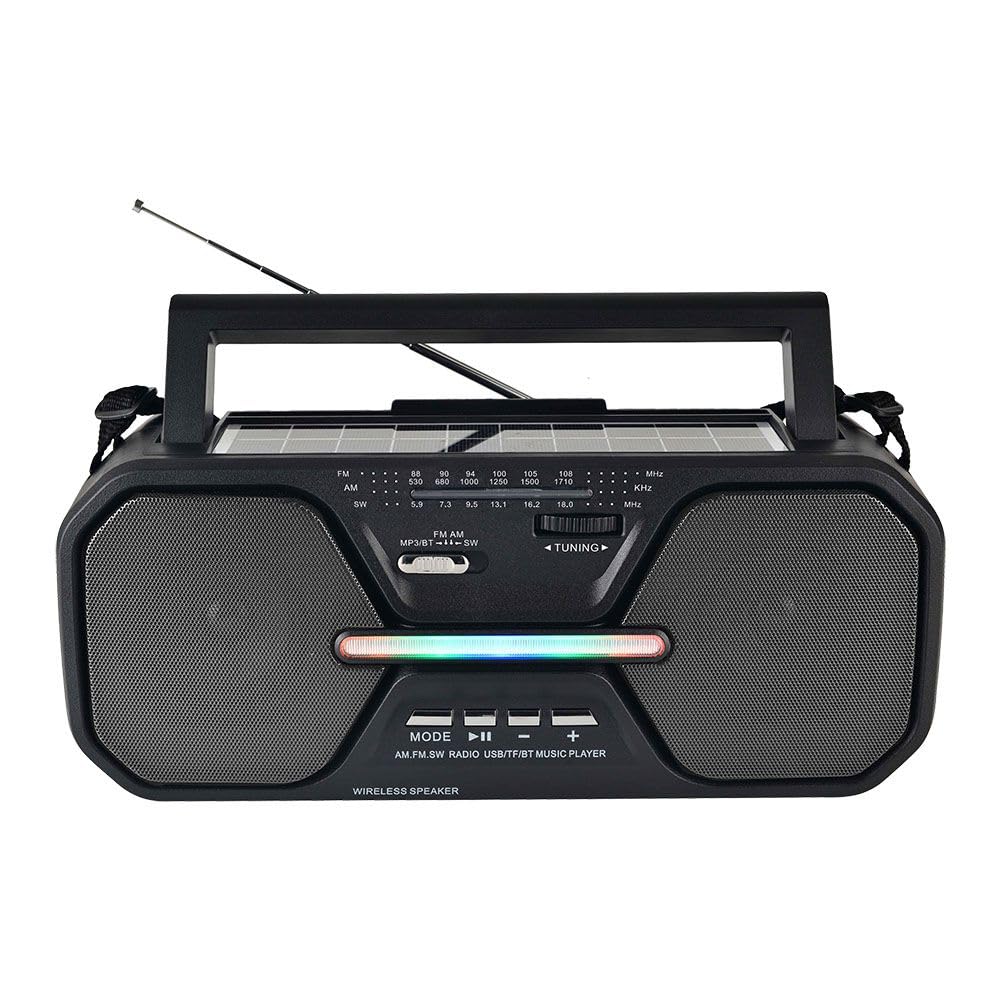
Figure 4.1: Front view of the Telefunken THP-2535 radio, showing speakers, control panel, antenna, and carrying handle.

Figure 4.2: Top view highlighting the solar panel and control buttons.
Controls and Ports:
- Power Switch: Turns the radio on or off.
- Mode Button: Switches between Bluetooth, FM, USB, TF, and AUX modes.
- Play/Pause Button: Controls playback in Bluetooth, USB, and TF modes.
- Previous/Volume Down Button: Skips to the previous track or decreases volume.
- Next/Volume Up Button: Skips to the next track or increases volume.
- Tuning Dial: For manual FM station selection.
- USB Port: For playing music from USB flash drives.
- TF Card Slot: For playing music from TF (MicroSD) cards.
- AUX Input: For connecting external audio devices via a 3.5mm cable.
- Headphone Jack: For private listening.
- Solar Panel: Charges the internal battery when exposed to sunlight.
- Charging Port: For charging the internal battery using the provided USB cable.
- Antenna: Extend for improved FM radio reception.
5. Setup
5.1 Initial Charging
- Before first use, fully charge the radio's internal battery.
- Connect the provided USB charging cable to the radio's charging port.
- Connect the other end of the USB cable to a standard USB power adapter (not included) or a computer's USB port.
- The charging indicator light will illuminate. Once fully charged, the light may change color or turn off (refer to specific indicator behavior if detailed in product).
- Charging via the solar panel: Place the radio with the solar panel facing direct sunlight. Ensure the panel is clean and unobstructed. Solar charging is slower than USB charging and is best for maintaining charge or extending playtime.
5.2 Powering On/Off
- To power on the radio, slide the Power Switch to the "ON" position.
- To power off the radio, slide the Power Switch to the "OFF" position.
6. Operating Instructions
6.1 Mode Selection
Press the Mode button repeatedly to cycle through the available modes: Bluetooth, FM Radio, USB, TF Card, and AUX Input.
6.2 Bluetooth Mode
- Switch the radio to Bluetooth mode. The radio will indicate it is ready for pairing (e.g., a voice prompt or flashing indicator light).
- On your Bluetooth-enabled device (smartphone, tablet, etc.), enable Bluetooth and search for available devices.
- Select "THP-2535" (or similar name) from the list of devices.
- Once paired, the radio will confirm the connection. You can now stream audio from your device to the radio.
- Use the Play/Pause, Previous/Volume Down, and Next/Volume Up buttons on the radio to control playback and volume.
6.3 FM Radio Mode
- Switch the radio to FM mode.
- Extend the telescopic antenna fully for optimal reception.
- Rotate the Tuning Dial to scan for FM radio stations (frequency range: 87.5-108 MHz).
- Adjust the volume using the Volume Up/Down buttons.
6.4 USB/TF Card Playback
- Insert a USB flash drive into the USB port or a TF (MicroSD) card into the TF card slot.
- Switch the radio to USB or TF mode. The radio will automatically detect and begin playing audio files (e.g., MP3 format).
- Use the Play/Pause, Previous/Volume Down, and Next/Volume Up buttons to control playback and volume.
6.5 AUX Input Mode
- Connect one end of a 3.5mm audio cable (not included) to the AUX input port on the radio.
- Connect the other end of the audio cable to the headphone jack or audio output of your external device (e.g., MP3 player, laptop).
- Switch the radio to AUX mode.
- Control playback and volume primarily from your external device. The radio's volume controls will also adjust the output.
6.6 Headphone Use
Insert 3.5mm headphones (not included) into the headphone jack for private listening. The internal speakers will automatically mute.
7. Maintenance
- Cleaning: Wipe the radio with a soft, dry cloth. Do not use abrasive cleaners, waxes, or solvents.
- Storage: When not in use for extended periods, store the radio in a cool, dry place.
- Battery Care: To prolong battery life, avoid fully discharging the battery frequently. Recharge the battery regularly, even if the radio is not in active use.
- Solar Panel: Keep the solar panel clean and free of dust or debris to ensure efficient charging.
8. Troubleshooting
| Problem | Possible Cause | Solution |
|---|---|---|
| Radio does not power on. | Battery is depleted. Power switch is off. | Charge the battery using the USB cable or solar panel. Ensure the power switch is in the "ON" position. |
| No sound. | Volume is too low. Mute function active. Incorrect mode selected. Headphones connected. | Increase the volume. Check if headphones are plugged in. Ensure the correct mode (Bluetooth, FM, USB, TF, AUX) is selected. |
| Poor FM reception. | Antenna not extended. Weak signal. Interference. | Fully extend the telescopic antenna. Reposition the radio for better signal. Avoid sources of electronic interference. |
| Bluetooth not pairing. | Radio not in Bluetooth mode. Device's Bluetooth is off. Radio is already paired with another device. | Ensure the radio is in Bluetooth mode. Turn on Bluetooth on your device. Disconnect from other devices or restart the radio and your device. |
| USB/TF card not playing. | Incorrect mode. Unsupported file format. Corrupted files. Card/drive not inserted correctly. | Ensure the correct mode is selected. Check if audio files are in a supported format (e.g., MP3). Reinsert the USB drive/TF card. Try another drive/card. |
9. Specifications
| Model Number | THP-2535 |
| Brand | TELEFUNKEN |
| Power Source | Solar Powered, USB Rechargeable (Lithium Ion Battery) |
| Connectivity | Bluetooth, USB, TF Card, AUX Input |
| Tuner Technology | FM |
| Radio Bands Supported | FM (87.5-108 MHz) |
| Product Dimensions | 38.7L x 13.3W x 16.5H centimetres |
| Special Features | Portable, Built-in Speaker, Headphone Jack, Carrying Handle |
10. Warranty and Support
10.1 Manufacturer's Warranty
This Telefunken THP-2535 radio comes with a 1 Year Manufacturer Warranty from the date of purchase. This warranty covers manufacturing defects and workmanship under normal use. It does not cover damage caused by misuse, accidents, unauthorized modifications, or normal wear and tear.
Please retain your proof of purchase for warranty claims.
10.2 Customer Support
For technical assistance, warranty claims, or further inquiries, please contact your retailer or the Telefunken customer support service. Refer to the product packaging or the official Telefunken website for contact details.