1. Introduction
The SONOFF TRVZB Smart Radiator Thermostat is designed to provide intelligent control over your home heating system. By replacing traditional radiator valves, it allows for precise temperature management, scheduling, and remote control via a smartphone application, enhancing comfort and energy efficiency. This device requires a Zigbee 3.0 hub for full functionality.
2. Safety Information
- Read all instructions carefully before installation and use.
- Do not attempt to disassemble or repair the device yourself.
- Keep the device away from water and high humidity environments.
- Ensure proper battery installation according to polarity markings.
- This device is intended for indoor use only.
3. Package Contents
The package typically includes:
- SONOFF TRVZB Smart Radiator Thermostat (quantity as purchased, e.g., 4 pieces)
- Various adapters for different radiator valves (RA/RAV/RAVL/CAL/GIA/M28)
- User Manual

Image: Four SONOFF TRVZB Smart Radiator Thermostats, showing their compact white design with a digital display.
4. Product Overview
The TRVZB features a digital display for current temperature and settings, a rotary knob for manual adjustments, and a middle button for mode selection. It connects wirelessly via Zigbee 3.0.

Image: A diagram illustrating the components of the SONOFF TRVZB, including the middle button, rotary knob, internet connection indicator, low battery indicator, target temperature display, heating valve interface, and various specifications like model, wireless connection, input voltage, battery model, threaded connection, color, product dimensions, net weight, casing material, and temperature setting range.
5. Setup
5.1. Installation on Radiator
The TRVZB is compatible with existing M30 x 1.5 mm radiator valves. For other valve types, use the appropriate adapter included in the package.
- Remove your existing thermostatic head from the radiator valve.
- If necessary, select the correct adapter for your valve type (e.g., RA, RAV, RAVL, CAL, GIA, M28).
- Attach the TRVZB to the radiator valve, ensuring a secure fit.
- Rotate the TRVZB's knob to the lowest setting before proceeding with pairing.

Image: A diagram illustrating the SONOFF TRVZB attached to a radiator valve, surrounded by various adapters (RA, RAV, RAVL, GIA, CAL, M28) with their respective clamp sizes, demonstrating compatibility with most heating manufacturers.
5.2. Pairing with Zigbee Hub
A Zigbee 3.0 hub (e.g., SONOFF ZBDongle-P, ZBDongle-E, ZBBridge Pro, NSPanel Pro, iHost) is required for smart functionality.
- Ensure your Zigbee hub is powered on and connected to your network.
- Open the eWelink app on your smartphone.
- In the app, initiate the "Add Device" process for your Zigbee hub.
- On the TRVZB, press and hold the middle button for several seconds until the Wi-Fi symbol flashes, indicating pairing mode.
- Follow the on-screen instructions in the eWelink app to complete the pairing process. The green LED on the hub will flash during pairing and become solid once connected.
Note: For optimal temperature accuracy, calibrate the temperature sensor for each valve through the app after installation.
6. Operating Instructions
6.1. Manual Control
You can manually adjust the temperature directly on the TRVZB by rotating the knob. The digital display will show the target temperature.
6.2. App Control (eWelink)
The eWelink app provides comprehensive control over your TRVZB devices:
- Remote Control: Adjust temperature settings from anywhere.
- Scheduling: Create custom heating schedules for different days and times to optimize comfort and energy usage.
- Group Control: Manage multiple TRVZB devices simultaneously.
- Historical Data: Access up to 6 months of historical heating data to monitor usage patterns.
- Percentage Adjusting: Fine-tune valve opening ratios from 0% to 100% with 1% precision for precise heating control.

Image: A smartphone displaying the eWelink app interface, showing remote control of a radiator thermostat. The app displays the current heating status and allows temperature adjustments.

Image: A smartphone displaying the eWelink app's "Smart Schedule" interface, allowing users to set heating schedules for different days and time intervals.
6.3. Voice Control
The TRVZB is compatible with Amazon Alexa and Google Home when connected to a Zigbee hub. Use voice commands to adjust temperatures.
- Example: "Alexa, set the baby room temperature to 26 degrees."

Image: A person interacting with an Amazon Echo device to control the heating via voice command, demonstrating compatibility with Alexa and Google Home.
6.4. Advanced Features
- Open Window Detection: The device can automatically turn off heating when an open window is detected, saving energy.
- Multi-room Control: Independently control the temperature in different rooms to meet specific needs.
- Child Lock: Prevents unauthorized tampering with the radiator thermostat settings.
- Frost Protection: Automatically activates to prevent pipes from freezing and bursting in cold conditions.
- Automatic Calibration: Maintains consistent performance and improves comfort by automatically calibrating.
- Home Assistant Support: Integrate the device into Home Assistant via Zigbee2mqtt for advanced automation and control.

Image: A SONOFF TRVZB on a radiator, with an arrow indicating cold air from an open window, and the thermostat displaying "OP" (Open Window), signifying the open window detection feature.

Image: A smartphone displaying the eWelink app with different temperature settings for various rooms (Kitchen, Baby room, Study room), illustrating the multi-room control feature.

Image: A laptop screen displaying the Home Assistant interface with Zigbee2mqtt integration, showing detailed controls and data for a smart thermostat, indicating support for Home Assistant.
Image: A child's hand reaching for a radiator thermostat, with a lock icon indicating the child lock feature is active, preventing accidental adjustments.

Image: A radiator thermostat next to a window with snowflakes, indicating the frost protection feature is active to prevent freezing.
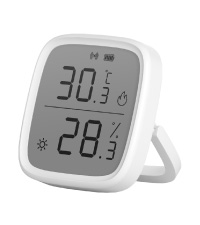
Image: A radiator thermostat displaying a calibration icon, indicating the automatic calibration feature for maintaining consistent performance.
6.5. External Sensor Integration
For more accurate room temperature readings, an external SONOFF Zigbee temperature sensor can be paired with the TRVZB (currently supported when added to ZBBridge-P). This allows the TRVZB to adjust heating based on the external sensor's data, ensuring the room stays at the desired temperature.

Image: A living room scene showing a SONOFF TRVZB on a radiator and an external temperature sensor (SNZB-02D) on a table, with a smartphone displaying the eWelink app showing the external sensor's temperature reading and its use for maintaining comfort.
7. Maintenance
- Battery Replacement: The TRVZB uses 3x 1.5V AA batteries. Replace them when the low battery indicator appears on the display or in the app.
- Cleaning: Wipe the device with a soft, dry cloth. Do not use abrasive cleaners or solvents.
8. Troubleshooting
| Problem | Possible Cause | Solution |
|---|---|---|
| Device not pairing with hub. | Device not in pairing mode; hub too far; hub not powered on. | Ensure TRVZB is in pairing mode (flashing Wi-Fi symbol). Move device closer to hub. Check hub power and network connection. |
| Inaccurate temperature reading. | Thermostat is too close to the radiator; internal sensor bias. | Calibrate the temperature offset in the eWelink app. Consider using an external SONOFF Zigbee temperature sensor for more accurate room readings. |
| Heating not turning on/off as scheduled. | Incorrect schedule settings; low battery; hub offline. | Verify schedule settings in the eWelink app. Check battery level. Ensure Zigbee hub is online and connected. |
| Valve not fitting radiator. | Incorrect adapter used or no adapter for specific valve type. | Refer to the adapter compatibility diagram and ensure the correct adapter is used. If no suitable adapter is available, the valve may not be compatible. |
9. Specifications
| Brand | SONOFF |
| Model | TRVZB |
| Color | White |
| Wireless Connection | Zigbee 3.0 |
| Input Voltage | 4.5V (3x 1.5V AA Batteries) |
| Battery Model | 1.5V LR6 Alkaline AA Battery |
| Threaded Connection | M30x1.5mm |
| Casing Material | Polycarbonate (PC) |
| Product Dimensions | 59.4 x 59.4 x 95 mm |
| Net Weight | 154g |
| Temperature Setting Range | 4°C - 35°C |
| Special Features | Programmable, Voice Control, App Control, Open Window Detection, Child Lock, Frost Protection, Automatic Calibration |
10. Warranty and Support
For warranty information and technical support, please refer to the official SONOFF website or contact their customer service. Keep your purchase receipt for warranty claims.


