
1. Introduction
Thank you for choosing the Satisfyer Cloud Dancer. This device is designed to provide a unique experience through a combination of air pulse technology and vibration. Crafted from medical-grade silicone, it offers a comfortable and waterproof design for versatile use. This manual provides essential information on how to set up, operate, maintain, and troubleshoot your device to ensure optimal performance and longevity.

This image illustrates the core technology of the Satisfyer Cloud Dancer, highlighting its 11 intensity levels for air pulse stimulation. The graphic depicts air waves emanating from the device's tip.
2. Safety Information
Please read all safety instructions before using the device. Failure to follow these instructions may result in injury or damage to the product.
- Consult a healthcare professional before use if you have any medical conditions or concerns.
- Discontinue use immediately if you experience any discomfort, pain, or irritation.
- The device is made from medical-grade silicone. If you have known allergies to silicone, do not use this product.
- Use only the provided USB magnetic charging cable. Do not use damaged cables or chargers.
- Do not charge the device in or near water. Ensure the charging contacts are dry before connecting the cable.
- Keep the device out of reach of children.
- Do not expose the device to extreme temperatures, direct sunlight, or corrosive substances.
3. Package Contents
Ensure all items are present in the package:
- 1 x Satisfyer Cloud Dancer device
- 1 x USB magnetic charging cable
- 1 x Instruction Manual
4. Charging
Before first use, fully charge your Satisfyer Cloud Dancer. A full charge typically takes approximately 2-3 hours.
- Locate the two magnetic charging contacts on the bottom of the device.
- Connect the USB magnetic charging cable to these contacts. The cable will snap into place magnetically.
- Plug the USB end of the cable into a standard USB power adapter (not included) or a computer USB port.
- The indicator light on the device will illuminate during charging and turn off or change color when fully charged (refer to device for specific light behavior).

A view of the bottom of the Satisfyer Cloud Dancer, clearly showing the two small magnetic charging contacts for charging.
5. Operation
The Satisfyer Cloud Dancer features two independently controllable motors for air pulse and vibration functions.

A diagram showing the Satisfyer Cloud Dancer held in a hand, with labels pointing to the control buttons for vibration and air pulse functions.
Turning On/Off
- To Turn On: Press and hold the Power button (⏻) for approximately 2 seconds until the device activates.
- To Turn Off: Press and hold the Power button (⏻) for approximately 2 seconds until the device deactivates.
Air Pulse Function
- The air pulse function is controlled by its dedicated Power button (⏻ with waves). Press and hold for 2 seconds to activate.
- Once active, press the Intensity Up (+) button to increase the air pulse intensity. There are 11 distinct air pulse patterns.
- Press the Intensity Down (-) button to decrease the air pulse intensity.
Vibration Function
- The vibration function is controlled by its dedicated Power button (⏻ with squiggly line). Press and hold for 2 seconds to activate.
- Once active, press the Programs (📊) button to cycle through the 12 available vibration programs.
6. Cleaning and Maintenance
Proper cleaning and maintenance are essential for hygiene and to prolong the life of your device.
- Clean the device thoroughly before and after each use.
- Wash the device with warm water and a mild, antibacterial soap or a specialized toy cleaner.
- Rinse thoroughly with clean water.
- Pat dry with a lint-free cloth or allow to air dry completely before storing.
- The Satisfyer Cloud Dancer is waterproof, allowing for easy cleaning under running water.

This image displays key features of the device through icons, including dual air pulse and vibration, suitability for beginners, ease of cleaning, waterproof design, medical-grade silicone material, and quiet operation (whisper mode).
7. Storage
To maintain the quality and integrity of your device:
- Store the device in a clean, dry, and dust-free environment.
- Avoid storing the device in direct sunlight or extreme temperatures.
- Keep the device separate from other silicone products to prevent material degradation or discoloration.
8. Troubleshooting
If you encounter any issues with your Satisfyer Cloud Dancer, refer to the following common solutions:
| Problem | Possible Cause | Solution |
|---|---|---|
| Device does not turn on. | Battery is depleted. | Charge the device fully using the provided USB cable. |
| Weak air pulse or vibration. | Low battery. | Recharge the device. |
| Buttons are unresponsive. | Temporary software glitch. | Turn the device off and then on again. If the issue persists, ensure the device is fully charged. |
9. Specifications
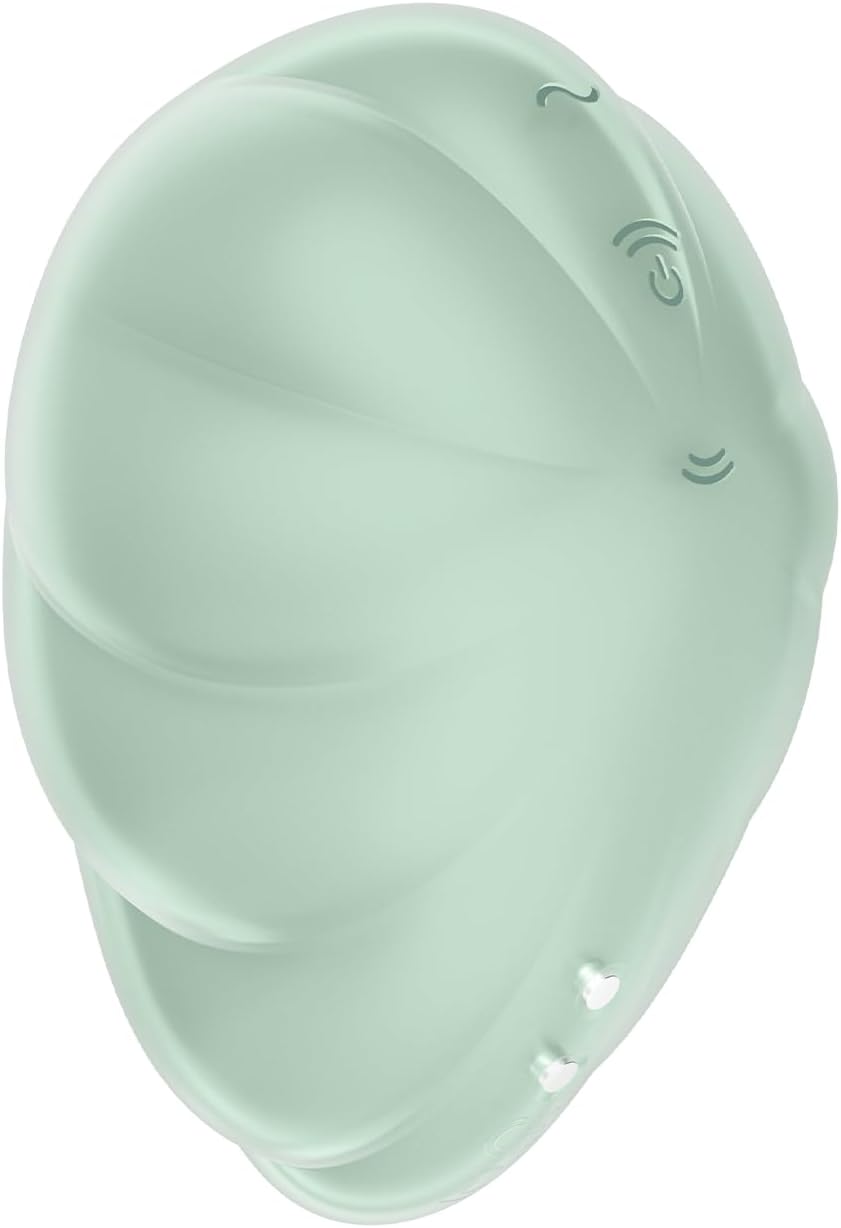
A clear side view of the Satisfyer Cloud Dancer device, showcasing its ergonomic shape and mint color.
- Model Number: 360589
- Material: Medical-Grade Silicone + ABS Plastic
- Color: Mint
- Battery: 1 Lithium Ion (included)
- Water Resistance: Waterproof
- Functions: 11 air pulse patterns, 12 vibration programs
- Motors: Two independently controllable motors
10. Warranty and Support
Satisfyer stands by the quality of its products.
- Warranty: This product is covered by a 15-year warranty from the date of purchase. Please retain your proof of purchase for warranty claims.
- Support: For further assistance, troubleshooting, or warranty inquiries, please visit the official Satisfyer website or contact customer support through your retailer.

An image displaying the "15 Year Warranty" logo, indicating the product's extended warranty period.
