Introduction
This manual provides detailed instructions for the VOKSUN Outdoor Weather Station Sensor. This sensor is designed to accurately measure outdoor temperature and humidity, transmitting data wirelessly to compatible VOKSUN weather stations. Please read this manual thoroughly before use to ensure proper operation and longevity of your device.
Safety Information
- Do not expose the sensor to extreme temperatures outside its operating range.
- Avoid direct exposure to water or heavy rain. While designed for outdoor use, prolonged submersion or direct water jets may cause damage.
- Use only the specified battery type (2 x AA batteries). Do not mix old and new batteries or different battery types.
- Keep out of reach of children.
- Dispose of used batteries responsibly according to local regulations.
Product Overview
The VOKSUN Outdoor Sensor is a compact device designed for reliable outdoor environmental monitoring. It features a clear display for local readings and a wireless transmitter for sending data to your main weather station unit.

Figure 1: Front view of the VOKSUN Wireless Outdoor Sensor. The display shows "WIRELESS SENSOR" at the top, with temperature (e.g., 30.5°C) and humidity (e.g., 48%) readings below it, along with a channel indicator (CH1).
Key Features:
- Wireless transmission of outdoor temperature and humidity.
- Maximum transmission distance of 60 meters (open area).
- Manual switching between Celsius (°C) and Fahrenheit (°F).
- Integrated hanging hole and mounting bracket for flexible placement.
- Compact and lightweight design.

Figure 2: Dimensions of the VOKSUN Wireless Outdoor Sensor. The sensor measures 9.6 cm in height, 4.5 cm in width, and 3 cm in depth.
Setup
1. Battery Installation
- Locate the battery compartment on the back of the sensor.
- Slide open the battery cover.
- Insert 2 x AA batteries (not included) according to the polarity indicators (+ and -) inside the compartment.
- Close the battery cover securely.

Figure 3: Battery installation in the VOKSUN Wireless Outdoor Sensor. The back cover is removed, revealing slots for two AA batteries. A switch for channel selection (CH1-CH2-CH3) is also visible.
2. Mounting the Sensor
The sensor can be mounted in various locations using its integrated hanging hole or mounting bracket.
- Location Selection: Choose a location outdoors that is protected from direct sunlight and heavy precipitation for accurate readings. Ensure it is within 60 meters of your main weather station unit.
- Hanging: Use a screw or nail (not included) to hang the sensor via the hole on its back.
- Bracket Mounting: Utilize the bracket on the bottom to secure it to a flat surface or pole.
3. Pairing with Weather Station
Once batteries are installed, the sensor will automatically begin transmitting data. Refer to your main VOKSUN weather station's manual for specific instructions on how to pair and receive data from the outdoor sensor. Ensure both devices are within the 60-meter transmission range.
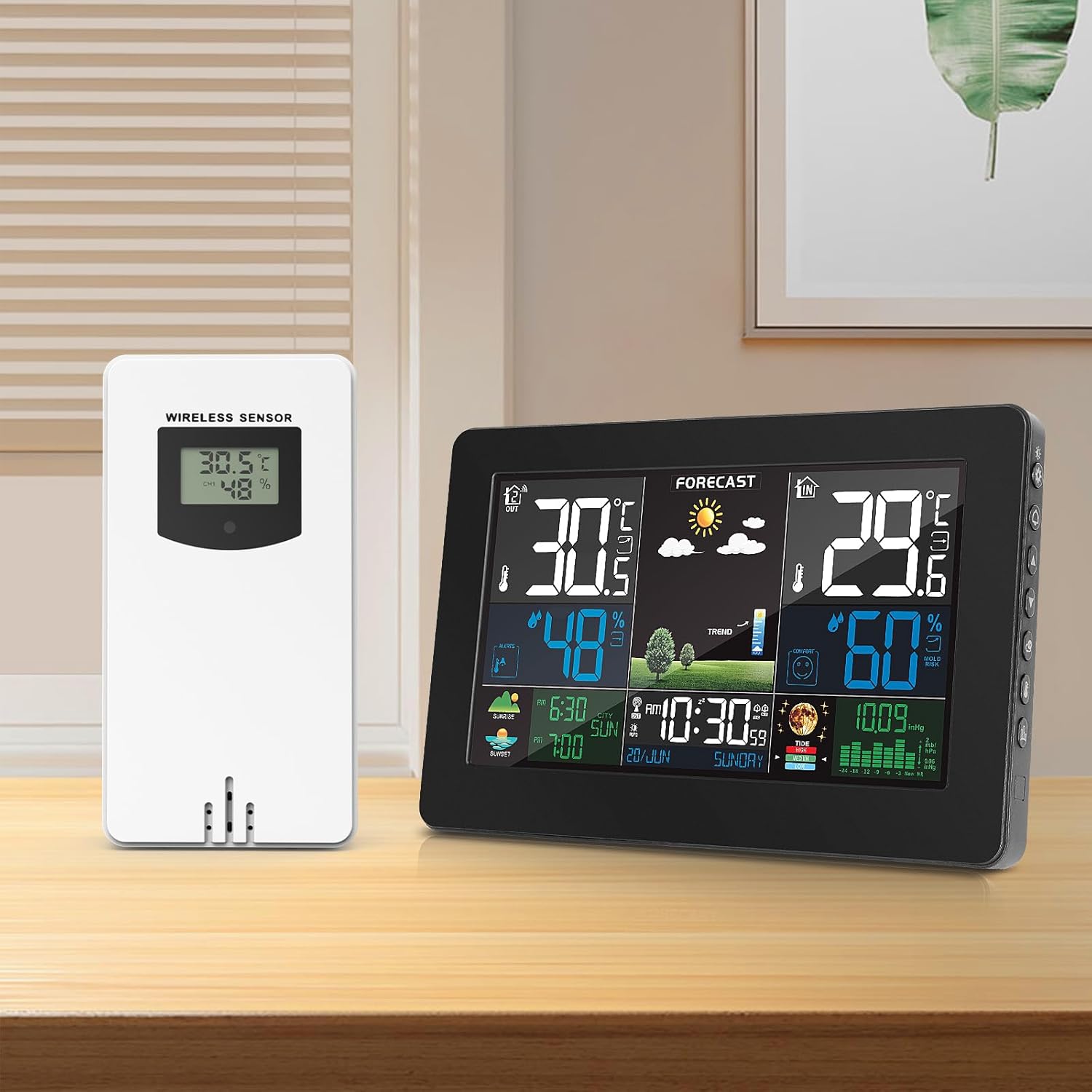
Figure 4: The VOKSUN Wireless Outdoor Sensor positioned alongside a compatible VOKSUN Weather Station display unit, illustrating their intended use together.
Operation
Temperature and Humidity Display
The sensor's built-in display shows the current outdoor temperature and humidity readings directly. These readings are also transmitted wirelessly to your compatible weather station.
Switching °C/°F
On the back of the sensor, usually within the battery compartment or near it, there is a small button or switch to toggle between Celsius (°C) and Fahrenheit (°F) temperature units. Press or slide this control to select your preferred unit.
Maintenance
Battery Replacement
When the display on the sensor or your main weather station indicates low battery, replace both AA batteries following the "Battery Installation" steps in the Setup section. Always replace both batteries at the same time with new ones.
Cleaning
Wipe the sensor's exterior with a soft, damp cloth. Do not use abrasive cleaners or solvents, as these may damage the casing or display. Ensure the sensor is dry before re-exposing it to outdoor elements.
Troubleshooting
| Problem | Possible Cause | Solution |
|---|---|---|
| No readings on weather station. |
|
|
| Inaccurate readings. |
|
|
| Display on sensor is blank. |
|
|
Specifications
| Model Number | Sensor (Compatible with 3378QX, 3390F, 3383D, 3383C) |
| Dimensions (L x W x H) | 9.6 x 4.5 x 3 cm (3.78 x 1.77 x 1.18 inches) |
| Weight | 50 g (0.11 lbs) |
| Color | White |
| Power Source | 2 x AA Batteries (not included) |
| Transmission Range | Up to 60 meters (197 feet) in open area |
| Temperature Unit | °C / °F switchable |
| Connectivity Technology | Wireless |
Warranty and Support
For warranty information and technical support, please refer to the documentation provided with your main VOKSUN weather station unit or visit the official VOKSUN website. Keep your purchase receipt as proof of purchase for any warranty claims.


