
1. Introduction
This manual provides detailed instructions for the installation, operation, and maintenance of the CDBAIRUI E22-900T22U LoRa Module with USB Interface. This module utilizes new generation LoRa spread spectrum technology, offering long-distance wireless communication, relay networking support, and a standard USB plug-and-play interface. Please read this manual thoroughly before using the product to ensure proper functionality and safety.
2. Product Overview
The E22-900T22U is a high-performance LoRa wireless module designed for reliable long-distance data transmission. It features a USB interface for easy connectivity to personal computers, laptops, and servers. Key features include:
- New Generation LoRa Spread Spectrum Technology: Enhances anti-interference capabilities and extends transmission range.
- USB Standard Interface: Provides plug-and-play convenience.
- Long Transmission Distance: Capable of reaching up to 5 kilometers under ideal conditions.
- Relay Networking Support: Allows for multi-level relay networks in complex environments.
- Remote Configuration: Enables parameter modification remotely, reducing setup and maintenance costs.
- Listen Before Talk (LBT) Function: Improves communication success rate by detecting channel activity before transmission.
- RSSI Signal Strength Indication: Provides packet and ambient noise signal strength for network optimization and ranging.
- Communication Key: Enhances data confidentiality with user-definable keys.
- Online Firmware Upgrade: Supports USB (serial) IAP for convenient firmware updates.
2.1 Product Components and Dimensions
The E22-900T22U module comes with a USB interface and an SMA antenna connector. An external stick antenna is included for optimal performance.

Figure 1: Front view of the CDBAIRUI E22-900T22U LoRa Module, showing the USB connector and SMA antenna port.

Figure 2: Detailed dimensions of the E22-900T22U LoRa Module, illustrating its compact size for various applications.
2.2 Hardware Interface Description
Familiarize yourself with the module's interfaces:
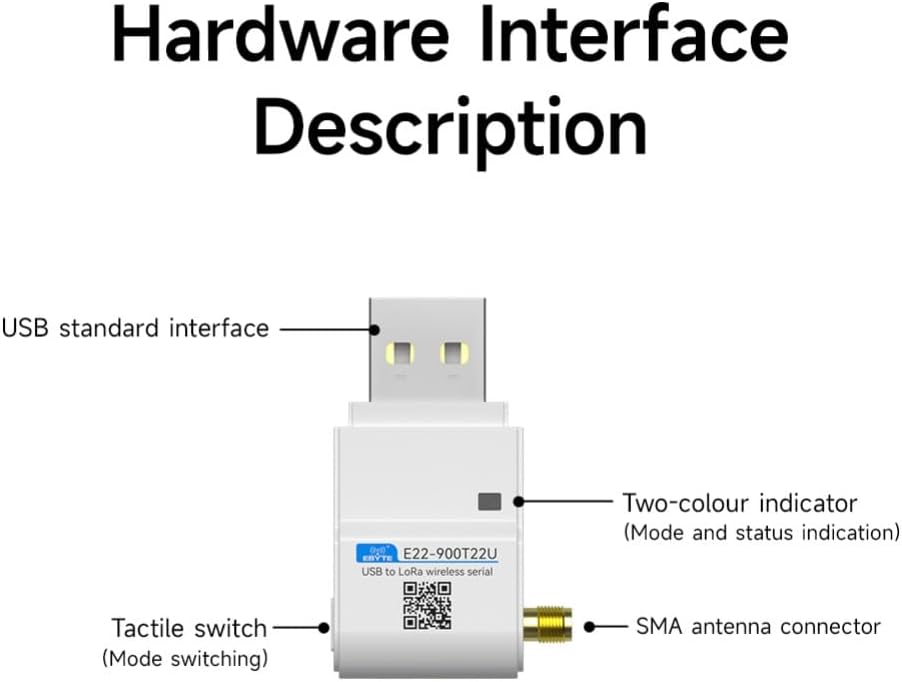
Figure 3: Diagram illustrating the hardware interfaces of the E22-900T22U module, including the USB standard interface, two-color indicator, tactile switch, and SMA antenna connector.
- USB Standard Interface: For power supply and data communication with a host device.
- Two-color Indicator: Provides visual feedback on the module's operating mode and status.
- Tactile Switch: Used for mode switching or other configurable functions.
- SMA Antenna Connector: For connecting the included external antenna.
2.3 LoRa Spread Spectrum Technology
The module leverages LoRa spread spectrum technology to overcome interference and obstacles, ensuring stable and long-range communication compared to traditional single-frequency methods.

Figure 4: Comparison of LoRa spread spectrum communication with single frequency communication, highlighting LoRa's anti-interference and extended range capabilities.
2.4 Application Scenarios
The E22-900T22U module is suitable for a variety of applications requiring robust, long-range wireless communication:

Figure 5: Examples of application scenarios including Industrial Manufacturing, Smart Home, Smart Farm, and Hotel Management, demonstrating the versatility of the LoRa module.
3. Setup
Follow these steps to set up your E22-900T22U LoRa Module:
- Attach the Antenna: Carefully screw the provided stick antenna onto the SMA antenna connector of the module. Ensure it is securely fastened but do not overtighten.
- Connect to Host Device: Insert the USB standard interface of the module into an available USB port on your personal computer, laptop, or server. The module is designed for plug-and-play operation.
- Driver Installation (if necessary): In most modern operating systems, the necessary drivers for the USB serial interface will install automatically. If prompted, allow the system to install drivers. If automatic installation fails, please visit the manufacturer's website www.cdebyte.com for driver downloads and support.
- Power On: Once connected, the module will receive power via the USB port. Observe the two-color indicator for initial status.
4. Operating Instructions
After successful setup, you can begin operating the E22-900T22U module:
4.1 Basic Communication
The module functions as a USB to LoRa wireless serial device. Data sent to the module via its USB serial interface will be transmitted wirelessly, and data received wirelessly will be output via the USB serial interface. Use appropriate serial communication software on your host device to interact with the module.
4.2 Indicator Lights and Tactile Switch
- Two-color Indicator: Refer to the module's specific firmware documentation for detailed interpretations of the indicator light patterns (e.g., solid, blinking, color changes) which typically denote power, data transmission/reception, or error states.
- Tactile Switch: This switch is generally used for mode switching (e.g., configuration mode, normal operation mode). Consult the detailed product documentation or software interface for its specific functions and how to use it.
4.3 Advanced Features
- Remote Configuration: Utilize the provided software tools (available from the manufacturer's website) to remotely modify module parameters such as operating frequency, air data rate, and power settings. This feature is crucial for optimizing network performance and reducing on-site adjustments.
- Automatic Trunking Networking: For applications requiring extended range or communication in environments with many obstacles, configure multiple modules to form a multi-level relay network. The modules can automatically manage routing to ensure data delivery.
- Communication Key: To enhance data security, set a unique communication key. Only modules configured with the identical key will be able to communicate with each other, preventing unauthorized access to your data.
- Listen Before Talk (LBT): Enable the LBT function to improve communication reliability. The module will automatically check for channel activity before transmitting. If the channel is busy, it will delay transmission until the channel is clear, reducing data collisions.
- RSSI Signal Strength Indication: The module can output RSSI values for received packets and ambient noise. This information is valuable for assessing signal quality, optimizing antenna placement, and improving network design. It can also be used to manually implement LBT functions in custom applications.
5. Maintenance
Proper maintenance ensures the longevity and reliable operation of your E22-900T22U module:
- Environmental Conditions: Operate and store the module within the specified temperature and humidity ranges (refer to Section 7, Specifications). Avoid exposure to extreme temperatures, direct sunlight, moisture, or corrosive environments.
- Cleaning: Keep the module clean and free from dust. Use a soft, dry cloth for cleaning. Do not use liquid cleaners or solvents.
- Antenna Care: Ensure the antenna is always securely connected during operation. Avoid bending or damaging the antenna.
- Firmware Upgrades: Periodically check the manufacturer's website (www.cdebyte.com) for available firmware updates. Firmware upgrades can introduce new features, improve performance, or fix bugs. Use the USB (serial) IAP Online Firmware Upgrade function as per instructions provided with the firmware.
6. Troubleshooting
If you encounter issues with your E22-900T22U module, consider the following:
- No Power/Indicator Off: Ensure the module is correctly plugged into a functional USB port. Try a different USB port or host device.
- Communication Failure:
- Verify that the antenna is properly connected.
- Check that both transmitting and receiving modules are configured with the same communication key and operating parameters (frequency, air data rate).
- Ensure the modules are within the effective communication range. Obstacles and interference can significantly reduce range.
- Check for local interference. The LBT function can help mitigate this.
- Use the RSSI output to assess signal quality. Low RSSI values indicate poor signal strength.
- Driver Issues: If the module is not recognized by your computer, ensure the correct drivers are installed. Refer to Section 3. Setup for driver information.
- Module Overheating: Ensure adequate ventilation around the module. Operating outside specified temperature ranges can cause instability.
For persistent issues, consult the detailed product documentation on the manufacturer's website or contact technical support.
7. Specifications
Detailed technical specifications for the CDBAIRUI E22-900T22U LoRa Module:

Figure 6: Table detailing the specification parameters of the E22-900T22U LoRa Module.
| Parameter | Min. | Typ. | Max. | Remark |
|---|---|---|---|---|
| Supply Voltage (V) | 4.8 | 5.0 | 5.5 | ≥5.0V guaranteed output power. Over 5.5V permanently burns out the module. |
| Emission Current (mA) | - | 110 | - | Instantaneous power consumption. |
| Receiving Current (mA) | - | 14 | - | - |
| Operating Temperature (°C) | -40 | 20 | 85 | Industrial grade design. |
| Working Humidity (%) | 10 | 60 | 90 | - |
| Storage Temperature (°C) | -40 | 20 | 85 | - |
| Parameter | Value | Remark |
|---|---|---|
| Communication Interface | USB | - |
| Packaging Method | DIP | - |
| Interface Method | USB | - |
| Dimension | 45.3*27.8*11.2mm | ±0.2mm, plus housing with cap. |
| Antenna Form | SMA | Male threaded bore, equivalent impedance approx. 50 Ω. |
| Product Net Weight | 8.4g | ±0.2g |
| Operating Frequency (MHz) | 850.125 - 930.125 | - |
| Transmitting Power | 22dBm | Software adjustable. |
| Acceptance Sensitivity | -122dBm | Air rate 2.4 kbps. |
| FIFO | 240 Byte | Packets of 32/64/128/240 bytes can be sent by command. |
| Modulation Method | LoRa | New generation LoRa modulation technology. |
| Measured Distance | 5km | Clear and open environment, antenna gain 5dBi, antenna height 2.5m, air rate 2.4kbps. |
8. Warranty and Support
For warranty information, please refer to the terms and conditions provided by your retailer or the manufacturer at the time of purchase. Specific warranty details may vary by region and seller.
For technical support, additional documentation, software, and firmware updates, please visit the official CDBAIRUI website:
When contacting support, please have your product model (E22-900T22U) and any relevant purchase information ready.