
Flamaker 0214
Flamaker Fireplace Corner TV Stand User Manual
Model: 0214
Introduction
Thank you for purchasing the Flamaker Fireplace Corner TV Stand. This manual provides essential information for the safe assembly, operation, and maintenance of your new entertainment center. This unit combines a stylish TV console with an integrated 18-inch electric fireplace, offering both storage and heating functionality. Please read this manual thoroughly before assembly and use, and retain it for future reference.
Important Safety Information
Please observe the following safety precautions to prevent injury or damage to the product:
- Always place the TV stand on a flat, stable, and level surface.
- Do not overload the TV stand. Ensure the weight of your television and other items does not exceed the maximum load capacity (220 lbs).
- Keep children and pets away from the electric fireplace when it is in operation.
- Do not block the air vents of the electric fireplace. Ensure adequate clearance for proper heat dissipation.
- Only use the provided power cord and plug. Do not use extension cords or power strips with the fireplace.
- Unplug the fireplace from the power outlet before cleaning or performing any maintenance.
- Do not attempt to repair or modify the electric fireplace. Contact qualified service personnel for repairs.
- Avoid placing flammable materials near the fireplace.
Package Contents
Before beginning assembly, ensure all parts are present and undamaged. If any parts are missing or damaged, do not proceed with assembly and contact customer support.
- TV Stand Components (panels, shelves, hardware)
- 18-inch Electric Fireplace Insert
- Remote Control for Fireplace
- Assembly Hardware (screws, dowels, cam locks, etc.)
- Instruction Manual
Note: The TV stand and fireplace may arrive in separate packages.
Setup and Assembly
Assembly typically requires two adults and basic tools (e.g., screwdriver). Follow the step-by-step instructions provided in the separate assembly guide included with your product. While estimated assembly time may vary, allocate sufficient time for careful construction.
- Unpack and Identify Parts: Carefully remove all components from the packaging. Lay them out on a clean, soft surface to prevent scratches. Identify each part using the provided parts list and diagrams.
- Assemble the Main Frame: Begin by connecting the side panels to the base and top panels according to the diagrams. Use the specified hardware (screws, dowels, cam locks) for each connection.
- Install Shelves and Dividers: Secure the fixed shelves and any internal dividers. For adjustable shelves, insert the shelf pins into the desired holes.
- Attach Back Panels: Fasten the back panels to the rear of the unit.
- Install Glass Doors: Attach the hinges to the doors and then to the cabinet frame. Adjust hinges as needed for proper door alignment.
- Insert Electric Fireplace: Carefully slide the 18-inch electric fireplace insert into the designated opening in the TV stand. Ensure it is securely seated.
- Final Checks: Verify all connections are tight and the stand is stable.

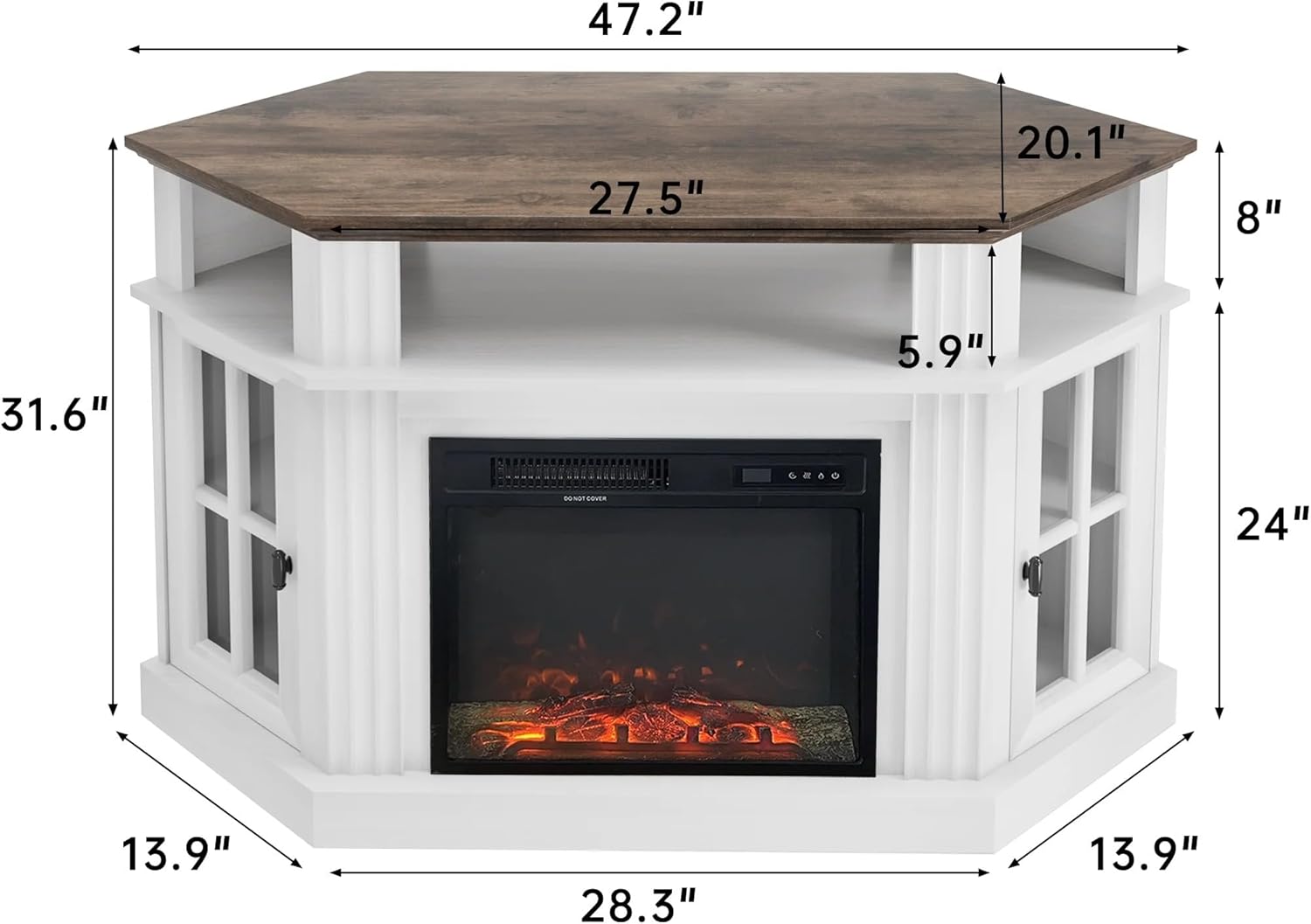
Operating the Electric Fireplace
The electric fireplace can be operated using the control panel on the unit or the included remote control.
Control Panel and Remote Functions:
- Power Button: Turns the fireplace ON or OFF.
- Flame Effect Button: Adjusts the flame brightness (3 dimming settings) or turns the flame effect ON/OFF independently of heat.
- Heater Button: Activates the heating function. Press to cycle through heat settings (e.g., Low Heat 750W, High Heat 1400W) or to turn heating OFF.
- Temperature Control: Adjusts the desired room temperature (65℉-95℉). The fireplace will cycle ON/OFF to maintain the set temperature.
- Timer Button: Sets an automatic shut-off timer (30 minutes to 9 hours).


Care and Maintenance
Regular care will help maintain the appearance and functionality of your TV stand and fireplace.
- Cleaning the Stand: Wipe surfaces with a soft, damp cloth. Avoid harsh chemicals or abrasive cleaners that could damage the finish.
- Cleaning the Fireplace: Ensure the fireplace is unplugged and cool before cleaning. Use a soft, dry cloth to wipe the exterior. For the glass panel, use a glass cleaner applied to a cloth, not directly to the unit.
- Dusting: Regularly dust the unit, especially around the fireplace vents, to ensure proper airflow.
- Hardware Check: Periodically check all assembly hardware to ensure it remains tight. Retighten if necessary.
Troubleshooting
If you encounter issues, refer to the following common problems and solutions:
| Problem | Possible Cause | Solution |
|---|---|---|
| Fireplace does not turn on. | No power, power cord loose, main power switch off. | Check power outlet, ensure cord is securely plugged in, verify main power switch on fireplace is ON. |
| No heat, but flame effect works. | Heater function not activated, temperature setting too low. | Press the Heater button to activate heat. Increase the temperature setting above room temperature. |
| Flame effect not visible. | Flame effect turned off, brightness set to minimum. | Press the Flame Effect button to cycle through brightness settings or turn ON. |
| Remote control not working. | Dead batteries, obstruction, remote out of range. | Replace batteries. Ensure no obstructions between remote and fireplace. Operate within recommended range. |
| Unit is unstable after assembly. | Loose hardware, uneven floor. | Retighten all assembly hardware. Ensure the stand is on a level surface. |
Product Specifications
| Brand | Flamaker |
| Model Name | Fireplace Corner TV Stand |
| Model Number | 0214 |
| Product Dimensions | 20"D x 47.2"W x 31.7"H |
| Material | MDF, P2 Class Particle Board, Wood |
| Color | White |
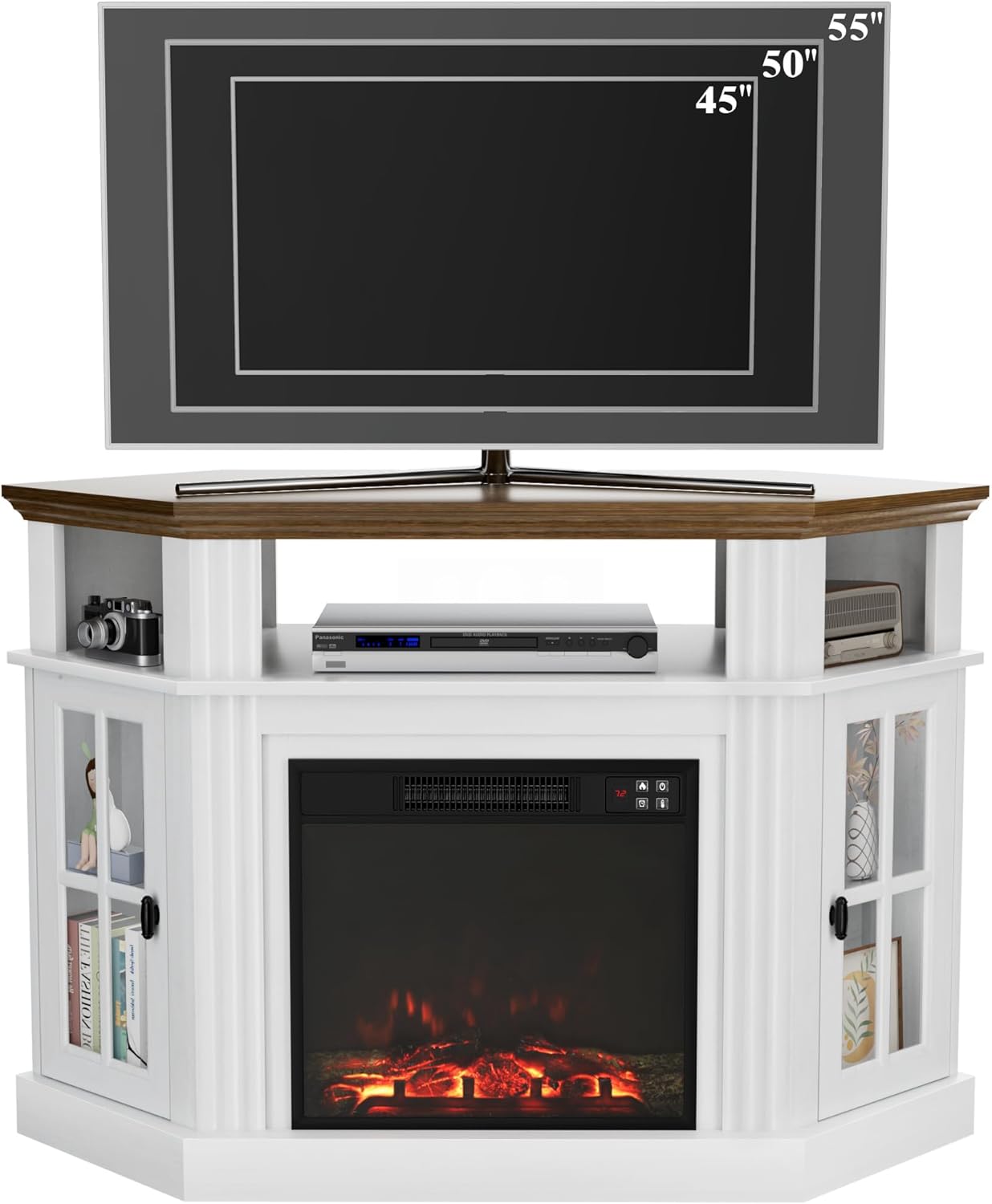
| Maximum TV Size | Up to 55 inches |
| Weight Capacity | 220 lbs |
| Fireplace Type | 18-inch Electric Fireplace |
| Heat Output | 1400 Watts (750W/1400W settings) |
| Heating Coverage | Up to 400 sq ft |
| Temperature Range | 65℉-95℉ |
| Special Features | Flame Effect, Timer (30min-9h), Remote Control, Adjustable Shelves |
| Power Source | Corded Electric |
| Item Weight | 82.03 Pounds |

Warranty Information
Flamaker products are manufactured with quality and care. This product comes with a limited warranty against manufacturing defects. Please refer to the warranty card included in your package or contact Flamaker customer support for specific warranty terms and conditions.
Customer Support
For any questions, missing parts, or assistance with assembly or operation, please contact Flamaker customer support. You can typically find contact information on the manufacturer's website or on the packaging materials.
Please have your model number (0214) and purchase date ready when contacting support.
Ask a question about this manual
Ask about setup, troubleshooting, compatibility, parts, safety, or missing instructions. Manuals+ will review the question and use this page’s manual context to help answer it.