
visiPower PT302
visiPower Robot Security Camera User Manual
Model: PT302
1. Product Overview
The visiPower PT302 Robot Security Camera is an advanced 3MP HD WiFi IP camera designed for indoor surveillance. It features a unique robot design, pan and tilt capabilities, two-way audio, night vision, and intelligent motion detection, including humanoid tracking. Its one-click call function allows for easy communication, making it ideal for monitoring babies, pets, or general home security.
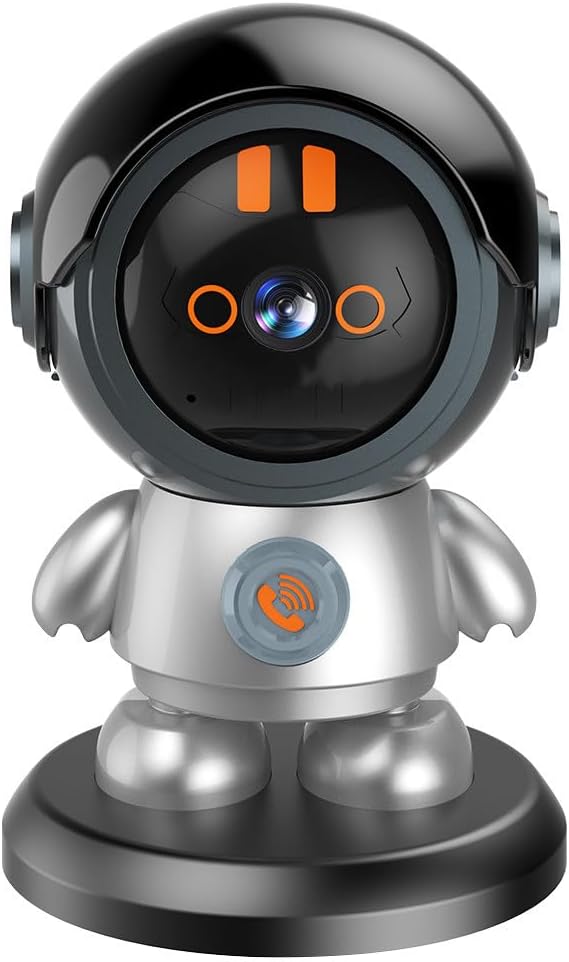
Image: Front view of the visiPower PT302 Robot Security Camera, showcasing its distinctive robot shape with a black helmet-like head and a silver body, standing on a black base. The camera lens is visible on the head, and a call button is on the chest.
Key Features:
- 3MP HD Resolution: Captures clear video at 2304x1296 resolution.
- Pan & Tilt Functionality: Offers 355° horizontal pan and 60° vertical tilt for comprehensive coverage.
- Two-Way Audio: Built-in microphone and speaker enable real-time communication.
- Infrared Night Vision: Provides clear monitoring up to 33 feet (10 meters) in low-light conditions with 4 IR LEDs.
- Smart Motion Detection: Includes humanoid detection, motion tracking, and customizable alert areas with APP push notifications and sound alarms.
- One-Click Call: Allows users to initiate a call from the camera to the connected phone app.
- Wi-Fi Connectivity: Supports 2.4GHz Wi-Fi for wireless setup and remote access via the iCam365 app.
- Local & Cloud Storage: Supports Micro SD card up to 128GB (not included) and cloud storage options.
2. Package Contents
Before proceeding with installation, please verify that all items are present and in good condition:
- visiPower PT302 Robot Security Camera
- Power Adapter (DC 5V)
- USB Type-C Cable
- User Manual
- Mounting Accessories (if applicable, not explicitly mentioned but common for cameras)
3. Setup Guide
3.1 Powering On the Camera
- Connect the provided USB Type-C cable to the camera's power port.
- Plug the other end of the cable into the power adapter.
- Insert the power adapter into a standard electrical outlet.
The camera will power on, and you should hear a startup prompt or see an indicator light. Ensure the power source is stable.
3.2 App Installation and Account Creation
- Download the iCam365 app from your mobile device's app store (Google Play Store for Android or Apple App Store for iOS).
- Open the iCam365 app and follow the on-screen instructions to create a new account or log in if you already have one.
3.3 Connecting the Camera to Wi-Fi
The camera supports 2.4GHz Wi-Fi networks only. 5GHz networks are not supported.
- Ensure your mobile device is connected to a 2.4GHz Wi-Fi network.
- In the iCam365 app, tap the "Add Device" or "+" icon.
- Select "Smart Camera" or a similar option.
- Follow the app's prompts to enter your Wi-Fi network name (SSID) and password.
- The app will generate a QR code. Hold your mobile device with the QR code approximately 4-8 inches (10-20 cm) in front of the camera lens until the camera scans it. You should hear a confirmation sound from the camera.
- Once connected, the camera's indicator light will change, and the app will confirm successful pairing.

Image: A hand holding a smartphone displaying the iCam365 app's Wi-Fi connection screen, next to the visiPower PT302 camera. Blue Wi-Fi signal waves are depicted above the camera, illustrating wireless connectivity.
3.4 Micro SD Card Installation (Optional)
To enable local video recording, install a Micro SD card (up to 128GB, not included).
- Locate the Micro SD card slot on the camera (refer to the product diagram if needed).
- Gently insert the Micro SD card into the slot until it clicks into place.
- In the iCam365 app, navigate to the camera settings to format the Micro SD card for optimal performance.
4. Operating Instructions
4.1 Live View and Pan/Tilt Control
Once connected, open the iCam365 app and select your camera to view the live feed.
- Pan/Tilt: Use the directional controls within the app to remotely rotate the camera 355° horizontally (pan) and 60° vertically (tilt) to adjust the viewing angle.
- Digital Zoom: Pinch to zoom on the live feed to magnify specific areas.

Image: A smartphone displaying the iCam365 app's live view with pan/tilt controls, next to the visiPower PT302 camera. Arrows indicate the camera's 355° pan and 60° tilt movement capabilities.
4.2 Two-Way Audio Communication
The camera features a built-in microphone and speaker for two-way communication.
- In the live view interface of the iCam365 app, tap the microphone icon to speak through the camera's speaker.
- The camera's built-in microphone will pick up audio from its surroundings, which you can hear through your phone.

Image: A man and a dog on a couch, with the visiPower PT302 camera on a nearby table. Speech bubbles illustrate a two-way conversation between the person and someone communicating via the camera, demonstrating the two-way talk feature.
4.3 One-Click Call Function
The camera has a dedicated button that, when pressed, initiates a call to the connected phone app.
- Instruct children or elderly family members to press the call button on the camera when they need to reach you.
- Your phone will receive a call notification from the iCam365 app, allowing you to answer and communicate directly through the camera.
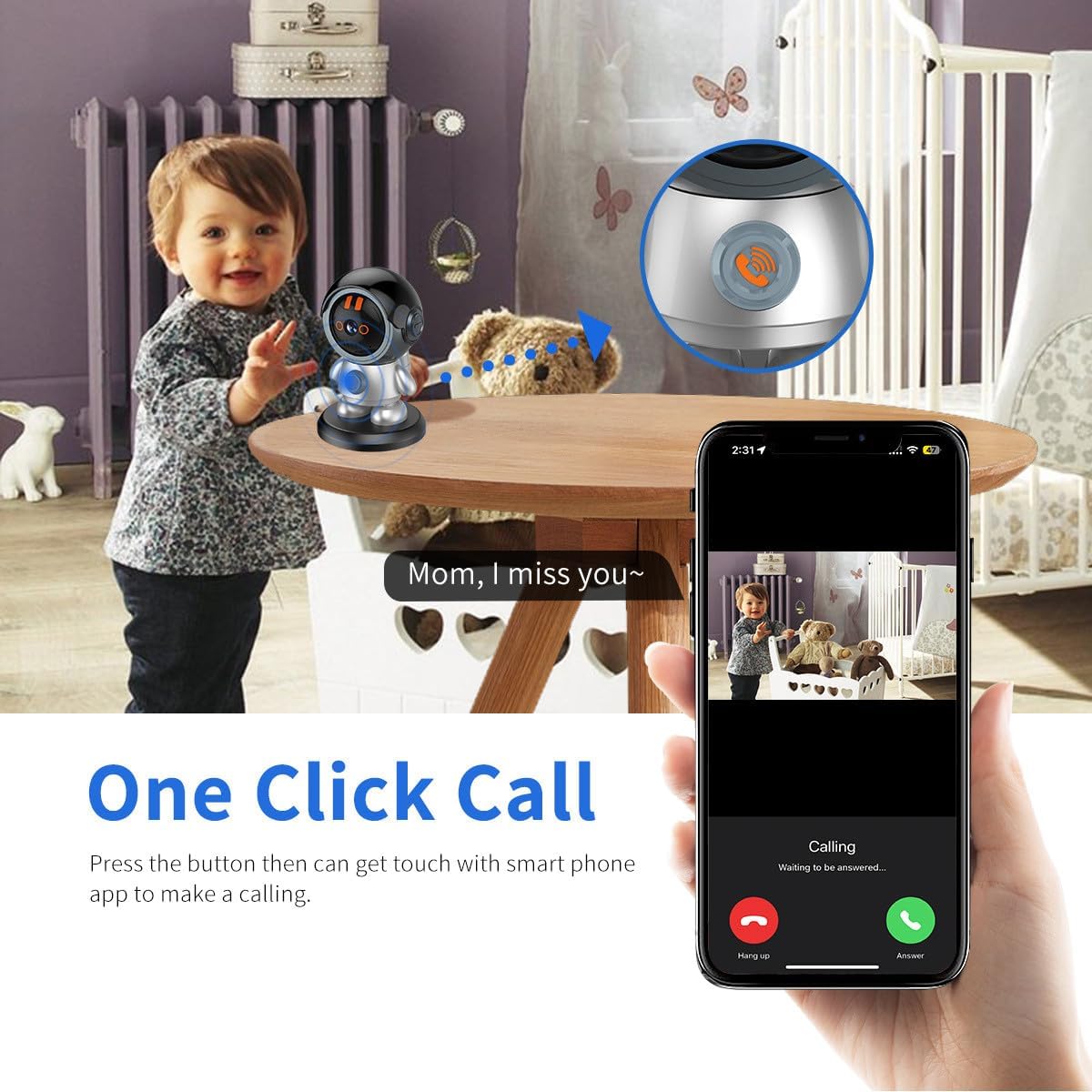
Image: A child near the visiPower PT302 camera, with a close-up of the camera's call button. A smartphone screen shows an incoming call from the camera, illustrating the one-click call function.
4.4 Motion Detection and Alerts
The camera can detect motion and humanoid figures, sending alerts to your phone.
- Enable Motion Detection: In the iCam365 app settings for your camera, enable motion detection and humanoid detection.
- Customize Detection Area: Set specific areas within the camera's view where you want motion detection to be active.
- Alerts: When motion or a humanoid figure is detected, the camera will trigger an alarm (if enabled) and send a push notification to your phone. Recorded events can be stored on the Micro SD card or cloud.

Image: The visiPower PT302 camera monitoring a room, with a red alert overlay indicating motion detection. A smartphone displays the iCam365 app's alarm message log, showing records of motion and humanoid detection events.
4.5 Night Vision
The camera automatically switches to infrared night vision in low-light conditions.
- The 4 infrared lights provide clear black-and-white video up to 33 feet (10 meters) in complete darkness.
- No manual intervention is required for night vision activation.

Image: The visiPower PT302 camera on a table in a dimly lit room, with an overlay highlighting "Day/Night Vision" and specifying "4 pcs IR LED" and "10m Night vision," demonstrating its low-light capabilities.
5. Maintenance
- Cleaning: Use a soft, dry cloth to clean the camera lens and body. Do not use liquid cleaners or aerosols.
- Placement: Place the camera on a stable, flat surface indoors. Avoid direct sunlight, heat sources, and areas with high humidity.
- Firmware Updates: Regularly check the iCam365 app for firmware updates to ensure optimal performance and security.
- Storage: If storing the camera for an extended period, disconnect it from power and store it in a cool, dry place.
6. Troubleshooting
| Problem | Possible Cause | Solution |
|---|---|---|
| Camera fails to connect to Wi-Fi. | Incorrect Wi-Fi password; Camera too far from router; 5GHz Wi-Fi network used; Router firewall settings. |
|
| No live video feed. | Camera offline; Poor Wi-Fi signal; App issue. |
|
| Motion alerts not received. | Motion detection disabled; App notifications blocked; Network issues. |
|
| Two-way audio not working. | Microphone/speaker muted in app; Volume too low; Network latency. |
|
| Micro SD card not recording. | Card not inserted correctly; Card not formatted; Card full; Faulty card. |
|
7. Specifications
| Feature | Detail |
|---|---|
| Model | PT302 |
| Resolution | 3MP (2304x1296) |
| Pan/Tilt Range | Pan 355°, Tilt 60° |
| Night Vision | Infrared, up to 33 feet (10 meters) with 4 IR LEDs |
| Connectivity | 2.4GHz Wi-Fi (IEEE802.11b/g/n) |
| Audio | Two-way audio (built-in microphone and speaker) |
| Storage | Micro SD card (up to 128GB, not included), Cloud Storage |
| Power Supply | DC 5V, Type-C external power supply |
| App Compatibility | iCam365 (Android, iOS) |
| Material | Acrylonitrile Butadiene Styrene (ABS) |
| Dimensions | 7.48 x 4.33 x 4.33 inches (Package Dimensions) |
| Weight | 14.1 ounces |
| Indoor/Outdoor Usage | Indoor Only |
8. Warranty and Support
For warranty information and technical support, please refer to the contact details provided with your product packaging or visit the official visiPower website. If you have any questions regarding setup, operation, or troubleshooting, do not hesitate to contact our customer service team.
Manufacturer: YZY TECH
Ask a question about this manual
Ask about setup, troubleshooting, compatibility, parts, safety, or missing instructions. Manuals+ will review the question and use this page’s manual context to help answer it.