
1. Introduction
Thank you for choosing the ERAY S1 150W Rechargeable LED Projector. This portable work light is designed for various applications, including camping, emergency lighting, vehicle repair, and construction sites. It features multiple lighting modes, USB and solar charging capabilities, and can function as a power bank. Please read this manual thoroughly before use to ensure proper operation and maintenance.

Image 1.1: ERAY S1 150W Rechargeable LED Projector with stand.
2. Product Components
The package includes the following items:
- 1 x ERAY S1 LED Projector with Tripod Stand
- 1 x Remote Control
- 1 x USB Charging Cable
- 1 x User Manual
- 1 x Colored Box
3. Specifications
| Feature | Detail |
|---|---|
| Model Number | S1 |
| Power | 150 Watts |
| Light Source | 296 LED Beads |
| Battery Type | 3 Lithium-ion (included) |
| Battery Capacity | 15000 mAh |
| Voltage | 5 Volts |
| Color Temperature | 3000K - 9000K (White, Warm, Warm White) |
| Color Rendering Index (CRI) | 80 |
| Waterproof Rating | IP66 |
| Material | Silicone |
| Dimensions (L x W x H) | 29.6 x 6.5 x 27.7 cm |
| Weight | 1.51 kg |
| Mounting Type | Practical Hooks / Strong Magnets |
| Special Features | Dimmable, Power Bank Function, Solar Charging, Remote Control |
For detailed energy efficiency information, please refer to the official EPREL database: https://eprel.ec.europa.eu/qr/1852071

Image 3.1: Detailed view of the ERAY S1 LED Projector's features and construction.
4. Setup
The ERAY S1 projector comes with a flexible stand for versatile positioning.
4.1 Stand Assembly and Adjustment
- Positioning: The projector can be placed on a flat surface using its integrated stand.
- Rotation: The light panel offers 360° rotation, and the bracket allows for 170° rotation, enabling precise light direction.
- Hanging: Utilize the integrated hook for suspending the light from elevated points.
- Magnetic Attachment: The projector features strong magnets for attachment to metallic surfaces.

Image 4.1: Illustration of the 360° rotatable panel and 170° rotatable bracket for flexible positioning.
5. Operating Instructions
5.1 Power On/Off and Mode Selection
The projector features 5 lighting modes:
- White Light: Standard bright illumination.
- Warm Light: Softer, warmer illumination.
- Warm White Light: A balanced blend of white and warm light.
- Red Blue Strobe Light: An emergency warning signal.
Press the power button on the unit or the remote control to cycle through the modes. Long press the power button for stepless dimming.

Image 5.1: Visual representation of the four primary lighting modes and stepless dimming capability.
5.2 Remote Control Usage
The included remote control allows for convenient operation from a distance of up to 10m (32ft).
- Power Button: Turns the light ON/OFF.
- Mode Switch: Cycles through the different lighting modes.
- Dimming Buttons: Adjusts brightness (stepless dimming by long-pressing).
- SOS Flash: Activates the red and blue strobe warning light.
Important Notes for Remote Control:
- Remove the transparent film from the remote control battery compartment before first use.
- To pair the remote control, long press the 'off' button on the remote and the work light switch for 3 seconds simultaneously.
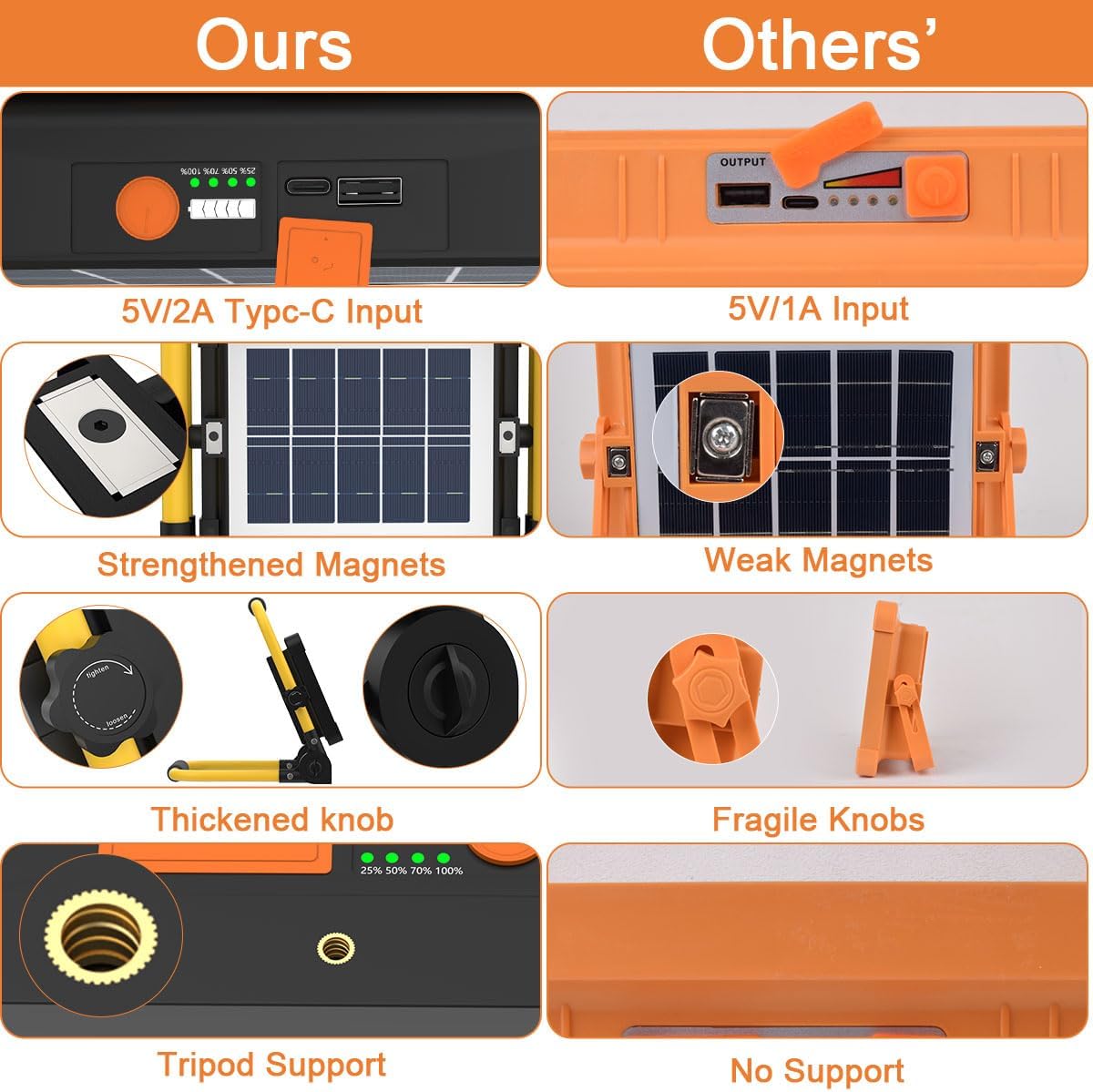
Image 5.2: Remote control layout and pairing instructions.
6. Charging
The ERAY S1 projector offers two charging methods:
6.1 USB Charging
Connect the provided USB charging cable to the projector's charging port and a compatible USB power adapter (not included). The charging indicator will show the battery status.
6.2 Solar Charging
The integrated solar panel allows for charging using sunlight. This method is recommended for outdoor use only and serves as a supplementary charging option. For faster and more reliable charging, USB charging is preferred.

Image 6.1: Illustration of USB and solar charging methods.
7. Power Bank Function
The ERAY S1 projector can function as a power bank (5V/1A output) to charge your electronic devices in emergencies. Simply connect your device to the projector's USB output port using a compatible cable.
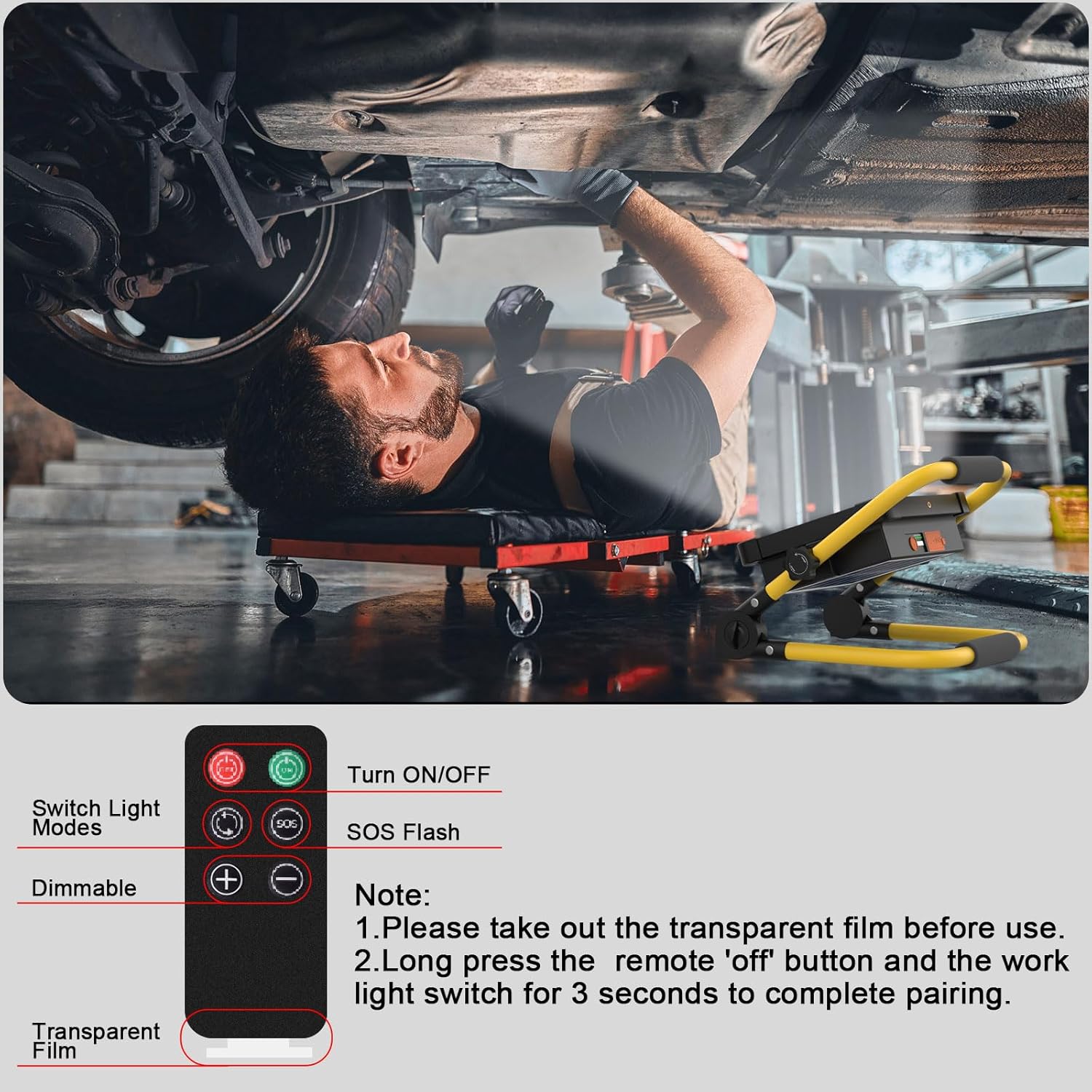
Image 7.1: The projector charging a mobile device, demonstrating its power bank capability.
8. Maintenance
To ensure the longevity and optimal performance of your ERAY S1 projector, follow these maintenance guidelines:
- Cleaning: Wipe the projector with a soft, damp cloth. Avoid using abrasive cleaners or solvents that could damage the surface or internal components.
- Storage: Store the projector in a cool, dry place when not in use. Ensure it is fully charged before long-term storage to preserve battery health.
- Water Resistance: The projector has an IP66 waterproof rating, protecting it from dust and strong jets of water. However, it is not designed for submersion. Ensure the silicone cover on the charging port is securely closed to maintain water resistance.
- Battery Care: Avoid completely draining the battery frequently. Recharge the device regularly, especially if it has been stored for an extended period.
9. Troubleshooting
If you encounter any issues with your ERAY S1 projector, refer to the following common problems and solutions:
| Problem | Possible Cause | Solution |
|---|---|---|
| Projector does not turn on. | Low battery. | Charge the projector using the USB cable. |
| Remote control is not working. | Transparent film not removed from battery. / Remote not paired. | Remove the transparent film. Pair the remote by long-pressing the 'off' button on the remote and the work light switch for 3 seconds. |
| Solar charging is slow or ineffective. | Insufficient sunlight or solar panel is a supplementary method. | Ensure the solar panel is exposed to direct sunlight. Use USB charging for faster and more reliable power. |
| Light output is dim. | Low battery or dimming setting. | Recharge the projector. Adjust brightness using the dimming buttons on the remote or by long-pressing the power button on the unit. |
| Device connected to power bank port is not charging. | Projector battery is low or cable is faulty. | Ensure the projector has sufficient charge. Try a different USB cable. |
10. Safety Information
Please observe the following safety precautions:
- Do not look directly into the LED light when it is on, as it can cause eye strain or damage.
- Keep the device away from extreme temperatures, direct heat sources, and open flames.
- Do not attempt to disassemble, repair, or modify the device yourself. Contact qualified personnel for service.
- Keep out of reach of children.
- Dispose of batteries and electronic components responsibly according to local regulations.
- Ensure the charging port's silicone cover is sealed when not charging to maintain water resistance.
11. Warranty and Support
ERAY products are manufactured to high-quality standards. For warranty information or technical support, please refer to the documentation provided at the time of purchase or contact your retailer. Keep your purchase receipt as proof of purchase.