
1. Introduction
Thank you for choosing the BLASTKING POD740BT 7-Channel Powered Mixer. This manual provides essential information for the safe and efficient operation of your device. Please read it thoroughly before use and retain it for future reference. The POD740BT is a versatile audio solution featuring dual internal amplifiers, a 7-channel mixer, Bluetooth connectivity, an MP3 player, and a 32-bit digital multi-effects processor.
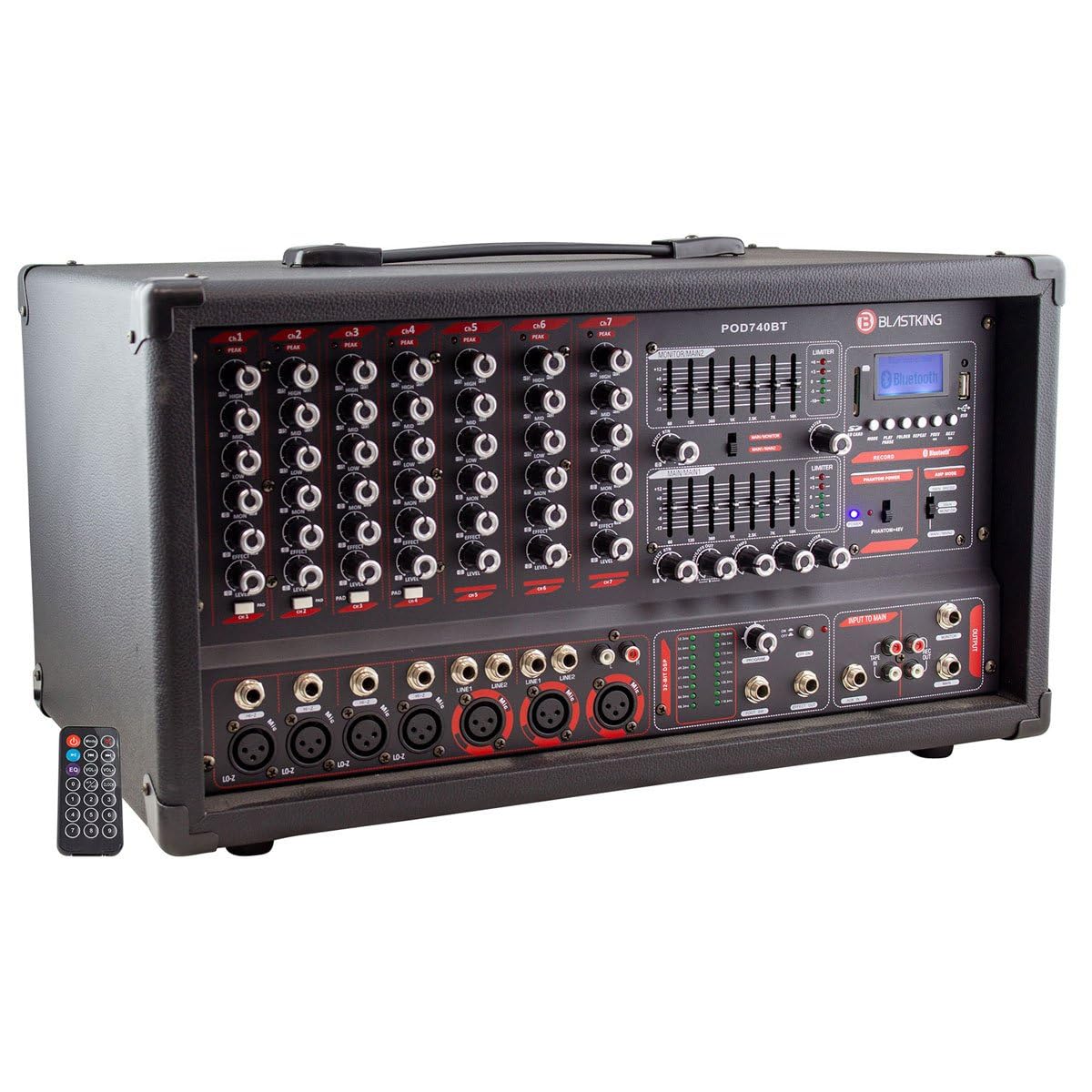
Image 1.1: Front view of the BLASTKING POD740BT Powered Mixer, showcasing its control panel and various inputs.
2. Key Features
- Dual Internal Amplifiers: Each amplifier provides 250W of output power.
- 7 Input Channels: Includes MIC/LINE inputs, with stereo line inputs available on channels 5-7.
- Master 7-Band Graphic EQ: Features selectable in/out switches for precise frequency control.
- 3-Band EQ per Channel: Individual high, mid, and low tone controls for each input channel.
- 32-Bit Digital Multi-Effects Processor: Offers 16 distinct programs for vocal and instrument enhancement.
- Built-in Limiters: Two internal limiters help prevent signal clipping and protect speakers.
- Pad Control: Available on channels 3-7 for managing high-level input signals.
- Global 48V Phantom Power: Supplies power for condenser microphones.
- Integrated Media Player: Built-in Bluetooth, MP3/USB, and SD card player for versatile audio playback.
- Switchable Power: Operates on either 115V or 230V AC for international compatibility.
3. Safety Instructions
To ensure safe operation and prevent damage, please observe the following precautions:
- Power Source: Connect the unit only to the specified power supply (115V or 230V AC) as indicated on the device. Ensure the voltage selector switch is set correctly for your region before plugging in.
- Grounding: Always use a grounded power outlet. Do not defeat the safety purpose of the polarized or grounding-type plug.
- Moisture: Do not expose this appliance to rain or moisture. Do not use near water or in damp environments.
- Ventilation: Ensure adequate ventilation. Do not block any ventilation openings. Install in accordance with the manufacturer's instructions.
- Heat: Do not install near any heat sources such as radiators, heat registers, stoves, or other apparatus (including amplifiers) that produce heat.
- Cables: Protect the power cord from being walked on or pinched, particularly at plugs, convenience receptacles, and the point where they exit from the apparatus.
- Servicing: Refer all servicing to qualified service personnel. Servicing is required when the apparatus has been damaged in any way, such as power-supply cord or plug is damaged, liquid has been spilled or objects have fallen into the apparatus, the apparatus has been exposed to rain or moisture, does not operate normally, or has been dropped.
- Cleaning: Unplug this apparatus during lightning storms or when unused for long periods of time. Clean only with a dry cloth.
4. Setup Guide
4.1 Unpacking
Carefully remove the mixer from its packaging. Inspect the unit for any signs of damage that may have occurred during transit. Retain the packaging materials for future transport or storage.
4.2 Power Connection
- Locate the voltage selector switch on the rear panel of the mixer.
- Ensure the switch is set to the correct voltage for your region (115V or 230V). Incorrect voltage selection can cause severe damage to the unit.
- Connect the provided power cord to the mixer's AC inlet and then to a grounded power outlet.
4.3 Connecting Inputs
- Microphones: Connect dynamic or condenser microphones to the XLR inputs (channels 1-7). If using condenser microphones, activate the global 48V phantom power switch.
- Line-Level Devices: Connect instruments, keyboards, or other line-level devices to the 1/4" TRS/TS inputs (channels 1-7). Channels 5-7 also support stereo line inputs.
- MP3/USB/SD Player: Insert a USB drive or SD card into the dedicated slot for media playback.
4.4 Connecting Outputs
- Speakers: Connect passive speakers to the amplifier outputs using appropriate speaker cables. Ensure the impedance of your speakers matches the mixer's output specifications.
- Monitor/Auxiliary Outputs: Use the dedicated monitor or auxiliary outputs to send signals to stage monitors or external effects processors.
5. Operating Instructions
5.1 Basic Operation
- Power On: After all connections are made, turn on the mixer using the power switch.
- Gain Control: Adjust the GAIN knob for each input channel to achieve an optimal input level. The PEAK LED should flash only occasionally.
- Channel EQ: Use the HIGH, MID, and LOW knobs on each channel to adjust the tonal characteristics of the input signal.
- Channel Fader/Volume: Adjust the individual channel faders to set the desired volume balance for each input.
- Master Volume: Use the MASTER volume control to set the overall output level of the mixer.
5.2 Phantom Power
The POD740BT provides global 48V phantom power. Activate the PHANTOM POWER switch only when using condenser microphones that require external power. Ensure all condenser microphones are connected before engaging phantom power to prevent damage.
5.3 Digital Multi-Effects Processor
The built-in 32-bit digital multi-effects processor offers 16 programs (e.g., reverb, delay, chorus). Use the PROGRAM selector to choose an effect and the FX SEND/RETURN controls to apply the effect to individual channels and adjust its overall level.
5.4 Master Graphic Equalizer
The 7-band graphic equalizer allows for fine-tuning the overall frequency response of the main mix. Use the sliders to boost or cut specific frequency bands. The IN/OUT switch allows for quick comparison between the equalized and unequlized sound.
5.5 Bluetooth Operation
- Activate the Bluetooth function on the mixer's media player section.
- On your Bluetooth-enabled device (e.g., smartphone, tablet), search for available devices.
- Select "BLASTKING POD740BT" from the list to pair.
- Once paired, audio from your device will play through the mixer. Adjust the media player's volume control.
5.6 MP3/USB/SD Player
Insert a USB flash drive or SD card containing MP3 audio files into the corresponding slot. Use the media player controls (Play/Pause, Skip, Folder) to navigate and play your audio files. The display will show track information.
6. Maintenance
6.1 Cleaning
Regularly clean the exterior of the mixer with a soft, dry cloth. Do not use abrasive cleaners, solvents, or waxes, as these can damage the finish. Ensure the unit is powered off and unplugged before cleaning.
6.2 Storage
When not in use for extended periods, store the mixer in a cool, dry place, away from direct sunlight and extreme temperatures. It is recommended to use the original packaging for protection during storage or transport.
7. Troubleshooting
| Problem | Possible Cause | Solution |
|---|---|---|
| No power | Power cord disconnected; Power switch off; Incorrect voltage selection; Blown fuse | Check power cord connection; Turn power switch on; Verify voltage selector setting; Replace fuse (if applicable, by qualified personnel) |
| No sound output | Master volume down; Channel fader down; Speaker cables disconnected/faulty; Amplifier protection mode | Increase master volume; Raise channel fader; Check speaker connections; Reduce input levels to prevent clipping |
| Distorted sound | Input gain too high; Master volume too high; Speaker impedance mismatch | Reduce input GAIN; Lower master volume; Ensure correct speaker impedance |
| Bluetooth not connecting | Bluetooth not enabled on mixer; Device too far; Device already paired elsewhere | Enable Bluetooth on mixer; Move device closer; Disconnect from other devices and try again |
| Phantom power not working | Phantom power switch off; Faulty microphone cable | Engage phantom power switch; Test with a different XLR cable |
8. Specifications
- Model: POD740BT
- Amplifier Output: 2 x 250W (Dual Internal Amplifiers)
- Channels: 7 (MIC/LINE, stereo line inputs on channels 5-7)
- Equalization: 3-band EQ per channel, Master 7-band graphic EQ
- Effects Processor: 32-bit Digital Multi-Effects (16 programs)
- Phantom Power: Global 48V
- Media Player: Bluetooth, MP3/USB, SD Card
- Power Source: Corded Electric
- Voltage: Switchable 115V / 230V AC
- Item Weight: 36 pounds (16.3 kg)
- Product Dimensions (WxHxL): Approximately 13 x 12 x 20 inches (33 x 30.5 x 50.8 cm)
- Connectivity Technology: Auxiliary, Bluetooth, USB
9. Warranty and Support
BLASTKING products are designed and manufactured to the highest quality standards. For information regarding warranty coverage, terms, and conditions, please refer to the warranty card included with your product or visit the official BLASTKING website. For technical support, service, or replacement parts, please contact your authorized BLASTKING dealer or customer service department.
Please have your model number (POD740BT) and purchase date available when contacting support.