
1. Introduction
Thank you for purchasing the Livofloral Side Table with Charging Station. This manual provides detailed instructions for assembly, operation, maintenance, and troubleshooting to ensure safe and efficient use of your new furniture. Please read this manual thoroughly before assembly and retain it for future reference.

Figure 1: Livofloral Side Table with Charging Station in a living room.
2. Safety Information
Please observe the following safety precautions to prevent injury or damage to the product:
- Ensure all parts are correctly assembled and tightened before use.
- Do not exceed the maximum weight recommendation of 49.9 kg (110 lbs) for the tabletop.
- Place the table on a stable, level surface to prevent tipping.
- Keep liquids away from the charging station to prevent electrical hazards. The charging station is designed to minimize risk from spills, but caution is always advised.
- Do not attempt to modify the electrical components of the charging station.
- Keep small children and pets away from small parts during assembly.
- Use only the provided hardware for assembly.
3. Package Contents
Before beginning assembly, verify that all components and hardware are present. Refer to the included parts list in your package. Typical components include:
- Tabletop panel
- Side panels and shelves
- Drawer components (fronts, sides, backs, bottoms)
- Metal frame components
- Charging station module (with 2 AC outlets, 2 USB ports, 1 Type-C port)
- Power cord (6.5 ft)
- Assembly tools (e.g., Allen wrench, screwdriver)
- Instruction manual
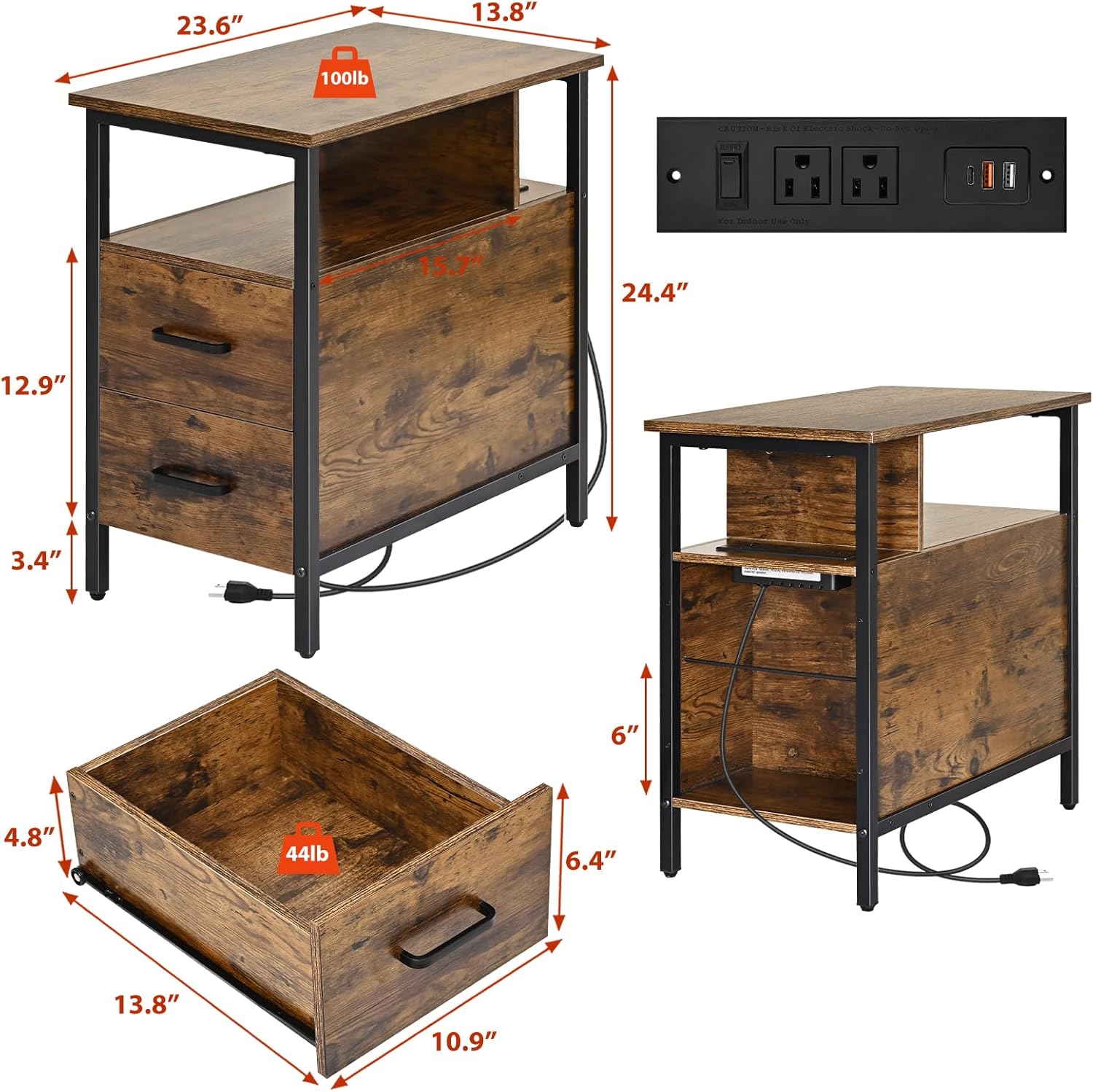
Figure 2: Product dimensions and charging station detail.
4. Assembly Instructions
Assembly typically requires one person and a screwdriver. Follow the numbered steps in the provided installation instructions carefully. All parts are numbered for easy identification.
- Unpack and Identify Parts: Lay out all components on a clean, soft surface to prevent scratches. Verify all parts against the included parts list.
- Assemble the Metal Frame: Attach the metal frame components using the provided screws and tools. Ensure all connections are secure.
- Attach Wooden Panels: Secure the wooden panels (tabletop, shelves, side panels) to the metal frame.
- Install Drawer Slides: Attach the metal slide rails to the table frame and to the drawer sides as per the instructions. Ensure they are aligned correctly for smooth operation.
- Assemble Drawers: Construct the two wooden drawers. Pay close attention to the orientation of the drawer fronts and bottoms.
- Insert Drawers: Carefully slide the assembled drawers onto the installed drawer slides. Test for smooth opening and closing. If drawers are difficult to operate, recheck slide alignment and assembly.
- Install Charging Station: Mount the charging station module into its designated slot on the second board. Connect the power cord.
- Attach Adjustable Feet: Screw the adjustable feet into the bottom of the table legs. Adjust them to ensure the table is stable and level on uneven floors.
Tip: For easier screw insertion into hard materials, a small amount of beeswax or a votive candle can be applied to the screw threads as a lubricant. Exercise caution if using power tools for tightening screws to avoid overtightening or damaging components.
5. Operating Instructions
5.1 Charging Station
The integrated charging station is located on the second board, designed to minimize risk from accidental spills. It features:
- 2 AC Outlets (120V/12A)
- 2 USB Ports (5V/2A)
- 1 Type-C Port (20W)
To use, plug the table's 6.5 ft power cord into a standard wall outlet. Use the power switch on the charging station to turn it on or off. You can charge up to five devices simultaneously.

Figure 3: Detail of the charging station features.
5.2 Storage Drawers and Shelves
The table includes two wooden drawers and open storage shelves. The drawers operate on metal slide rails for smooth access to personal essentials. The open shelves provide additional space for books, decorations, or other items.

Figure 4: Functional partitions for storage and charging.
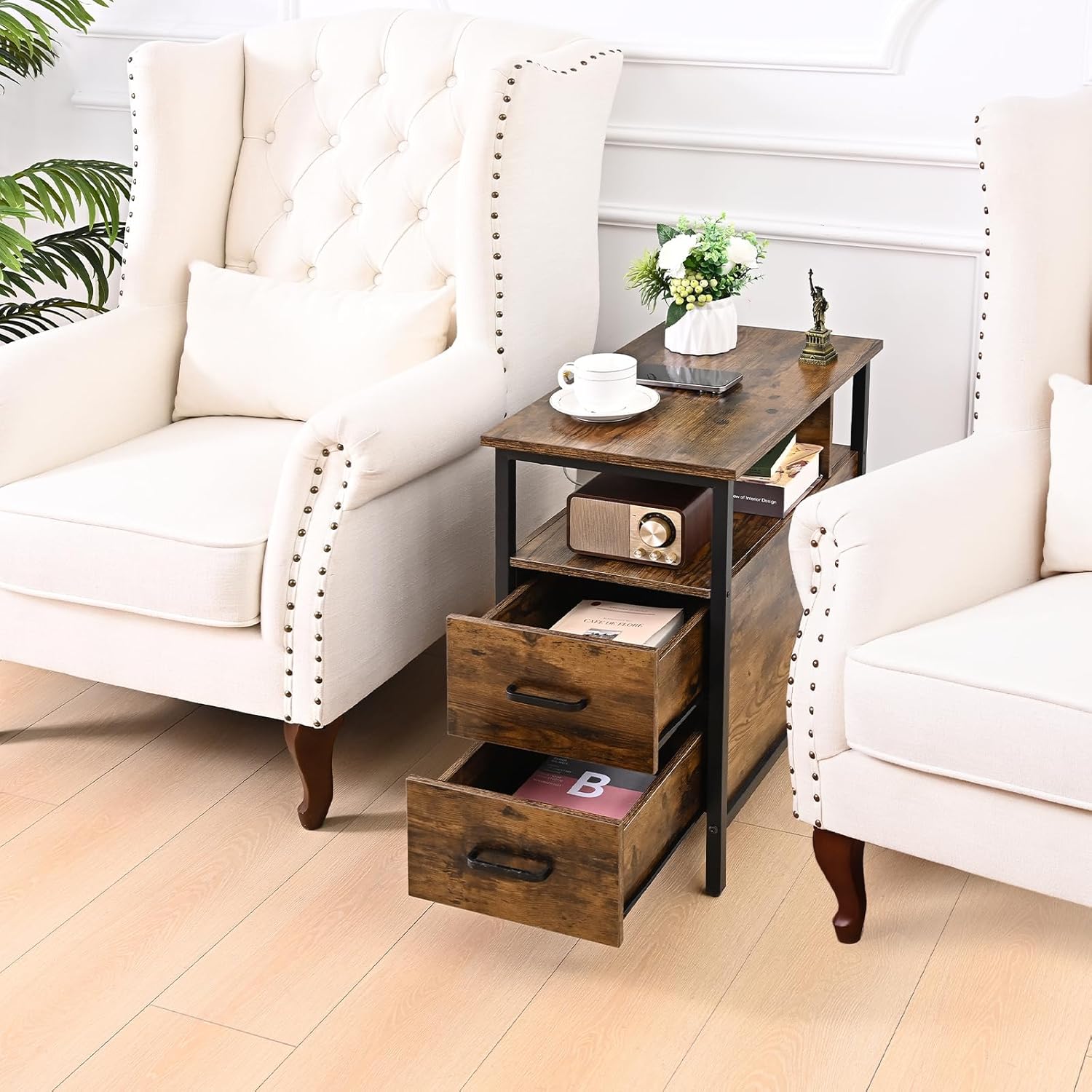
Figure 5: Side table with drawers open, demonstrating storage.
6. Maintenance
To maintain the appearance and functionality of your Livofloral Side Table:
- Cleaning: Wipe surfaces with a soft, damp cloth. Avoid harsh chemicals or abrasive cleaners that may damage the finish.
- Dusting: Regularly dust the table with a dry, soft cloth.
- Spills: Clean up spills immediately to prevent staining, especially on wooden surfaces.
- Hardware: Periodically check and tighten all screws and bolts to ensure stability.
- Electrical Components: Ensure the charging station and power cord are free from dust and debris. Do not immerse the charging station in water.
7. Troubleshooting
| Problem | Possible Cause | Solution |
|---|---|---|
| Charging station not working. |
|
|
| Drawers are difficult to open or close. |
|
|
| Table is wobbly or unstable. |
|
|
8. Specifications
| Feature | Detail |
|---|---|
| Brand | Livofloral |
| Model Name | Livofloral Side Tables |
| Model Number | 6ebd87ed-3d94-47c0-9fe4-c8a74ce522fd |
| Product Dimensions (D x W x H) | 59.9D x 35W x 62H centimetres (23.6 x 13.78 x 24.4 inches) |
| Item Weight | 14.29 kg (31.5 lbs) |
| Maximum Weight Recommendation | 49.9 kg (110 lbs) |
| Frame Material | Metal |
| Top Material Type | Engineered Wood |
| Number of Drawers | 2 |
| Number of Shelves | 2 (including the charging station shelf) |
| Charging Station | 2 AC Outlets (120V/12A), 2 USB Ports (5V/2A), 1 Type-C Port (20W) |
| Power Cord Length | 6.5 ft |
| Recommended Assembly People | 1 |
| Recommended Tools for Assembly | Screwdriver (included) |
| Color | Brown (as per current product variant) |
| Recommended Uses | Nightstand, Bedside Table, Office Desk, Printer Stand |
9. Warranty & Customer Support
Specific warranty information is not provided in this manual. For details regarding warranty coverage, please refer to the product packaging or contact the retailer where the product was purchased.
If you encounter any issues during assembly or operation, or if you have questions about your Livofloral Side Table, please contact Livofloral customer support through the retailer's platform or their official website. Please have your model number (6ebd87ed-3d94-47c0-9fe4-c8a74ce522fd) and purchase information ready when contacting support.