
1. Introduction
This manual provides essential instructions for the safe operation, maintenance, and troubleshooting of your Genkins GKJ4500D Dual Fuel Generator. Please read this manual thoroughly before operating the generator to ensure proper use and to prevent injury or damage.
The Genkins GKJ4500D is a versatile portable generator designed to provide reliable power using either gasoline or propane (LPG). It offers a maximum output of 4500 watts on gasoline and 4200 watts on propane, making it suitable for various applications including home backup, RV camping, and job site power.

Image 1.1: Genkins GKJ4500D Dual Fuel Generator. This image shows the overall view of the generator with its orange and black frame, control panel, and engine components.
2. Safety Information
WARNING: Carbon Monoxide Hazard
- Generators produce carbon monoxide, a colorless, odorless, poisonous gas. Operating a generator indoors can kill you in minutes.
- ALWAYS operate the generator outdoors in a well-ventilated area, far away from windows, doors, and vents.
- Install battery-operated carbon monoxide alarms in your home or RV.
WARNING: Electrical Shock Hazard
- Never operate the generator in wet conditions. Keep the generator dry.
- Ensure proper grounding of the generator before use.
- Do not connect the generator directly to your home's electrical system without a transfer switch installed by a qualified electrician.
WARNING: Fire Hazard
- Fuel is highly flammable. Store gasoline in an approved container in a well-ventilated area.
- Do not refuel the generator while it is running or hot. Allow it to cool down before adding fuel.
- Keep flammable materials away from the generator during operation.
3. Product Overview
Familiarize yourself with the main components and controls of your Genkins GKJ4500D generator.

Image 3.1: Control Panel Diagram. This image highlights the Power Switch, AC breaker button, AC receptacles (L5-20R and L5-30R), Circuit Breaker, and Ground Terminal on the generator's control panel.
- Power Switch (ENG.SW): Used to turn the engine ON or OFF.
- AC Breaker Button: Resets the AC circuit if overloaded.
- AC Receptacles (L5-20R 120V/20A*2, L5-30R 120V/30A): Outlets for connecting electrical devices.
- Circuit Breaker: Provides protection against overcurrent.
- Ground Terminal: For connecting a ground wire to ensure safe operation.
- Fuel Selector Switch: Located near the engine, this switch allows you to select between Gasoline and LPG operation.
- Choke Lever: Assists in starting a cold engine.
- Recoil Starter: Manual pull-start mechanism.
- Fuel Tank (Gasoline): 4-gallon capacity.
- Oil Fill Cap/Dipstick: For checking and adding engine oil.
4. Setup and Initial Preparation
4.1 Unpacking
Carefully remove the generator from its packaging. Inspect for any shipping damage. Retain packaging for future storage or transport.
4.2 Adding Engine Oil
The generator is shipped without engine oil. It is crucial to add the recommended oil before the first start-up.
- Place the generator on a level surface.
- Locate the oil fill cap/dipstick (typically on the side of the engine, often yellow or black).
- Remove the cap/dipstick and slowly add approximately 1.16 pints (0.55 liters) of recommended oil (SJ 10W-40). Do not overfill.
- Reinsert the dipstick and check the oil level. It should be at the top of the full mark.
- Securely replace the oil fill cap.

Image 4.1: Engine Side View. This image shows the side of the generator engine, where the oil fill cap and dipstick are typically located.
4.3 Fuel Connection
The GKJ4500D operates on either gasoline or propane (LPG).
For Gasoline Operation:
- Ensure the generator is OFF and cool.
- Open the fuel cap on top of the gasoline tank.
- Fill the tank with fresh, unleaded gasoline (minimum 87 octane). Do not overfill; leave space for expansion. The tank capacity is 4 gallons.
- Securely close the fuel cap.
For Propane (LPG) Operation:
- Ensure the generator is OFF.
- Connect a standard propane tank (not included) to the generator's propane inlet using the provided hose.
- Ensure the propane hose is TIGHTLY secured before starting.
- Slowly open the valve on the propane tank.
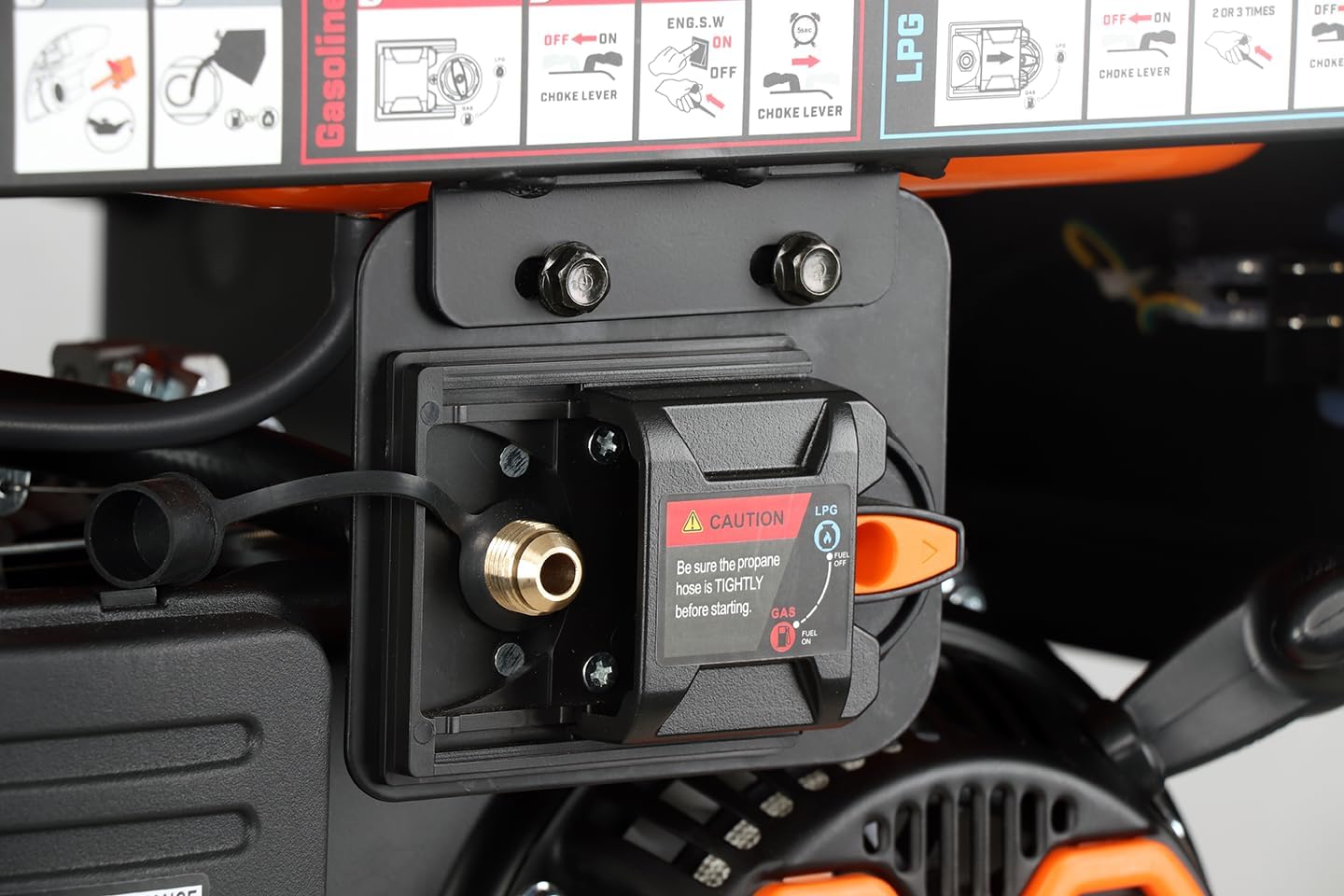
Image 4.2: Propane Connection Point. This image shows a close-up of the fuel selector switch and the propane inlet on the generator, with a caution label regarding tight hose connection.
4.4 Grounding the Generator
For safety, the generator must be properly grounded. Connect a heavy-gauge copper wire from the generator's ground terminal to an approved ground rod driven into the earth.
5. Operation
5.1 Starting the Generator
Before starting, ensure all electrical loads are disconnected from the generator.
Starting on Gasoline:
- Ensure the fuel selector switch is set to 'Gasoline'.
- Turn the engine switch (ENG.SW) to 'ON'.
- Move the choke lever to the 'CHOKE' position (for cold starts).
- Pull the recoil starter handle firmly and steadily until the engine starts.
- Once the engine starts, slowly move the choke lever to the 'RUN' position.
- Allow the engine to run for a few minutes to warm up before connecting electrical loads.
Starting on Propane (LPG):
- Ensure the fuel selector switch is set to 'LPG'.
- Ensure the propane tank valve is open.
- Turn the engine switch (ENG.SW) to 'ON'.
- Move the choke lever to the 'CHOKE' position (for cold starts).
- Pull the recoil starter handle firmly and steadily until the engine starts. Propane may require a few more pulls than gasoline.
- Once the engine starts, slowly move the choke lever to the 'RUN' position.
- Allow the engine to run for a few minutes to warm up before connecting electrical loads.
5.2 Connecting Electrical Loads
Once the generator is running smoothly and warmed up:
- Plug in the electrical devices you wish to power.
- Ensure the total wattage of connected devices does not exceed the generator's running wattage (3600W for gas, 3300W for LPG).
- Turn on the circuit breaker on the generator's control panel if it is in the 'OFF' position.
5.3 Stopping the Generator
- Disconnect all electrical loads from the generator.
- Turn the engine switch (ENG.SW) to 'OFF'.
- If operating on propane, close the valve on the propane tank.
6. Maintenance
Regular maintenance ensures the longevity and reliable performance of your generator.
6.1 Maintenance Schedule
| Item | Every Use | Every 25 Hrs / Monthly | Every 50 Hrs / 3 Months | Every 100 Hrs / 6 Months |
|---|---|---|---|---|
| Check Engine Oil Level | ✓ | |||
| Clean Air Filter | ✓ | |||
| Change Engine Oil | ✓ | |||
| Check Spark Plug | ✓ | |||
| Inspect Fuel Lines | ✓ |
6.2 Storage
For long-term storage (over 30 days):
- Drain all gasoline from the fuel tank and carburetor. Run the engine until it stops from lack of fuel.
- If using propane, disconnect the propane tank.
- Change the engine oil.
- Remove the spark plug and pour a small amount of engine oil into the cylinder. Pull the recoil starter a few times to distribute the oil, then reinstall the spark plug.
- Clean the generator thoroughly.
- Store in a clean, dry, well-ventilated area.
7. Troubleshooting
This section addresses common issues you might encounter with your generator.
| Problem | Possible Cause | Solution |
|---|---|---|
| Engine will not start | No fuel (gasoline/propane) Engine switch OFF Low oil level Choke not set correctly Spark plug issue | Add fuel, open propane valve Turn engine switch ON Add oil to correct level Adjust choke lever Inspect/clean/replace spark plug |
| No power output | Circuit breaker tripped Overload Loose connections | Reset AC breaker Reduce connected load Check all electrical connections |
| Engine runs rough | Stale fuel Dirty air filter Spark plug issue | Drain old fuel, add fresh fuel Clean/replace air filter Inspect/clean/replace spark plug |
| Low oil shutdown activates | Low oil level | Add oil to correct level |
8. Technical Specifications
Detailed specifications for the Genkins GKJ4500D Dual Fuel Generator.

Image 8.1: Generator Dimensions. This image illustrates the physical dimensions of the Genkins GKJ4500D generator: 25 inches (L) x 19 inches (W) x 19 inches (H).
| Specification | Value |
|---|---|
| Model Name | GKJ4500D Dual Fuel |
| Rated Voltage & Frequency | 120V/60HZ |
| Running VAC Amperage (Gas) | 30A |
| Running VAC Amperage (LPG) | 27.5A |
| Rated Output (Gas) | 3600W |
| Rated Output (LPG) | 3300W |
| Max. Output (Gas) | 4500W |
| Max. Output (LPG) | 4200W |
| Engine Type | OHV, 4-stroke |
| Engine Displacement | 223 cc |
| Engine RPM | 3600 rpm |
| Recommended Oil | SJ 10W-40 |
| Oil Volume | 1.16 pt (0.55 L) |
| Fuel Tank - Gasoline | 4 gal |
| Full Load Run Time (Gas) | 6.5 h |
| 1/2 Load Run Time (Gas) | 9 h |
| Noise Level | 70dB/7m |
| Net Weight | 95 lb (43 kg) |
| Assembly Dimensions (L*W*H) | 23.2*17.3*17.7 inch (589*439*450 mm) |
| Receptacle Details | L5-20R 120V/20A*2, L5-30R 120V/30A |
9. Warranty Information
The Genkins GKJ4500D Dual Fuel Generator comes with a 1-Year Manufacturer Warranty. This warranty covers parts and service within the first year of purchase. Please retain your proof of purchase for warranty claims.
10. Customer Support
For technical assistance, warranty claims, or general inquiries, please contact Genkins customer support. Refer to the contact information provided with your product packaging or visit the official Genkins website for the most up-to-date support details.