
1. Introduction
Thank you for choosing the Brigii Ultrasonic Jewelry Cleaner. This manual provides essential information for the safe and effective operation, maintenance, and troubleshooting of your new device. Please read this manual thoroughly before first use and retain it for future reference.
Important Safety Information
- Always unplug the cleaner when not in use or before cleaning.
- Do not immerse the main unit in water or other liquids.
- Keep out of reach of children.
- Do not operate if the power cord or plug is damaged.
- Use only plain water for cleaning unless specifically instructed otherwise for certain items. Avoid harsh chemicals.
2. Product Overview
The Brigii Ultrasonic Jewelry Cleaner utilizes high-frequency ultrasonic waves to provide powerful yet gentle cleaning for various items.
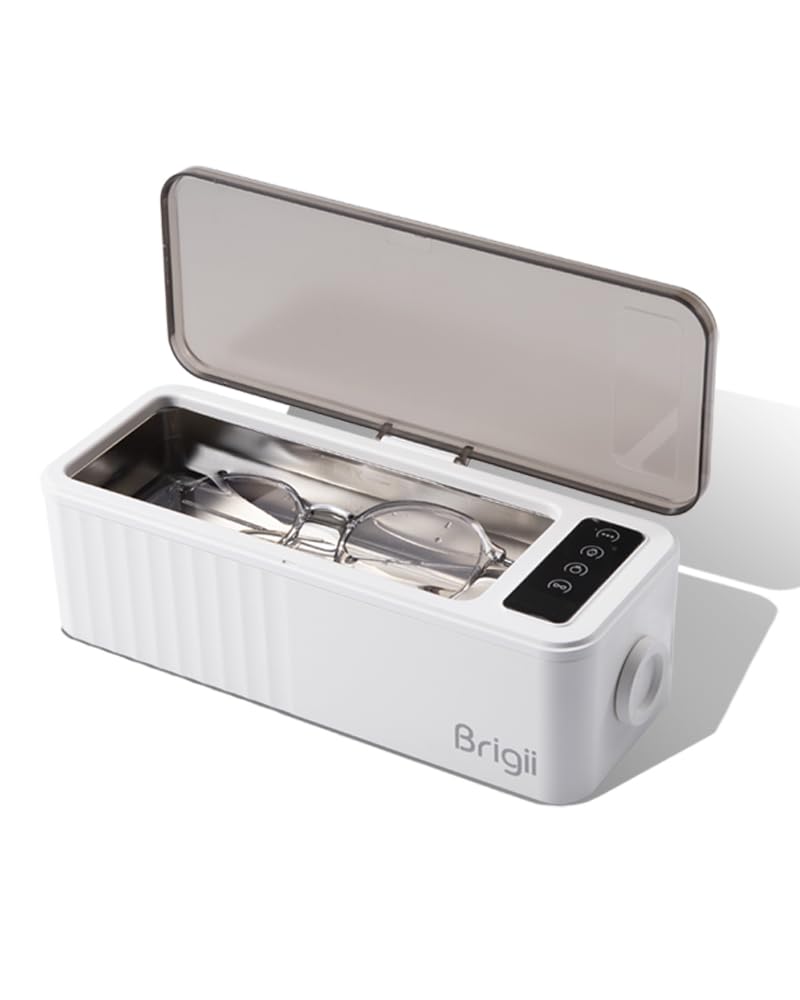
Image: The Brigii Ultrasonic Jewelry Cleaner, a compact white device with a transparent lid open, revealing the stainless steel cleaning tank. A pair of eyeglasses rests inside the tank, ready for cleaning.
Components
- Ultrasonic Cleaner Unit
- Charging Wire
- Cleaning Basket (for smaller items like rings)
- Watch Holder
Key Features
- Powerful yet Gentle Cleaning: Harnesses 45,000 Hz ultrasonic waves to generate millions of tiny bubbles, effectively removing dirt, grease, dust, and contaminants.
- Customizable Cleaning Options: Features four preset cleaning cycles for various items.
- Versatile and Convenient: 15 oz (450 ml) stainless steel tank accommodates jewelry, dentures, eyeglasses, and more. Includes a watch holder.
- Stylish and Durable Design: Sleek, modern design with a digital time display. Constructed from high-quality materials for lasting durability.

Image: A diagram titled "Principle of ultrasonic cleaning" showing three stages: 1. Water producing millions of tiny bubbles under ultrasound. 2. Bubbles constantly bursting, impacting dirt. 3. Dirt being differentiated and stripped under continuous impact.
3. Setup
- Unpack: Carefully remove the ultrasonic cleaner and all accessories from the packaging.
- Placement: Place the unit on a stable, flat, and dry surface, away from heat sources and direct sunlight. Ensure adequate ventilation.
- Power Connection: Connect the charging wire to the cleaner and then plug it into a standard electrical outlet.
- Initial Rinse: Before first use, fill the tank with clean water and run a short cycle (e.g., 180s) without items to rinse out any manufacturing residues. Empty the water and wipe the tank dry.
4. Operation
Follow these steps to effectively clean your items:
- Fill the Tank: Open the lid and fill the stainless steel tank with tap water. Ensure the water level is between the MIN and MAX marks. For optimal results, use room temperature water.
- Place Items: Carefully place the items to be cleaned into the tank. For smaller items like rings or earrings, use the provided cleaning basket. For watches, use the watch holder to suspend the watch head above the water while the band is immersed. Ensure items are fully submerged but not overcrowded.
- Close Lid: Close the transparent lid securely.
- Select Cleaning Mode: The cleaner features a control knob with four preset cleaning cycles. Turn the knob to select the desired mode:
- Glasses Mode: 180 seconds (3 minutes) - Ideal for eyeglasses, sunglasses.
- Watch Mode: 300 seconds (5 minutes) - Suitable for watch bands (ensure watch head is protected).
- Jewelry Mode: 240 seconds (4 minutes) - For rings, necklaces, earrings, and other jewelry.
- Multi-function Mode: 360 seconds (6 minutes) - For general items or heavily soiled items.
- Start Cleaning: Press the control knob to start the cleaning cycle. The digital display will show the remaining time.
- Cycle Completion: The unit will automatically stop when the cycle is complete.
- Remove Items: Open the lid and carefully remove the cleaned items. Rinse them under clean running water and dry them with a soft, lint-free cloth.

Image: A composite image demonstrating the versatility of the cleaner, showing it in use for cleaning dirty jewelry, eyeglasses, and watches, highlighting the included basket and watch holder.

Image: A detailed view of the control panel on the Brigii Ultrasonic Cleaner, showing the four mode icons (Multi-function, Jewelry, Watch, Glasses) with their corresponding working times, and the digital time display.
5. Maintenance
Regular maintenance ensures the longevity and optimal performance of your ultrasonic cleaner.
- Empty Water: After each use, unplug the unit and carefully empty the water from the tank.
- Clean Tank: Wipe the inside of the stainless steel tank with a soft cloth to remove any residue. Do not use abrasive cleaners or scouring pads.
- Exterior Cleaning: Wipe the exterior of the unit with a damp cloth. Do not use harsh chemicals.
- Storage: Store the cleaner in a cool, dry place with the lid slightly ajar to allow for air circulation.
6. Troubleshooting
| Problem | Possible Cause | Solution |
|---|---|---|
| Unit does not turn on. | Not plugged in; Power outlet issue; Damaged power cord. | Ensure power cord is securely plugged into unit and outlet. Test outlet with another device. Contact support if cord is damaged. |
| Cleaning results are unsatisfactory. | Insufficient cleaning time; Items too dirty; Water level too low/high; Items overcrowded. | Run a longer cycle. Pre-rinse heavily soiled items. Adjust water level. Clean fewer items at a time. |
| Unusual noise during operation. | Normal ultrasonic sound; Unit not on a flat surface; Items touching tank walls. | A slight buzzing sound is normal. Ensure unit is on a stable, flat surface. Reposition items to prevent contact with tank walls. |
| Water becomes cloudy quickly. | Effective cleaning removing dirt. | This indicates the cleaner is working. Empty and refill with fresh water for subsequent cycles if needed. |
7. Specifications
- Model Number: Ultrasonic jewelry cleaner
- Tank Capacity: 15 oz (450 ml)
- Ultrasonic Frequency: 45,000 Hz
- Dimensions: 11.69 x 4.57 x 3.82 inches
- Weight: 1.46 Pounds
- Manufacturer: Brigii
- Date First Available: October 16, 2023
8. Warranty and Support
For any inquiries or concerns regarding your Brigii Ultrasonic Jewelry Cleaner, please do not hesitate to reach out to the seller via Amazon message. We are committed to providing prompt assistance and will respond within 24 hours.
Please retain your purchase receipt as proof of purchase for any warranty claims.