
WOOPKER AK55
WOOPKER AK55 Stereo Amplifier User Manual
Model: AK55
Introduction
The WOOPKER AK55 Home Audio Stereo Amplifier is designed to enhance your audio experience with powerful sound output and versatile connectivity options. Featuring Bluetooth 5.0, multiple input ports, and microphone capabilities, this amplifier is ideal for home entertainment, karaoke, and various audio setups. Its compact design allows for easy integration into any space.
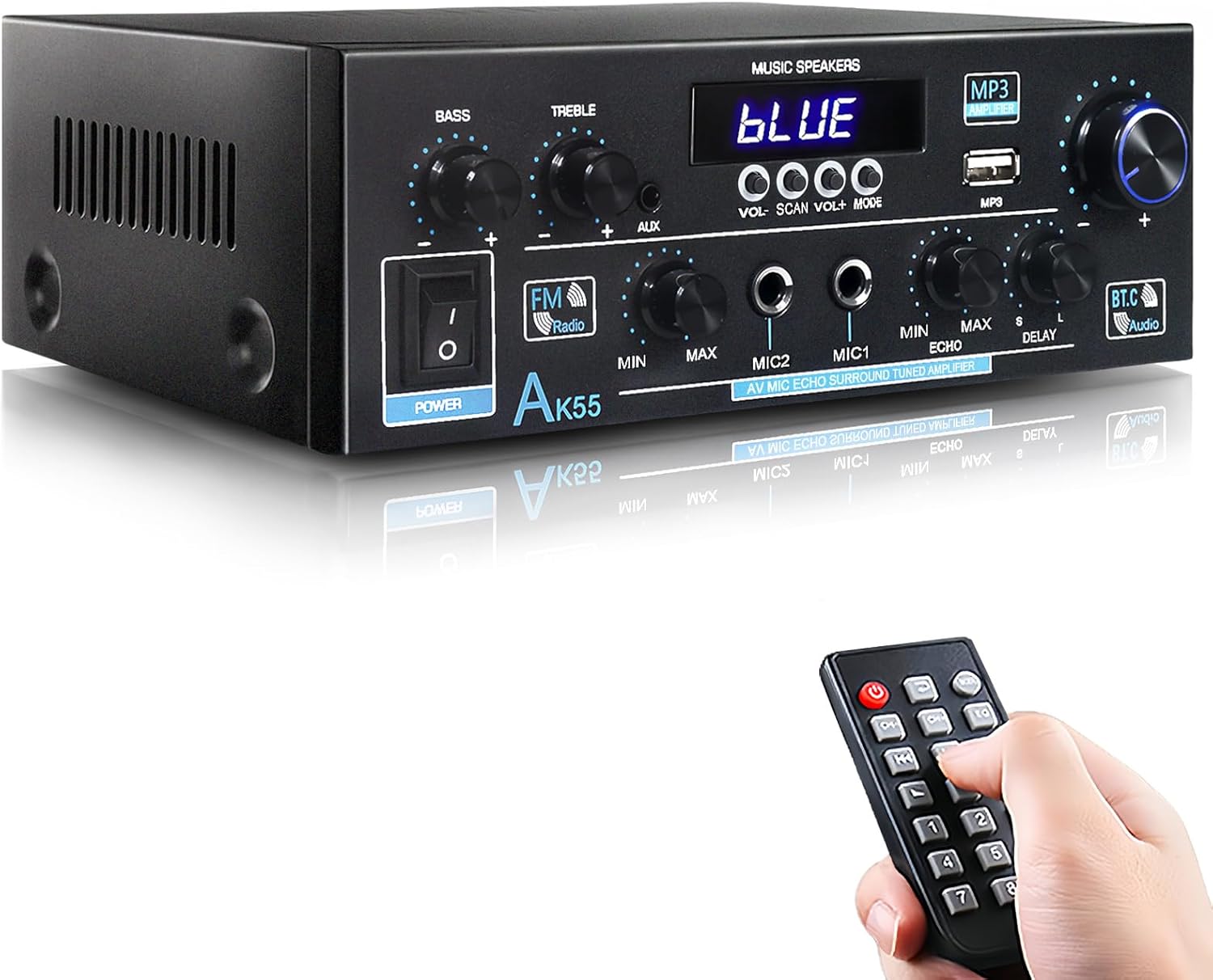
The AK55 Stereo Amplifier, shown with its remote control, offers a compact solution for home audio needs.
Package Contents
Upon opening the package, ensure all the following items are present:
- AK55 Power Amplifier x 1
- Infrared Remote Control x 1
- AC Power Cord x 1
- FM Antenna Line x 1
- User Manual x 1
- Quick Start Guide x 1

All items included in the AK55 amplifier package.
Product Features
- Upgraded Power: Enhanced chip for 70W x2 output, supporting higher power devices.
- Powerful Sound & Compact Size: Delivers robust audio for 4-16 ohm speakers, ideal for various room sizes.
- Multiple Input & Multipurpose: Bluetooth, AUX, MIC, USB inputs for diverse audio sources like CD, DVD, TV, PC, phones, MP3 players.
- Bluetooth 5.0 & Remote Control: Easy wireless connection and convenient remote operation.
- MIC & USB Card Input: Two microphone jacks for karaoke and USB stick input for direct playback.
- Bass & Treble Control: Fine-tune sound effects with dedicated knobs for microphone volume, bass, treble, and master volume.

Seamless wireless audio streaming with Bluetooth 5.0.

Experience high-quality audio for all your music.

Dual microphone inputs for karaoke and public speaking.
Setup
Front Panel Overview
Familiarize yourself with the controls and indicators on the front panel:

Detailed view of the AK55 amplifier's front panel controls.
- POWER Switch: Turns the unit on or off.
- BASS/TREBLE Knobs: Adjust low and high frequencies.
- AUX Input: 3.5mm jack for external audio devices.
- USB Port: For playing MP3 files from a USB stick.
- VOLUME Knob: Master volume control.
- MIC1/MIC2 Inputs: 6.35mm jacks for microphones.
- MIC VOL Knob: Adjusts microphone volume.
- ECHO/DELAY Knobs: Control microphone echo and delay effects.
- FM Radio Button: Activates FM radio mode.
- Digital Display: Shows current mode, frequency, or track information.
Rear Panel Connections
Connect your speakers and audio sources to the rear panel:

Rear panel connections for the AK55 amplifier.
- AUDIO INPUT (AUX1/AUX2): RCA jacks for connecting external audio devices like CD/DVD players, TVs, or PCs.
- SPEAKER SYSTEM (4Ω-16Ω): Connect your passive speakers here. Ensure correct polarity (red for positive, black for negative).
- FM ANT: Connect the included FM antenna for radio reception.
- OPT/COAX INPUT: Digital audio inputs for compatible devices.
- POWER DC INPUT (12V/5A): For DC power supply (if applicable).
- AC POWER INPUT (110-240V): Connect the AC power cord to this port.
Speaker Connection Guide
- Before connecting speakers, distinguish positive (red) and negative (black) terminals.
- Press the clasp on the back of the AK55 amplifier and insert all bare wires into the speaker clasp corresponding to the positive and negative terminals.
- Avoid plugging and unplugging USB drives, SD cards, RCA audio cables, or speaker cables while the amplifier is turned on.
Visual Setup Guide
This video provides a visual guide to setting up the AK55 Amplifier, including unboxing and connecting various components.
Operating Instructions
Power On/Off
Flip the POWER switch on the front panel to turn the amplifier on or off. The digital display will illuminate when powered on.
Mode Selection
Press the MODE button on the front panel or remote control to cycle through available input modes: Bluetooth, AUX1, AUX2, USB, OPT/COAX, and FM Radio. The digital display will indicate the current mode.
Volume and Tone Control
- Master Volume: Rotate the large VOLUME knob to adjust the overall output volume.
- Bass/Treble: Use the BASS and TREBLE knobs to fine-tune the low and high frequencies of your audio.
Microphone Usage (Karaoke/Speaking)
- Connect up to two microphones to the MIC1 and MIC2 input jacks.
- Adjust the microphone volume using the MIC VOL knob.
- Apply echo and delay effects to the microphone audio using the ECHO and DELAY knobs for enhanced vocal performance.
FM Radio Operation
- Switch to FM Radio mode using the MODE button.
- Use the SCAN button to automatically search and save available FM stations.
- Use the VOL+/- buttons to manually tune to specific frequencies or navigate through saved stations.
USB Playback
Insert a USB stick containing MP3 audio files into the USB port. The amplifier will automatically detect and begin playing the files. Use the VOL+/- and SCAN (for track skip) buttons to control playback.
Maintenance
- Keep the amplifier in a well-ventilated area to prevent overheating.
- Clean the unit with a soft, dry cloth. Do not use liquid cleaners or aerosols.
- Avoid exposing the amplifier to direct sunlight, high temperatures, humidity, or dust.
- Do not block ventilation openings.
Troubleshooting
| Problem | Possible Cause | Solution |
|---|---|---|
| No power | Power cord not connected; Power switch off. | Ensure power cord is securely plugged in; Turn power switch ON. |
| No sound output | Volume too low; Incorrect input mode; Speakers not connected properly. | Increase volume; Select correct input mode; Check speaker connections and polarity. |
| Bluetooth not connecting | Device not in pairing mode; Amplifier too far from device. | Ensure Bluetooth mode is selected on amplifier and device; Move devices closer. |
| Poor FM reception | FM antenna not connected or positioned incorrectly. | Connect FM antenna securely; Adjust antenna position for better signal. |
Specifications
| Feature | Detail |
|---|---|
| Model Number | AK55 |
| Power Output | 70W x 2 (Rated) |
| Speaker Impedance | 4-16 ohms |
| Bluetooth Version | 5.0 |
| Inputs | Bluetooth, AUX (RCA), USB, MIC (x2), Optical, Coaxial |
| Dimensions (L x W x H) | 19.9cm x 18.8cm x 6.9cm (approx. 7.83 x 7.4 x 2.72 inches) |
| Item Weight | 2.27 pounds |
| Manufacturer | Jieyang Rongcheng District Baitong Electronics Factory |
| Country of Origin | China |
| Date First Available | October 27, 2023 |
Warranty and Support
WOOPKER is committed to providing high-quality products and customer satisfaction. For any inquiries or support needs, please refer to the following:
- Quick Response: Expect a response within 24 hours for your queries.
- Return Policy: Return within 30 days for an exchange or refund.
- Technical Support: Lifetime technical customer support is provided.
- For detailed warranty information and to contact support, please refer to the official WOOPKER website or the contact information provided in your product packaging.
Related documentsAK55


Ask a question about this manual
Ask about setup, troubleshooting, compatibility, parts, safety, or missing instructions. Manuals+ will review the question and use this page’s manual context to help answer it.