
iBooMas IT-9777
iBooMas Massage Chair IT-9777 User Manual
Model: IT-9777 / IT-9777L
Brand: iBooMas
Introduction
This user manual provides comprehensive instructions for the safe and effective operation, setup, and maintenance of your iBooMas IT-9777 Full Body Massage Chair. Please read this manual thoroughly before using the product and retain it for future reference.
Important Safety Instructions
To reduce the risk of electric shock, burns, fire, or injury to persons:
- Always unplug the massage chair from the electrical outlet immediately after using and before cleaning.
- Do not use while bathing or in a shower.
- Do not place or store the appliance where it can fall or be pulled into a tub or sink.
- Do not place in or drop into water or other liquid.
- Do not reach for an appliance that has fallen into water. Unplug it immediately.
- Close supervision is necessary when this appliance is used by, on, or near children, invalids, or disabled persons.
- Use this appliance only for its intended use as described in this manual. Do not use attachments not recommended by the manufacturer.
- Never operate this appliance if it has a damaged cord or plug, if it is not working properly, if it has been dropped or damaged, or dropped into water.
- Keep the cord away from heated surfaces.
- Never use while sleeping or drowsy.
- Never drop or insert any object into any opening.
- Do not operate where aerosol (spray) products are being used or where oxygen is being administered.
- To disconnect, turn all controls to the off position, then remove plug from outlet.
- This appliance is intended for household use only.
Consult your physician before using this product if you:
- Are pregnant or have a pacemaker.
- Have any concerns regarding your health.
- Are experiencing any unusual pain.
The massage chair is designed for personal relaxation and should not be used as a substitute for medical treatment.
Setup and Assembly
Follow these steps to unbox and assemble your iBooMas massage chair. It is recommended to have two people for assembly due to the size and weight of the chair.
1. Unboxing
Carefully cut the packaging tape and lift the cardboard box upwards to reveal the massage chair. Dispose of the cardboard and other packing materials responsibly.
Video: iBooMas IT9777 massage chair Unboxing and Installation Video. This video demonstrates the unboxing process and initial setup steps for the massage chair.
Remove the protective plastic film from the main body of the chair and the footstool.

Image: The iBooMas Massage Chair IT-9777 in its fully assembled state, showcasing its brown and black design.
2. Checking Accessories
Locate and check all accessories inside the chair's packaging. This typically includes the LCD screen, power cable, LCD screen support bracket, user manual, and foot cushions.
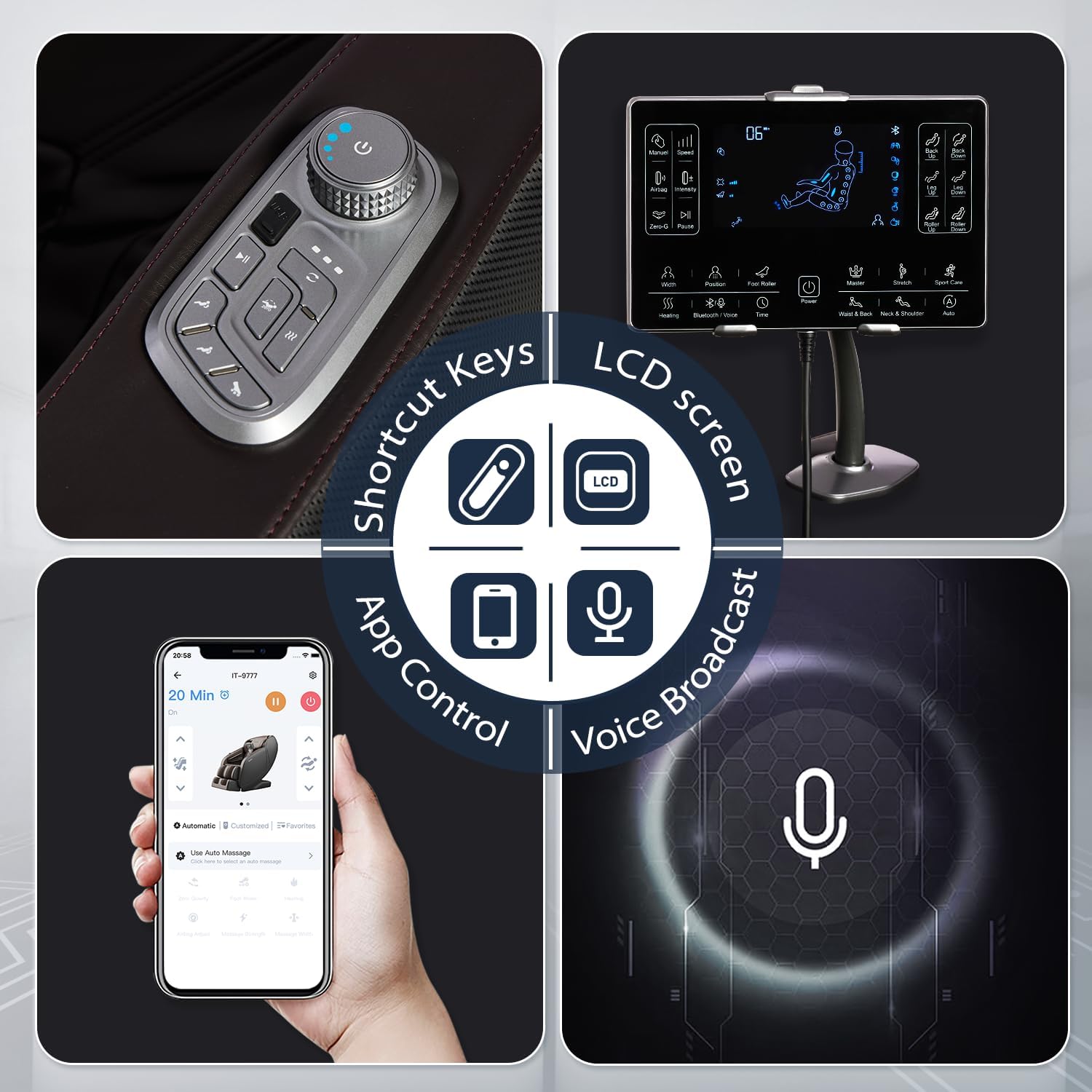
Image: A close-up view of the iBooMas massage chair's control panel, showing the LCD screen, shortcut keys, and app control interface.
3. Installing the Display Bracket
Securely install the LCD screen support bracket onto the designated slot on the armrest of the chair. Use the provided tools to tighten the screws.
4. Connecting Cables and Footstool
Insert the air pipe and interface cables into their respective counterparts. Ensure a secure connection.
Put the legrest bracket into the fixed axis and attach the locking tabs on both sides of the footstool to the seat frame.
Connect the cable of the screen to the cable located under the seat.
Zip up the zippers under the backrest pad and the zipper between the cushion and the footstool.
5. Powering On
Plug in the power cord to a suitable electrical outlet.
Turn on the main power switch located on the chair. The chair will reset to its default position.
Operating Your Massage Chair
The iBooMas IT-9777 offers multiple control methods for your convenience: LCD screen, knob shortcut, and mobile app control.
1. LCD Screen Operation
The LCD screen provides a visual interface for controlling all massage functions.
Video: IT9777 zero gravity massage chair LCD operation. This video demonstrates how to use the LCD control panel for various massage functions.
Basic Controls:
- Power Button: Turn the massage chair ON/OFF.
- Manual Mode: Select from 6 manual massage techniques: kneading, tapping, knocking, sync, shiatsu, or rolling.
- Speed Adjustment: Adjust the back roller speed from level 1-6 (manual mode only).
- Width Selection: Select the width of the back roller (width, medium, or narrow) (manual mode only).
- Airbag Intensity: Adjust the airbag pressure from level 1-3. Open the airbag and select the airbag position: full body, shoulders, arms, waist, legs, and ankles (manual mode only).
- Foot Roller Strength: Select the strength of the foot roller from level 1-3.
- Heating: Turn the back and calf heating ON/OFF.
- Bluetooth/Voice: Short press to turn voice broadcast ON/OFF. Long press to turn Bluetooth ON/OFF.
- Time: Set the massage time from 10-30 minutes. Long press to turn ON/OFF the Oxygen Ion function.
- Zero-G: Activate Zero Gravity mode.
- Pause/Resume: Pause or resume the massage function.
- Auto Programs: Switch between 12 massage auto programs (Stretch, Sport Care, Soft, Master, Neck & Shoulder, Waist & Back, Sleep, Relaxing, Refreshing, Slim, Spine Care, SPA).
- Back Up/Down: Press and hold to raise or lower the backrest.
- Leg Up/Down: Press and hold to raise or lower the legrest.
- Roller Up/Down: Press and hold to adjust the back roller up or down in body detection.

Image: An internal view of the iBooMas massage chair highlighting the 40 airbags and 3 heat zones (shoulder, waist, and legs) for comprehensive massage and warmth.

Image: A diagram illustrating the SL-Track mechanism of the iBooMas massage chair, showing its extended coverage from neck and shoulder to waist, hip, back, and thigh.

Image: A visual representation of the 12 preset massage programs available on the iBooMas massage chair, including Stretch, Sport Care, Soft, Master, Sleep, and SPA.
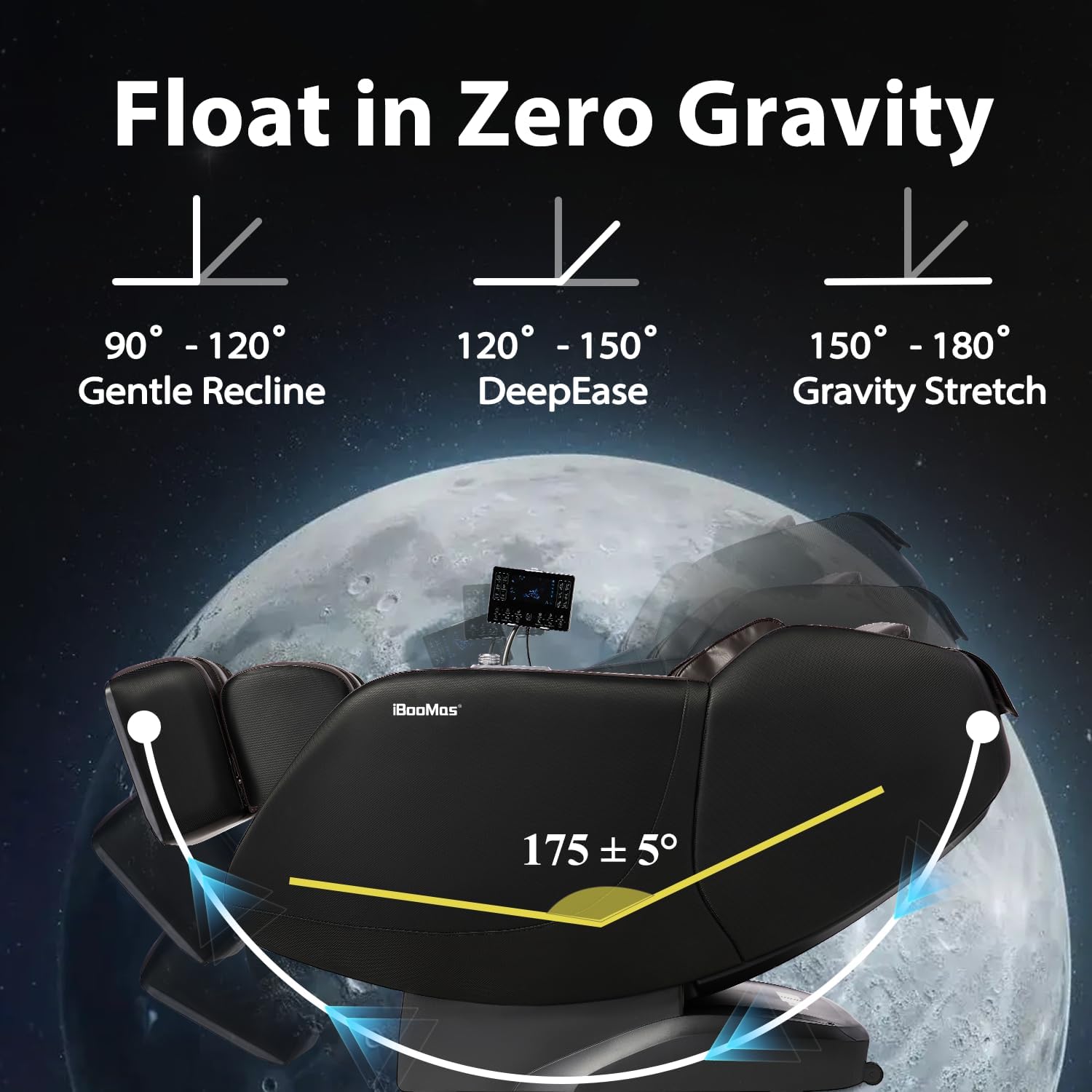
Image: A diagram showing the three levels of Zero Gravity inclination angles (Gentle Recline, DeepEase, Gravity Stretch) for optimal relaxation.

Image: An illustration of the intelligent manipulator within the iBooMas massage chair, demonstrating its ability to perform 6 professional massage techniques: Shiatsu, Knocking, Tapping, Rolling, Kneading, and Sync.
2. Mobile App Control
Download the iBooMas app from your smartphone's app store. Connect your massage chair via Bluetooth. The app allows for personalized program saving and effortless operation.
Video: iBooMas zero gravity massage chair full body. This video highlights the chair's features including voice control, app control, and various massage techniques.
The app provides a comprehensive interface to control all aspects of your massage, including massage strength, width, airbag intensity, and specific massage techniques.
Maintenance
Cleaning
Wipe clean with a damp cloth. Do not use abrasive cleaners or solvents.
Storage
Store the massage chair in a cool, dry place away from direct sunlight and extreme temperatures.
Troubleshooting
If you encounter any issues with your iBooMas massage chair, please refer to the following common solutions:
| Problem | Possible Cause | Solution |
|---|---|---|
| Chair does not power on. | Power cord not securely plugged in. Main power switch is off. | Ensure the power cord is firmly plugged into both the chair and the electrical outlet. Turn on the main power switch. |
| Massage rollers are not moving. | Chair is in pause mode. Auto body scan in progress. | Press the Pause/Resume button. Wait for the body scan to complete. |
| Airbags are not inflating. | Air pipe or interface not connected properly. Airbag intensity set to minimum. | Check the air pipe and interface connections. Increase the airbag intensity setting. |
| Bluetooth not connecting. | Bluetooth function is off. | Long press the Bluetooth/Voice button on the LCD screen to turn Bluetooth ON. Ensure your device's Bluetooth is also ON. |
Specifications
- Brand: iBooMas
- Model: IT-9777
- Color: Brown+black
- Product Dimensions: 57.7"D x 29.8"W x 33.5"H
- Item Weight: 189 pounds
- Maximum Weight Recommendation: 300 Pounds
- Special Features: Upgraded Heating (Shoulder, Back, Legs), SL-Track, Zero Gravity, Full Body Airbag Compression, Foot Roller, APP Control, Bluetooth, Voice Broadcast, Body Scan.
- Massage Techniques: Shiatsu, Knocking, Tapping, Rolling, Kneading, Sync.
- Preset Programs: 12 (Stretch, Sport Care, Soft, Master, Neck & Shoulder, Waist & Back, Sleep, Relaxing, Refreshing, Slim, Spine Care, SPA).
- Power: Standard electrical outlet.
Warranty and Customer Support
iBooMas offers a 3-year warranty for this product, covering parts.
For any pre-sale questions or after-sale support, please contact iBooMas Wellness customer service.
- Returns: 30-day easy returns.
- Parts Coverage: 3-year free parts coverage.
- Customer Support: Available for assistance.

Image: A graphic illustrating the customer support details, including 30-day easy returns, 3-year free parts coverage, and customer support availability.
Related documentsIT-9777


Ask a question about this manual
Ask about setup, troubleshooting, compatibility, parts, safety, or missing instructions. Manuals+ will review the question and use this page’s manual context to help answer it.