
ALPHAGEAR Bravo XL
Bravo XL Smartwatch User Manual
Model: Bravo XL | Brand: ALPHAGEAR
Introduction
Welcome to the Bravo XL Smartwatch user manual. This rugged smartwatch is designed for both iPhone and Android users, offering robust features for communication and wellness tracking. With its durable construction, long-lasting battery, and comprehensive health monitoring capabilities, the Bravo XL is an ideal companion for your daily activities and outdoor adventures.
Please read this manual carefully before using your Bravo XL Smartwatch to ensure proper operation and to maximize its features.
What's in the Box
- Bravo XL Smartwatch
- Charging Cable
- User Manual
- 2x Screen Protectors
- Extra XL Band (if included with specific package)
Setup
1. Initial Charging
Before first use, fully charge your Bravo XL Smartwatch. Connect the charging cable to the watch's charging port and plug the other end into a USB power adapter (not included). A full charge typically takes about 2 hours.

Image: Bravo XL Smartwatch screen showing a green battery icon, indicating charging.
2. App Installation and Pairing
To unlock the full potential of your Bravo XL Smartwatch, download the companion app on your smartphone. The app is compatible with both Android and iOS devices. Refer to the quick start guide included in the box for QR codes or search for the app name in your device's app store.
- Download and install the official Bravo XL companion app from your phone's app store.
- Enable Bluetooth on your smartphone.
- Open the app and follow the on-screen instructions to pair your Bravo XL Smartwatch. Ensure the watch is powered on and within Bluetooth range.
- Once paired, synchronize your watch with the app to update time, date, and transfer health data.
Operating Instructions
Basic Navigation
The Bravo XL features a 1.65-inch high-definition AMOLED screen for clear visuals and smooth operation. Navigate through menus by swiping left, right, up, or down. Use the physical buttons on the side for power, back, and quick access to sports modes.
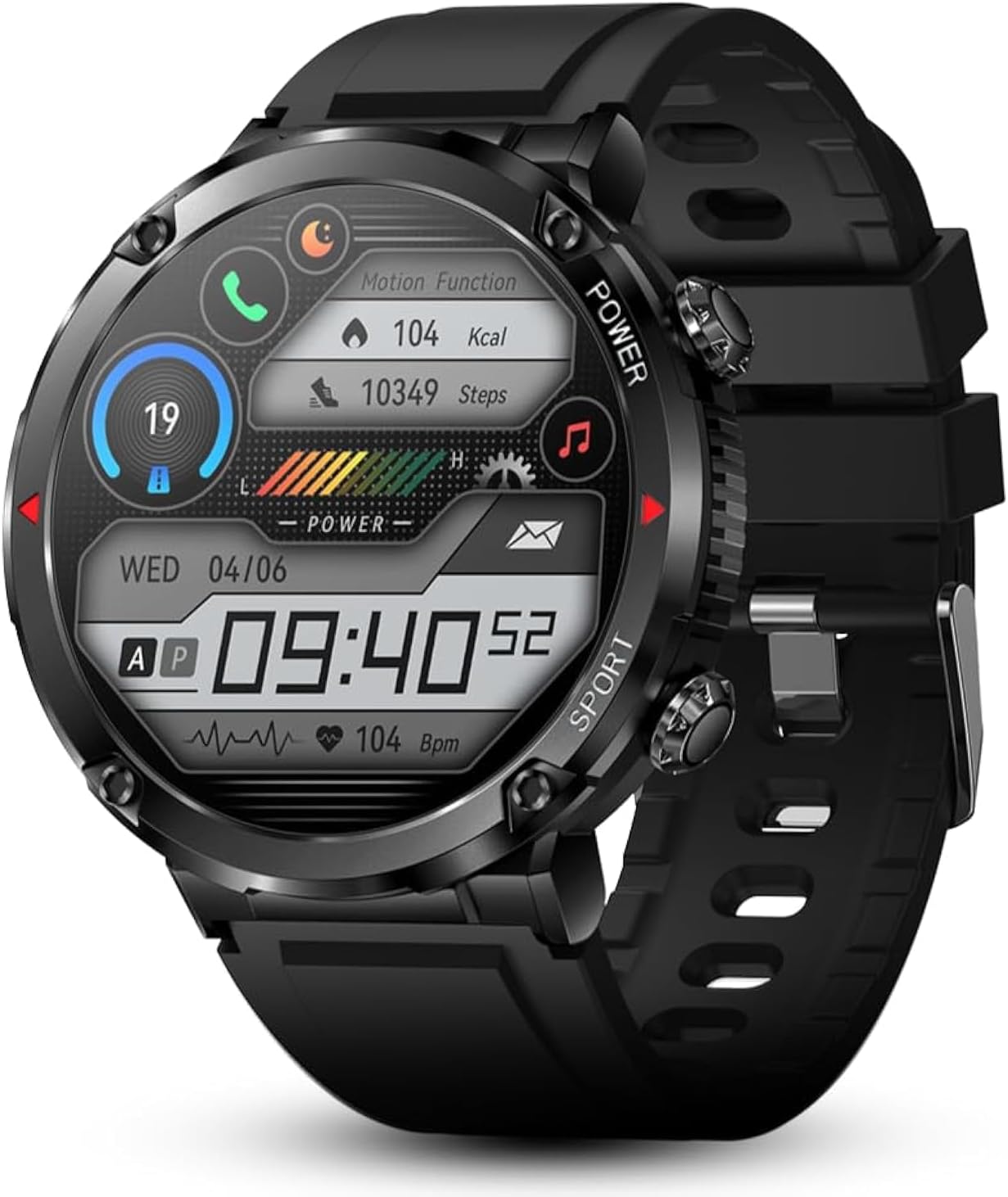
Image: The Bravo XL Smartwatch showing its main display with various metrics.
Making and Receiving Calls
The Bravo XL is equipped with high-quality speakers and supports on-wrist calling. Ensure your watch's audio Bluetooth is successfully connected to your phone.
- Making Calls: Access the dialer or contacts list on your watch to initiate a call.
- Receiving Calls: When a call comes in, the watch will display the caller ID and vibrate. You can answer or reject the call directly from your wrist.
Notifications
Receive real-time notifications for calls, messages (SMS), and app alerts (e.g., Facebook, WhatsApp, Twitter) directly on your wrist. The watch will vibrate to alert you.
Wellness Tracking (24/7)
The Bravo XL provides comprehensive health monitoring features. Note: This device is not a medical instrument and its readings should not be used for medical diagnosis or treatment.
- Heart Rate Monitoring: Continuous 24-hour heart rate tracking.
- Blood Pressure & Blood Oxygen: On-demand measurements.
- Sleep Quality Monitoring: Tracks your sleep patterns (deep, light, wake times).
- Step Count & Calories: Real-time tracking of steps taken and calories burned.

Image: Watch face showing various health metrics including heart rate, blood oxygen, and sleep score.

Image: Visual representation of the smartwatch's audio capabilities, battery capacity, and health tracking functions.
Sports Modes & Fitness Trackers
The Bravo XL supports over 50 sports modes to accurately track your workouts. Select your activity from the watch's sports menu to begin tracking.
- Supported Modes: Walking, weightlifting, running, basketball, football, cycling, rope skipping, mountain climbing, and many more.
- GPS Tracking: For outdoor activities like biking, the watch can utilize connected GPS from your phone to map your route and track distance.

Image: Collage showing the IP68 water resistance, a cyclist demonstrating sports mode use, and a selection of customizable watch faces.
Additional Functions
Your Bravo XL Smartwatch offers several convenient features:
- Weather Forecasts: Get real-time weather updates.
- Alarm Clocks: Set alarms directly from your watch.
- Camera Controller: Remotely control your phone's camera.
- Music Control: Play, pause, skip tracks, and adjust volume for music playing on your phone.
- Sedentary Reminders: Get alerts to move after periods of inactivity.
- Find Phone: Locate your misplaced phone by making it ring.
- DIY Watch Face: Customize your watch face with personal photos or designs via the app.
- Menu Style: Choose different menu display styles.
- Stopwatch & Timer: Built-in timing functions.
- Brightness & Vibration Adjustment: Personalize display brightness and vibration intensity.
- Theater Mode: Quickly dim the screen and mute vibrations.

Image: A variety of digital and analog watch faces available for customization.
Maintenance
Water Resistance (IP68)
The Bravo XL Smartwatch has an IP68 waterproof rating, meaning it is resistant to dust and can withstand immersion in water up to 1.5 meters for up to 30 minutes. It is suitable for daily activities such as washing hands and jogging in the rain.
Important Limitations: The watch is not designed for prolonged swimming (more than 15-30 minutes), diving, or use in steam baths/saunas. Avoid exposure to hot water, chemical detergents, or strong impacts, as these can compromise the waterproof seal.
Cleaning and Care
- Wipe the watch and strap regularly with a soft, damp cloth.
- Avoid using abrasive cleaners or solvents.
- Ensure the charging contacts on the back of the watch are clean and dry before charging to prevent corrosion.
Troubleshooting
| Problem | Possible Solution |
|---|---|
| Watch won't turn on. | Ensure the watch is fully charged. Press and hold the power button for several seconds. |
| Cannot pair with phone. | Make sure Bluetooth is enabled on your phone and the watch. Restart both devices. Ensure the app is installed and open. Check if the watch is already paired with another device. |
| Notifications not received. | Check app notification permissions on your phone. Ensure the watch is connected via Bluetooth. Verify notification settings within the Bravo XL app. |
| Inaccurate health data. | Ensure the watch is worn snugly on your wrist, not too tight or too loose. Clean the sensor on the back of the watch. Note that the device is not medical equipment. |
| Short battery life. | Reduce screen brightness, disable continuous heart rate monitoring, limit frequent notifications, or turn off features like "Always-On Display" if available. Ensure proper charging. |
Specifications
- Model: Bravo XL
- Brand: ALPHAGEAR
- Screen Size: 1.65 inches AMOLED
- Battery Capacity: 650mAh
- Battery Life: Up to 10-14 days (typical use)
- Charging Time: Approximately 2 hours
- Water Resistance: IP68
- Connectivity: Bluetooth
- Operating System: Android (compatible with iOS)
- Material: Special aluminum alloy
- Item Weight: 4.2 ounces (119 grams)
- Package Dimensions: 7.72 x 3.11 x 1.65 inches
- Country of Origin: China
Warranty & Support
Warranty Information
ALPHAGEAR offers a 30-day money-back guarantee for the Bravo XL Smartwatch. If you are not satisfied with your purchase within 30 days, you may return it for a full refund. Please refer to your purchase receipt or the ALPHAGEAR website for detailed warranty terms and conditions.
Customer Support
For technical assistance, troubleshooting, or warranty claims, please contact ALPHAGEAR customer support. You can find contact information on the official ALPHAGEAR website or through the companion app.
Online Support: Visit the official ALPHAGEAR website for FAQs, support articles, and contact forms.
Email Support: Refer to your product packaging or the ALPHAGEAR website for the customer support email address.
Related Documents - Bravo XL
 |
Spovan Bravo II User Manual: Features, Functions, and Operation Comprehensive user manual for the Spovan Bravo II watch, detailing its features like altimeter, barometer, compass, chronograph, and how to use them for outdoor activities. Includes setup and operational guides. |
 |
MPP35-3TENB Wireless Charger with QI2.2 Module User Manual User manual for the MPP35-3TENB Wireless Charger with QI2.2 Module, detailing its features, specifications, operation, and compliance information. |
 |
MPP25-1LJNB Wireless Charger User Manual - QI2.2 Module User manual for the CE LINK LIMITED MPP25-1LJNB wireless charger with QI2.2 Module, detailing features, specifications, operation, compatibility, and safety information. |
 |
BLAUBERG Bravo Axial Fan User Manual and Installation Guide This user manual provides comprehensive information for the BLAUBERG Bravo axial fan, including delivery set, technical specifications, installation instructions, operation guidelines, maintenance procedures, and manufacturer's warranty details for models Bravo 100, 125, and 150. |
 |
Insta360 Flow 2 Pro/Flow 2 スマートフォン互換性一覧 Insta360 Flow 2 ProおよびFlow 2ジンバルと互換性のあるiOSおよびAndroidスマートフォンモデルの詳細なリスト。カメラ機能、ズーム、解像度などの互換性情報を確認してください。 |
 |
Duss Protector L/XL Assembly Guide and User Manual Comprehensive assembly instructions and user guide for the Duss Protector L/XL. Learn how to install, use, and maintain your protector safely. Includes details on parts, recommendations, warranty, and contact information. |
Ask a question about this manual
Ask about setup, troubleshooting, compatibility, parts, safety, or missing instructions. Manuals+ will review the question and use this page’s manual context to help answer it.