
1. Introduction
This manual provides essential information for the installation, operation, and maintenance of your SPANN replacement battery. This high-quality Ni-MH battery is designed to restore power to your compatible Braun Oral-B electric toothbrush models.
The SPANN replacement battery features a 1.2V output and a 2500mAh capacity, ensuring reliable performance. It incorporates advanced protection mechanisms against over-charge, over-discharge, over-heat, over-current, and short-circuit conditions, enhancing safety and longevity.
2. Safety Information
WARNING: Please read all safety instructions carefully before handling or installing the battery.
- Do not disassemble, crush, puncture, or short-circuit the battery.
- Do not expose the battery to high temperatures (above 60°C / 140°F) or direct sunlight.
- Do not dispose of the battery in fire or water.
- Keep the battery away from children and pets.
- If the battery leaks, avoid contact with skin and eyes. Rinse immediately with plenty of water and seek medical attention.
- Ensure proper polarity when installing the battery.
- This battery is designed for specific devices. Do not use it for incompatible applications.
The battery is equipped with built-in protection circuits to prevent common issues such as over-charging, over-discharging, over-heating, over-current, and short-circuits. This design contributes to the battery's safety and extends its operational life.
3. Compatibility
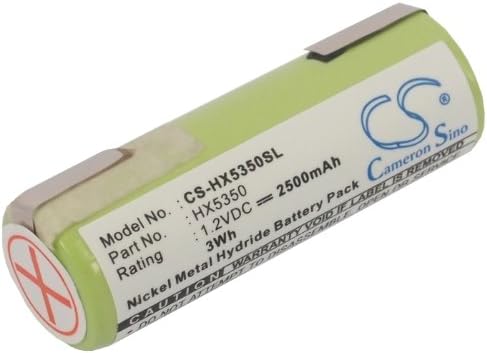
This SPANN replacement battery (Model No: CS-HX5350SL) is compatible with the following Braun Oral-B electric toothbrush models and part numbers:
- Braun Oral-B Triumph 4000
- Braun Oral-B Oxyjet
- Braun Oral-B Professional Care series (including 8300, 8500)
- Part No: 233.8008860
Please verify your device's model number or existing battery part number to ensure compatibility before installation.
4. Specifications
| Attribute | Value |
|---|---|
| Battery Type | Ni-MH (Nickel-Metal Hydride) |
| Voltage | 1.2V |
| Capacity | 2500mAh / 3.00Wh |
| Model Number | CS-HX5350SL |
| Dimensions (L x W x H) | 48.70 x 16.82 x 16.82 mm (1.92 x 0.66 x 0.66 inches) |
| Weight | 86.0 g (3.03 ounces) |
| Manufacturer | SPANN |

5. Installation and Setup
Note: Battery replacement in electric toothbrushes often requires disassembling the device. If you are not comfortable with electronic repairs, it is recommended to seek professional assistance to avoid damaging your toothbrush.
Installation Steps (General Guide):
- Prepare the Device: Ensure your electric toothbrush is turned off and unplugged from any charging base.
- Disassemble the Toothbrush: Carefully open the casing of your Braun Oral-B toothbrush. This may involve removing screws, prying open seams, or desoldering connections depending on the specific model. Refer to your toothbrush's original service manual or online guides for precise disassembly instructions.
- Remove Old Battery: Locate the existing battery. Note its orientation and how it is connected (e.g., soldered tabs, battery holder). Carefully desolder or disconnect the old battery.
- Install New Battery: Insert the SPANN replacement battery, ensuring correct polarity. If soldering is required, ensure clean and secure connections.
- Reassemble the Toothbrush: Carefully reassemble the toothbrush casing, ensuring all components are properly seated and secured.
- Initial Charge: After installation, fully charge the toothbrush for at least 16-24 hours before its first use. This helps to condition the new Ni-MH battery for optimal performance.
6. Operating Instructions
Once installed and fully charged, the SPANN replacement battery operates seamlessly within your compatible Braun Oral-B electric toothbrush, providing power for its normal functions.
Charging:
- Use the original charging base provided with your Braun Oral-B toothbrush.
- Allow the battery to fully charge as indicated by your toothbrush's charging indicator. Ni-MH batteries benefit from full charge cycles, especially initially.
Usage:
- Operate your toothbrush as usual. The battery is designed to provide consistent power throughout its discharge cycle.
- For optimal battery life, avoid frequently recharging the battery when it is only partially discharged. It is generally better to allow Ni-MH batteries to discharge significantly before recharging.
7. Maintenance
Proper maintenance can extend the life of your SPANN replacement battery.
- Storage: If the toothbrush will not be used for an extended period, store it in a cool, dry place. It is advisable to store Ni-MH batteries with some charge (around 40-50%) to prevent deep discharge.
- Cleaning: Keep the battery contacts (if accessible) and the charging contacts of your toothbrush clean and free of debris to ensure efficient charging.
- Disposal: When the battery reaches the end of its life, do not dispose of it with household waste. Recycle it at an authorized battery recycling facility. Consult your local regulations for proper disposal methods.
8. Troubleshooting
If you encounter issues with your SPANN replacement battery, consider the following:
- Battery Not Charging:
- Ensure the toothbrush is correctly placed on its charging base.
- Check if the charging base is properly connected to a power source.
- Inspect charging contacts on both the toothbrush and the base for dirt or corrosion.
- Verify that the battery was installed with correct polarity and secure connections.
- Short Operating Time:
- Ensure the battery has been fully charged for the recommended duration (16-24 hours initially).
- New Ni-MH batteries may require a few charge/discharge cycles to reach full capacity.
- If the battery has been in use for a long time, its capacity may naturally degrade.
- Device Not Turning On:
- Confirm the battery is fully charged.
- Re-check all internal connections of the battery to the toothbrush's circuitry.
- Ensure the toothbrush's internal components were not damaged during battery replacement.
If problems persist after following these steps, please refer to the Warranty and Support section.
9. Warranty and Support
Your SPANN replacement battery comes with a 365-day warranty from the date of purchase. This warranty covers manufacturing defects and ensures the product meets its stated specifications.
For any questions, concerns, or technical support regarding your SPANN battery, please contact our customer service. When contacting support, please have your purchase details and the battery's model number (CS-HX5350SL) ready.
Contact Information:
Please refer to your purchase platform or the seller's information for direct contact methods. You can typically find support contact details on the product listing page or your order history.