
Ingco CFALI2001
Ingco 20V Battery-Powered Stand Fan
Model: CFALI2001
Introduction
Thank you for choosing the Ingco 20V Battery-Powered Stand Fan, Model CFALI2001. This manual provides essential information for the safe operation, assembly, maintenance, and troubleshooting of your fan. Please read it thoroughly before use and keep it for future reference.
Important Safety Instructions
- Always ensure the fan is placed on a stable, level surface to prevent tipping.
- Do not insert fingers or any objects through the fan guards when the fan is operating.
- Keep hair, clothing, and loose items away from the fan blades.
- This fan is designed for indoor use only. Do not expose it to rain or moisture.
- Use only Ingco 20V batteries and chargers with this fan. Using incompatible batteries may cause damage or injury.
- Disconnect the battery before cleaning, performing maintenance, or moving the fan.
- Do not operate the fan if any part is damaged. Contact customer service for repairs.
- Keep out of reach of children and pets.
Package Contents
Upon unpacking, please verify that all components are present and undamaged:
- Ingco 20V Battery-Powered Stand Fan (Model CFALI2001)
- User Manual
Note: Battery and charger are sold separately and are not included with the fan unit.
Product Overview
Familiarize yourself with the main components of your Ingco stand fan.
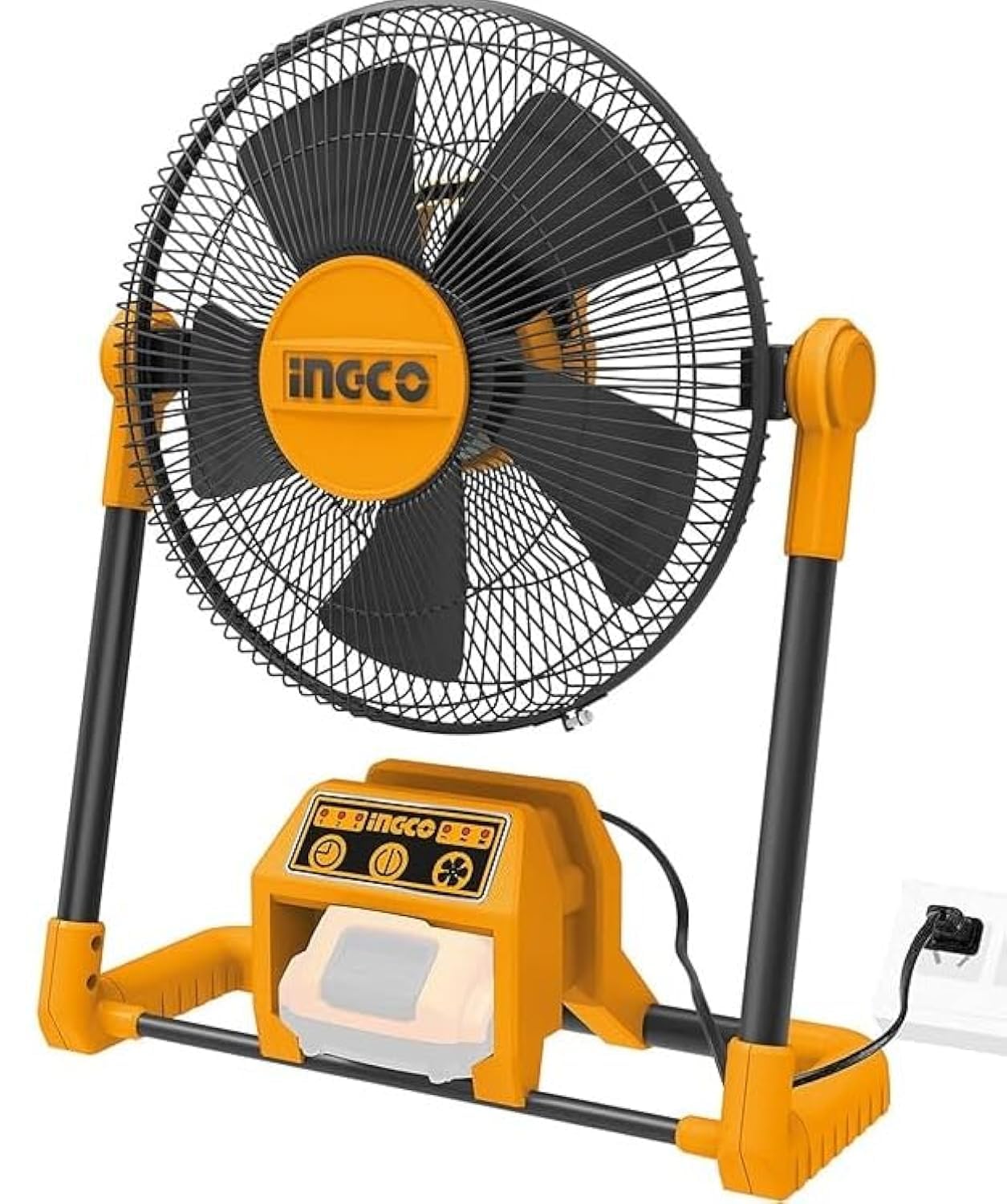
Image: The Ingco 20V Battery-Powered Stand Fan, Model CFALI2001, showing its main body, fan head with guard and blades, and base. The fan is orange and black.
Key Components:
- Fan Head: Contains the motor, blades, and protective guards.
- Front and Rear Guards: Protect the fan blades.
- Fan Blades: Three plastic blades for airflow.
- Control Panel: Buttons for power and speed settings.
- Battery Compartment: Located at the base, for inserting the 20V battery.
- Stand/Base: Provides stability for the fan.
Setup and Assembly
The Ingco CFALI2001 fan is designed for easy assembly. Follow these steps to set up your fan:
1. Unpacking:
- Carefully remove all components from the packaging.
- Check for any damage during transit.
2. Base Assembly:
- Place the fan base on a flat surface.
- Ensure the stand pole is securely attached to the base.
3. Fan Head Attachment:
- Align the fan head with the top of the stand pole.
- Secure the fan head using the provided fasteners (if any, refer to specific diagrams in the physical manual).
4. Battery Installation:
- Ensure the fan is turned off.
- Locate the battery compartment on the fan base.
- Insert a fully charged Ingco 20V battery into the compartment until it clicks into place.
- To remove the battery, press the release button and slide the battery out.
Operating Instructions
Once assembled and with a charged battery installed, your fan is ready for use.
Power On/Off:
- Press the Power Button on the control panel to turn the fan ON.
- Press the Power Button again to turn the fan OFF.
Speed Settings:
- This fan features one power level. When turned on, it will operate at its standard speed.
Remote Control (if applicable):
- If your model includes a remote control, ensure batteries are installed in the remote.
- Point the remote control towards the fan's receiver to operate power functions.
Adjusting Fan Angle:
- Gently tilt the fan head up or down to direct airflow as desired. Do not force the fan head beyond its natural range of motion.
Maintenance
Regular maintenance ensures optimal performance and extends the life of your fan.
Cleaning:
- Always disconnect the battery before cleaning.
- Use a soft, damp cloth to wipe the exterior surfaces of the fan.
- To clean the fan blades, carefully remove the front guard (if designed for removal, refer to specific product diagrams). Wipe the blades with a soft cloth.
- Do not use abrasive cleaners, solvents, or harsh chemicals, as these can damage the fan's finish.
- Ensure all parts are completely dry before reassembling and operating the fan.
Storage:
- Store the fan in a cool, dry place when not in use.
- Remove the battery if storing for extended periods.
- Keep the fan covered to protect it from dust.
Troubleshooting
If you encounter issues with your fan, refer to the following common problems and solutions:
| Problem | Possible Cause | Solution |
|---|---|---|
| Fan does not turn on. | Battery not installed correctly or discharged. | Ensure the battery is fully inserted and charged. Try a different charged battery. |
| Weak airflow. | Fan blades or guards are dirty. | Clean the fan blades and guards as described in the Maintenance section. |
| Unusual noise during operation. | Loose parts or obstruction. | Turn off and disconnect the battery. Check for any loose components or foreign objects obstructing the blades. Tighten any loose screws. |
| Fan stops unexpectedly. | Battery is depleted. | Replace with a fully charged battery. |
If the problem persists after trying these solutions, please contact Ingco customer support.
Specifications
| Feature | Specification |
|---|---|
| Model Number | CFALI2001 |
| Brand | Ingco |
| Power Source | 20V Battery (Battery not included) |
| Wattage | 25 Watts |
| Number of Blades | 3 |
| Electric Fan Design | Floor Fan / Stand Fan |
| Control Type | Button Control, Remote Control |
| Switch Type | Push Button |
| Special Features | Cordless, Rechargeable |
| Mounting Type | Floor Mount, Self-standing |
| Material | Plastic |
| Blade Material | Plastic |
| Indoor/Outdoor Use | Indoor |
| Number of Power Levels | 1 |
| Product Dimensions | 10 x 20 x 37 cm |
| Item Weight | 209 grams |
Warranty and Support
Specific warranty information for the Ingco CFALI2001 fan is not provided in this manual. For details regarding warranty coverage, terms, and conditions, please refer to the warranty card included with your purchase or visit the official Ingco website.
For technical support, spare parts, or service inquiries, please contact Ingco customer service through their official channels. Contact information can typically be found on the manufacturer's website or on your product packaging.
Ask a question about this manual
Ask about setup, troubleshooting, compatibility, parts, safety, or missing instructions. Manuals+ will review the question and use this page’s manual context to help answer it.