
1. Introduction
The Hantek 6254BE is a high-performance USB virtual oscilloscope designed for a wide range of applications, including automotive diagnostics, electronic circuit testing, and general measurement tasks. This device connects to your computer via a USB 2.0 interface, transforming your PC into a powerful oscilloscope without requiring an external power supply. Its compact design and robust aluminum casing make it suitable for both laboratory and field use.
This manual provides essential information for setting up, operating, maintaining, and troubleshooting your Hantek 6254BE oscilloscope. Please read it thoroughly to ensure proper and safe use of the instrument.
2. Product Overview
The Hantek 6254BE offers advanced features and robust performance, making it a versatile tool for various measurement needs. It is part of the Hantek 6074BE/6104BE/6204BE/6254BE series, with the 6254BE model providing a 250MHz bandwidth and 1GSa/s real-time sampling rate across 4 channels.
Key Features:
- 4 independent oscilloscope channels.
- Up to 1GSa/s real-time sampling rate.
- 250MHz bandwidth (for Hantek 6254BE).
- 2mV-10V/DIV high input sensitivity and large input range.
- Over 80 types of automotive measurement functions.
- USB 2.0 interface for plug-and-play operation, no external power required.
- Support for Windows 7, Windows 8, and Windows 10 operating systems.
- Pass/Fail test function and resourceful trigger functions.
- Dynamic cursor tracking, waveform record and replay.
- FFT spectrum analyzer.
- Waveform data export to EXCEL, BMP, JPG formats.
- Compact and durable anodized aluminum casing.

Figure 2.1: Front view of the Hantek USB Virtual Oscilloscope, illustrating the compact design.
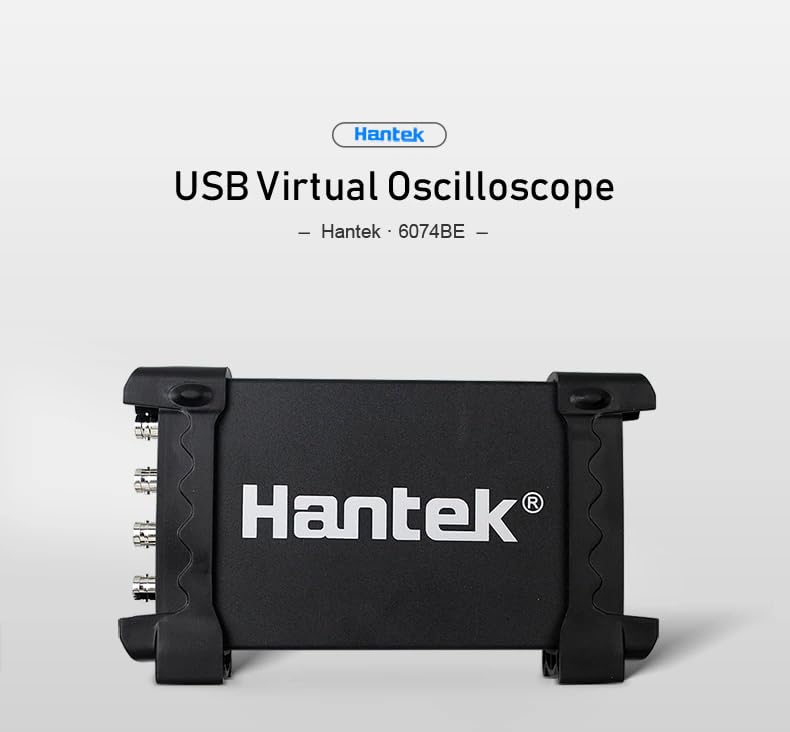
Figure 2.2: General perspective view of the Hantek USB Virtual Oscilloscope unit.
3. Setup
3.1 System Requirements
To operate the Hantek 6254BE, your computer must meet the following minimum requirements:
- Operating System: Windows 10, Windows 8, or Windows 7.
- Available USB 2.0 port.
- Sufficient hard disk space for software installation and data storage.
3.2 Connecting the Device
- Ensure your computer is powered on and running the supported operating system.
- Locate an available USB 2.0 port on your computer.
- Connect the Hantek 6254BE oscilloscope to the computer using the provided USB cable. The device is plug-and-play and does not require an external power supply.
- The operating system should automatically detect the new hardware. Follow any on-screen prompts for driver installation. If drivers are not automatically installed, refer to the software installation guide provided with the product or download them from the official Hantek website.

Figure 3.1: The USB 2.0 interface on the Hantek oscilloscope for PC connection.
3.3 Software Installation
After connecting the device, install the Hantek oscilloscope software on your computer. This software provides the user interface for controlling the oscilloscope and analyzing waveforms. Refer to the installation instructions included with your software package or available on the Hantek support website. The device supports secondary development libraries (DLL) and provides examples for Labview, VB, VC, and QT.
4. Operating Instructions
This section outlines the basic operation of the Hantek 6254BE USB Virtual Oscilloscope.
4.1 Basic Waveform Acquisition
- Launch the Hantek oscilloscope software on your computer.
- Connect your probes to the desired input channels (CH1, CH2, CH3, CH4) on the oscilloscope.
- Connect the probe tips to the circuit or signal source you wish to measure.
- In the software, configure the vertical scale (Volts/Div) and horizontal scale (Time/Div) as needed for your signal.
- Adjust the trigger settings (mode, source, level) to stabilize the waveform display.
- Observe the waveform on your computer screen.

Figure 4.1: The Hantek oscilloscope featuring four independent input channels (CH1-CH4).
4.2 Measurement Functions
The Hantek 6254BE includes over 20 automatic measurement functions, such as Vpp, Vamp, Vmax, Vmin, Vtop, Vbase, Vavg, Vrms, Vcrms, Preshoot, Overshoot, Frequency, Period, Rise Time, Fall Time, Positive Width, Negative Width, and Duty Cycle. These can be accessed and displayed through the software interface.
The PASS/FAIL Check function allows you to set specific waveform masks, and the oscilloscope will automatically indicate if the acquired waveform falls within or outside the defined parameters.
4.3 Trigger System
The device features a resourceful trigger system with multiple modes:
- Edge Trigger: Triggers on a rising or falling edge of the input signal.
- Pulse Trigger: Triggers on pulses of a specified width.
- Video Trigger: Triggers on standard video signals.
- Alternative Trigger: Allows triggering on multiple channels sequentially.
Trigger sources can be selected from CH1, CH2, CH3, or CH4.
4.4 Waveform Processing and Analysis
The software provides various waveform processing capabilities:
- Mathematical Operations: Add, Subtract, Multiply, Divide waveforms.
- FFT Spectrum Analyzer: Converts time-domain signals into their frequency components, useful for analyzing signal harmonics and noise.
- Waveform Averaging: Reduces random noise in repetitive signals.
- Afterglow and Lightness Control: Adjusts the persistence and brightness of the waveform display.
- X-Y Display: Plots one channel against another, useful for phase relationship analysis (e.g., Lissajous figures).
- Dynamic Cursor Tracking: Allows precise measurement of waveform points using horizontal and vertical cursors.
- Waveform Record and Replay: Captures and stores waveform data for later analysis.

Figure 4.2: The Hantek oscilloscope connected to a laptop, demonstrating the FFT Spectrum Analyzer function.
5. Automotive Measurement Functions
The Hantek 6254BE is specifically equipped with over 80 types of automotive measurement functions, making it an ideal tool for vehicle diagnostics. These functions are typically accessed through dedicated software modules or presets.
5.1 First Diagnosis
- Intake manifold vacuum & ignition: Analyze engine vacuum and ignition timing.
- Petrol fumes adjusting valve vacuum & ignition: Diagnose fuel system components.
- Idle exhaust ignition: Evaluate ignition performance at idle.
- Starting exhaust ignition: Check ignition system during engine start-up.
5.2 Ignition System Analysis
- Primary Ignition: Measure voltage and current waveforms in the primary ignition circuit.
- Secondary Ignition: Analyze high-voltage waveforms from spark plugs and ignition coils.
5.3 Sensor Testing
Test and analyze signals from various automotive sensors:
- Air Flow Meter (AFM)
- Camshaft Position Sensor
- Crankshaft Position Sensor
- Distributor
- Lambda (Oxygen) Sensor
- Throttle Position Sensor (TPS)
5.4 Bus Diagnosis
Perform diagnostics on vehicle communication networks:
- CAN bus data examine: View and analyze CAN bus data packets.
- CAN bus signal integrity: Assess the quality and integrity of CAN bus signals.
- CAN bus LH long time acquisition: Capture and analyze CAN bus data over extended periods.
- LIN bus: Diagnose Local Interconnect Network (LIN) bus communications.
5.5 Performer Tests
- Petrol/Diesel Starter and charging circuits: Evaluate the performance of starter motors and vehicle charging systems for both petrol and diesel engines.
6. Maintenance
Proper maintenance ensures the longevity and accuracy of your Hantek 6254BE oscilloscope.
6.1 Cleaning
- Always disconnect the device from the computer and any signal sources before cleaning.
- Use a soft, dry cloth to wipe the exterior of the oscilloscope.
- For stubborn dirt, lightly dampen the cloth with water or a mild, non-abrasive cleaner. Avoid using harsh chemicals, solvents, or abrasive materials, as these can damage the casing and labels.
- Ensure no liquid enters the device through ports or ventilation openings.
6.2 Storage
- Store the oscilloscope in a clean, dry environment, away from direct sunlight, extreme temperatures, and high humidity.
- Protect the device from dust and physical impact.
- When not in use, disconnect all probes and cables and store them neatly to prevent damage.
7. Troubleshooting
If you encounter issues with your Hantek 6254BE, refer to the following common troubleshooting steps.
7.1 Device Not Recognized by Computer
- Check USB Connection: Ensure the USB cable is securely connected to both the oscilloscope and the computer. Try a different USB port.
- Restart Computer: Sometimes a simple restart can resolve connectivity issues.
- Driver Installation: Verify that the correct drivers are installed. Check Device Manager in Windows for any unknown devices or driver errors. Reinstall drivers if necessary.
- Try Another Computer: If possible, test the oscilloscope on another computer to rule out a computer-specific issue.
7.2 No Waveform Display or Incorrect Readings
- Probe Connection: Ensure probes are correctly connected to the oscilloscope channels and to the signal source. Check for loose connections.
- Probe Compensation: If using passive probes, ensure they are properly compensated.
- Software Settings: Verify that the vertical (Volts/Div) and horizontal (Time/Div) scales are appropriate for the signal you are measuring. Adjust the trigger level and mode.
- Signal Source: Confirm that the signal source is active and producing a signal.
- Channel Selection: Ensure the correct input channel is selected and enabled in the software.
7.3 Software Issues
- Software Updates: Check for the latest software version and updates from the Hantek website.
- Reinstallation: If the software is crashing or behaving erratically, try uninstalling and reinstalling it.
- System Resources: Ensure your computer has sufficient RAM and CPU resources, especially when dealing with high-speed data acquisition.
8. Specifications
The following table details the technical specifications for the Hantek 6254BE USB Virtual Oscilloscope.
| Parameter | Specification (Hantek 6254BE) |
|---|---|
| Model Number | GL-Hantek6254BE |
| Channels | 4 |
| Bandwidth | 250MHz |
| Real-time Sampling Rate | 1GSa/s |
| Memory Depth | 64K |
| Time Base Precision | ±50ppm |
| Time Base Range | 2ns/div - 1000s/div (1-2-4 sequences) |
| Input Impedance | 1MΩ 25pF |
| Input Sensitivity | 2mV/div ~ 10V/div |
| Vertical Resolution | 8 Bit |
| Vertical Displacement Range | 2mV ~ 10V/div @ x1 probe; 20mV ~ 100V/div @ x10 probe; 2V ~ 1000V/div @ x1000 probe |
| DC Gain Accuracy | ±3% |
| Bandwidth Limit | 20MHz |
| Trigger Mode | Edge, Pulse, Video, Alternative |
| Trigger Source | CH1, CH2, CH3, CH4 |
| Waveform Signal Process | +,-,x,÷,FFT, Invert |
| Cursors Measurement | Cross, Trace, Horizontal, Vertical |
| Auto Measurement | Vpp, Vamp, Vmax, Vmin, Vtop, Vbase, Vavg, Vrms, Vcrms, Preshoot, Overshoot, Frequency, Period, Rise Time, Fall Time, Positive Width, Negative Width, Duty Cycle |
| Dimensions (L*W*H) | 175mm * 105mm * 25mm |
| Weight | 0.9KG |
| Manufacturer | Hantek |
9. Warranty and Support
For warranty information, please refer to the documentation provided with your purchase or contact your retailer. Hantek products typically come with a standard manufacturer's warranty covering defects in materials and workmanship.
For technical support, software updates, or further assistance, please visit the official Hantek website or contact their customer service department. Ensure you have your model number (Hantek 6254BE) and purchase details ready when seeking support.