
1. Introduction
The Hantek 2D42 is a versatile 3-in-1 handheld device combining the functionalities of a digital oscilloscope, a waveform generator, and a digital multimeter. Designed for portability and ease of use, it features a compact size, a large-capacity lithium battery, and a Type-C charging interface. This manual provides essential information for the proper setup, operation, and maintenance of your device.

Figure 1: Hantek 2D42 device and included accessories, including probes, USB cable, and power adapter.
2. Setup
2.1 Battery Installation and Charging
The Hantek 2D42 is powered by a large-capacity 18650 replaceable lithium battery system. Ensure the battery is correctly installed before first use.
- Battery Installation: Open the battery compartment cover on the rear of the device. Insert the 18650 lithium battery, ensuring the correct polarity as indicated inside the compartment. Close the cover securely.
- Charging: Connect the device to a 5V/2A charger or a computer USB interface using the provided Type-C cable. The device supports intelligent charging control, allowing use while charging. A full charge typically provides a full day of continuous operation or over two months of standby time.
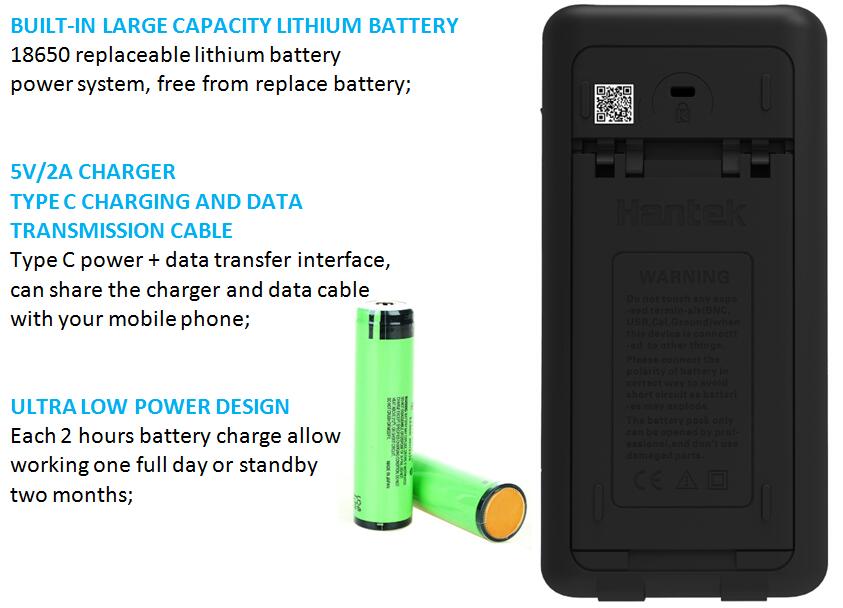
Figure 2: Rear view of the Hantek 2D42 showing the battery compartment and Type-C charging port. The device uses 18650 replaceable lithium batteries.
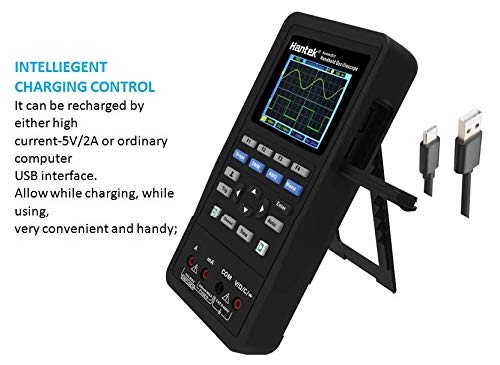
Figure 3: The Hantek 2D42 device shown with its integrated kickstand extended and connected to a USB-C charging cable.
2.2 Initial Power On
Press and hold the power button located on the device to turn it on. The color highlight LCD screen will display the main interface. The device features a minimalist keyboard design for simplified operation.

Figure 4: The Hantek 2D42 held in hand, displaying its color LCD screen and control buttons for various functions.
3. Operating Instructions
The Hantek 2D42 integrates three primary functions: Oscilloscope, Waveform Generator, and Multimeter. Use the dedicated buttons on the front panel to switch between modes.
3.1 Oscilloscope Function
The oscilloscope mode allows for detailed waveform analysis. Key features include:
- Sampling Rate: 250MSa/s
- Bandwidth: 40MHz (for 2D42 model)
- Vertical Resolution: 10mV~10V
- Automatic Measuring: Auto one-key test function for quick measurements.
- Display: Adjustable backlight brightness, backlight duration, and auto power-off time.
- Measurements: Digital voltmeter function, cursor measurement, reference waveform, and storage function.
- Language: Supports Chinese and English menu switching.

Figure 5: The Hantek 2D42 screen showing a typical oscilloscope waveform display with measurement parameters.
3.2 Waveform Generator Function
The waveform generator produces various test signals for circuit analysis. Specifications include:
- Sampling Rate: 250MSa/s
- Vertical Resolution: 12 bits
- Waveform Types: Sine (1Hz~25MHz), Square (1Hz~10MHz), Triangular (1Hz~1MHz), Trapezoid (1Hz~5MHz), and 4 types of arbitrary waveforms.
- Frequency Resolution: 1Hz
- Output Impedance: 50Ω

Figure 6: The Hantek 2D42 screen showing a generated sine waveform in waveform generator mode.
3.3 Multimeter Function
The integrated digital multimeter offers standard measurement capabilities with high accuracy.
- Measurements: AC/DC voltage, AC/DC current, resistance, diode, capacitance, and on-off test.
- Performance: High sensitivity, accuracy, clear display, strong overload ability, and ultra-portable design.
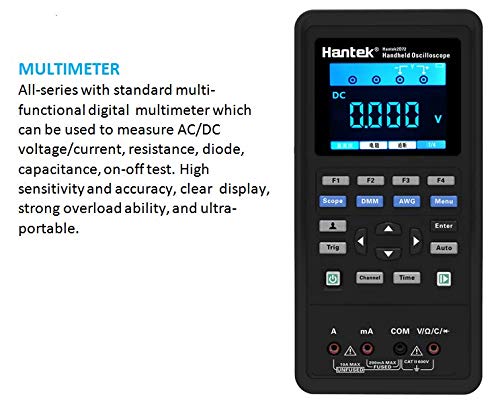
Figure 7: The Hantek 2D42 screen showing a digital multimeter voltage reading.
4. Maintenance
- Cleaning: Use a soft, dry cloth to clean the device. Avoid using abrasive cleaners or solvents.
- Battery Care: For prolonged storage, ensure the battery is partially charged (around 50%) and store the device in a cool, dry place. Replace the 18650 lithium battery if its performance degrades significantly.
- Storage: Store the device and its accessories in a protective case when not in use to prevent damage from impacts or dust.
5. Troubleshooting
If you encounter issues with your Hantek 2D42, consider the following basic troubleshooting steps:
- Device not powering on: Ensure the battery is correctly installed and sufficiently charged. Try connecting the device to a charger.
- Incorrect readings: Verify that probes are correctly connected and that the correct measurement mode is selected. Check probe integrity.
- Screen issues: Adjust backlight brightness in the settings menu. If the screen remains unresponsive, try restarting the device.
- Software issues: If the device behaves unexpectedly, a factory reset (if available in the menu) or firmware update (refer to Hantek's official website) might resolve the problem.
For more complex issues, please refer to the official Hantek support resources.
6. Specifications
Below are the general and model-specific specifications for the Hantek 2000 series, including the Hantek 2D42.

Figure 8: Comparison table for Hantek 2000 series models (2C42, 2C72, 2D42, 2D72) and detailed feature list.
6.1 General Specifications
- Brand: Hantek
- Power Source: Battery Powered (18650 Lithium Battery, Type-C Charging)
- Item Weight: 0.5 Kilograms
- Display: Color Highlight LCD Screen
- Casing: High quality casing with Silicon protective cover for impact resistance and heat dissipation.
6.2 Hantek 2D42 Specifics
| Feature | Specification |
|---|---|
| Channels | 2CH+AFG+DMM |
| Bandwidth | 40 MHz |
| Sample Rate | 250MSa/s |
| Power | Direct Charge |
| DMM Function | Included |
| AFG (Arbitrary Function Generator) | Included |
7. Warranty and Support
For warranty information, technical support, and service inquiries, please visit the official Hantek website or contact their customer service department. Keep your purchase receipt as proof of purchase for warranty claims.
You can find more information and support resources at the Hantek Store on Amazon.


