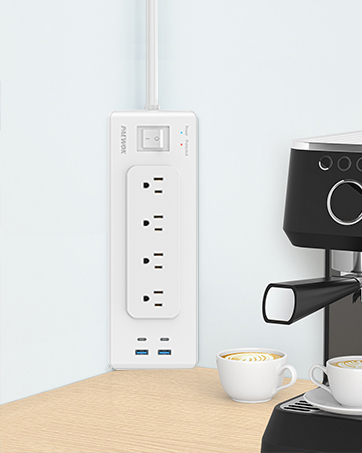
Thank you for choosing the PAEWOK Flat Plug Outlet Extender. This device is designed to expand your power options by converting a single wall outlet into multiple AC sockets and USB charging ports, all while offering surge protection. Please read this manual carefully before use to ensure safe and optimal performance.
Image 1.1: PAEWOK Flat Plug Outlet Extender
2. Safety Instructions
To prevent injury, electric shock, fire, or damage to the product, please observe the following safety precautions:
Do not exceed the maximum load capacity of 1250W (10A) for the AC outlets.
This product is for indoor use only. Do not expose to moisture or use in wet environments.
Do not disassemble, modify, or attempt to repair the device. Contact customer support if service is required.
Keep away from children and pets.
Ensure the plug is fully inserted into the wall outlet.
Avoid running the cord under carpets, furniture, or in high-traffic areas where it could be damaged or create a tripping hazard.
The built-in 350 Joules surge protector safeguards connected devices from voltage spikes. However, in severe weather conditions, it is advisable to unplug sensitive electronics.
Image 2.1: Surge Protection Feature
3. Product Overview
The PAEWOK Flat Plug Outlet Extender provides a versatile power solution with multiple charging options and a space-saving design.
Key Features:
7-in-1 Power Expansion: Converts one wall outlet into 4 AC sockets, 2 USB-A ports, and 1 USB-C port.
Flat Plug Design: Ultra-thin 0.37-inch flat plug allows furniture to sit closer to the wall.
8 ft Flat Extension Cord: Durable and flexible flat cord reduces tangles and deformation.
Surge Protection: Integrated 350 Joules surge protector shields connected devices from power fluctuations.
Dual Installation Methods: Can be mounted using adhesive tape or screws.
Image 3.1: 7-in-1 Outlet Extender Ports
Image 3.2: Flat Plug Design
4. Specifications
Feature
Specification
Model
B0CL293G5R
AC Outlets
4 (1250W Max, 10A)
USB-A Ports
2 (5V/2.4A Max per port, 12W Max total)
USB-C Port
1 (5V/3A Max, 15W Max)
Surge Protection
350 Joules
Cable Length
8 Feet
Input Voltage
125 Volts
Product Dimensions
3 x 1.2 x 4.3 inches (extender unit)
Item Weight
10 ounces
5. Setup & Installation
The PAEWOK Flat Plug Outlet Extender offers two convenient installation methods to suit your needs.
Image 5.1: Installation Overview
Method 1: Mounting with Screws
Identify the desired location for the extender.
Attach the provided mounting hook to the wall using the two screws. Ensure it is securely fastened.
Slide the extender onto the mounting hook until it clicks into place.
Image 5.2: Screw Mounting Method
Method 2: Mounting with Adhesive Tape
Clean the surface where you intend to mount the extender, ensuring it is dry and free of dust or grease.
Peel off the backing from the adhesive tape provided.
Firmly press the extender onto the desired location for at least 30 seconds.
Image 5.3: Adhesive Tape Mounting Method
Connecting to Power:
Once mounted, plug the flat plug of the extender into a standard 3-prong wall outlet.
The flat plug design allows for discreet placement behind furniture.
Image 5.4: Extender behind furniture
Image 5.5: Flexible placement with 8ft cord
6. Operation
After proper installation, the PAEWOK Flat Plug Outlet Extender is ready for use.
Using AC Outlets:
Plug your devices directly into any of the 4 AC sockets.
Ensure the total power consumption of all connected AC devices does not exceed 1250W (10A).
Using USB Charging Ports:
Connect your USB-A compatible devices to the 2 USB-A ports. Each port provides up to 5V/2.4A.
Connect your USB-C compatible devices to the 1 USB-C port. This port provides up to 5V/3A.
The USB ports are designed for charging small electronic devices such as smartphones, tablets, and smartwatches.
7. Maintenance
To ensure the longevity and proper functioning of your outlet extender, follow these simple maintenance guidelines:
Cleaning: Disconnect the extender from the wall outlet before cleaning. Use a dry, soft cloth to wipe the surface. Do not use liquid cleaners or abrasive materials.
Storage: If not in use for an extended period, unplug the extender and store it in a cool, dry place away from direct sunlight.
Cord Care: Avoid bending or kinking the power cord excessively. Do not place heavy objects on the cord.
8. Troubleshooting
If you encounter issues with your PAEWOK Flat Plug Outlet Extender, refer to the following common problems and solutions:
No Power to Devices:
Ensure the extender's flat plug is fully inserted into the wall outlet.
Check if the wall outlet itself is functioning by plugging in another device.
Verify that the total power consumption of connected devices does not exceed 1250W. Overloading can trigger the surge protector.
USB Ports Not Charging:
Confirm that your device's charging cable is securely connected to both the extender and your device.
Test with a different USB cable or device to rule out cable or device issues.
Surge Protection Indicator Off:
If the 'Protected' indicator light is off, it may indicate that the surge protection component has absorbed a significant surge and is no longer providing protection. While the outlets may still provide power, it is recommended to replace the unit for continued surge protection.
If the problem persists after attempting these solutions, please contact customer support.
9. Warranty & Support
For warranty information or technical assistance, please refer to the contact details provided with your product packaging or visit the official PAEWOK website. Please have your model number (B0CL293G5R) and purchase date available when contacting support.
Ask a question about this manual
Ask about setup, troubleshooting, compatibility, parts, safety, or missing instructions. Manuals+ will review the question and use this page’s manual context to help answer it.