
Leopold FC750RBT
Leopold FC750RBT Mechanical Keyboard User Manual
Model: FC750RBT | Brand: Leopold
Introduction
The Leopold FC750RBT is a high-quality Tenkeyless (TKL) mechanical keyboard designed for both wired and wireless use. It features durable Double Shot PBT keycaps and authentic Cherry MX Blue switches, providing a reliable and satisfying typing experience. This manual provides essential information for setting up, operating, maintaining, and troubleshooting your keyboard.
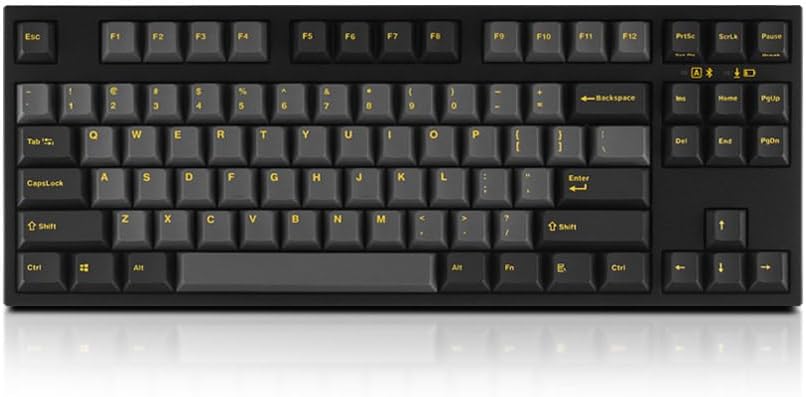
Image: Top-down view of the Leopold FC750RBT keyboard, highlighting its compact design and keycap legends.
Setup
Package Contents
- Leopold FC750RBT Mechanical Keyboard
- USB-C to USB-A Cable
- 2 x AAA Batteries
Battery Installation
The keyboard requires two AAA batteries for wireless operation. The battery compartment is located on the underside of the keyboard. Ensure correct polarity when inserting the batteries.
Connectivity Options
The FC750RBT keyboard supports both wired and wireless (Bluetooth) connections.
- Wired Connection: Connect the included USB-C cable to the keyboard's USB-C port and the USB-A end to your computer's USB-A port. The keyboard will be automatically recognized.
- Bluetooth Connection (Bluetooth 5.3):
- Ensure the keyboard is powered on and in Bluetooth mode (refer to the keyboard's function keys or switches for mode selection, typically indicated by an LED).
- On your device (Laptop, PC, Smartphone, Tablet), navigate to Bluetooth settings.
- Search for available devices and select "Leopold FC750RBT" (or similar name) to pair.
- Follow any on-screen prompts to complete the pairing process.

Image: Front view of the Leopold FC750RBT keyboard, showcasing its ergonomic design and keycap texture.
Operating Instructions
Basic Usage
The FC750RBT functions as a standard QWERTY keyboard. Its TKL layout omits the numeric keypad, making it more compact. The keyboard features 87 keys.
Special Functions and DIP Switches
The keyboard includes DIP switches on its underside, which allow for customizing certain key functions without software. Refer to the markings near the DIP switches for specific configurations, which may include:
- Swapping Caps Lock and Left Control keys.
- Changing the function of the Windows key.
- Enabling or disabling specific keys.
The keyboard also features a sound absorbing pad for an enhanced typing experience.

Image: Angled view of the Leopold FC750RBT keyboard, showing its profile and the texture of the PBT keycaps.
Maintenance
Cleaning
- To clean the keycaps, use a soft, damp cloth. For deeper cleaning, keycaps can be carefully removed (using a keycap puller, not included) and washed with mild soap and water. Ensure they are completely dry before reattaching.
- Use compressed air to remove dust and debris from between the keys.
- Avoid using harsh chemicals or abrasive materials, as these can damage the keycaps or keyboard finish.
Storage
When not in use for extended periods, store the keyboard in a dry, cool place away from direct sunlight. If storing for a long time, it is recommended to remove the AAA batteries to prevent leakage.
Troubleshooting
- Keyboard not responding (Wired):
Ensure the USB-C cable is securely connected to both the keyboard and the computer. Try a different USB port on your computer or a different USB-C cable if available.
- Keyboard not connecting (Bluetooth):
- Check if the AAA batteries are properly installed and have sufficient charge.
- Ensure the keyboard is in Bluetooth pairing mode.
- On your device, try "forgetting" or "removing" the keyboard from your Bluetooth device list and then re-pairing it.
- Ensure your device's Bluetooth is enabled and discoverable.
- Move the keyboard closer to your device to rule out range issues.
- Keys not registering or double-typing:
This could be due to debris under the keycap. Refer to the cleaning instructions in the Maintenance section. If the issue persists, contact support.
Specifications
| Brand | Leopold |
| Model | FC750RBT |
| Connectivity | Bluetooth 5.3, USB-C (Wired) |
| Keyboard Type | Mechanical |
| Switch Type | Genuine Cherry MX Blue |
| Keycaps | 1.5mm thick Double Shot PBT |
| Layout | Tenkeyless (TKL), 87 Keys |
| Power | 2 x AAA Batteries (included) |
| Compatible Devices | Laptop, PC, Smartphone, Tablet |
| Special Features | Bluetooth, DIP Switches for customization, Sound Absorbing Pad |
Warranty and Support
Specific warranty details for the Leopold FC750RBT keyboard are typically provided at the point of purchase or on the manufacturer's official website. Please retain your proof of purchase for warranty claims.
For technical support, troubleshooting assistance beyond this manual, or warranty inquiries, please visit the official Leopold website or contact their customer service department. Contact information can usually be found on the manufacturer's packaging or website.
Manufacturer: Leopold
Official Website: www.leopold.co.kr (Note: This is a general link to Leopold's official site, specific support pages may vary.)
Ask a question about this manual
Ask about setup, troubleshooting, compatibility, parts, safety, or missing instructions. Manuals+ will review the question and use this page’s manual context to help answer it.