
Introduction
This manual provides essential instructions for the setup, operation, and maintenance of your Forever See Me KW-310 GPS WiFi Smartwatch. Designed for children, this smartwatch offers advanced location tracking, communication features, and an SOS function for enhanced safety and connectivity. Please read this manual thoroughly before using the device.

Image: The Forever See Me KW-310 Smartwatch, showcasing its display and design.
1. Setup
1.1 Package Contents
Verify that your package contains the following items:
- Forever See Me KW-310 Smartwatch
- USB Charging Cable
- User Manual
1.2 Charging the Smartwatch
Before first use, fully charge the smartwatch. Connect the USB charging cable to the charging port on the watch and plug the other end into a compatible USB power adapter (not included) or a computer's USB port. The battery indicator on the screen will show charging progress.
1.3 SIM Card Installation
The smartwatch requires a Nano-SIM card for cellular communication features (calls, chat, LBS tracking). Ensure the SIM card is active and has a data plan.
- Locate the SIM card slot on the side of the smartwatch.
- Carefully open the SIM card tray using the provided tool (if applicable) or your fingernail.
- Insert the Nano-SIM card into the tray with the gold contacts facing up and the cut corner aligned correctly.
- Gently push the tray back into the slot until it clicks into place.

Image: Detail of the smartwatch indicating the SIM card insertion point.
1.4 App Installation and Pairing
To manage the smartwatch and access its full features, download the dedicated companion application on your smartphone. Search for the 'Forever KidsCare' or similar app (refer to packaging for exact name) in your device's app store (Google Play Store or Apple App Store).
- Install the application on your smartphone.
- Create an account and log in.
- Follow the in-app instructions to pair your smartwatch. This usually involves scanning a QR code displayed on the watch screen or entering a unique device ID.
2. Operating Instructions
2.1 Basic Navigation
The smartwatch features a touchscreen display. Swipe left/right or up/down to navigate through menus and functions. Press the side button to return to the home screen or wake the device.
2.2 Making and Receiving Calls
Once a SIM card is installed and the watch is paired, your child can make and receive calls from pre-approved contacts. Guardians can manage the contact list through the companion app.
- To Make a Call: Navigate to the 'Contacts' menu, select a contact, and tap the call icon.
- To Receive a Call: When a call comes in, tap the green answer icon on the screen.
2.3 Chat Function
The smartwatch supports a chat function, allowing your child to send and receive voice messages or short text messages with approved contacts via the companion app.
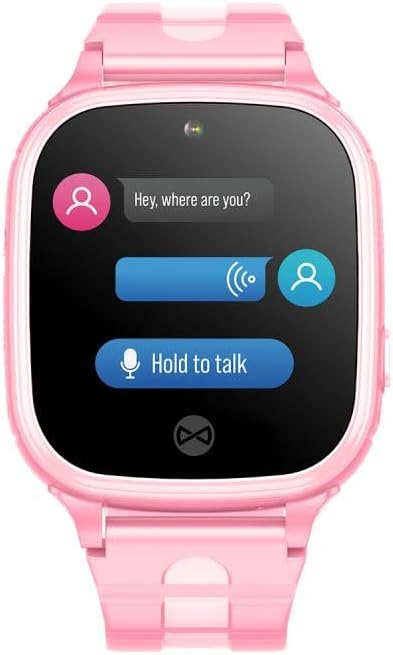
Image: The smartwatch screen showing the chat interface for sending and receiving messages.
2.4 SOS Function
In an emergency, your child can activate the SOS function. Press and hold the dedicated SOS button (usually on the side of the watch) for a few seconds. The watch will automatically dial up to three pre-defined emergency contacts sequentially until one answers. It will also send a location alert to these contacts.

Image: Illustration of the SOS function, showing the watch displaying an emergency call.
2.5 Location Tracking (GPS, LBS, Wi-Fi)
The Forever See Me KW-310 uses a combination of GPS, LBS (Location Based Service via cellular networks), and Wi-Fi positioning to provide accurate location data. Guardians can view the child's real-time location and historical routes through the companion app.
- Real-time Tracking: View your child's current location on a map in the app.
- Historical Route: Review the child's movement history for specific dates.
- Safe Zones (Geofencing): Set up virtual boundaries (e.g., home, school). You will receive an alert if your child enters or exits these designated areas.

Image: The companion app interface showing location tracking and route history.
2.6 Remote Monitoring
The smartwatch may include a remote monitoring feature, allowing guardians to discreetly listen to the child's surroundings through the app. This function is intended for safety purposes only and should be used responsibly.
3. Maintenance
3.1 Cleaning
To clean the smartwatch, wipe it gently with a soft, dry, or slightly damp cloth. Do not use harsh chemicals, abrasive cleaners, or solvents, as these can damage the device.
3.2 Water Resistance (IP67)
The Forever See Me KW-310 Smartwatch is rated IP67, meaning it is protected against dust ingress and can withstand immersion in water up to 1 meter for up to 30 minutes. It is suitable for everyday use and splashes, but it is not recommended for swimming, showering, or prolonged submersion.

Image: Smartwatches shown with water splashes, illustrating their IP67 water resistance.
3.3 Battery Care
To prolong battery life:
- Avoid extreme temperatures.
- Charge the watch regularly, but avoid leaving it fully charged or fully depleted for extended periods.
- Use only the provided charging cable.
4. Troubleshooting
If you encounter issues with your smartwatch, refer to the following common problems and solutions:
| Problem | Possible Solution |
|---|---|
| Watch not turning on | Ensure the watch is fully charged. Press and hold the power button for at least 10 seconds. |
| Location tracking is inaccurate | Ensure the watch has a clear view of the sky for GPS. Check for strong Wi-Fi signals. LBS accuracy depends on cellular network density. |
| Cannot make/receive calls | Verify the SIM card is correctly inserted and active with a valid plan. Check network signal strength. Ensure contacts are approved in the app. |
| App cannot connect to watch | Ensure the watch is powered on and has network connectivity. Re-check pairing steps in the app. Restart both the watch and the smartphone. |
5. Specifications
| Feature | Detail |
|---|---|
| Brand | FOREVER |
| Model Name | KW-310 |
| Connectivity Technology | Wi-Fi, Cellular |
| Wireless Communication Standard | 802.11ac |
| Special Features | GPS Location, Wi-Fi Connectivity, SOS Function Button, Chat Function |
| Compatible Devices | Smartphone |
| Battery Composition | Lithium-ion |
| GPS | Integrated GPS |
| Water Resistance | IP67 |
| Strap Material | Silicone |


