
1. Safety Instructions
Please read all safety instructions carefully before using the mollie Robot Vacuum Cleaner. Keep this manual for future reference.
- This appliance is not intended for use by persons (including children) with reduced physical, sensory or mental capabilities, or lack of experience and knowledge, unless they have been given supervision or instruction concerning use of the appliance by a person responsible for their safety.
- Children should be supervised to ensure that they do not play with the appliance.
- Do not operate the vacuum cleaner in areas with open flames, flammable or explosive materials.
- Do not allow the vacuum cleaner to pick up large objects, liquids, or burning/smoking materials.
- Ensure the charging dock is placed against a wall on a level surface and is not obstructed.
- Only use the original AC adapter and charging dock provided by the manufacturer.
- Do not immerse the vacuum cleaner or its electronic components in water.
- Regularly clean the dustbin and filter to maintain optimal performance.
- The product is certified safe and reliable with CE, FCC, and RoHS certifications.
2. Package Contents
Verify that all components are present in the package:
- mollie Robot Vacuum Cleaner
- Remote Control
- AC Adapter
- Charging Dock
- Side Brushes (2 pairs)
- User Manual
- Dry Mop
3. Product Overview
The mollie Robot Vacuum Cleaner is designed for efficient and hassle-free cleaning across various floor types.
Key Features:
- Enhanced Brushless Suction System: Delivers powerful cleaning without hair entanglement.
- High-Efficiency Filtration: Equipped with a 310ml dustbin and HEPA filter for cleaner air.
- Slim Design: At just 2.8 inches (7.1 cm) in height, it easily cleans under furniture.
- Intelligent Navigation: Uses a 'Bow-Shaped' trajectory and anti-falling technology.
- Whisper-Quiet Operation: Operates at approximately 68 dB, similar to a casual conversation.
- Automatic Recharging: Returns to the charging dock when battery is low or cleaning is complete.

Image 3.1: The mollie Robot Vacuum's slim design allows it to effectively navigate and clean under furniture.

Image 3.2: Underside view illustrating the swivel wheel, dual side brushes, vacuum inlet, drive suspension tires, and mopping cloth for 2-in-1 functionality.

Image 3.3: The robot vacuum effectively picks up debris with its 1300Pa powerful suction for thorough cleaning.

Image 3.4: The robot vacuum features a spacious 310ml dustbin designed to capture and retain more debris during cleaning cycles.

Image 3.5: The mollie Robot Vacuum is suitable for deep cleaning on various surfaces including hardwood, marble, ceramic tile, and low-to-medium pile carpets.

Image 3.6: The robot vacuum operates silently, providing noise-free cleaning performance that won't disrupt daily activities.
4. Setup
4.1 Unpacking and Initial Preparation
- Remove the robot vacuum and all accessories from the packaging.
- Remove any protective films or stickers from the robot and charging dock.
- Attach the side brushes by pressing them into their respective slots on the underside of the vacuum until they click into place.
4.2 Placing the Charging Dock
- Place the charging dock against a wall on a hard, level surface.
- Ensure there is at least 1 meter (3 feet) of clear space on both sides of the dock and 2 meters (6 feet) in front of it.
- Plug the AC adapter into the charging dock and then into a wall outlet.
- Ensure the power indicator on the charging dock illuminates.
4.3 Initial Charging
- Place the robot vacuum onto the charging dock, ensuring the charging contacts on the robot align with those on the dock.
- The robot will begin charging automatically. Allow 3-5 hours for a full charge before first use.
- The indicator light on the robot will change to indicate charging status (refer to the robot's specific indicator light guide in the manual for details).

Image 4.1: The robot vacuum automatically returns to its charging dock for recharging, ensuring uninterrupted cleaning sessions.
5. Operating Instructions
5.1 Powering On/Off
- Power On: Press and hold the power button on the robot for a few seconds until the indicator light illuminates.
- Power Off: Press and hold the power button on the robot for a few seconds until the indicator light turns off.
5.2 Starting a Cleaning Cycle
- Press the power button on the robot once, or the 'Start/Pause' button on the remote control, to begin cleaning in Auto mode.
- The robot will automatically navigate and clean your space using its intelligent 'Bow-Shaped' trajectory.
5.3 Cleaning Modes
Use the remote control to select different cleaning modes:
- Auto Mode: The default cleaning mode, suitable for general cleaning. The robot intelligently plans its path.
- Focus Mode: The robot will clean a specific area more intensely, moving in a spiral pattern.
- Edge Mode: The robot will clean along walls and furniture edges.
5.4 Using the Remote Control
The remote control provides convenient access to all functions:
- Start/Pause: Start or pause the cleaning cycle.
- Directional Buttons: Manually control the robot's movement.
- Return: Send the robot back to the charging dock.
- Mode Selection: Buttons for Auto, Focus, and Edge cleaning modes.
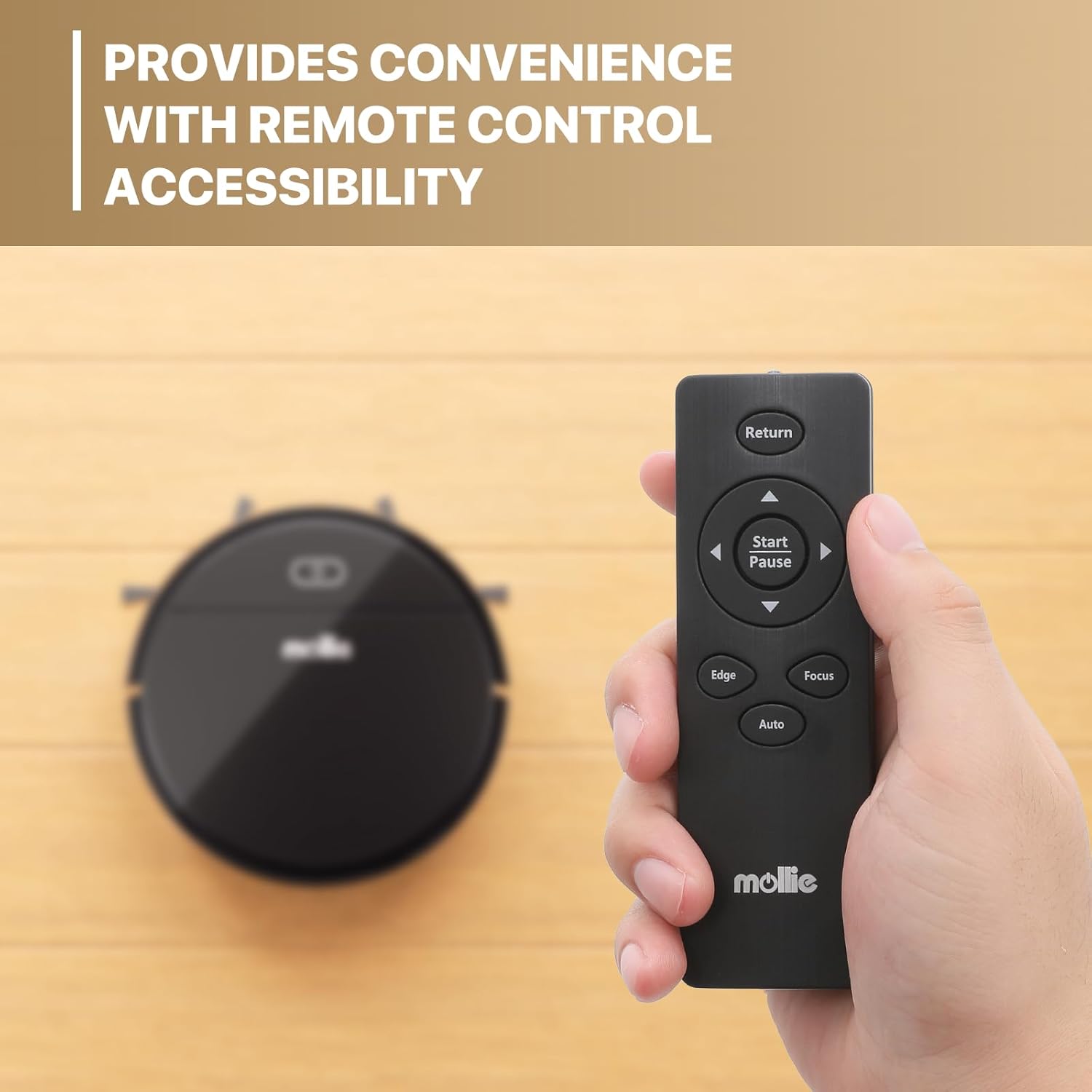
Image 5.1: The remote control offers convenient accessibility for managing the robot vacuum's functions and cleaning modes.
5.5 Anti-Falling Technology
The robot is equipped with sensors to detect drops and ledges, preventing it from falling down stairs or off elevated surfaces.
6. Cleaning and Maintenance
Regular maintenance ensures optimal performance and extends the lifespan of your robot vacuum.
6.1 Emptying the Dustbin
- Press the dustbin release button and pull out the dustbin.
- Open the dustbin cover and empty its contents into a trash bin.
- Rinse the dustbin with water if necessary, ensuring it is completely dry before reinserting.
6.2 Cleaning the HEPA Filter
- Remove the HEPA filter from the dustbin.
- Tap the filter gently to remove dust and debris. Do not wash the HEPA filter with water.
- Replace the HEPA filter every 3-6 months, depending on usage.
6.3 Cleaning Side Brushes
- Periodically check the side brushes for tangled hair or debris.
- Carefully remove any obstructions. If brushes are damaged, replace them with new ones.
6.4 Cleaning Sensors and Charging Contacts
- Wipe the anti-drop sensors, bumper sensors, and charging contacts on both the robot and the charging dock with a clean, dry cloth.
- Ensure these components are free of dust and debris for proper operation.
7. Troubleshooting
If you encounter issues with your mollie Robot Vacuum, refer to the following common problems and solutions:
| Problem | Possible Cause | Solution |
|---|---|---|
| Robot does not power on | Low battery; Power button not pressed long enough | Charge the robot fully; Press and hold the power button for several seconds. |
| Robot does not charge | Charging contacts dirty; Charging dock not powered; Robot not properly aligned | Clean charging contacts; Ensure dock is plugged in; Realign robot on dock. |
| Poor suction or leaves debris | Dustbin full; Filter clogged; Side brushes tangled | Empty dustbin; Clean/replace filter; Clean side brushes. |
| Robot gets stuck frequently | Obstacles in path; Too many cables/rug fringes | Clear obstacles; Tidy up cables and loose rug fringes before cleaning. |
| Robot falls down stairs | Anti-drop sensors dirty or blocked | Clean the anti-drop sensors on the underside of the robot. |
If the problem persists after trying these solutions, please contact customer support.
8. Specifications
| Feature | Specification |
|---|---|
| Model Name | mollie A03-RV-001-18W |
| Form Factor | Robotic |
| Product Dimensions (L x W x H) | 27.9L x 27.9W x 7.1H Centimetres (2.8" height) |
| Colour | Black |
| Controller Type | Remote Control |
| Filter Type | HEPA Filter |
| Dustbin Capacity | 310 ml |
| Battery Life | Up to 90 minutes |
| Charging Time | 3-5 hours |
| Cleaning Area | Up to 1290 ft² |
| Sound Output | 68 dB |
| Surface Recommendation | Low Pile Carpet, Hard Floors, Wood Floor, Tile Floor |
| Special Feature | Cordless, Anti-falling Technology |
| Certifications | CE, FCC, RoHS |
| ASIN | B0CKYH32SL |
9. Warranty & Support
The mollie Robot Vacuum Cleaner comes with a standard manufacturer's warranty. For detailed warranty information, including terms and conditions, please refer to the warranty card included in your package or contact mollie customer support.
If you have any questions, require technical assistance, or need to report an issue, please contact our customer support team through the contact information provided on the mollie official website or your purchase platform.